 Tech Tribers
How HashMap Works Internally in Java (With Diagrams and Real Output)
Hashing, bucket index, collisions, treeify at 8 and 64, load factor and resize, explained with diagrams and programs run on JDK 25, plus 12 interview questions.
New25 min read
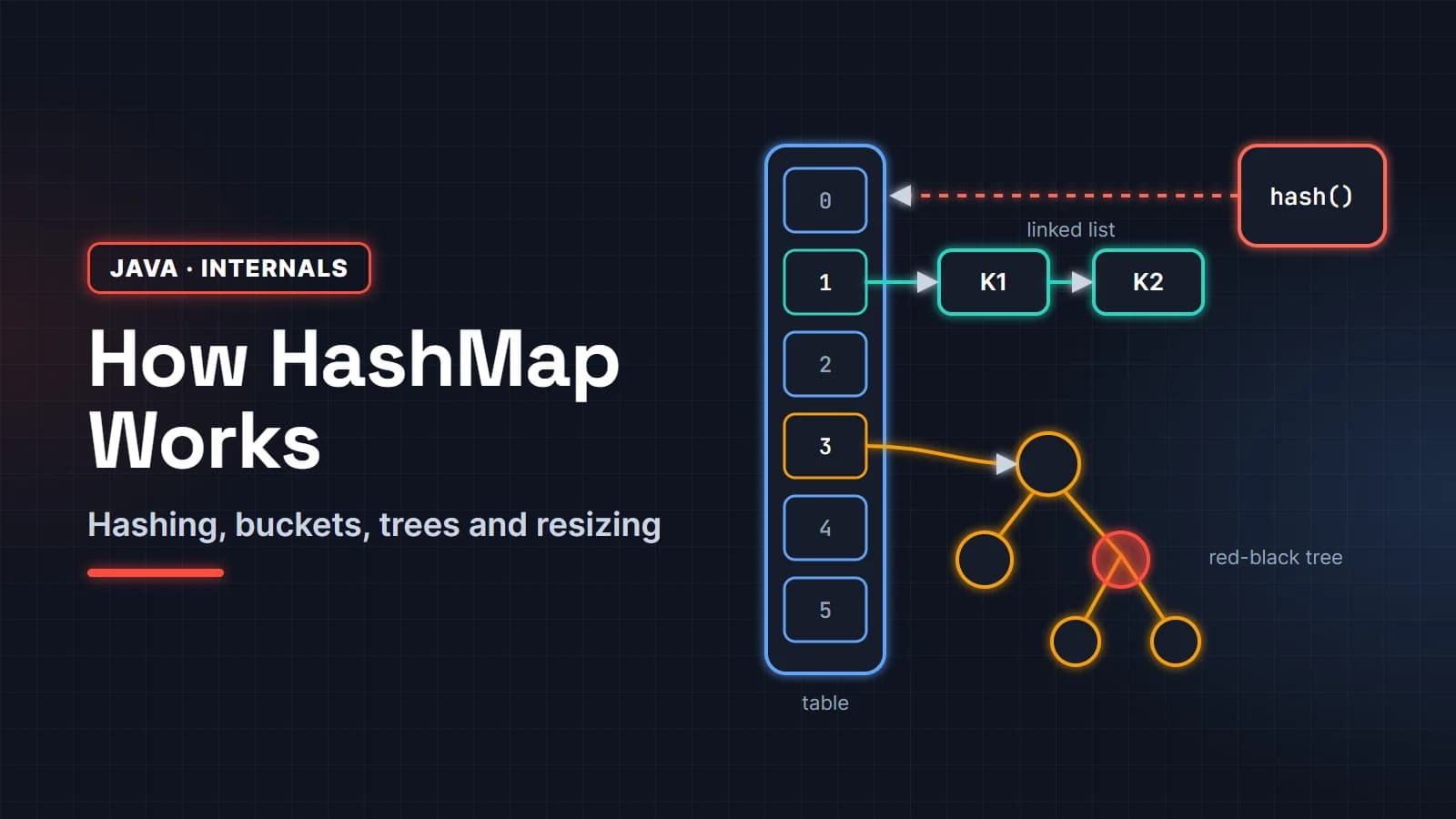
HashMap internal working in Java comes down to one idea: turn the key into an int with hashCode(), mix that int, use it to pick a slot in an array, and store the entry in that slot. When two keys land in the same slot, HashMap chains them in a linked list. When a list gets too long, it becomes a red-black tree. When the map gets too full, the array doubles.
That summary is what most interview answers stop at. This guide goes further. Every number and code path below was checked against the JDK 25 source of java.util.HashMap, and every program was run on JDK 25 with the real output pasted underneath. You will see exactly which bucket "apple" goes to, watch a bucket turn into a tree, and see why a resize never calls hashCode() again.
It is written for Java developers preparing for interviews, from freshers to people with a few years of experience who want a clear mental model. The last part is a set of 12 HashMap interview questions with short, direct answers.
In this guide
- How HashMap works internally, in 60 seconds
- The internal structure: table, buckets and Node
- Step 1: hashCode() and the hash spreading function
- Step 2: from hash to bucket index
- How put() works, step by step
- How get() works
- HashMap collisions and treeify: list to red-black tree
- Load factor, threshold and rehashing
- The equals and hashCode contract
- The mutable key bug
- Null keys, iteration order and fail-fast iterators
- HashMap vs Hashtable vs ConcurrentHashMap vs LinkedHashMap vs TreeMap
- What changed across Java versions
- HashMap interview questions
How HashMap works internally, in 60 seconds
If an interviewer asks "how does HashMap work internally?", this is the answer that covers everything in about a minute:
- Storage. HashMap keeps an array called
table. Each slot is a bucket. Each bucket holdsnull, a linked list of nodes, or a red-black tree of nodes. - Hashing. On
put(key, value), it callskey.hashCode()and spreads the result withh ^ (h >>> 16), so the high bits also affect the bucket choice. - Index. The bucket index is
(n - 1) & hash, wherenis the table length.nis always a power of two, so this equalshash mod nfor non-negative values but is cheaper. - Collision handling. If the bucket is taken, HashMap walks the nodes. A node with the same hash and an
equals()key gets its value replaced. Otherwise the new node is appended at the tail. - Treeify. If a bucket grows past 8 nodes and the table has at least 64 slots, the list becomes a red-black tree, so a bad bucket costs O(log n) instead of O(n).
- Resize. When the number of entries passes
capacity × loadFactor(16 × 0.75 = 12 by default), the table doubles and every bucket splits into two.
The rest of this article explains each step with a picture and a program you can run.
The internal structure: table, buckets and Node
A HashMap object holds a handful of fields. These are the ones that matter, with the names used in the JDK source:
Node<K,V>[] table: the bucket array. It is created lazily, on the firstput, not in the constructor.int size: the number of key-value pairs.int threshold: the size at which the next resize happens (capacity × load factor).final float loadFactor: 0.75 unless you pass another value.int modCount: counts structural changes, used by fail-fast iterators.
Each entry is a Node. A node stores four things: the cached hash, the key, the value and a next pointer to the following node in the same bucket. Caching the hash is important: HashMap never needs to call hashCode() on a key again after the first insert, not during lookups of other keys and not during a resize.
Here is what the table looks like after inserting five fruit names and a null key into a default HashMap. The bucket numbers are real, computed by JDK 25:
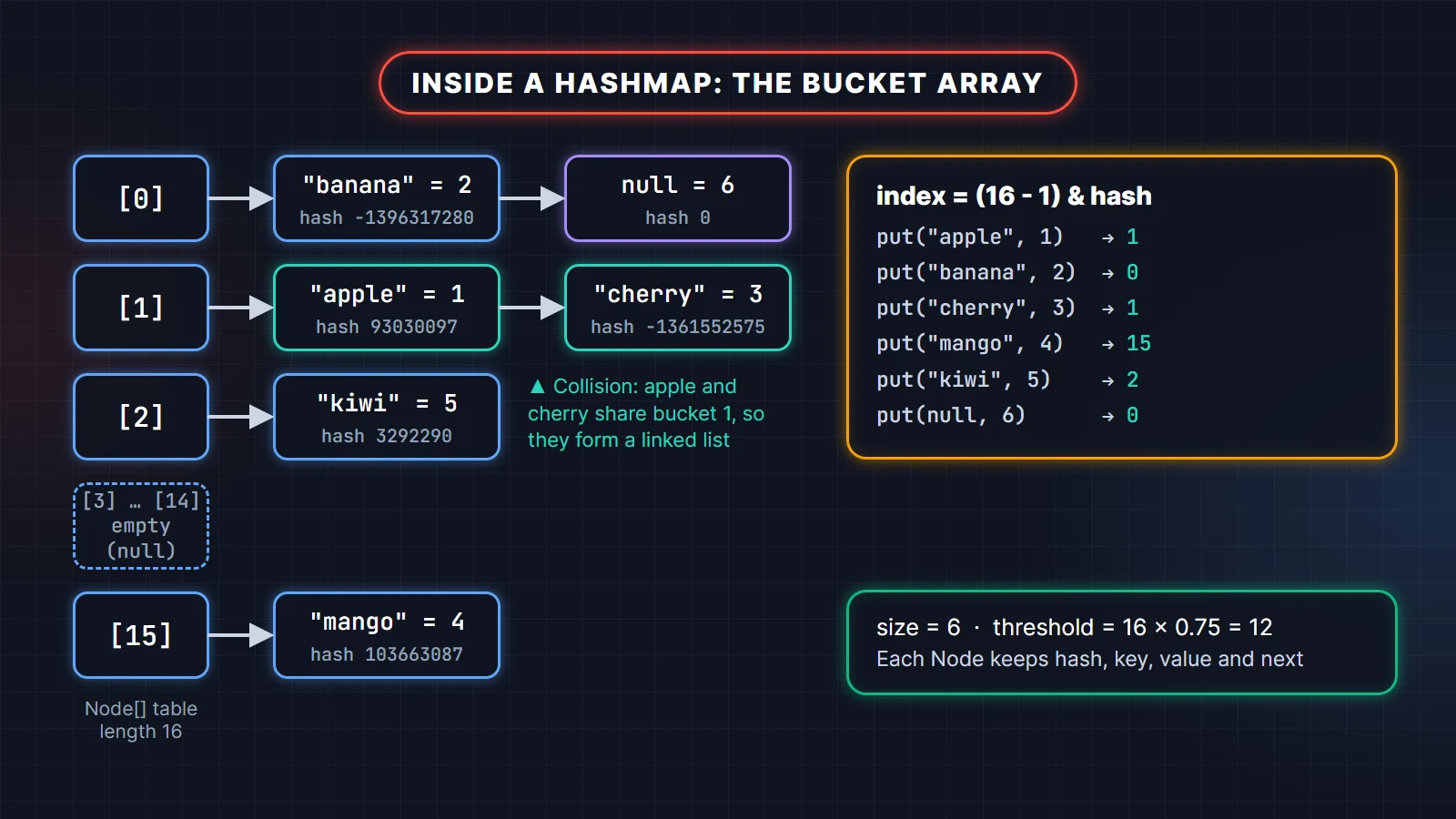
You do not have to trust the diagram. This program uses reflection to print the real bucket layout. Reflection into java.util needs the --add-opens flag shown in the comment; never do this in production code, it is only for looking inside.
import java.lang.reflect.Field;
import java.util.HashMap;
import java.util.Map;

// Run with: java --add-opens java.base/java.util=ALL-UNNAMED Dump.java
public class Dump {
    public static void main(String[] args) throws Exception {
        Map<String, Integer> m = new HashMap<>();
        m.put("apple", 1); m.put("banana", 2); m.put("cherry", 3); m.put("mango", 4); m.put("kiwi", 5); m.put(null, 6);
        Field t = HashMap.class.getDeclaredField("table"); t.setAccessible(true);
        Field th = HashMap.class.getDeclaredField("threshold"); th.setAccessible(true);
        Object[] tab = (Object[]) t.get(m);
        System.out.println("table=" + tab.length + " threshold=" + th.get(m) + " size=" + m.size());
        Class<?> nodeC = Class.forName("java.util.HashMap$Node");
        Field next = nodeC.getDeclaredField("next"); next.setAccessible(true);
        Field key = nodeC.getDeclaredField("key"); key.setAccessible(true);
        for (int i = 0; i < tab.length; i++) {
            if (tab[i] == null) continue;
            StringBuilder sb = new StringBuilder("[" + i + "]");
            for (Object e = tab[i]; e != null; e = next.get(e)) sb.append(" -> ").append(key.get(e));
            System.out.println(sb);
        }
        System.out.println(m);
    }
}
Output on JDK 25:
table=16 threshold=12 size=6
[0] -> banana -> null
[1] -> apple -> cherry
[2] -> kiwi
[15] -> mango
{banana=2, null=6, apple=1, cherry=3, kiwi=5, mango=4}
Look at the last line. Iteration walks the table from bucket 0 upward, so the printed order is bucket order, not insertion order. That is the real reason "HashMap does not keep insertion order".
Step 1: hashCode() and the hash spreading function
HashMap does not use hashCode() directly. It first runs it through a small function, copied here from the JDK source:
static final int hash(Object key) {
    int h;
    return (key == null) ? 0 : (h = key.hashCode()) ^ (h >>> 16);
}
Two things happen here. A null key always gets hash 0, so it always goes to bucket 0. And for every other key, the top 16 bits are XORed into the bottom 16 bits.
Why bother? The bucket index only uses the low bits of the hash. With a 16-slot table, only the lowest 4 bits matter. If your keys have hash codes that differ only in their high bits, they would all crash into one bucket. Spreading lets the high bits influence the index. This program shows the effect with eight hash codes that differ only above bit 16:
import java.util.Set;
import java.util.TreeSet;

public class WhySpread {
    public static void main(String[] args) {
        int n = 16;
        Set<Integer> withoutSpread = new TreeSet<>();
        Set<Integer> withSpread = new TreeSet<>();
        // hash codes that differ only in their high 16 bits
        for (int i = 1; i <= 8; i++) {
            int h = i << 16;
            withoutSpread.add((n - 1) & h);
            withSpread.add((n - 1) & (h ^ (h >>> 16)));
        }
        System.out.println("buckets without spreading: " + withoutSpread);
        System.out.println("buckets with spreading:    " + withSpread);
    }
}buckets without spreading: [0]
buckets with spreading: [1, 2, 3, 4, 5, 6, 7, 8]Without spreading, all eight keys share bucket 0. With it, they land in eight different buckets. The JDK comments call this a trade-off: one shift and one XOR is cheap, and tree bins handle the remaining bad cases, so a heavier mixing function is not worth it.
Step 2: from hash to bucket index
The index is (n - 1) & hash. Because n is a power of two, n - 1 is a mask of ones (15 is 1111 in binary), so the AND keeps the lowest bits of the hash. It gives the same result as hash % n for non-negative numbers, works for negative hashes too, and avoids a division.
This is why the capacity is always a power of two. If you call new HashMap<>(10), HashMap rounds the capacity up to 16 (the method is tableSizeFor). new HashMap<>(17) gives 32.
public class BucketIndex {
    // Same two steps HashMap uses: spread the hash, then mask it with (n - 1)
    static int spread(Object key) {
        int h;
        return (key == null) ? 0 : (h = key.hashCode()) ^ (h >>> 16);
    }

    public static void main(String[] args) {
        int n = 16; // default table size
        for (String key : new String[] {"apple", "banana", "cherry", "mango", "kiwi"}) {
            int hash = spread(key);
            System.out.printf("%-7s hashCode=%11d  hash=%11d  index=%2d%n",
                    key, key.hashCode(), hash, (n - 1) & hash);
        }
        System.out.println("null    index=" + ((n - 1) & spread(null)));
    }
}apple hashCode= 93029210 hash= 93030097 index= 1
banana hashCode=-1396355227 hash=-1396317280 index= 0
cherry hashCode=-1361513063 hash=-1361552575 index= 1
mango hashCode= 103662530 hash= 103663087 index=15
kiwi hashCode= 3292336 hash= 3292290 index= 2
null index=0Notice that banana has a negative hash code and still gets a valid index. The mask clears the sign bit. Also notice apple and cherry: different strings, different hashes, same bucket. That is a collision, and it is completely normal.
What the interviewer is checking: that you know the index comes from the hash, not from
hashCode()directly, and that you can explain why the capacity is a power of two. Saying "it uses modulo" is half right; saying "it masks with n minus 1, which is modulo for powers of two" is the full answer.
How put() works, step by step
put() calls an internal method named putVal. Its logic fits in one diagram:
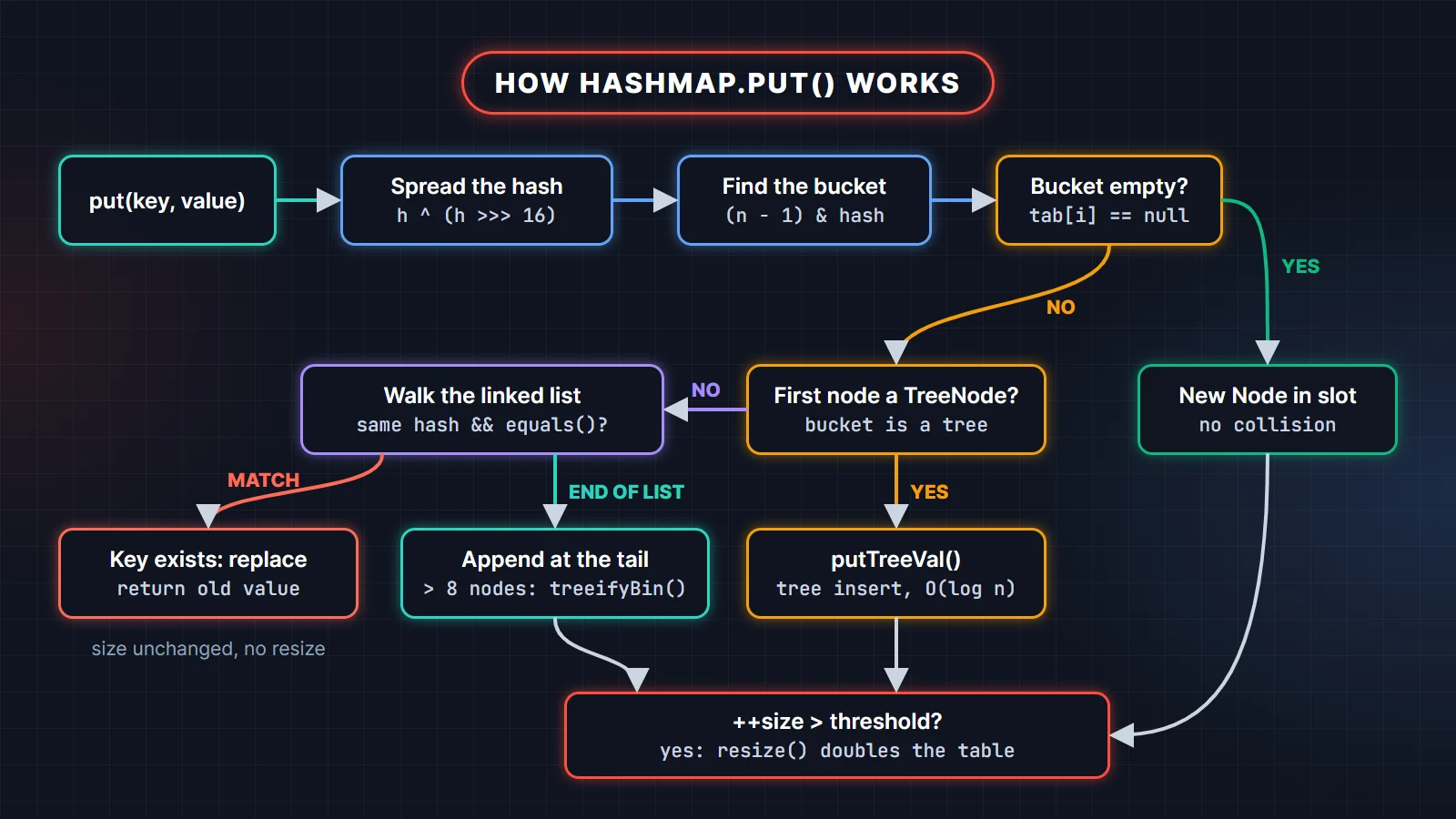
In words:
- If
tableis null (first insert), callresize()to allocate it. With defaults that is 16 slots and a threshold of 12. - Compute
i = (n - 1) & hash. Iftable[i]is null, put a new node there. Done. - Otherwise compare against the first node. A key counts as "the same" when the cached hashes are equal and the keys are the same reference or
equals()returns true. - If the first node is a
TreeNode, insert into the red-black tree withputTreeVal. - Otherwise walk the list. If a matching key is found, stop. If the end is reached, append a new node at the tail. If that makes the chain longer than 8 nodes, call
treeifyBin. - If an existing key was found, replace its value and return the old value. The size does not change, so there is no resize check.
- For a new key, increment
modCountandsize. Ifsizeis now greater thanthreshold, callresize().
Two small details are worth knowing. First, put returns the previous value or null, and a null return is ambiguous: the key may have been absent, or it may have been mapped to null. Second, putIfAbsent runs the same code with an onlyIfAbsent flag, so it only overwrites when the current value is null.
Why compare the hash before calling equals()? Comparing two ints is nearly free, and equals() on a long string or a complex object is not. Most nodes in a bucket have different hashes, so the int check skips almost every equals() call.
How get() works
get(key) follows the same path without the writes. It computes the spread hash, finds the bucket with (n - 1) & hash, checks the first node, then either searches the tree or walks the list, comparing hash first and equals() second. If nothing matches, it returns null.
The cost depends on the bucket, not on the map size. With a decent hashCode() and the default load factor, buckets hold very few nodes. The JDK source includes a table for random hash codes: about 61% of buckets are empty, 30% hold one node, and the chance of a bucket reaching 8 nodes is about 6 in 100 million. That is why get and put are O(1) on average. The worst case is a single crowded bucket: O(n) for a list, O(log n) once it becomes a tree.
Because get returns null both for a missing key and for a key mapped to null, use containsKey or getOrDefault when the difference matters.
HashMap collisions and treeify: list to red-black tree
A collision happens when two different keys get the same bucket index. HashMap handles it with separate chaining: the bucket holds a linked list. Since Java 8, a long list is converted to a red-black tree. This change came from JEP 180, which improves the worst case for a crowded bucket from O(n) to O(log n).
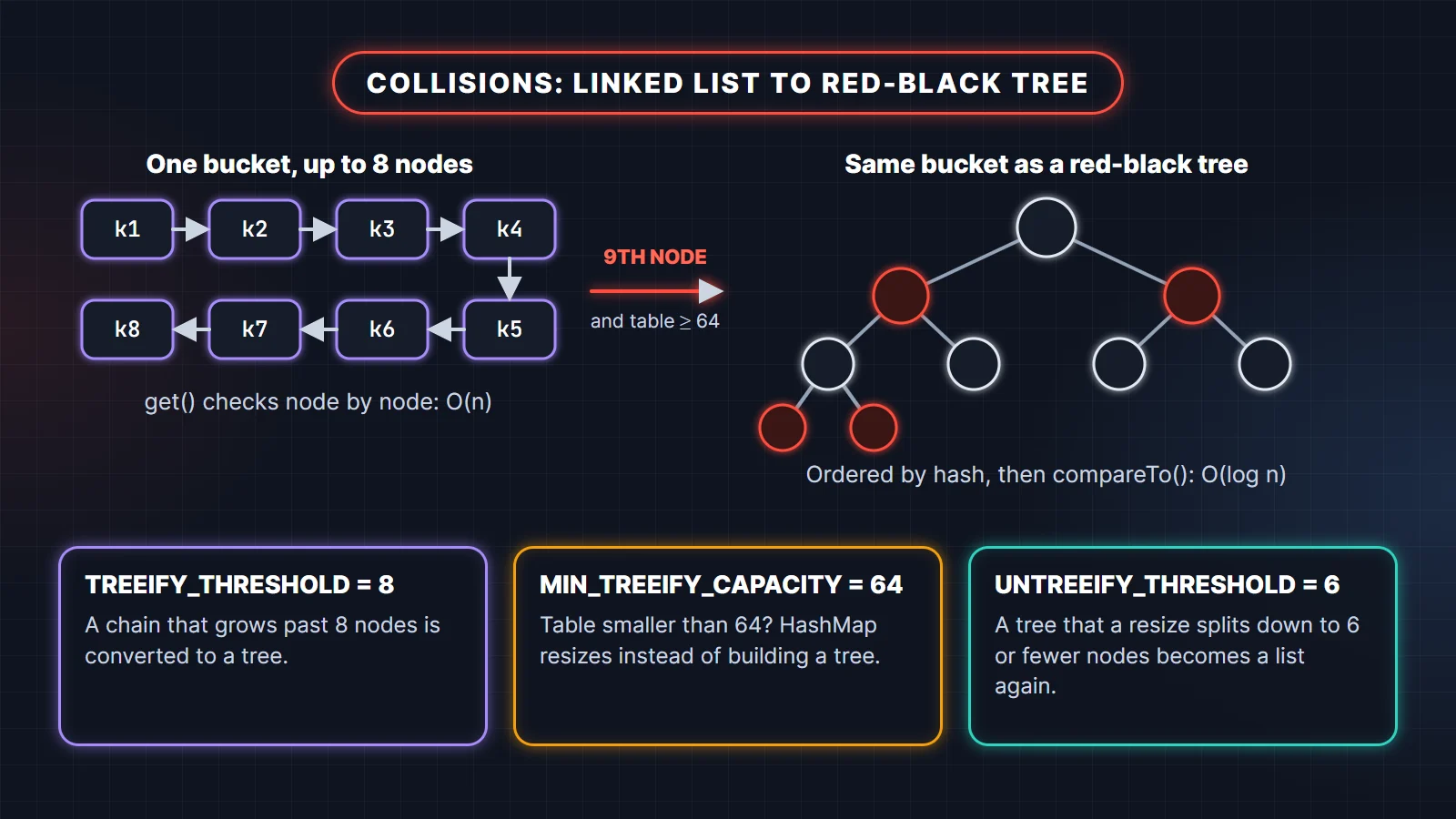
Three constants control this. All three are in the JDK 25 source exactly as shown:
TREEIFY_THRESHOLD = 8: a bucket whose chain grows beyond 8 nodes is a candidate for a tree.MIN_TREEIFY_CAPACITY = 64: if the table is smaller than 64, HashMap resizes instead of building a tree. A crowded bucket in a small table is usually just a sign that the table is too small.UNTREEIFY_THRESHOLD = 6: when a resize splits a tree bucket and one half has 6 or fewer nodes, that half goes back to a plain list. Tree nodes are about twice the size of normal nodes, so HashMap only uses them when they pay off.
The interesting part is the interaction between the first two. This program forces every key into the same bucket and prints the table size and the node type after each insert:
import java.lang.reflect.Field;
import java.util.HashMap;
import java.util.Map;

// Run with: java --add-opens java.base/java.util=ALL-UNNAMED TreeifyDemo.java
public class TreeifyDemo {
    // Every key has the same hashCode, so every key lands in the same bucket
    record BadKey(int id) {
        @Override public int hashCode() { return 42; }
    }

    public static void main(String[] args) throws Exception {
        Map<BadKey, Integer> map = new HashMap<>();
        Field tableField = HashMap.class.getDeclaredField("table");
        tableField.setAccessible(true);

        for (int i = 1; i <= 11; i++) {
            map.put(new BadKey(i), i);
            Object[] table = (Object[]) tableField.get(map);
            Object bin = table[(table.length - 1) & (42 ^ (42 >>> 16))];
            System.out.printf("put #%-2d table=%-3d bin=%s%n",
                    i, table.length, bin.getClass().getSimpleName());
        }
    }
}put #1 table=16 bin=Node
put #2 table=16 bin=Node
put #3 table=16 bin=Node
put #4 table=16 bin=Node
put #5 table=16 bin=Node
put #6 table=16 bin=Node
put #7 table=16 bin=Node
put #8 table=16 bin=Node
put #9 table=32 bin=Node
put #10 table=64 bin=Node
put #11 table=64 bin=TreeNodeThis output surprises most people. The 9th colliding key pushes the chain past 8, but the table has only 16 slots, so HashMap doubles it to 32 instead. The 10th key does the same: 32 to 64. Only the 11th key, with the table now at 64, triggers the real conversion to a tree. When we ran the same program with new HashMap<>(64), the bucket became a TreeNode on the 9th insert, exactly as the threshold suggests.
Notice that both resizes happened while the size was only 9 and 10, below the load-factor threshold at the time (12, then 24). A resize can be triggered by a crowded bucket, not only by the load factor.
How does a tree order keys that all have the same hash? Tree bins are ordered by hash first. For equal hashes, if the keys are of the same class and implement Comparable, HashMap uses compareTo(). If not, it falls back to a tie-break order for insertion, and a lookup may have to search both subtrees, which in the worst case is O(n) again. So keys that implement Comparable (like String and Integer) get the full O(log n) benefit in a collision storm.
Load factor, threshold and rehashing
The load factor is how full the table may get before it grows. The default is 0.75, and the HashMap javadoc describes it as a good trade-off between time and space. A higher value saves memory but makes chains longer; a lower value means fewer collisions but more empty slots.
The threshold is capacity × loadFactor. A default map has capacity 16 and threshold 12, so the 13th entry triggers a resize to 32 (threshold 24), the 25th to 64, and so on. The capacity tops out at 2 to the power 30 (1,073,741,824 buckets); after that the threshold is set to Integer.MAX_VALUE and the table stops growing.
Resizing is often called rehashing, but Java 8 and later do not recompute any hash code. Every node already caches its hash. Doubling the table only adds one bit to the mask, so each node either stays at its old index j or moves to j + oldCap. One bit of the hash decides which:
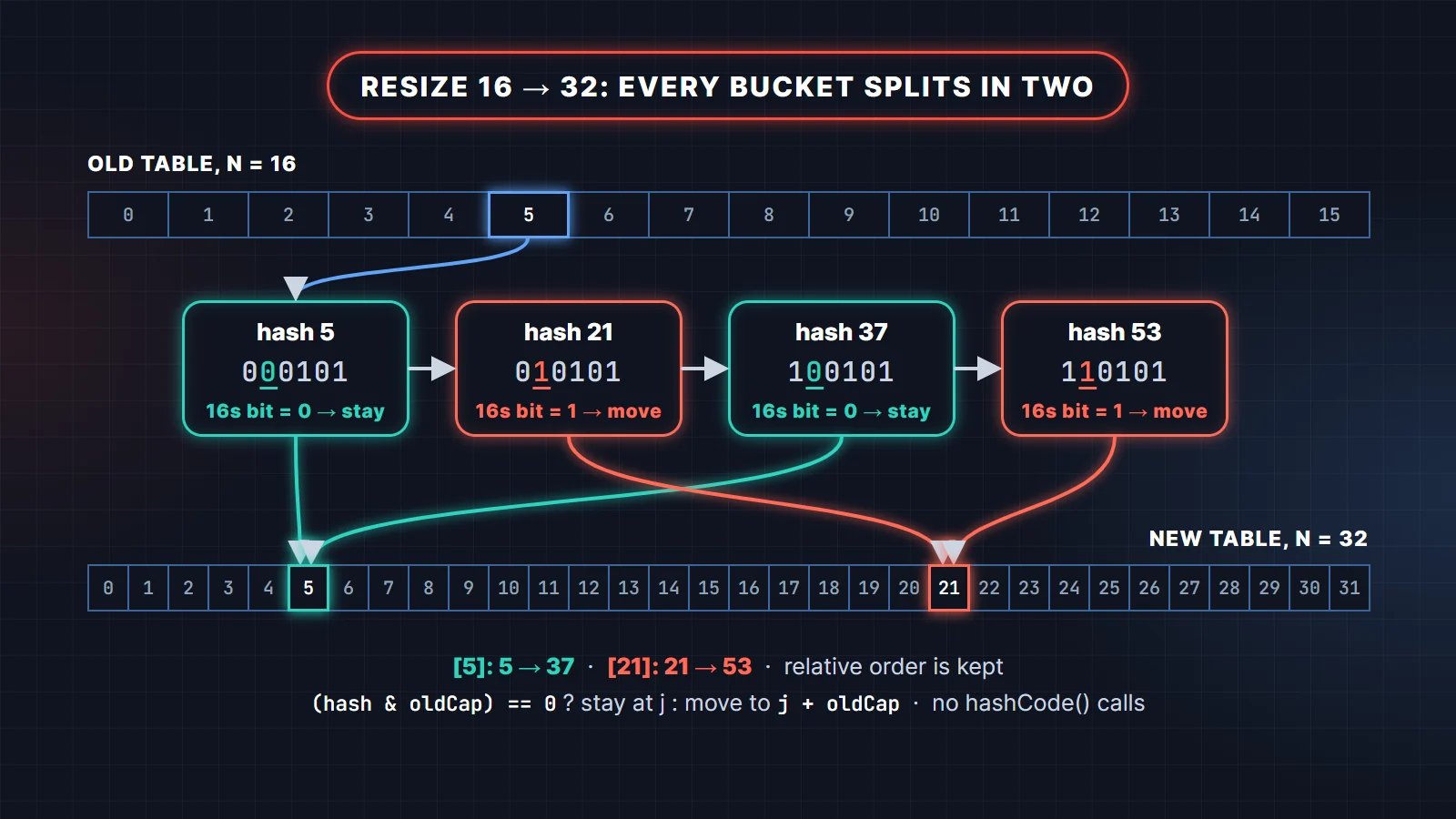
public class ResizeSplit {
    public static void main(String[] args) {
        int oldCap = 16;
        int[] hashes = {5, 21, 37, 53};   // all four sit in bucket 5 of a 16-slot table
        for (int hash : hashes) {
            int oldIndex = hash & (oldCap - 1);
            int newIndex = hash & (2 * oldCap - 1);
            String half = (hash & oldCap) == 0 ? "lo (stays)" : "hi (moves +16)";
            System.out.printf("hash=%2d  old index=%d  new index=%2d  %s%n",
                    hash, oldIndex, newIndex, half);
        }
    }
}hash= 5 old index=5 new index= 5 lo (stays)
hash=21 old index=5 new index=21 hi (moves +16)
hash=37 old index=5 new index= 5 lo (stays)
hash=53 old index=5 new index=21 hi (moves +16)The resize code builds two lists per old bucket, a "lo" list and a "hi" list, and keeps the original order inside each. A resize is still O(n), because every node is visited, which is why it pays to size the map up front when you know how many entries are coming.
Pre-sizing: new HashMap(n) vs HashMap.newHashMap(n)
A classic mistake is new HashMap<>(100) for 100 entries. The argument is the capacity, not the number of entries. Capacity 100 rounds to 128, the threshold is 96, so the 97th entry still triggers a resize. Java 19 added HashMap.newHashMap(int numMappings), which does the load-factor math for you. Here is the proof:
import java.lang.reflect.Field;
import java.util.HashMap;

// Run with: java --add-opens java.base/java.util=ALL-UNNAMED PreSize.java
public class PreSize {
    static final Field TABLE;
    static {
        try {
            TABLE = HashMap.class.getDeclaredField("table");
            TABLE.setAccessible(true);
        } catch (NoSuchFieldException e) { throw new ExceptionInInitializerError(e); }
    }

    static void resizes(HashMap<Integer, Integer> map, int entries) throws Exception {
        int count = 0, last = -1;
        for (int i = 0; i < entries; i++) {
            map.put(i, i);
            int len = ((Object[]) TABLE.get(map)).length;
            if (last != -1 && len != last) count++;
            last = len;
        }
        System.out.printf("final table=%d, resizes after the first allocation=%d%n", last, count);
    }

    public static void main(String[] args) throws Exception {
        resizes(new HashMap<>(), 100);            // default capacity 16
        resizes(new HashMap<>(100), 100);         // capacity 128, threshold 96
        resizes(HashMap.newHashMap(100), 100);    // Java 19+: sized for 100 entries
    }
}final table=256, resizes after the first allocation=4
final table=256, resizes after the first allocation=1
final table=256, resizes after the first allocation=0On a modern JDK, prefer HashMap.newHashMap(expectedSize). LinkedHashMap.newLinkedHashMap and HashSet.newHashSet were added at the same time.
The equals and hashCode contract
HashMap relies on a rule defined in the Object javadoc. In plain words:
- If two objects are equal by
equals(), they must return the samehashCode(). hashCode()must return the same value every time it is called on an object, as long as the fields used byequals()do not change.- Two unequal objects may share a hash code. That is a collision; it is allowed, it just costs performance.
Break the first rule and HashMap quietly stops working. The classic case: override equals() and forget hashCode().
import java.util.HashMap;
import java.util.Map;

public class NoHashCode {
    // equals() overridden, hashCode() forgotten: the contract is broken
    static final class Point {
        final int x, y;
        Point(int x, int y) { this.x = x; this.y = y; }
        @Override public boolean equals(Object o) {
            return o instanceof Point p && p.x == x && p.y == y;
        }
    }

    // A record generates equals() and hashCode() together
    record Pt(int x, int y) {}

    public static void main(String[] args) {
        Map<Point, String> broken = new HashMap<>();
        broken.put(new Point(1, 2), "A");
        System.out.println(broken.get(new Point(1, 2)));
        System.out.println(new Point(1, 2).equals(new Point(1, 2)));

        Map<Pt, String> fixed = new HashMap<>();
        fixed.put(new Pt(1, 2), "A");
        System.out.println(fixed.get(new Pt(1, 2)));
    }
}null
true
AThe two Point objects are equal, but each uses the identity hash code inherited from Object. The lookup computes a different hash, so the hash check fails before equals() is ever called (and usually it even looks in a different bucket). The record version works because records generate equals() and hashCode() from the same components. For map keys in modern Java, a record is the simplest correct choice.
The mutable key bug
The second rule says the hash must stay stable while the key is in use. If you change a field that hashCode() depends on after inserting the key, the entry is stranded in the old bucket.
import java.util.HashMap;
import java.util.Map;
import java.util.Objects;

public class MutableKeyBug {
    static final class Employee {
        String name;
        Employee(String name) { this.name = name; }
        @Override public boolean equals(Object o) {
            return o instanceof Employee e && Objects.equals(name, e.name);
        }
        @Override public int hashCode() { return Objects.hashCode(name); }
    }

    public static void main(String[] args) {
        Map<Employee, String> desk = new HashMap<>();
        Employee asha = new Employee("Asha");
        desk.put(asha, "Desk 12");

        asha.name = "Asha K";              // mutate the key after insertion
        System.out.println(desk.get(asha));               // looks in the wrong bucket
        System.out.println(desk.containsKey(asha));
        System.out.println(desk.size());                  // the entry is still in there
        System.out.println(desk.get(new Employee("Asha"))); // right bucket, equals() fails
    }
}null
false
1
nullThe entry still exists (size is 1), but neither the mutated key nor a fresh "Asha" key can reach it. The node cached the old hash, so the mutated key computes a new hash and misses. The fresh key finds the right bucket but fails equals(). This is a memory leak waiting to happen. Use immutable keys: String, Integer, records with immutable fields, or enums.
What the interviewer is checking: that you can connect the contract to the internals. "The node caches the hash, the bucket is chosen from it, so a changed hash means the key can't find its own node" is the sentence they want to hear.
Null keys, iteration order and fail-fast iterators
HashMap allows one null key and any number of null values. The null key always hashes to 0, so it sits in bucket 0. ConcurrentHashMap rejects both null keys and null values, because in a concurrent map a null from get could not tell "absent" apart from "mapped to null" without a race.
import java.util.HashMap;
import java.util.LinkedHashMap;
import java.util.Map;
import java.util.concurrent.ConcurrentHashMap;

public class NullsAndOrder {
    public static void main(String[] args) {
        Map<String, Integer> map = new HashMap<>();
        map.put(null, 1);
        map.put("a", null);
        System.out.println(map.get(null) + " " + map.get("a") + " " + map.containsKey("a"));

        Map<String, Integer> chm = new ConcurrentHashMap<>();
        try {
            chm.put("a", null);
        } catch (NullPointerException e) {
            System.out.println("ConcurrentHashMap rejects null: " + e.getClass().getSimpleName());
        }

        // LinkedHashMap in access order: a tiny LRU cache
        Map<String, Integer> lru = new LinkedHashMap<>(16, 0.75f, true) {
            @Override protected boolean removeEldestEntry(Map.Entry<String, Integer> eldest) {
                return size() > 3;
            }
        };
        lru.put("A", 1); lru.put("B", 2); lru.put("C", 3);
        lru.get("A");      // A becomes most recently used
        lru.put("D", 4);   // evicts B, the least recently used
        System.out.println(lru.keySet());
    }
}1 null true
ConcurrentHashMap rejects null: NullPointerException
[C, A, D]HashMap iterators are fail-fast. Each structural change increments modCount; the iterator remembers the value it started with and throws ConcurrentModificationException if it changes underneath it. The usual trigger is removing entries inside a for-each loop. Use removeIf or the iterator's own remove() instead:
import java.util.HashMap;
import java.util.Map;

public class Cme {
    public static void main(String[] args) {
        Map<String, Integer> stock = new HashMap<>(Map.of("pen", 0, "ink", 5, "pad", 0));
        try {
            for (String item : stock.keySet()) {
                if (stock.get(item) == 0) stock.remove(item);
            }
        } catch (java.util.ConcurrentModificationException e) {
            System.out.println("for-each + remove: " + e.getClass().getSimpleName());
        }
        stock.values().removeIf(qty -> qty == 0);  // safe
        System.out.println(stock);
    }
}for-each + remove: ConcurrentModificationException
{ink=5}Fail-fast behavior is best-effort, not a guarantee. It exists to catch bugs, not to make HashMap safe for threads.
HashMap vs Hashtable vs ConcurrentHashMap vs LinkedHashMap vs TreeMap
Interviewers almost always follow "how does HashMap work?" with "how is it different from X?". This card sums up the four maps you will actually choose between:
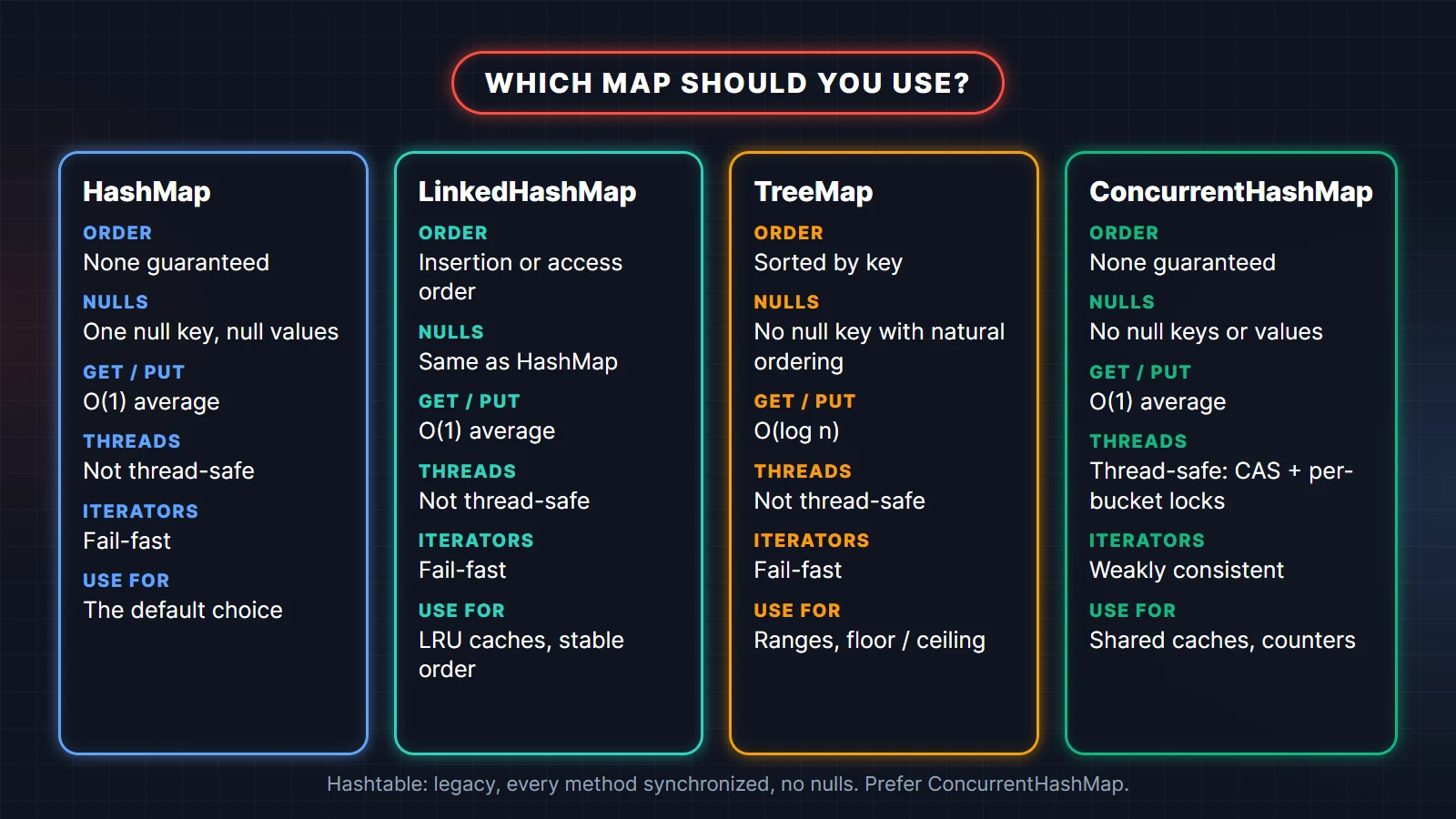
- HashMap: no ordering guarantee, one null key and null values, O(1) average, not thread-safe, fail-fast iterators. The default choice.
- LinkedHashMap: a HashMap plus a doubly linked list through all entries, so it iterates in insertion order, or access order if you pass
accessOrder = true. Same nulls and cost as HashMap. WithremoveEldestEntryit is a ready-made LRU cache. Since Java 21 it implementsSequencedMap, so you getfirstEntry(),putFirst()andreversed(). - TreeMap: a red-black tree sorted by key, O(log n) for
getandput. No null key with natural ordering (it throwsNullPointerException); null values are fine. Use it when you need sorted keys or range queries likefloorKey,ceilingKeyandsubMap. - ConcurrentHashMap: thread-safe without locking the whole map. An empty bucket is filled with a CAS (compare-and-set); an occupied bucket is updated while holding a lock on its first node, so writes to different buckets do not block each other. Reads do not lock. No null keys or values. Its iterators are weakly consistent: they never throw
ConcurrentModificationException. See the ConcurrentHashMap javadoc for the exact guarantees. - Hashtable: the legacy class from Java 1.0. Its methods are
synchronizedon the whole table, it allows no nulls, and it computes the index with(hash & 0x7FFFFFFF) % tab.lengthinstead of a bit mask. Do not use it in new code; use ConcurrentHashMap.
What about Collections.synchronizedMap(new HashMap<>())? It wraps every method in one lock, which is correct but serializes all access, much like Hashtable. ConcurrentHashMap scales far better under contention, and its compute, merge and putIfAbsent methods are atomic, which a synchronized wrapper gives you only if you lock around compound actions yourself.
What changed across Java versions
Many online answers describe the Java 7 HashMap. Here is what is different on the JDK you are actually using:
- Java 8: tree bins for long chains (JEP 180), a much simpler hash spreading function (one shift and one XOR), new nodes appended at the tail instead of inserted at the head, and the lo/hi split during resize that keeps node order. The Java 7 head-insertion resize could reverse a chain, which is why concurrent misuse of a Java 7 HashMap was known to create a cycle and hang a thread in an infinite loop.
- Java 19:
HashMap.newHashMap(int),LinkedHashMap.newLinkedHashMap(int)andHashSet.newHashSet(int)for correct pre-sizing. - Java 21: sequenced collections.
LinkedHashMapandTreeMap(throughSortedMap) implementSequencedMap. PlainHashMapdoes not, because it has no defined order. - Java 25: the internal design described in this article is unchanged; all constants above were read from the JDK 25 source.
Even after the Java 8 changes, sharing a HashMap between threads without synchronization is still a bug. You can lose updates, see a stale or corrupted structure, or read a size that does not match the contents. Use ConcurrentHashMap.
HashMap interview questions
These are the questions that come up again and again. Each answer starts with the short version you can say out loud.
How does HashMap work internally in Java?
HashMap stores entries in an array of buckets. It spreads the key's hashCode() with h ^ (h >>> 16), picks the bucket with (n - 1) & hash, and stores the entry there as a node. Collisions are chained in a linked list that becomes a red-black tree past 8 nodes, and the table doubles when size exceeds capacity × 0.75.
What is the default capacity and load factor of HashMap?
The default capacity is 16 and the default load factor is 0.75, so the first resize happens when the 13th entry is added. The table is allocated lazily on the first put, not when the HashMap is constructed.
Why is HashMap capacity always a power of two?
So the bucket index can be computed with a bitwise AND, (n - 1) & hash, instead of a slower modulo. It also makes resizing cheap: each node either stays at its index or moves exactly oldCap slots up, decided by one bit of the hash.
What happens when two keys have the same hashCode?
They go to the same bucket and HashMap compares them with equals(). If equals() returns true, the value is replaced. If not, both entries live in the bucket as a chain. A same-hash collision is legal; it only costs lookup time.
When does a HashMap bucket convert to a red-black tree?
When a chain grows past 8 nodes (TREEIFY_THRESHOLD) and the table has at least 64 buckets (MIN_TREEIFY_CAPACITY). If the table is smaller, HashMap resizes instead. A tree bin that a resize splits down to 6 or fewer nodes converts back to a list.
What is rehashing in HashMap?
Rehashing is redistributing entries into a table twice as large when size exceeds the threshold. Since Java 8 no hash code is recomputed; the cached hash decides, via hash & oldCap, whether each node stays at index j or moves to j + oldCap.
Can HashMap have a null key? Where is it stored?
Yes, one null key. Its hash is defined as 0, so it always lives in bucket 0. Null values are allowed for any number of keys. Hashtable and ConcurrentHashMap allow neither null keys nor null values.
Why should HashMap keys be immutable?
Because the bucket is chosen from the hash at insert time and the node caches that hash. If a field used by hashCode() changes later, lookups compute a different hash and miss the entry, which stays in the map but can no longer be found.
What is the time complexity of HashMap get and put?
O(1) on average, assuming a reasonable hashCode(). The worst case for a single bucket is O(n) when it is a linked list and O(log n) once it is a tree, provided the colliding keys have different hashes or implement Comparable; same-hash keys that are not comparable can still cost O(n). A resize is O(n) but happens rarely, so put is still O(1) amortized.
Is HashMap thread-safe? What should you use instead?
No. Concurrent writes can lose updates or corrupt the structure. Use ConcurrentHashMap, which uses CAS for empty buckets and a per-bucket lock for occupied ones, and offers atomic compute and merge.
What is the difference between HashMap and Hashtable?
Hashtable is a synchronized legacy class that allows no null keys or values and uses modulo for the index. HashMap is unsynchronized, allows one null key and null values, has tree bins, and is faster in single-threaded code. For thread safety, prefer ConcurrentHashMap over Hashtable.
How is HashSet related to HashMap?
A HashSet is backed by a HashMap: each element is stored as a key, with a shared dummy object as the value. So everything in this article (hashing, buckets, treeify, resize, the equals and hashCode contract) applies to HashSet too.
Practise with the full question bank
If HashMap internals are on your list, the rest of the Collections framework usually is too. Two TechTriber PDFs cover it in the same answer-first style:
- Complete Collections Framework Q&A: 100 Java Collections Framework interview questions with detailed answers, code examples and performance tips.
- Core Java Fundamentals: 74 Interview Questions for Freshers: JDK vs JRE vs JVM, data types, classes, constructors, polymorphism, interfaces, static and final, with answers.
Related reading
- Java programs asked in interviews (with output), including frequency counting with HashMap.
- Big-O cheat sheet for the complexity of every common collection.
- Core Java interview questions for the basics interviewers pair with collections.
FAQ
Does HashMap maintain insertion order?
No. Iteration follows bucket order, which depends on the hashes and the table size, and it can change after a resize. Use LinkedHashMap for insertion order or TreeMap for sorted order.
Why is the HashMap load factor 0.75?
It balances memory against collisions. At 0.75 with random hash codes, most buckets hold zero or one node, so lookups stay fast without leaving most of the table empty. You can pass a different load factor to the constructor, but you rarely should.
What happens if hashCode() always returns the same value?
Every key goes into one bucket. HashMap still works correctly, but lookups slow to O(n), or O(log n) once the bucket becomes a tree and the keys are Comparable. The table also keeps resizing until it reaches 64 slots, as the treeify program above shows.
How many entries fit before a HashMap resizes?
Capacity × load factor. A default map resizes on the 13th entry. To hold N entries without any resize, create it with HashMap.newHashMap(N) on Java 19 or later.
Is HashMap get() O(1) in Java 8 and later?
On average, yes. In the worst case a single bucket costs O(log n) instead of the O(n) it cost before Java 8, thanks to tree bins, provided the colliding keys are Comparable or have different hashes.