 Tech Tribers
Spring Boot Kafka Example: Producer, Consumer, Retries and Dead-Letter Topic (Spring Boot 4)
A runnable Spring Boot 4 Kafka example: KafkaTemplate with keys, @KafkaListener with manual ack, idempotent consumer, @RetryableTopic retries, a dead-letter topic and a Testcontainers test.
New18 min read
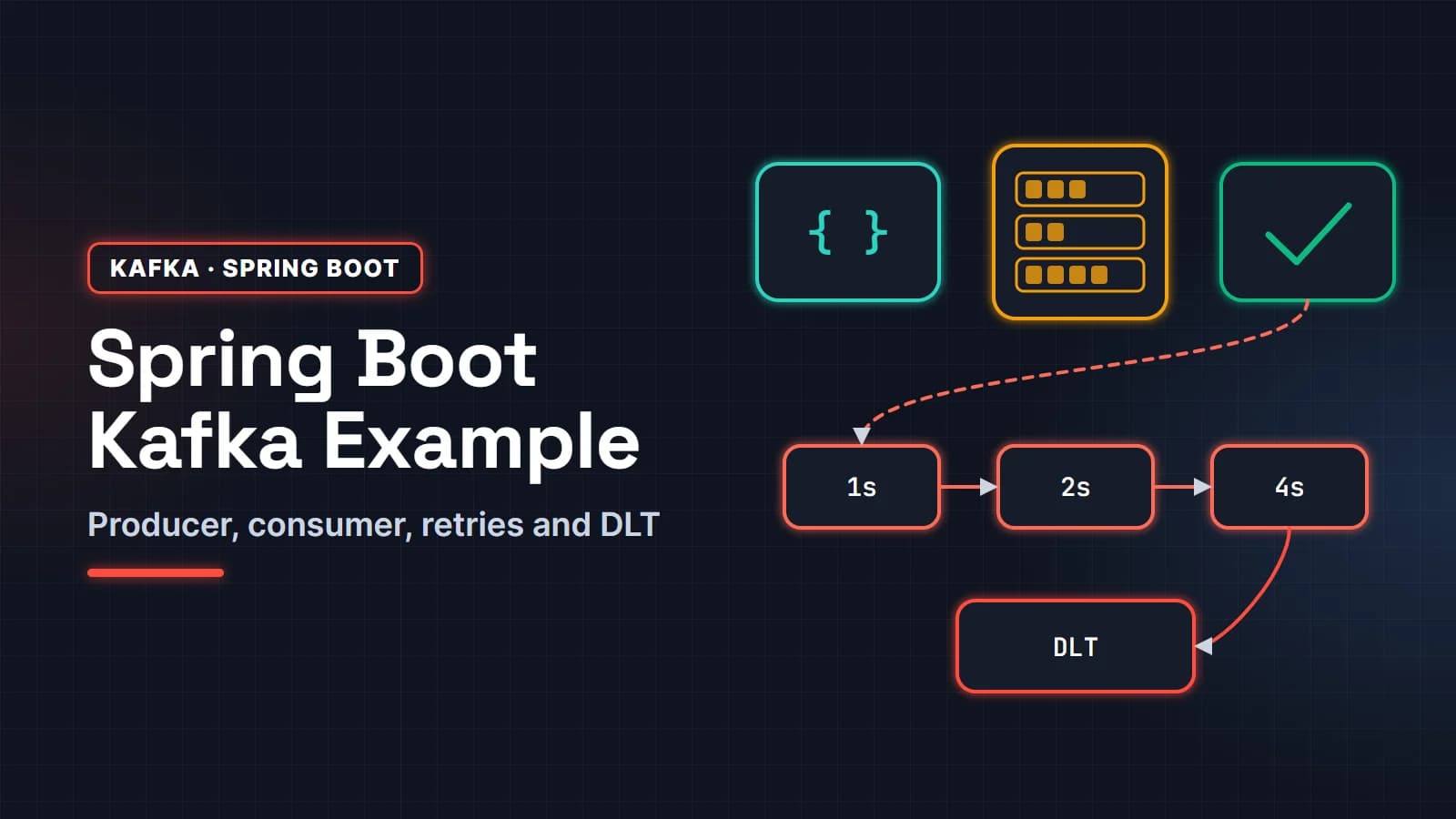
This Spring Boot Kafka example builds a small order-billing service end to end: a REST endpoint publishes an OrderPlaced event with KafkaTemplate, a @KafkaListener bills the order with manual acknowledgment, transient failures are retried on retry topics with back-off, and anything that cannot be fixed lands in a dead-letter topic. It ends with an integration test on real Kafka and Postgres containers.
It is written for Java developers who know Spring Boot and want a Kafka setup they could defend in a code review or an interview, not a hello-world. The stack is current as of late 2026: Spring Boot 4.1, Spring for Apache Kafka 4.1, Jackson 3, Java 25 and an Apache Kafka 4.4 broker in KRaft mode. We ran every step; the log lines and outputs below come from those runs.
In this guide
- What we are building
- Step 1: Run Kafka (KRaft) and Postgres with Docker Compose
- Step 2: Create the Spring Boot 4 project and configure JSON
- Step 3: The producer: KafkaTemplate with keys
- Step 4: The consumer: @KafkaListener with manual acknowledgment
- Step 5: Make the consumer idempotent
- Step 6: Retries and the dead-letter topic
- Step 7: Integration test with Testcontainers
- Production settings that matter
- FAQ
What we are building
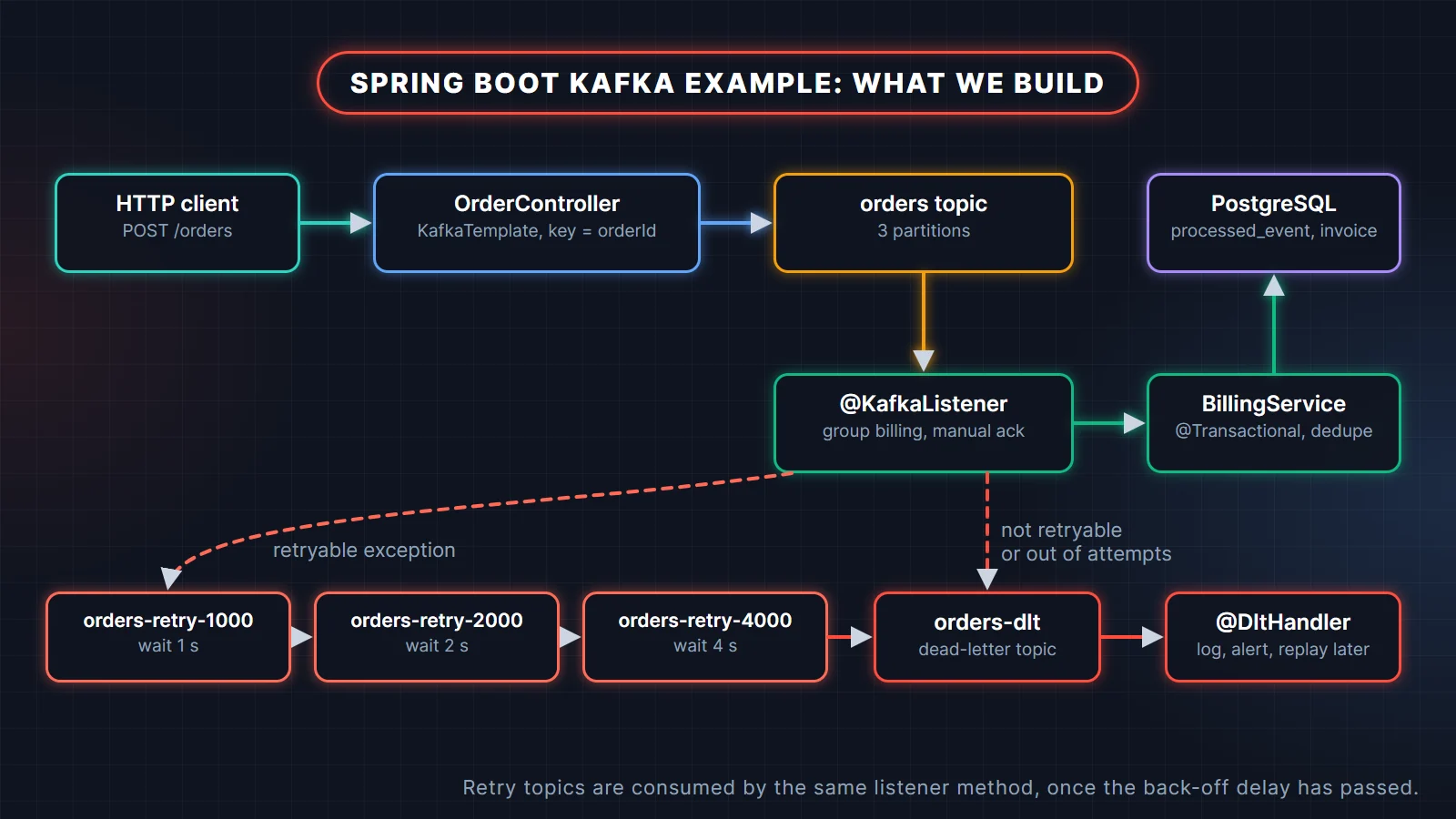
A client posts an order. The controller turns it into an event and sends it to the orders topic, keyed by order id so all events of one order stay in one partition. The billing listener reads it, records the event id so a redelivery cannot bill twice, calls a payment gateway and writes an invoice. When the gateway fails, the event moves through three retry topics with growing delays; when it still fails, or the data is simply invalid, it goes to orders-dlt.
Step 1: Run Kafka (KRaft) and Postgres with Docker Compose
Kafka 4 runs only in KRaft mode; there is no ZooKeeper to start. The official apache/kafka image can run one node as both broker and controller. Save this as compose.yaml:
services:
  kafka:
    image: apache/kafka:4.4.0
    container_name: kafka
    ports:
      - "9092:9092"
    environment:
      KAFKA_NODE_ID: 1
      KAFKA_PROCESS_ROLES: broker,controller
      KAFKA_LISTENERS: PLAINTEXT://:19092,CONTROLLER://:29093,PLAINTEXT_HOST://:9092
      KAFKA_ADVERTISED_LISTENERS: PLAINTEXT://kafka:19092,PLAINTEXT_HOST://localhost:9092
      KAFKA_LISTENER_SECURITY_PROTOCOL_MAP: CONTROLLER:PLAINTEXT,PLAINTEXT:PLAINTEXT,PLAINTEXT_HOST:PLAINTEXT
      KAFKA_CONTROLLER_LISTENER_NAMES: CONTROLLER
      KAFKA_CONTROLLER_QUORUM_VOTERS: 1@kafka:29093
      KAFKA_INTER_BROKER_LISTENER_NAME: PLAINTEXT
      KAFKA_OFFSETS_TOPIC_REPLICATION_FACTOR: 1
      KAFKA_TRANSACTION_STATE_LOG_REPLICATION_FACTOR: 1
      KAFKA_TRANSACTION_STATE_LOG_MIN_ISR: 1
      KAFKA_GROUP_INITIAL_REBALANCE_DELAY_MS: 0

  postgres:
    image: postgres:18-alpine
    container_name: orders-db
    ports:
      - "5432:5432"
    environment:
      POSTGRES_DB: orders
      POSTGRES_USER: orders
      POSTGRES_PASSWORD: orders
The listeners are the part people get wrong. The broker listens on three ports: 19092 for clients inside the Docker network (advertised as kafka:19092), 9092 for your app on the host (advertised as localhost:9092), and 29093 for the KRaft controller. A client connects to the bootstrap address, then reconnects to whatever address the broker advertises, so the advertised address has to be reachable from where the client runs. The replication-factor settings are 1 because there is only one broker; the default of 3 would fail. Start it with docker compose up -d.
Step 2: Create the Spring Boot 4 project and configure JSON
The dependencies, from pom.xml with spring-boot-starter-parent 4.1.0 and Java 25:
<dependency>
  <groupId>org.springframework.boot</groupId>
  <artifactId>spring-boot-starter-webmvc</artifactId>
</dependency>
<dependency>
  <groupId>org.springframework.boot</groupId>
  <artifactId>spring-boot-starter-kafka</artifactId>
</dependency>
<dependency>
  <groupId>org.springframework.boot</groupId>
  <artifactId>spring-boot-starter-jdbc</artifactId>
</dependency>
<dependency>
  <groupId>org.postgresql</groupId>
  <artifactId>postgresql</artifactId>
  <scope>runtime</scope>
</dependency>
Use spring-boot-starter-kafka. Spring Boot 4 split auto-configuration into modules, and adding only the plain spring-kafka jar no longer switches Kafka auto-configuration on, so you get no KafkaTemplate bean and listeners that never start.
Now application.yaml:
spring:
  datasource:
    url: jdbc:postgresql://localhost:5432/orders
    username: orders
    password: orders
  sql:
    init:
      mode: always
  kafka:
    bootstrap-servers: localhost:9092
    producer:
      key-serializer: org.apache.kafka.common.serialization.StringSerializer
      value-serializer: org.springframework.kafka.support.serializer.JacksonJsonSerializer
      acks: all
      properties:
        "[enable.idempotence]": true
        "[spring.json.add.type.headers]": false
    consumer:
      auto-offset-reset: earliest
      key-deserializer: org.apache.kafka.common.serialization.StringDeserializer
      value-deserializer: org.springframework.kafka.support.serializer.ErrorHandlingDeserializer
      properties:
        "[spring.deserializer.value.delegate.class]": org.springframework.kafka.support.serializer.JacksonJsonDeserializer
        "[spring.json.value.default.type]": com.example.orders.OrderPlaced
        "[spring.json.trusted.packages]": com.example.orders
    listener:
      ack-mode: manual_immediate
Which JSON serializer should you use in Spring Kafka 4?
Use JacksonJsonSerializer and JacksonJsonDeserializer. Spring for Apache Kafka 4.0 added Jackson 3 support (preferred when Jackson 3 is on the classpath, as it is with Spring Boot 4) and deprecated the Jackson 2 based JsonSerializer and JsonDeserializer for removal. Most tutorials online still show the old class names; they compile today with a warning and will break when the classes are removed.
Three settings in that file are deliberate:
spring.json.add.type.headers: falsestops the producer from writing a header with the Java class name. With it on, every consumer is coupled to the producer's package names. Off, the consumer decides the type withspring.json.value.default.type.spring.json.trusted.packageslimits which packages the deserializer will instantiate. Avoid*in anything that reads data from other teams.ErrorHandlingDeserializerwraps the JSON deserializer. Without it, a record that is not valid JSON fails inside the Kafka client'spoll(), before Spring has a record it can hand to your listener or error handler. With it, the failure is captured, reaches the error handler like any other exception and can be dead-lettered.
Step 3: The producer: KafkaTemplate with keys
The event is a record, and a NewTopic bean makes Spring's KafkaAdmin create the topic at startup if it does not exist:
public record OrderPlaced(
        String eventId,
        String orderId,
        String customerId,
        BigDecimal amount,
        Instant placedAt) {
}

@Configuration
class KafkaTopicsConfig {

    @Bean
    NewTopic ordersTopic() {
        return TopicBuilder.name("orders")
                .partitions(3)
                .replicas(1)          // 3 in production
                .build();
    }
}
eventId identifies this event (for de-duplication). orderId identifies the business entity and becomes the Kafka key. The controller:
@RestController
@RequestMapping("/orders")
class OrderController {

    record PlaceOrderRequest(String customerId, BigDecimal amount) {}

    private final KafkaTemplate<String, OrderPlaced> kafka;

    OrderController(KafkaTemplate<String, OrderPlaced> kafka) {
        this.kafka = kafka;
    }

    @PostMapping
    ResponseEntity<Map<String, Object>> place(@RequestBody PlaceOrderRequest request) {
        var event = new OrderPlaced(
                UUID.randomUUID().toString(),
                "ord-" + UUID.randomUUID().toString().substring(0, 8),
                request.customerId(),
                request.amount(),
                Instant.now());

        // key = orderId: every event for one order goes to the same partition, in order
        SendResult<String, OrderPlaced> result = kafka
                .send("orders", event.orderId(), event)
                .orTimeout(10, TimeUnit.SECONDS)
                .join();

        var md = result.getRecordMetadata();
        return ResponseEntity.accepted().body(Map.of(
                "orderId", event.orderId(),
                "partition", md.partition(),
                "offset", md.offset()));
    }
}
KafkaTemplate.send() returns a CompletableFuture<SendResult>. Here the controller waits (with a timeout) so it only answers 202 once the broker has acknowledged the write. That costs a few milliseconds per request and means the client never gets "accepted" for an event that was lost. If you cannot afford to wait, attach a callback with whenComplete and log or store failures; do not just fire and forget.
Run the app (./mvnw spring-boot:run) and post an order:
$ curl -X POST localhost:8080/orders -H 'Content-Type: application/json' \
       -d '{"customerId":"cust-42","amount":499.00}'
{"offset":0,"partition":1,"orderId":"ord-e86ce55a"}
On the producer side, acks: all plus enable.idempotence: true means a write is acknowledged only after all in-sync replicas have it, and producer retries cannot create duplicates in the log. Both have been Kafka client defaults since 3.0; setting them explicitly documents the intent and protects you from someone "tuning" them away.
Step 4: The consumer: @KafkaListener with manual acknowledgment
With ack-mode: manual_immediate, the container commits a record's offset when your code calls Acknowledgment.acknowledge(), not before. Here is the listener, already annotated for the retries we add in step 6:
@Component
class BillingListener {

    private static final Logger log = LoggerFactory.getLogger(BillingListener.class);

    private final BillingService billing;

    BillingListener(BillingService billing) {
        this.billing = billing;
    }

    @RetryableTopic(
            attempts = "4",                                        // 1 try + 3 retries
            backOff = @BackOff(delay = 1000, multiplier = 2.0),   // 1s, 2s, 4s
            exclude = InvalidOrderException.class,                 // straight to the DLT
            numPartitions = "3")                                   // match the main topic
    @KafkaListener(topics = "orders", groupId = "billing")
    void onOrderPlaced(OrderPlaced order,
                       @Header(KafkaHeaders.RECEIVED_TOPIC) String topic,
                       @Header(KafkaHeaders.OFFSET) long offset,
                       Acknowledgment ack) {
        log.info("Received {} from {}@{}", order.orderId(), topic, offset);
        billing.bill(order);
        ack.acknowledge();
    }

    @DltHandler
    void onDeadLetter(ConsumerRecord<String, ?> record,
                      @Header(KafkaHeaders.EXCEPTION_MESSAGE) String error,
                      Acknowledgment ack) {
        log.error("DLT {}@{} key={} error={}", record.topic(), record.offset(), record.key(), error);
        // alert, store for manual replay, etc.
        ack.acknowledge();   // the DLT container uses manual ack too
    }
}
The order matters: bill, then acknowledge. If the process dies between the two, the offset was never committed and the record is delivered again after restart. That is at-least-once delivery, and it is the right default. The price is that the consumer must cope with duplicates, which is step 5. Ack-after-processing only means something if it happens in the listener thread; if you hand work to another executor and acknowledge immediately, you are back to at-most-once.
The @DltHandler acknowledges too. The retry and dead-letter containers are built from the same listener container factory, so they inherit manual_immediate. A DLT handler that never calls acknowledge() never commits its offsets, and every dead-lettered record is handled (and alerted on) again after each restart or rebalance. Spring's own default DLT handler acknowledges for the same reason.
A note on imports, because old examples mislead here: @BackOff is org.springframework.kafka.annotation.BackOff. Spring for Apache Kafka 4 no longer uses Spring Retry's @Backoff on @RetryableTopic.
At startup the container logs one consumer for the main topic and one per retry topic, each in its own group:
billing-dlt: partitions assigned: [orders-dlt-0, orders-dlt-1, orders-dlt-2]
billing-retry-4000: partitions assigned: [orders-retry-4000-0, orders-retry-4000-1, orders-retry-4000-2]
billing-retry-1000: partitions assigned: [orders-retry-1000-0, orders-retry-1000-1, orders-retry-1000-2]
billing: partitions assigned: [orders-0, orders-1, orders-2]
billing-retry-2000: partitions assigned: [orders-retry-2000-0, orders-retry-2000-1, orders-retry-2000-2]
If partition assignment, consumer groups and offsets are still fuzzy, read Kafka consumer groups, partitions and rebalancing explained first; the rest of this tutorial leans on it.
Step 5: Make the consumer idempotent
Redelivery happens in normal operation: after a crash between processing and commit, after a rebalance, after a retry. The consumer has to make the second delivery of the same event harmless. The simplest reliable way is to record each processed event id in the same database transaction as the business change:
CREATE TABLE IF NOT EXISTS processed_event (
    event_id     VARCHAR(64) NOT NULL,
    consumer     VARCHAR(64) NOT NULL,
    processed_at TIMESTAMPTZ NOT NULL DEFAULT now(),
    PRIMARY KEY (event_id, consumer)
);

CREATE TABLE IF NOT EXISTS invoice (
    order_id    VARCHAR(64) PRIMARY KEY,
    customer_id VARCHAR(64) NOT NULL,
    amount      NUMERIC(12, 2) NOT NULL,
    created_at  TIMESTAMPTZ NOT NULL DEFAULT now()
);@Service
class BillingService {
private static final Logger log = LoggerFactory.getLogger(BillingService.class);
private final JdbcClient jdbc;
private final PaymentGateway gateway;
BillingService(JdbcClient jdbc, PaymentGateway gateway) {
this.jdbc = jdbc;
this.gateway = gateway;
}
@Transactional
public void bill(OrderPlaced order) {
// 1. Claim the event. A redelivered event hits the primary key and inserts 0 rows.
int claimed = jdbc.sql("""
INSERT INTO processed_event (event_id, consumer) VALUES (:id, 'billing')
ON CONFLICT DO NOTHING""")
.param("id", order.eventId())
.update();
if (claimed == 0) {
log.info("Duplicate event {} for {}, skipping", order.eventId(), order.orderId());
return;
}
// 2. Validate. Bad data is not retryable.
if (order.amount() == null || order.amount().signum() <= 0) {
throw new InvalidOrderException("amount must be positive: " + order.amount());
}
// 3. Side effects. If anything throws, the claim above rolls back too.
gateway.charge(order);
jdbc.sql("INSERT INTO invoice (order_id, customer_id, amount) VALUES (:o, :c, :a)")
.param("o", order.orderId())
.param("c", order.customerId())
.param("a", order.amount())
.update();
log.info("Invoiced {} for {}", order.orderId(), order.amount());
}
}Because the claim and the invoice share one transaction, a failure anywhere rolls back both, and the retry can claim the event again. The primary key is (event_id, consumer) so another service can track the same event independently. PaymentGateway is a stub in the demo: customer ids starting with flaky fail twice and then succeed, and ids starting with down always fail.
To test it, we published the same event twice with the console producer:
$ kafka-console-producer.sh --bootstrap-server localhost:9092 --topic orders \
    --reader-property parse.key=true --reader-property key.separator='|'
ord-dup1|{"eventId":"evt-123","orderId":"ord-dup1","customerId":"cust-5","amount":10.00,"placedAt":"2026-10-30T07:30:00Z"}
ord-dup1|{"eventId":"evt-123","orderId":"ord-dup1","customerId":"cust-5","amount":10.00,"placedAt":"2026-10-30T07:30:00Z"}
The application log:
BillingListener : Received ord-dup1 from orders@1
BillingService  : Invoiced ord-dup1 for 10.00
BillingListener : Received ord-dup1 from orders@2
BillingService  : Duplicate event evt-123 for ord-dup1, skipping
One invoice, two deliveries. When the side effect is outside your database (an email, a call to a payment provider), pass the event id as an idempotency key to that system too, because no local transaction can roll back a remote call.
Step 6: Retries and the dead-letter topic
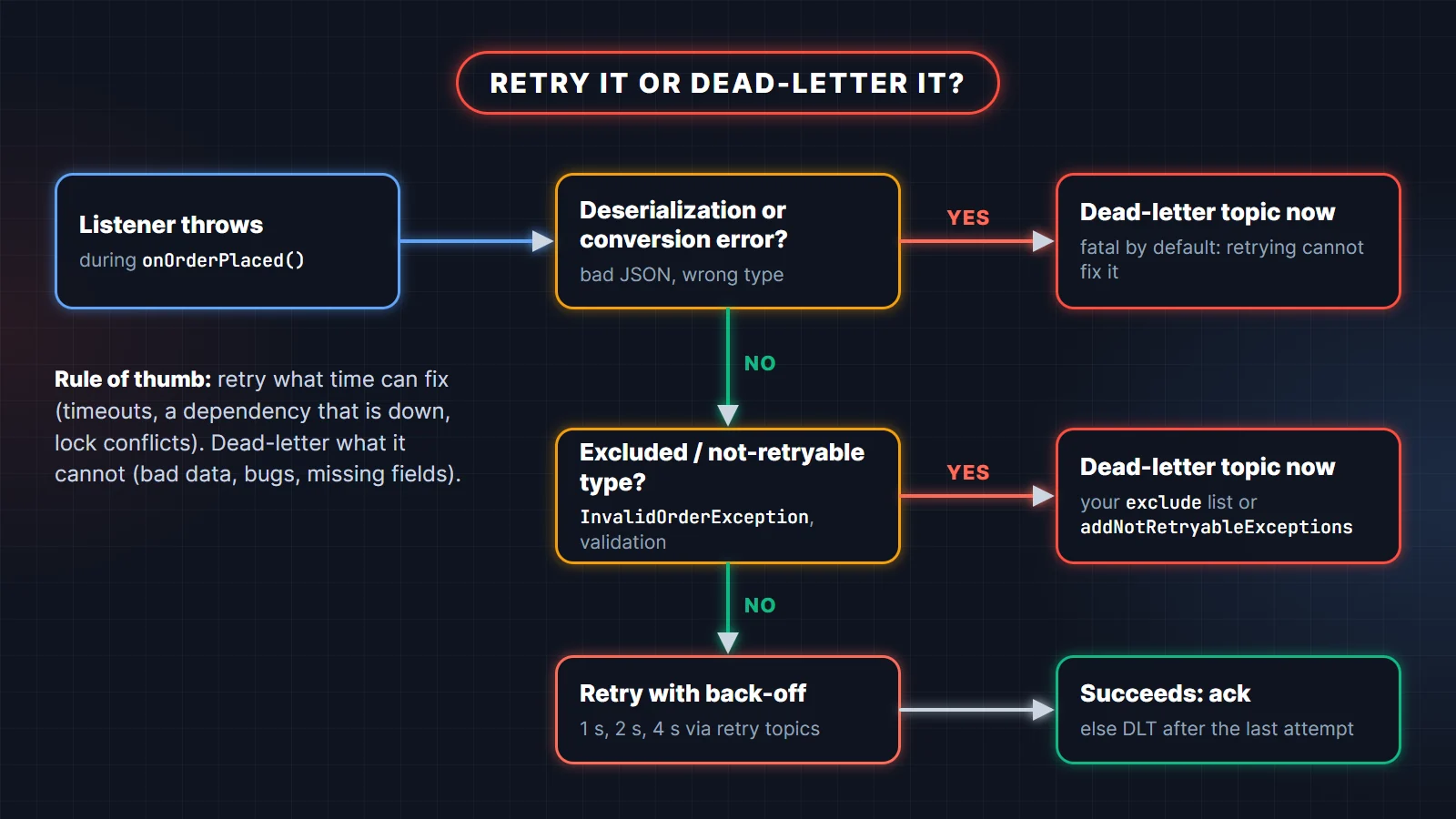
Not every exception deserves a retry. A timeout from the payment gateway may succeed in two seconds; an order with a negative amount will fail forever. Retrying the second kind only delays the inevitable and, with blocking retries, holds up every record behind it.
Spring for Apache Kafka gives you two ways to retry, and they behave very differently.
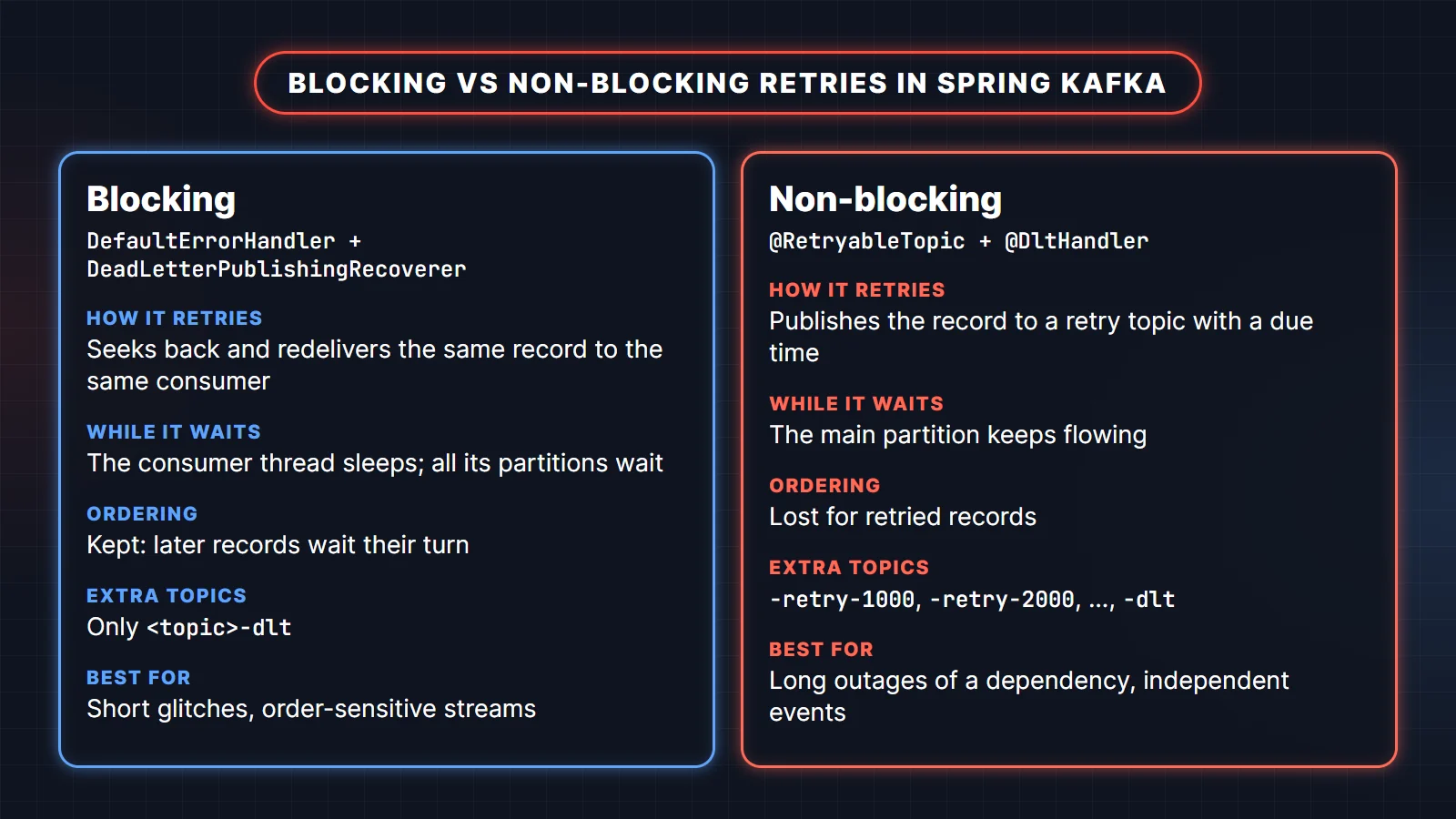
- Blocking (
DefaultErrorHandler): seeks back so the failed record is redelivered to the same consumer. Order is preserved, but the consumer thread waits out the back-off, so every partition that consumer owns is stuck meanwhile. No extra topics apart from the DLT. - Non-blocking (
@RetryableTopic): publishes the failed record to a retry topic and moves on. The main partition keeps flowing, but retried records lose their order relative to the rest.
Option A: blocking retries with DefaultErrorHandler and DeadLetterPublishingRecoverer
If you define no error handler at all, Spring uses a DefaultErrorHandler with FixedBackOff(0L, 9): ten attempts with no delay, then the record is logged and skipped. That is rarely what you want. A configured version with a dead-letter topic:
@Configuration
class BlockingRetryConfig {

    // Spring Boot attaches a CommonErrorHandler bean to the auto-configured listener container factory.
    @Bean
    DefaultErrorHandler errorHandler(KafkaTemplate<?, ?> template) {
        var recoverer = new DeadLetterPublishingRecoverer(template);    // -> <topic>-dlt, same partition
        var handler = new DefaultErrorHandler(recoverer, new FixedBackOff(1000L, 2));  // 1 try + 2 retries
        handler.addNotRetryableExceptions(InvalidOrderException.class);
        return handler;
    }
}
Some exceptions are treated as fatal and go to the recoverer on the first failure, including DeserializationException, MessageConversionException, ConversionException, MethodArgumentResolutionException, NoSuchMethodException and ClassCastException. addNotRetryableExceptions adds your own. We tested this handler on a second listener without @RetryableTopic: the failing record was tried three times one second apart and then published to audit-dlt. Two lessons from that run. First, the dead-letter topic did not exist, so the producer logged UNKNOWN_TOPIC_OR_PARTITION until the broker auto-created it with one partition. Second, the recoverer sends to the same partition number as the original record, and it warned Destination resolver returned non-existent partition audit-dlt-2. Create DLTs yourself with the same partition count as the source topic.
The default back-off sleeps the consumer thread. Keep the total delay well under max.poll.interval.ms, or configure the ContainerPausingBackOffHandler, which pauses the container instead.
Option B: non-blocking retries with @RetryableTopic
The listener in step 4 already uses this. With attempts = "4" and @BackOff(delay = 1000, multiplier = 2.0), Spring creates orders-retry-1000, orders-retry-2000, orders-retry-4000 and orders-dlt, plus a consumer for each. A failed record is forwarded with a "not before" timestamp; the retry consumer pauses that partition until the time is due, then calls the same listener method. numPartitions = "3" matters: the default is one partition per retry topic, which funnels all retries through a single consumer.
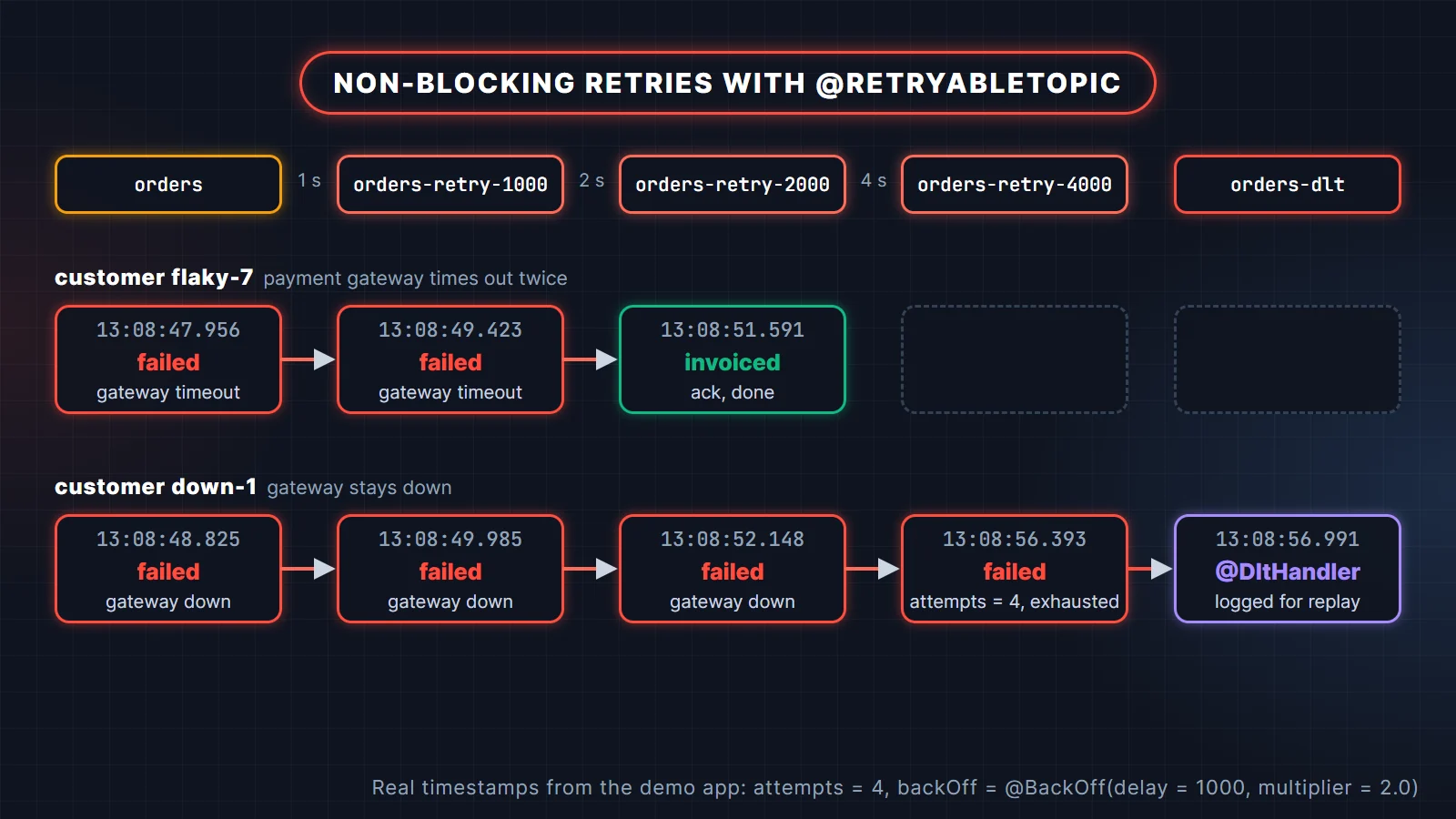
We posted two orders, one for a flaky customer and one for a down customer. The trimmed log:
13:08:47.956 BillingListener : Received ord-459a72db from orders@0
13:08:48.825 BillingListener : Received ord-0336238d from orders@0
13:08:49.423 BillingListener : Received ord-459a72db from orders-retry-1000@0
13:08:49.985 BillingListener : Received ord-0336238d from orders-retry-1000@0
13:08:51.591 BillingListener : Received ord-459a72db from orders-retry-2000@0
13:08:51.679 BillingService  : Invoiced ord-459a72db for 120.50
13:08:52.148 BillingListener : Received ord-0336238d from orders-retry-2000@0
13:08:56.393 BillingListener : Received ord-0336238d from orders-retry-4000@0
13:08:56.412 DeadLetterPublishingRecovererFactory : Record: topic = orders-retry-4000, partition = 2,
             offset = 0, main topic = orders threw an error at topic orders-retry-4000 and won't be
             retried. Sending to DLT with name orders-dlt.
13:08:56.991 BillingListener : DLT orders-dlt@0 key=ord-0336238d error=Listener failed; gateway down
The flaky order was invoiced on its third attempt, about 3.7 seconds after the first. The other one used all four attempts and reached the DLT handler. An InvalidOrderException skipped the retry topics completely: in our run, an order with amount -5 went from orders straight to orders-dlt in under half a second.
Two things to know when you combine the options. The retry-topic feature configures its own error handling for the containers it creates, so the global DefaultErrorHandler from option A did not affect the @RetryableTopic listener in our test; it still applied to the other listener. And you trade ordering for throughput: if event 2 for an order succeeds while event 1 waits in a retry topic, they are processed out of order. Use non-blocking retries for independent events, blocking ones where order matters.
Poison pills: keep the original bytes in the DLT
We also sent a record whose value was the text this is not json. The ErrorHandlingDeserializer caught the failure, it was classed as fatal, and it went straight to orders-dlt. But in the first version of the app the DLT copy read "dGhpcyBpcyBub3QganNvbg==". The recoverer had correctly restored the original byte[], and then JacksonJsonSerializer wrote that byte array as a Base64 JSON string. Not useful when someone has to inspect it at 3 a.m.
The fix is a value serializer that passes byte[] through untouched and writes everything else as JSON, plugged into Spring Boot's producer factory with a customizer:
@Configuration
class KafkaSerializationConfig {

    /**
     * A record that failed deserialization reaches the dead-letter publisher as its original byte[].
     * Send byte[] as-is and everything else as JSON, so the DLT keeps the exact bad payload.
     */
    @Bean
    DefaultKafkaProducerFactoryCustomizer jsonOrRawBytes() {
        return KafkaSerializationConfig::useJsonOrRawBytes;
    }

    @SuppressWarnings("unchecked")
    private static <K, V> void useJsonOrRawBytes(DefaultKafkaProducerFactory<K, V> factory) {
        Serializer<?> serializer = new DelegatingByTypeSerializer(Map.of(
                byte[].class, new ByteArraySerializer(),
                Object.class, new JacksonJsonSerializer<>()), true);
        factory.setValueSerializer((Serializer<V>) serializer);
    }
}
The true argument makes DelegatingByTypeSerializer match by assignable type, and the most specific match wins, so byte[] goes to ByteArraySerializer and every event object to JSON. After the change, reading the DLT shows the exact bad payload and the exception headers Spring adds (output trimmed):
$ kafka-console-consumer.sh --bootstrap-server localhost:9092 --topic orders-dlt --from-beginning \
    --formatter-property print.key=true --formatter-property print.headers=true
... kafka_exception-fqcn:org.springframework.kafka.support.serializer.DeserializationException,
kafka_exception-message:failed to deserialize, ... kafka_original-topic:orders, ...
kafka_dlt-original-consumer-group:billing ...    ord-bad    this is not json
The @DltHandler itself cannot deserialize that record either, so Spring logs it and moves on. The DLT is the safe place it lives until someone fixes the producer and replays or discards it.
Step 7: Integration test with Testcontainers
Mocks cannot tell you whether serialization, topic creation, retries and the database transaction work together. A Testcontainers test can, and Spring Boot's @ServiceConnection wires the container addresses into the app without any properties. Test dependencies: spring-boot-starter-kafka-test, spring-boot-testcontainers, org.testcontainers:testcontainers-junit-jupiter, testcontainers-kafka, testcontainers-postgresql and org.awaitility:awaitility, all version-managed by the Boot parent.
@SpringBootTest
@Testcontainers
class BillingFlowTest {

    @Container
    @ServiceConnection
    static KafkaContainer kafka = new KafkaContainer("apache/kafka:4.4.0");

    @Container
    @ServiceConnection
    static PostgreSQLContainer postgres = new PostgreSQLContainer("postgres:18-alpine");

    @Autowired KafkaTemplate<String, OrderPlaced> kafkaTemplate;
    @Autowired JdbcClient jdbc;

    @Test
    void sameEventTwiceProducesOneInvoice() {
        var event = new OrderPlaced("evt-1", "ord-1", "cust-1", new BigDecimal("49.99"), Instant.now());

        kafkaTemplate.send("orders", event.orderId(), event);
        kafkaTemplate.send("orders", event.orderId(), event);   // simulated redelivery

        // must reach 1 within 20 s, then stay at 1 for 3 s (the duplicate must not add a row)
        await().atMost(Duration.ofSeconds(20)).during(Duration.ofSeconds(3)).untilAsserted(() ->
                assertThat(jdbc.sql("SELECT count(*) FROM invoice WHERE order_id = 'ord-1'")
                        .query(Long.class).single()).isEqualTo(1L));
    }
}
KafkaContainer is org.testcontainers.kafka.KafkaContainer, the class for the apache/kafka image, and PostgreSQLContainer comes from org.testcontainers.postgresql in Testcontainers 2. The result of ./mvnw test, including the duplicate being skipped:
BillingListener : Received ord-1 from orders@0
BillingService  : Invoiced ord-1 for 49.99
BillingListener : Received ord-1 from orders@1
BillingService  : Duplicate event evt-1 for ord-1, skipping
[INFO] Tests run: 1, Failures: 0, Errors: 0, Skipped: 0
[INFO] BUILD SUCCESS
If Docker is not available in CI, @EmbeddedKafka from spring-boot-starter-kafka-test starts an in-process broker instead. Since Kafka 4 it is KRaft-only. It is faster to start, but it is not the same image you run in production, so prefer containers when you can. For a deeper look at test slices and container-based tests, see the Spring Boot Testcontainers reference.
Production settings that matter
- Replication. Use replication factor 3 and
min.insync.replicas=2on topics that matter. Withacks=all, a write then survives the loss of one broker, and the producer gets an error instead of silent data loss if two are down.TopicBuildertakes both:.replicas(3).config(TopicConfig.MIN_IN_SYNC_REPLICAS_CONFIG, "2"). - Concurrency.
spring.kafka.listener.concurrencytimes the number of instances should not exceed the partition count, or the extra consumers sit idle. - Poll budget.
spring.kafka.consumer.max-poll-records(Kafka default 500) multiplied by your worst-case time per record must stay undermax.poll.interval.ms(default five minutes), or the group rebalances in a loop. - Retry and DLT topics. Create them with the same partition count as the main topic, give them retention long enough for someone to investigate, and alert on any record arriving in a DLT.
- Observability.
spring.kafka.template.observation-enabledandspring.kafka.listener.observation-enabledturn on Micrometer observations, so traces follow a request from the REST call through Kafka to the listener. - Lag. Export consumer lag per group and alert on a rising trend. It is the first sign that billing is falling behind.
- Rebalance protocol. Kafka 4 brokers support the KIP-848 consumer protocol. You can opt in with
spring.kafka.consumer.properties[group.protocol]=consumerfor faster, incremental rebalances; the consumer groups article explains the trade-offs.
The reference pages worth bookmarking are the Spring Boot Kafka documentation, the Spring for Apache Kafka sections on error handling and on how non-blocking retries work. For the rest of a Spring Boot service, the Spring Boot production checklist covers health checks, timeouts and configuration.
Practise with the full question bank
Interviewers who see Kafka on your CV ask exactly the questions this tutorial answers: why manual ack, what happens on redelivery, blocking or non-blocking retries, how you test it. Two TechTriber guides go further:
- Apache Kafka with Spring Boot: 100 Interview Questions and Answers covers partitions and replication, producers, consumer groups, delivery semantics, Spring Kafka error handling, schemas and operations.
- Spring Boot Testing Interview Questions: 75 Answers covers test slices, MockMvc,
@DataJpaTest, Testcontainers, Mockito, JUnit 5, flaky and slow tests, contract tests and CI.
Related reading
- Kafka consumer groups, partitions and rebalancing explained
- Kafka interview questions and answers
- Spring Boot in production: a pre-deploy checklist
FAQ
Do I need @EnableKafka in a Spring Boot application?
No. With spring-boot-starter-kafka on the classpath, Spring Boot enables @KafkaListener processing and creates the listener container factory, KafkaTemplate and KafkaAdmin for you. You only add @EnableKafka when you build that infrastructure yourself without Boot's auto-configuration.
Is JsonSerializer deprecated in Spring Kafka?
Yes. Since Spring for Apache Kafka 4.0, JsonSerializer and JsonDeserializer are deprecated for removal in favor of JacksonJsonSerializer and JacksonJsonDeserializer, which use Jackson 3.
What is the name of the dead-letter topic in Spring Kafka?
By default it is the original topic name plus -dlt, for both DeadLetterPublishingRecoverer and @RetryableTopic, so orders becomes orders-dlt. You can change it with a custom destination resolver or the dltTopicSuffix attribute.
Does @RetryableTopic keep message order?
No. A record waiting in a retry topic no longer blocks the main partition, so later records for the same key can be processed first. If per-key order matters, use blocking retries with DefaultErrorHandler instead.
What does manual_immediate do compared to manual?
With MANUAL_IMMEDIATE, the offset is committed as soon as you call acknowledge(). With MANUAL, acknowledged offsets are queued and committed together after the records from the current poll are processed, like BATCH.
How do I replay records from the dead-letter topic?
Fix the cause first, then read the DLT with a small consumer or tool and publish the records back to the main topic. The kafka_original-topic, partition and offset headers tell you where each record came from. Because the consumer is idempotent, replaying an event that was already processed is safe.