 Tech Tribers
Kafka Consumer Groups, Partitions and Rebalancing Explained (Kafka 4, KIP-848)
How Kafka consumer groups split partitions, what an offset commit stores, what triggers a rebalance, eager vs cooperative vs KIP-848, and how to measure lag. Real output from a Kafka 4.4 broker.
New20 min read
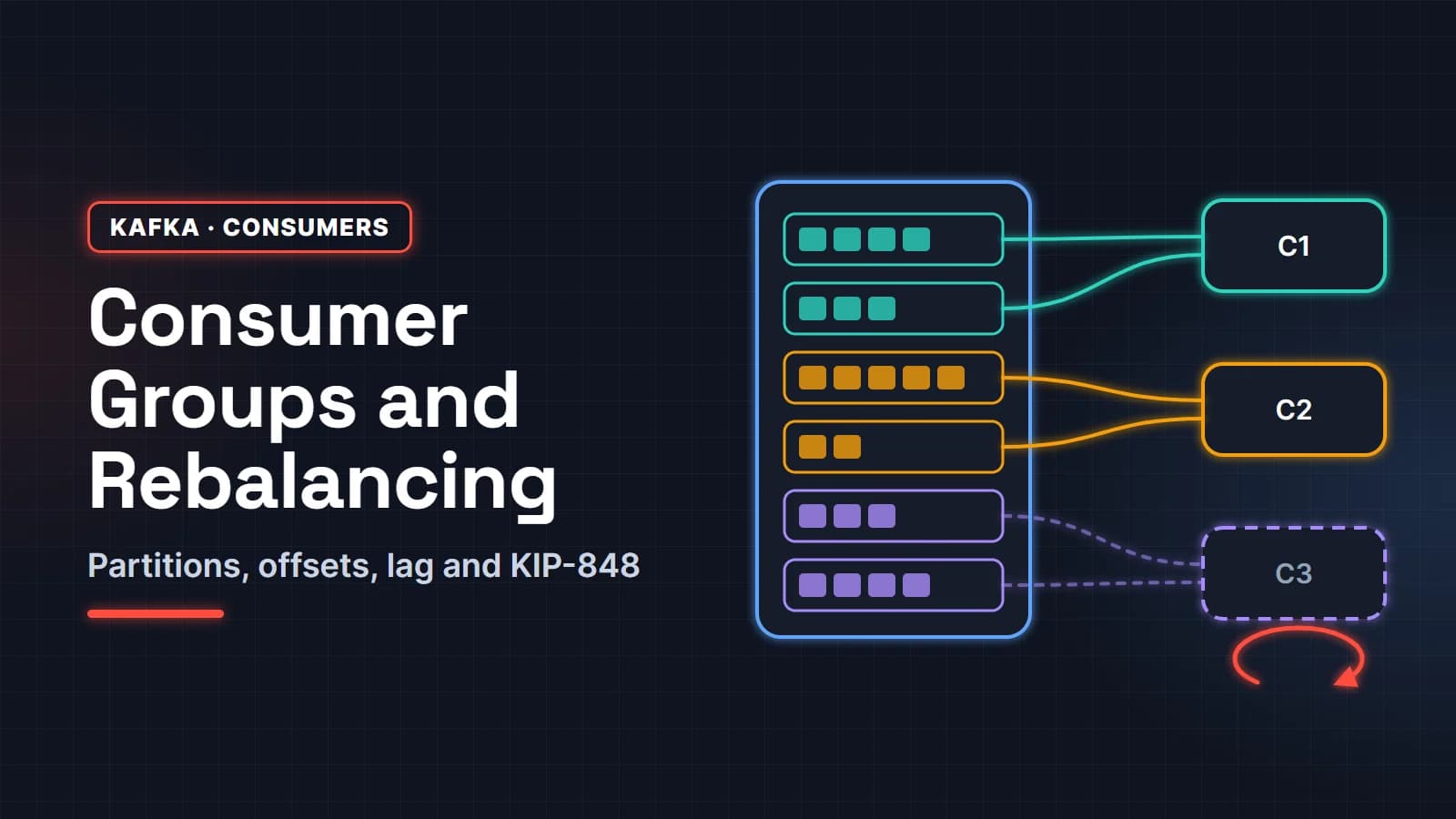
Kafka consumer groups are how Kafka spreads the work of reading a topic: every partition of the topic is given to exactly one consumer in the group, so adding consumers adds parallelism, and each group keeps its own place in the log. Partitions decide how far you can scale and what order you get. Rebalancing is what happens when the group's members change and those partitions have to move.
This guide is for Java developers who use Kafka at work or are preparing for interviews where "explain consumer groups" is a standard question. Every example was run against a real Kafka 4.4 broker in KRaft mode with Java 25, and the outputs below are copied from those runs, not invented. You will see what a partition is, how keys pick partitions, what an offset commit really stores, what triggers a rebalance, how eager, cooperative and the new KIP-848 protocol differ, and how to measure consumer lag.
In this guide
- Partitions: the unit of ordering and parallelism
- How a consumer group splits partitions
- Offsets and commits
- What triggers a rebalance
- Eager vs cooperative rebalancing (classic protocol)
- The new consumer rebalance protocol in Kafka 4 (KIP-848)
- Static membership
- How many partitions should a topic have?
- Consumer lag: measure it and act on it
- FAQ
Partitions: the unit of ordering and parallelism
What is a Kafka partition?
A partition is an ordered, append-only log. A topic is split into one or more partitions, and each record in a partition gets a sequential number called its offset. Kafka guarantees order inside a partition, never across partitions. Each partition lives on one leader broker (plus replicas), which is how a topic grows beyond one machine.
Two consequences follow, and almost every consumer group question comes back to them. First, ordering is per partition, so related events must land in the same partition if their order matters. Second, inside one group a partition is read by one consumer at a time, so the partition count is the ceiling on how many consumers in that group can do useful work.
How does the message key decide the partition?
When a record has a key and you do not choose a partition yourself, the default partitioner hashes the key bytes with murmur2 and takes the result modulo the partition count. Same key, same partition, as long as the partition count does not change. When the key is null, the producer uses a sticky partitioner: it fills a batch for one partition and then moves on, which spreads load but gives you no per-key ordering.
Here is a small program that creates a 6-partition orders topic and sends three events for each of three customers, keyed by customer id:
import org.apache.kafka.clients.admin.Admin;
import org.apache.kafka.clients.admin.NewTopic;
import org.apache.kafka.clients.producer.KafkaProducer;
import org.apache.kafka.clients.producer.ProducerConfig;
import org.apache.kafka.clients.producer.ProducerRecord;
import org.apache.kafka.clients.producer.RecordMetadata;
import org.apache.kafka.common.serialization.StringSerializer;

import java.util.List;
import java.util.Map;

public class KeyToPartition {

    public static void main(String[] args) throws Exception {
        String bootstrap = args.length > 0 ? args[0] : "localhost:9092";

        try (Admin admin = Admin.create(Map.of("bootstrap.servers", bootstrap))) {
            admin.createTopics(List.of(new NewTopic("orders", 6, (short) 1))).all().get();
        }

        Map<String, Object> props = Map.of(
                ProducerConfig.BOOTSTRAP_SERVERS_CONFIG, bootstrap,
                ProducerConfig.KEY_SERIALIZER_CLASS_CONFIG, StringSerializer.class,
                ProducerConfig.VALUE_SERIALIZER_CLASS_CONFIG, StringSerializer.class);

        // Three events per customer, sent in order. The key decides the partition.
        List<String> events = List.of("created", "paid", "shipped");
        List<String> customers = List.of("cust-17", "cust-42", "cust-99");

        try (var producer = new KafkaProducer<String, String>(props)) {
            for (String event : events) {
                for (String customer : customers) {
                    RecordMetadata md = producer
                            .send(new ProducerRecord<>("orders", customer, event))
                            .get();
                    System.out.printf("key=%s  value=%-8s -> partition %d, offset %d%n",
                            customer, event, md.partition(), md.offset());
                }
            }
        }
    }
}
Output from the run:
key=cust-17  value=created  -> partition 1, offset 0
key=cust-42  value=created  -> partition 2, offset 0
key=cust-99  value=created  -> partition 2, offset 1
key=cust-17  value=paid     -> partition 1, offset 1
key=cust-42  value=paid     -> partition 2, offset 2
key=cust-99  value=paid     -> partition 2, offset 3
key=cust-17  value=shipped  -> partition 1, offset 2
key=cust-42  value=shipped  -> partition 2, offset 4
key=cust-99  value=shipped  -> partition 2, offset 5
Every event for cust-17 sits in partition 1 in the order it was sent, so a consumer sees created, paid, shipped. Notice also that cust-42 and cust-99 share partition 2. A partition holds many keys, and with only a few keys some partitions stay empty while others get everything. That is the "hot partition" problem in miniature: pick keys with enough distinct values that the hash can spread them.
How a consumer group splits partitions
Every consumer that uses the same group.id belongs to the same group. One broker acts as the group coordinator for that group, and it makes sure each partition of the subscribed topics is assigned to exactly one member. With 6 partitions and 3 consumers, each consumer gets two.
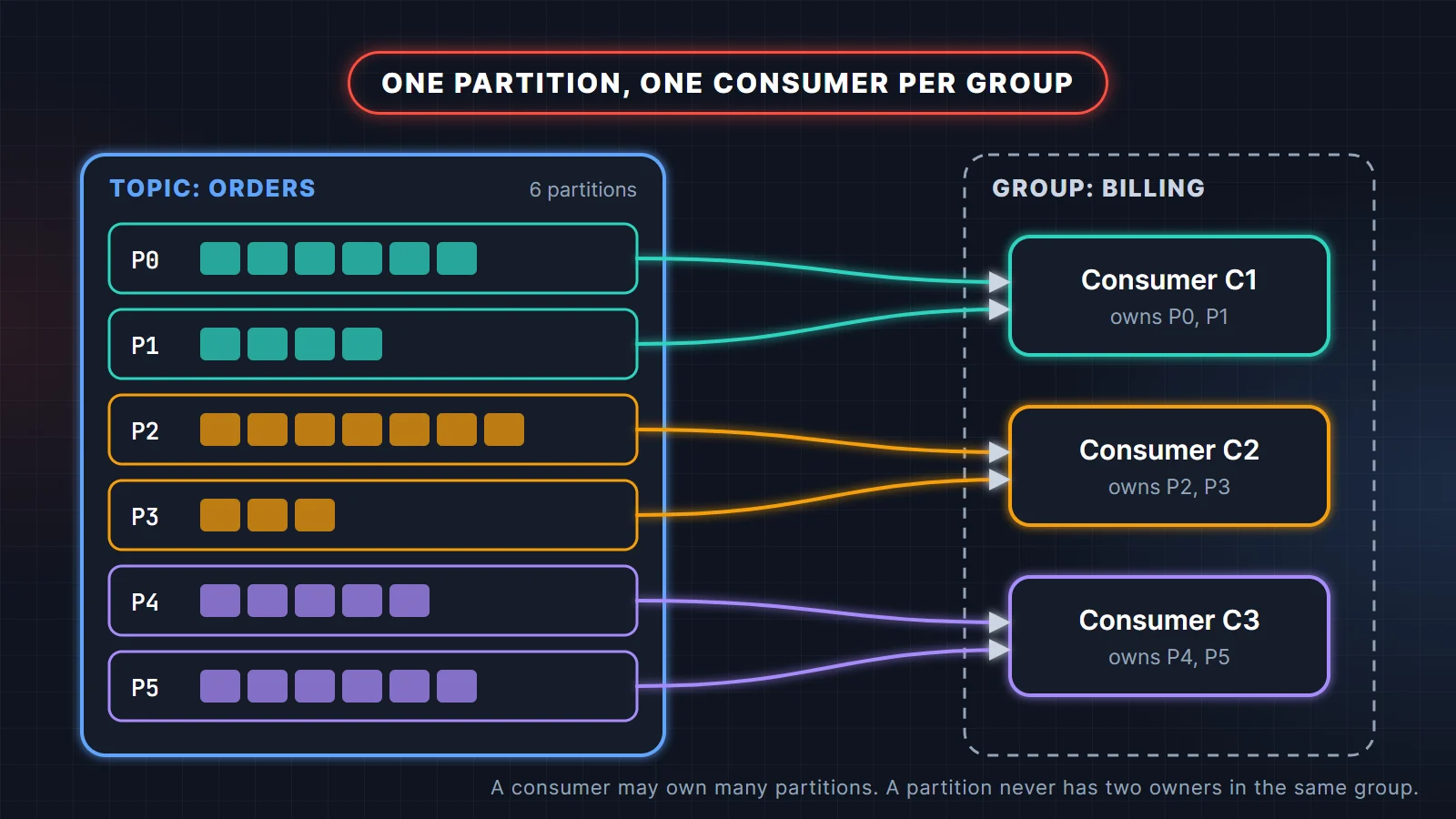
The coordinator for a group is the broker that leads the partition of the internal __consumer_offsets topic that the group id hashes to. That topic has 50 partitions by default (offsets.topic.num.partitions), which spreads the coordinator role for many groups across the cluster.
What happens when there are more consumers than partitions?
The extra consumers sit idle. A group with 6 partitions and 8 consumers has 2 members with nothing assigned. They still heartbeat and they are ready to take over if a busy member fails, so a small surplus works as warm standby, but they add no throughput. If you need more parallel consumers, you need more partitions (or a share group, covered later).
The same rule applies inside a single Spring Boot service. @KafkaListener(concurrency = "3") or spring.kafka.listener.concurrency=3 starts three consumers in the group, and running two instances of that service gives you six members. Six members on a 3-partition topic means three idle threads.
Can two consumer groups read the same topic?
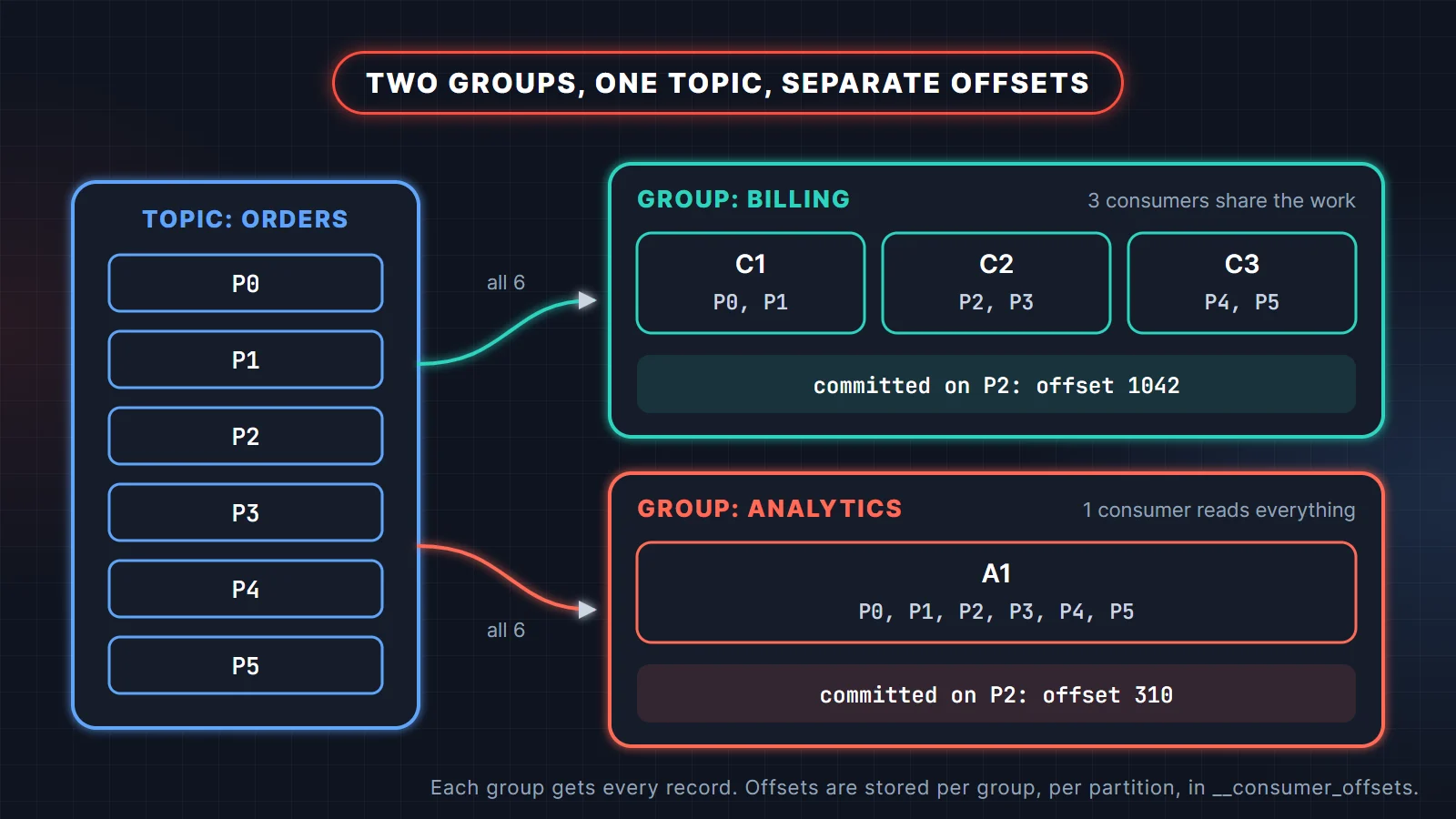
Yes, and that is the point of groups. Each group receives every record of the topic and tracks its own offsets. A billing service and an analytics job can read the same orders topic at different speeds without affecting each other. Inside a group Kafka behaves like a queue (each record handled once by the group); across groups it behaves like publish-subscribe.
Offsets and commits
What is a committed offset in Kafka?
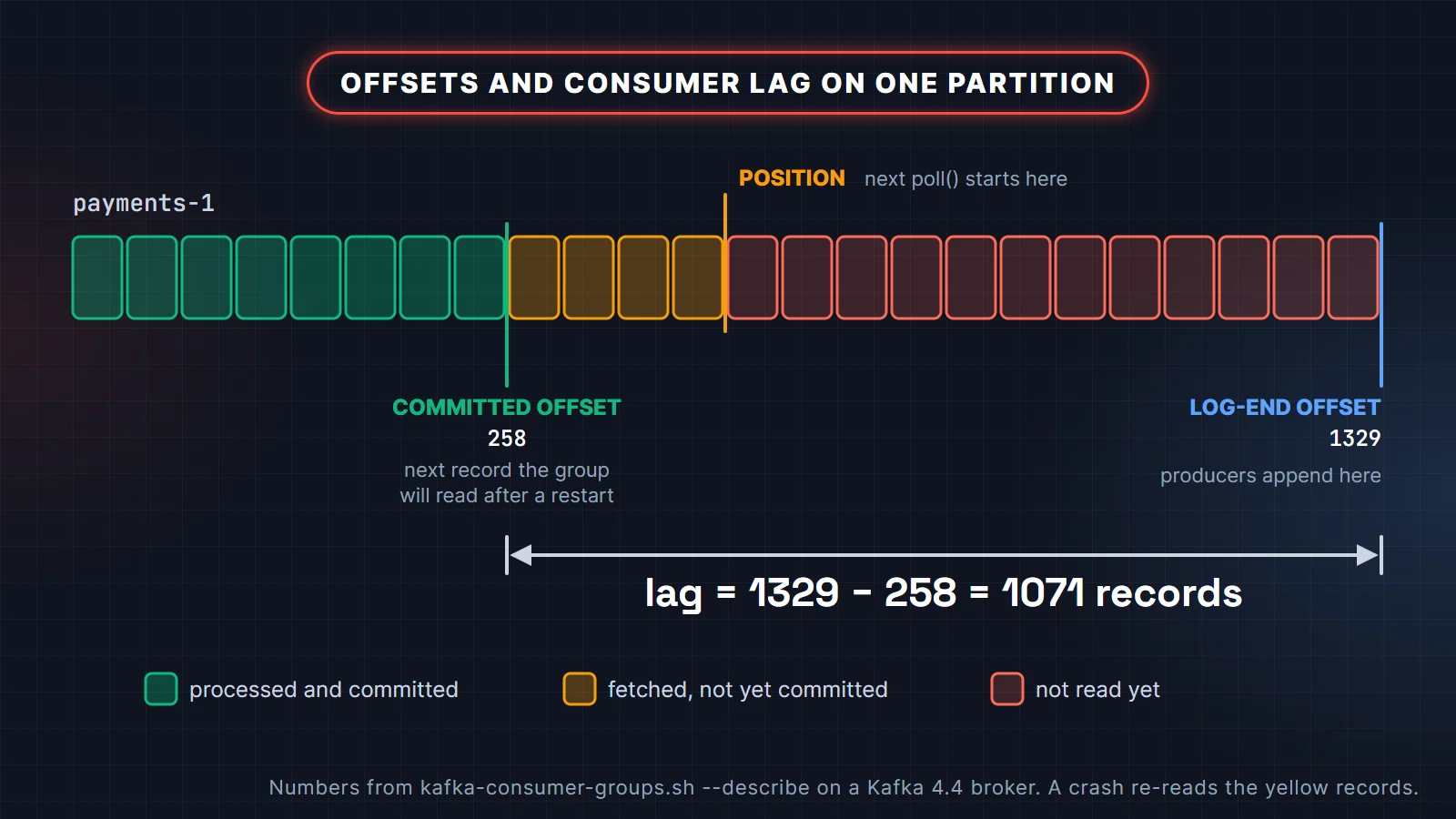
A committed offset is the position a group has saved for a partition: the offset of the next record the group should read. Kafka stores it in __consumer_offsets, keyed by group, topic and partition. When a consumer restarts, or a partition moves to another member, reading resumes from the committed offset, not from wherever the previous owner had reached.
Keep three numbers apart. The committed offset is what the group has saved. The position is where the next poll() will fetch from, which is usually ahead of the committed offset while records are being processed. The log-end offset is where the producer will write next. Lag is the gap between the committed offset and the log-end offset.
Auto commit vs manual commit: which should you use?
With the plain Java client, enable.auto.commit defaults to true and auto.commit.interval.ms to 5000. The commit happens inside poll(), and it commits the offsets of records returned by earlier polls. If you process each batch completely before you call poll() again, that gives you at-least-once delivery. It breaks as soon as you hand records to another thread: the next poll can commit offsets for records that are still in flight, and a crash then loses them.
Manual commit makes the order explicit: process first, then commit. A minimal loop looks like this:
consumer.subscribe(List.of("orders"));
while (running) {
    ConsumerRecords<String, String> records = consumer.poll(Duration.ofMillis(500));
    for (ConsumerRecord<String, String> record : records) {
        process(record);
    }
    consumer.commitSync();   // commits the offsets returned by the last poll()
}
Spring for Apache Kafka takes this decision away from you: its listener container sets enable.auto.commit=false unless you set it yourself, and commits on your behalf according to the container's AckMode. The default is BATCH (commit after all records from one poll have been handled). RECORD commits after each record, and MANUAL / MANUAL_IMMEDIATE let your listener call Acknowledgment.acknowledge().
Whatever you pick, a consumer can crash after processing a record and before committing it. The record will be read again. That is why "at least once plus an idempotent consumer" is the normal design, and it is exactly what the Spring Boot Kafka example builds with a processed-events table.
What the interviewer is checking: that you know a commit stores the next offset to read, that commit-after-processing gives at-least-once (so duplicates are possible), and that you would make the consumer idempotent rather than hope for no duplicates.
What triggers a rebalance
A rebalance is the group reassigning partitions because its membership or its subscription changed. These are the triggers you will meet in practice:
- A consumer joins. A new instance starts, or you raise listener concurrency.
- A consumer leaves cleanly.
close()sends a leave request, so the group reacts at once. - A consumer stops heartbeating. After a crash or a long GC pause, the coordinator waits for the session timeout (45 seconds by default) before it removes the member.
- A consumer stops polling. If the gap between two
poll()calls exceedsmax.poll.interval.ms(default 300000, five minutes), the client leaves the group even though its heartbeat thread is alive. Slow processing of a big batch is the classic cause. - The subscription changes. Partitions are added to a subscribed topic, or a regex subscription starts matching a new topic.
Why does my consumer group keep rebalancing?
When a group rebalances again and again under load, check the poll interval first. Each poll() can return up to max.poll.records records (default 500). If 500 records take longer than max.poll.interval.ms to process, the member is kicked out, its partitions move, it rejoins, gets a fresh batch and the cycle repeats. The usual fixes, in order: make processing faster, lower max.poll.records, or raise max.poll.interval.ms to a value that reflects your real worst case. Frequent deploys are the other common cause, and static membership (below) addresses that.
Eager vs cooperative rebalancing (classic protocol)
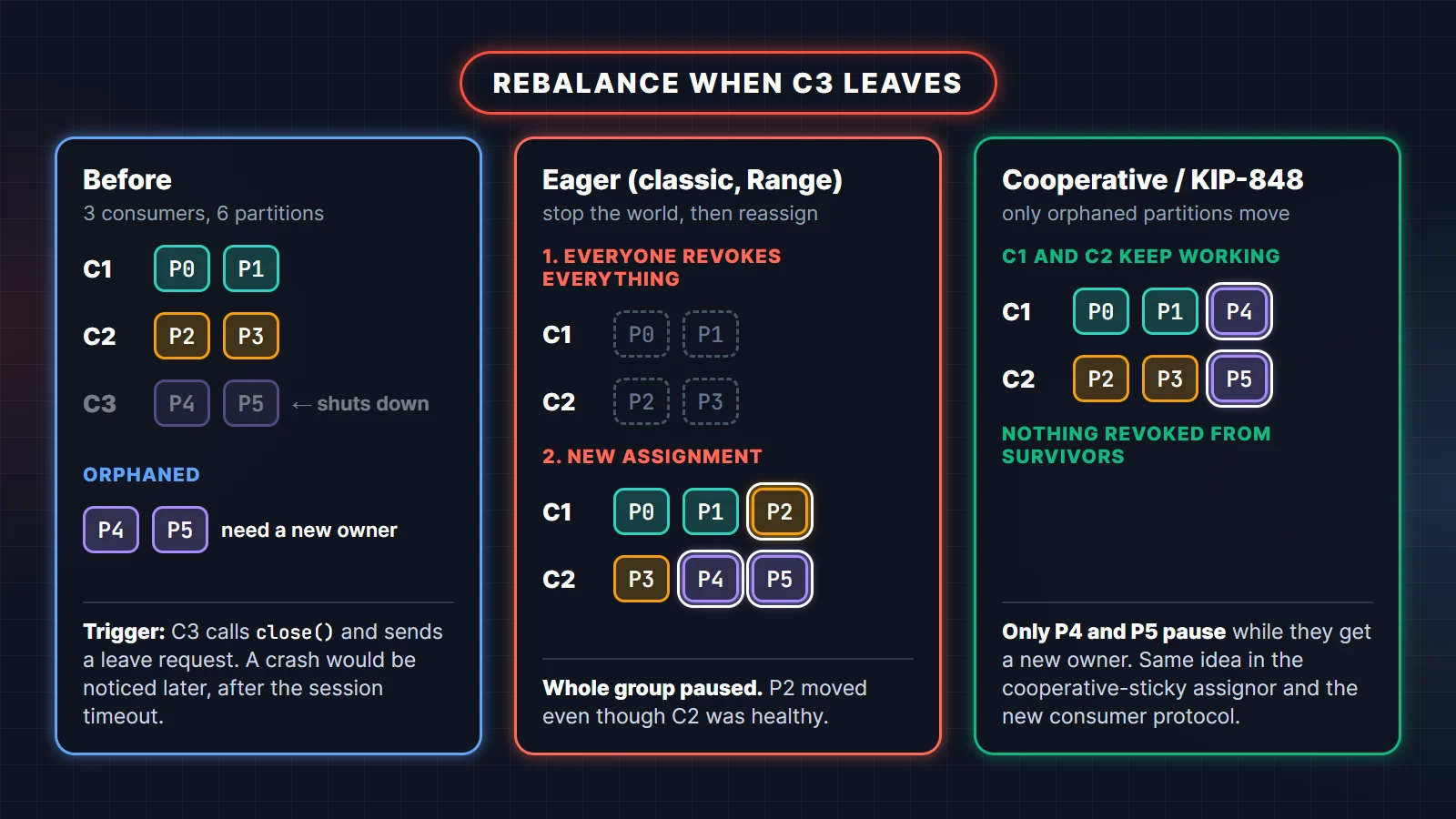
Under the classic protocol, the way a rebalance behaves depends on the assignor. An eager assignor such as RangeAssignor makes every member give up all of its partitions, then hands out a fresh assignment. The CooperativeStickyAssignor rebalances incrementally: members keep the partitions they will still own and only the partitions that actually move are revoked.
To see the difference instead of taking it on trust, this program starts three consumers in one group on the 6-partition topic, one every three seconds, and stops the third one. The mode argument switches between the eager assignor, the cooperative assignor and the new consumer protocol:
import org.apache.kafka.clients.consumer.ConsumerConfig;
import org.apache.kafka.clients.consumer.ConsumerRebalanceListener;
import org.apache.kafka.clients.consumer.CooperativeStickyAssignor;
import org.apache.kafka.clients.consumer.KafkaConsumer;
import org.apache.kafka.clients.consumer.RangeAssignor;
import org.apache.kafka.common.TopicPartition;
import org.apache.kafka.common.errors.WakeupException;
import org.apache.kafka.common.serialization.StringDeserializer;

import java.time.Duration;
import java.util.Collection;
import java.util.HashMap;
import java.util.List;
import java.util.Map;
import java.util.TreeSet;
import java.util.concurrent.atomic.AtomicBoolean;

public class RebalanceDemo {

    static final long START = System.currentTimeMillis();

    static synchronized void log(String who, String what, Collection<TopicPartition> parts) {
        var nums = new TreeSet<Integer>();
        parts.forEach(tp -> nums.add(tp.partition()));
        System.out.printf("%6d ms  %s %-9s %s%n", System.currentTimeMillis() - START, who, what, nums);
    }

    public static void main(String[] args) throws Exception {
        String mode = args[0];
        String bootstrap = args.length > 1 ? args[1] : "localhost:9092";

        Map<String, Object> props = new HashMap<>();
        props.put(ConsumerConfig.BOOTSTRAP_SERVERS_CONFIG, bootstrap);
        props.put(ConsumerConfig.GROUP_ID_CONFIG, "billing-" + mode);
        props.put(ConsumerConfig.KEY_DESERIALIZER_CLASS_CONFIG, StringDeserializer.class);
        props.put(ConsumerConfig.VALUE_DESERIALIZER_CLASS_CONFIG, StringDeserializer.class);
        switch (mode) {
            case "eager" -> props.put(ConsumerConfig.PARTITION_ASSIGNMENT_STRATEGY_CONFIG,
                    List.of(RangeAssignor.class.getName()));
            case "cooperative" -> props.put(ConsumerConfig.PARTITION_ASSIGNMENT_STRATEGY_CONFIG,
                    List.of(CooperativeStickyAssignor.class.getName()));
            case "consumer" -> props.put(ConsumerConfig.GROUP_PROTOCOL_CONFIG, "consumer");
            default -> throw new IllegalArgumentException(mode);
        }

        var workers = List.of(new Worker("C1", props), new Worker("C2", props), new Worker("C3", props));
        for (Worker w : workers) {
            Thread.ofPlatform().name(w.name).start(w);
            Thread.sleep(3000);               // join one at a time
        }
        Thread.sleep(5000);
        System.out.printf("%6d ms  --- stopping C3 ---%n", System.currentTimeMillis() - START);
        workers.get(2).stop();
        Thread.sleep(8000);
        workers.get(0).stop();
        workers.get(1).stop();
    }

    static class Worker implements Runnable, ConsumerRebalanceListener {
        final String name;
        final KafkaConsumer<String, String> consumer;
        final AtomicBoolean running = new AtomicBoolean(true);

        Worker(String name, Map<String, Object> props) {
            this.name = name;
            this.consumer = new KafkaConsumer<>(props);
        }

        public void run() {
            try (consumer) {
                consumer.subscribe(List.of("orders"), this);
                while (running.get()) {
                    consumer.poll(Duration.ofMillis(200));
                }
            } catch (WakeupException ignored) {
                // stop() was called
            }
        }

        void stop() {
            running.set(false);
            consumer.wakeup();
        }

        @Override
        public void onPartitionsRevoked(Collection<TopicPartition> partitions) {
            if (!partitions.isEmpty()) log(name, "revoked", partitions);
        }

        @Override
        public void onPartitionsAssigned(Collection<TopicPartition> partitions) {
            log(name, "assigned", partitions);
            log(name, "now owns", consumer.assignment());
        }
    }
}
Output with eager, trimmed to the final assignment before C3 stops and everything after it:
  8604 ms  C2 now owns  [2, 3]
  8604 ms  C3 now owns  [4, 5]
  8609 ms  C1 now owns  [0, 1]
 14890 ms  --- stopping C3 ---
 14903 ms  C3 revoked   [4, 5]
 17619 ms  C1 revoked   [0, 1]
 17622 ms  C2 revoked   [2, 3]
 17637 ms  C1 assigned  [0, 1, 2]
 17637 ms  C1 now owns  [0, 1, 2]
 17637 ms  C2 assigned  [3, 4, 5]
 17638 ms  C2 now owns  [3, 4, 5]
Both survivors revoked everything, and partition 2 moved from C2 to C1 even though C2 was healthy. For the duration of that rebalance, nobody in the group processed anything. The delay of about 2.7 seconds before C1 and C2 react is the heartbeat interval at work: members learn about a rebalance on their next heartbeat (3 seconds by default under the classic protocol).
The same experiment with cooperative:
 11557 ms  C2 now owns  [2, 4]
 11559 ms  C3 now owns  [3, 5]
 11559 ms  C1 now owns  [0, 1]
 15490 ms  --- stopping C3 ---
 15504 ms  C3 revoked   [3, 5]
 17666 ms  C1 assigned  [3]
 17666 ms  C2 assigned  [5]
 17668 ms  C1 now owns  [0, 1, 3]
 17668 ms  C2 now owns  [2, 4, 5]
No revocations on C1 or C2. They kept consuming their partitions and simply picked up the two orphans. With many partitions per member, or consumers that hold local state per partition, that difference is large.
One detail catches people out: the default partition.assignment.strategy is RangeAssignor, CooperativeStickyAssignor. The group uses the first assignor that every member supports, so out of the box you get eager Range. Listing the cooperative assignor second is there to make migration cheap: because every member already supports it, a single rolling restart that removes RangeAssignor from the list switches the group to cooperative rebalancing. If your service overrides the list with RangeAssignor alone, it takes two rolling restarts: first add CooperativeStickyAssignor after Range, then remove Range.
The new consumer rebalance protocol in Kafka 4 (KIP-848)
KIP-848 introduced a new group protocol, called consumer, that moves assignment from the clients to the broker. It is generally available and production-ready since Kafka 4.0, but it is opt-in: the client default for group.protocol is still classic. The Kafka documentation's timeline plans for the new protocol to become the client default in Kafka 5.0. The project is nudging users already: when the 4.4 console consumer starts with the classic protocol, it prints "The consumer rebalance protocol (KIP-848) is production-ready! Set group.protocol=consumer to try it out."
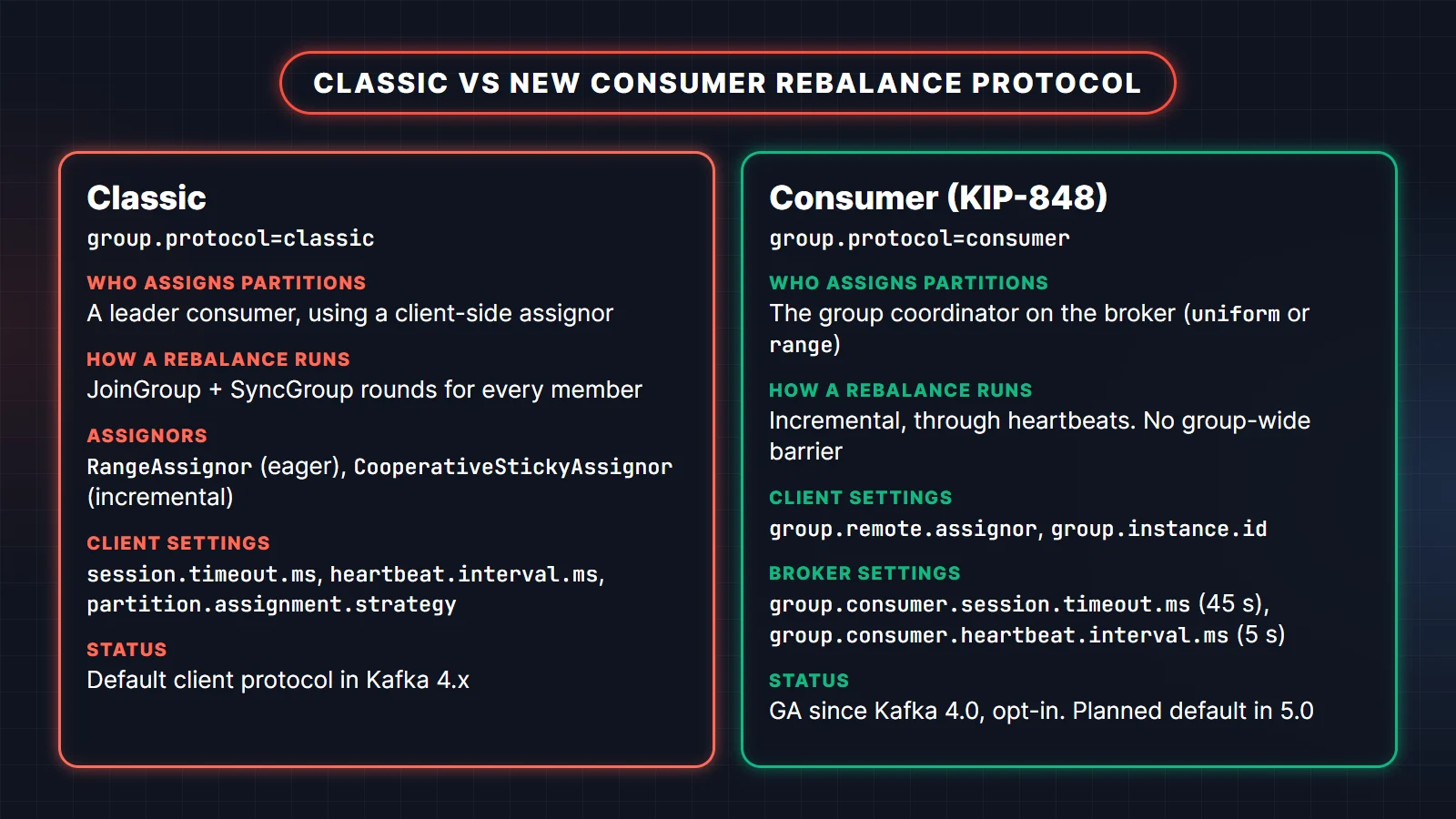
What changes when you set group.protocol=consumer:
- The group coordinator computes the assignment. It ships with two server-side assignors,
uniform(the default) andrange. A client can ask for one withgroup.remote.assignor. Client-side assignors are not supported. - There is no group-wide barrier. Members reconcile their own assignment through heartbeats, revoking and receiving partitions incrementally. One slow member no longer holds up everyone else.
- Timeouts move to the broker. The client settings
session.timeout.ms,heartbeat.interval.msandpartition.assignment.strategy, and theenforceRebalance()methods, cannot be used. The broker settingsgroup.consumer.session.timeout.ms(45 seconds) andgroup.consumer.heartbeat.interval.ms(5 seconds) take their place. - Upgrades can be online. A classic group converts when the first consumer-protocol member joins, provided the classic group uses an assignor without custom metadata. The docs map
RangeAssignortorange, and the sticky, cooperative-sticky and round-robin assignors touniform.
The demo with consumer mode on the same broker:
  7237 ms  C1 now owns  [0, 1]
  9005 ms  C2 now owns  [3, 4]
 12049 ms  C3 now owns  [2, 5]
 14972 ms  --- stopping C3 ---
 14990 ms  C3 revoked   [2, 5]
 17388 ms  C1 assigned  [5]
 17388 ms  C1 now owns  [0, 1, 5]
 19075 ms  C2 assigned  [2]
 19077 ms  C2 now owns  [2, 3, 4]
Like the cooperative assignor, survivors keep their partitions. Note how C1 and C2 picked up their new partitions at different moments: each member gets its update on its own heartbeat, rather than the whole group stopping for a join-and-sync round. In Spring Boot you enable the protocol through the pass-through consumer properties:
spring:
  kafka:
    consumer:
      group-id: billing
      properties:
        "[group.protocol]": consumer
    listener:
      concurrency: 3
We ran a Spring Boot 4.1 service with exactly this configuration against the same broker: the first listener thread to join took every partition, and as the other two joined, the coordinator moved partitions to them over the next few heartbeats without stopping the first one. The full reference is the consumer rebalance protocol page in the Kafka docs.
Kafka 4.2 also made share groups (KIP-932, "queues for Kafka") production-ready. A share group lets several consumers read from the same partition and acknowledge records one by one, which removes the "consumers cannot exceed partitions" ceiling. You give up per-partition ordering, so they suit job-queue style work, not event streams where order matters.
Static membership
By default every restart of a consumer is a leave followed by a join, which means two rebalances per instance during a rolling deploy. Static membership avoids that. You give each instance a stable group.instance.id, for example the pod name of a Kubernetes StatefulSet. When a static member disappears, the coordinator keeps its partitions reserved until the session timeout expires. If the same instance id comes back within that window, it gets its old partitions back with no rebalance.
spring:
  kafka:
    consumer:
      properties:
        "[group.instance.id]": ${HOSTNAME}
Spring's ConcurrentMessageListenerContainer supports this with concurrency above one by suffixing the id with -1, -2 and so on for each consumer thread. The trade-off is real: while a static member is down, its partitions are not processed by anyone until the timeout passes, so lag on those partitions grows during that window. With the classic protocol you size that window with session.timeout.ms; with the consumer protocol it is the broker's group.consumer.session.timeout.ms. Two instances must never share an id, or the group will fence one of them.
How many partitions should a topic have?
There is no universal number, but there is a sound method. Start from the throughput you need and measure what one partition handles for your record size and your consumer logic.
- Parallelism. The partition count is the maximum number of active consumers per group. If peak load needs 12 consumer threads, you need at least 12 partitions.
- Throughput. If the target is T records per second, a producer can push P per partition and a consumer can process C per partition, you need at least the larger of T/P and T/C. Measure P and C; do not copy them from a blog.
- Headroom. Adding partitions later is possible, but it changes which partition a key hashes to. Records for an existing key start landing in a different partition, and per-key ordering breaks across the switch. You also cannot reduce partitions without recreating the topic. So plan for expected growth up front.
- Cost. Every partition has replicas, files on disk and metadata the controller tracks, and every extra partition adds a little work to rebalances and leader elections. Thousands of partitions on a small cluster is a common self-inflicted problem.
- Key spread. Partitions only help if keys spread across them. A topic keyed by a field with three distinct values uses three partitions, whatever the count.
For a typical service topic, a modest count that is a multiple of your expected consumer counts (6 or 12, for example) is easy to divide evenly. Then load-test before you go to production.
Consumer lag: measure it and act on it
Consumer lag is the number of records written to a partition that the group has not yet committed. Per partition it is the log-end offset minus the committed offset, and for a group it is the sum. Lag that stays flat is fine. Lag that grows steadily means the group consumes slower than producers write, and eventually records may reach the topic's retention limit and be deleted before anyone reads them.
The quickest check is the CLI that ships with Kafka. This is the real output for a payments-service group that read about 1,000 of 3,000 records and stopped:
$ kafka-consumer-groups.sh --bootstrap-server localhost:9092 --describe --group payments-service

Consumer group 'payments-service' has no active members.

GROUP            TOPIC           PARTITION  CURRENT-OFFSET  LOG-END-OFFSET  LAG             CONSUMER-ID     HOST            CLIENT-ID
payments-service payments        0          742             742             0               -               -               -
payments-service payments        1          258             1329            1071            -               -               -
payments-service payments        2          0               929             929             -               -               -
CURRENT-OFFSET is the committed offset. Partition 0 is caught up, partition 1 is 1,071 records behind, and partition 2 has a committed offset of 0: the consumer was assigned it and committed its starting position, but never got past the first record. When the group is running, the last three columns show which member owns each partition, which is the fastest way to spot one slow consumer holding back a single partition.
For a health check or a custom metric, the Admin API gives you the same numbers in a few lines:
import org.apache.kafka.clients.admin.Admin;
import org.apache.kafka.clients.admin.ListOffsetsResult.ListOffsetsResultInfo;
import org.apache.kafka.clients.admin.OffsetSpec;
import org.apache.kafka.clients.consumer.OffsetAndMetadata;
import org.apache.kafka.common.TopicPartition;

import java.util.Map;
import java.util.TreeMap;
import java.util.stream.Collectors;

public class LagCheck {

    public static void main(String[] args) throws Exception {
        String bootstrap = args[0];
        String group = args[1];

        try (Admin admin = Admin.create(Map.of("bootstrap.servers", bootstrap))) {
            // 1. Where the group has committed, per partition
            Map<TopicPartition, OffsetAndMetadata> committed = admin
                    .listConsumerGroupOffsets(group)
                    .partitionsToOffsetAndMetadata().get();

            // 2. The log-end offset of the same partitions
            Map<TopicPartition, OffsetSpec> latest = committed.keySet().stream()
                    .collect(Collectors.toMap(tp -> tp, tp -> OffsetSpec.latest()));
            Map<TopicPartition, ListOffsetsResultInfo> ends = admin.listOffsets(latest).all().get();

            // 3. lag = log-end offset - committed offset
            long total = 0;
            var sorted = new TreeMap<String, Long>();
            for (var e : committed.entrySet()) {
                long lag = ends.get(e.getKey()).offset() - e.getValue().offset();
                sorted.put(e.getKey().toString(), lag);
                total += lag;
            }
            sorted.forEach((tp, lag) -> System.out.printf("%-12s lag=%d%n", tp, lag));
            System.out.println("total lag for " + group + " = " + total);
        }
    }
}payments-0 lag=0
payments-1 lag=1071
payments-2 lag=929
total lag for payments-service = 2000When lag grows, work through the causes in this order:
- Is the group even running? "No active members" or a rebalance loop explains most sudden lag.
- Is it one partition? Lag concentrated on one partition points to a hot key or one slow member.
- Is processing slow? A slow database call or remote API per record caps throughput. Batch the writes, add caching, or parallelize safely.
- Is the group under-scaled? If every member is busy and partitions outnumber members, add consumers. If members already equal partitions, you need more partitions.
- Is a poison message stuck? A record that fails forever, without a dead-letter topic, blocks its partition. That is covered in the Kafka scenario-based interview questions.
In production, export lag as a metric and alert on its trend, not on a single high reading. The consumer configuration reference lists every setting mentioned in this guide with its current default.
Practise with the full question bank
Consumer groups, offsets and rebalancing come up in nearly every Kafka interview, usually followed by "and what happens when it goes wrong?". Apache Kafka with Spring Boot: 100 Interview Questions and Answers covers partitions and replication, producers, consumer groups, delivery semantics, Spring Kafka error handling, schemas and operations, with answers you can say out loud in an interview.
Related reading
- Kafka interview questions and answers: the broader question set, from KRaft to exactly-once.
- Spring Boot Kafka example: a producer, a manual-ack consumer, retries and a dead-letter topic, all runnable.
- Kafka scenario-based interview questions: duplicates, ordering, lag and data loss as interviewers phrase them.
FAQ
Can one Kafka partition be consumed by two consumers in the same group?
No. Within one consumer group a partition has at most one owner at a time. Two consumers in different groups can read the same partition, because each group tracks its own offsets. Share groups in Kafka 4.2 and later are the exception: they let several members of a share group consume one partition.
What happens to offsets when a consumer group is deleted or inactive?
Committed offsets of an empty group are kept for offsets.retention.minutes, which defaults to 10080 (seven days). After that they expire, and a consumer that later joins with the same group id starts from auto.offset.reset (latest by default).
Does a rebalance cause duplicate messages?
It can. If a consumer processed records but had not committed them when its partition moved, the new owner starts from the last committed offset and processes those records again. Committing in onPartitionsRevoked narrows the window, and an idempotent consumer makes the duplicates harmless.
Is the KIP-848 consumer protocol the default in Kafka 4?
No. It is production-ready since Kafka 4.0 but clients use group.protocol=classic unless you set consumer. Kafka's documented plan is to make it the default in 5.0.
How do I reset a consumer group's offsets?
Stop the group's consumers, then use kafka-consumer-groups.sh --reset-offsets with an option such as --to-earliest, --to-datetime or --shift-by. Run it with --dry-run first, then with --execute.
Why are some consumers in my group idle?
The group has more members than the topic has partitions. Every partition already has an owner, so the extra members wait. Either reduce consumer count and concurrency, or increase the partition count if you need the extra parallelism.