 Tech Tribers
Kafka Scenario-Based Interview Questions: Duplicates, Ordering, Lag and Data Loss
24 real-time Kafka scenarios as interviewers ask them, each answered with what is happening, how to diagnose it, the fix and the trade-off.
New22 min read
Kafka scenario based interview questions describe a production problem and ask what you would do: "Your consumer processes some orders twice. Why, and how do you fix it?" There is no single definition to recite. The interviewer wants to hear how you reason: what is happening, how you would confirm it, what you would change, and what that change costs.
This guide has 24 real-time Kafka scenarios grouped by theme: duplicates and data loss, message ordering, consumer lag and performance, poison messages, data and schema changes, and multi-region. Each answer follows the same shape (what is happening, diagnose, fix, trade-off) so you can reuse the structure in the interview itself. The answers assume Kafka 4.x and Spring Boot with Spring for Apache Kafka, which is what most Java teams run in 2026.
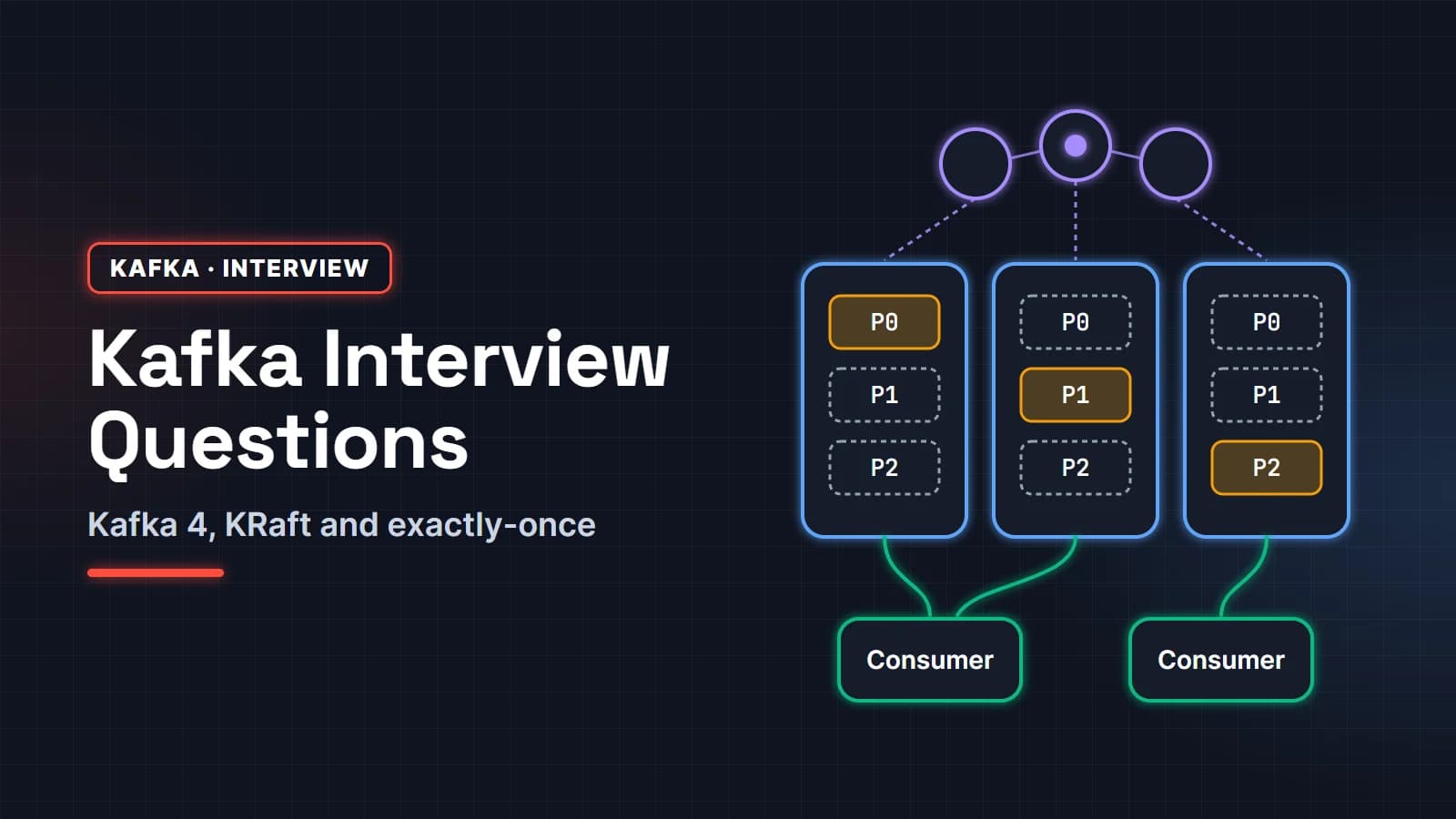
If you need to refresh the fundamentals first (partitions, ISR, offsets, exactly-once), start with our Kafka interview questions pillar page and come back.
In this guide
- Duplicates and data loss scenarios
- Message ordering scenarios
- Consumer lag and performance scenarios
- Poison messages, retries and dead-letter topics
- Data, schema and retention scenarios
- Multi-region and disaster recovery
- FAQ
Duplicates and data loss scenarios
1. Your consumer processes some orders twice. Why, and how do you fix it?
Kafka consumers are at-least-once by default. If a consumer processes records and then crashes, or is too slow and gets evicted from the group, before its offset commit reaches the broker, the partition moves to another consumer that resumes from the last committed offset and processes the same records again.
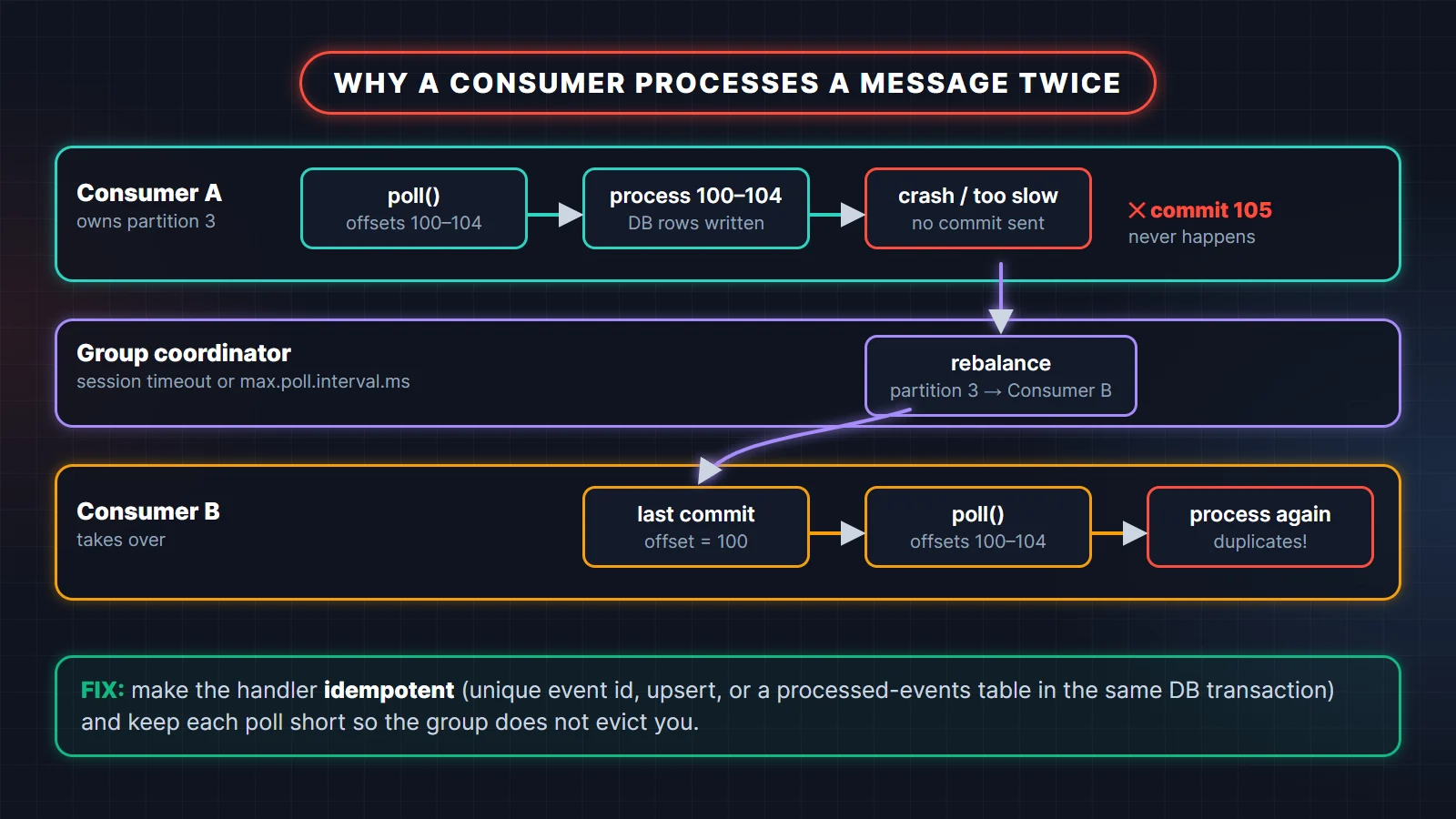
Diagnose: correlate the duplicate timestamps with rebalance log lines (partitions revoked and reassigned, members leaving or joining), consumer restarts, and CommitFailedException errors. Duplicates that cluster around deployments or long processing times point straight at this.
Fix: accept that redelivery will happen and make the handler idempotent. Give every event a unique id and record it in the same database transaction as the business change (PostgreSQL syntax):
@KafkaListener(topics = "orders", groupId = "billing")
@Transactional
public void onOrder(OrderPlaced event) {
    int inserted = jdbc.update("""
            INSERT INTO processed_events (event_id) VALUES (?)
            ON CONFLICT (event_id) DO NOTHING
            """, event.eventId());
    if (inserted == 0) {
        return;                  // seen before: a redelivery, skip it
    }
    billing.createInvoice(event);
}
Trade-off: an extra write per event and a table to clean up. Exactly-once transactions do not help here because the side effect is a database, not a Kafka topic.
What the interviewer is checking: that you do not promise "exactly-once" as a config switch. The mature answer is at-least-once delivery plus an idempotent consumer.
2. The producer retried after a timeout and the topic now has the same event twice. What went wrong?
Either idempotence was off, or the duplicate came from the application, not the client. The idempotent producer only removes duplicates caused by its own internal retries. If your code catches a failed send() and calls send() again, Kafka sees a brand-new record.
Diagnose: log the effective producer config at startup. Idempotence is on by default, but it is silently disabled when a conflicting setting is present and it was not explicitly enabled, for example acks=1 or max.in.flight.requests.per.connection above 5. Then check whether a retry loop or a scheduler wraps the send.
Fix: set enable.idempotence=true explicitly so a conflict fails fast, rely on delivery.timeout.ms rather than application retries, and put a stable event id in each record so consumers can deduplicate whatever slips through.
Trade-off: none worth mentioning for idempotence; it costs almost nothing. Removing application-level retries means you must handle the final failure, for example by keeping the outbox row for a later attempt.
3. A broker died and some acknowledged messages are gone. How is that possible?
The write was acknowledged by fewer replicas than you thought. With acks=1 only the leader had it. With acks=all but min.insync.replicas=1, the ISR may have shrunk to the leader alone. And if unclean leader election is on, an out-of-sync replica can become leader and truncate records.
Diagnose: check the producer's acks, the topic's replication factor and min.insync.replicas with kafka-topics.sh --describe and kafka-configs.sh --describe, and search the controller and broker logs for ISR shrink events and unclean elections around the failure.
Fix: replication factor 3, min.insync.replicas=2, producer acks=all, and unclean.leader.election.enable=false (the default). Alert on under-replicated partitions so a shrinking ISR is noticed before a second failure.
Trade-off: with two of three replicas down, producers get NotEnoughReplicasException and writes stop. You are choosing consistency over availability, which is right for orders and payments.
4. Offsets show the messages as consumed, but some were never processed. What happened?
The offsets were committed before the work finished. The usual causes are handing records to a thread pool while auto commit is on, or a listener that catches every exception, logs it, and returns normally so the container commits.
Diagnose: look for executor.submit or @Async inside listeners and for broad catch (Exception e) blocks. Compare counts: records consumed vs rows written.
Fix: process synchronously in the listener and let exceptions propagate to the error handler, which retries and then publishes to a dead-letter topic. If you need parallelism, add partitions and consumers rather than threads inside one consumer, or use a share group where per-record acknowledgement is built in.
Trade-off: synchronous processing caps throughput per partition, so you may need more partitions.
5. The service saves an order and publishes an event, but sometimes only one of the two happens. How do you fix it?
That is the dual-write problem. A database commit and a Kafka send cannot be made atomic with each other, so a crash or a Kafka outage between them leaves the two out of sync. The standard fix is the transactional outbox.
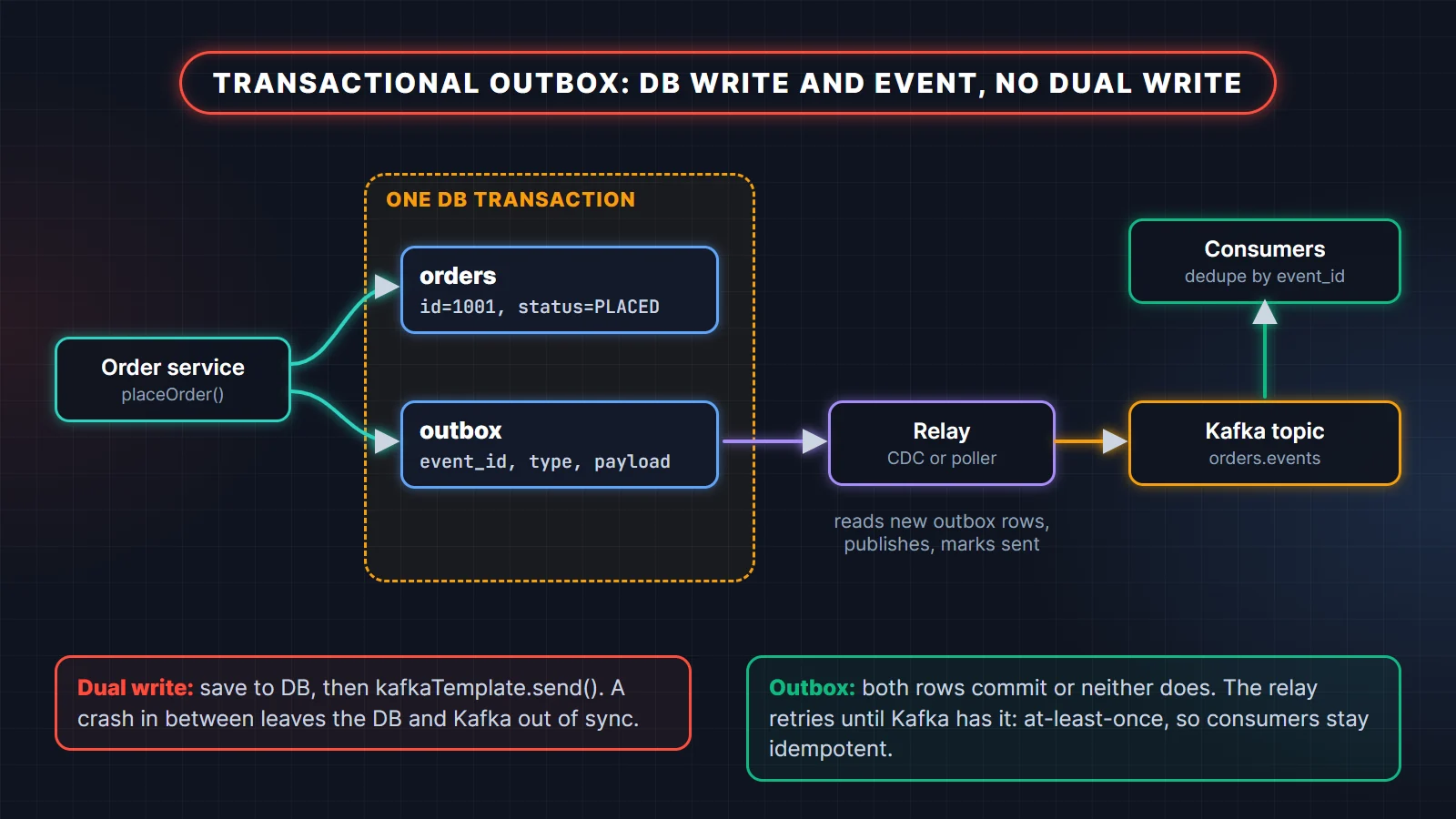
Fix: in the same database transaction as the business change, insert a row into an outbox table. A relay process reads new outbox rows and publishes them to Kafka: either a change data capture tool such as Debezium reading the database log, or a simple poller that selects unsent rows, publishes, and marks them sent.
Trade-off: extra moving parts and a little latency. The relay can publish a row twice (crash after publish, before marking sent), so consumers still deduplicate by event id.
6. A payment consumer must never charge a customer twice, even when Kafka redelivers. How?
Push idempotency all the way to the side effect. Deduplicating in your own database is not enough if the crash happens after the payment provider charged the card but before your transaction committed.
Fix: derive an idempotency key from the event (for example the payment id) and send it with the charge request; many payment APIs accept an idempotency key for exactly this reason. Record the charge result in your database keyed by the same id. On redelivery, the provider returns the original result instead of charging again.
Trade-off: you depend on the provider's idempotency window. For providers without it, use a two-step design: record "charge pending" first, and reconcile pending charges against the provider before retrying.
Message ordering scenarios
7. Events for the same order are processed out of order. Why?
Kafka orders records only within a partition. If the events were sent without a key, or with different keys (a random UUID per event), they can land on different partitions, and consumers of those partitions run in parallel.
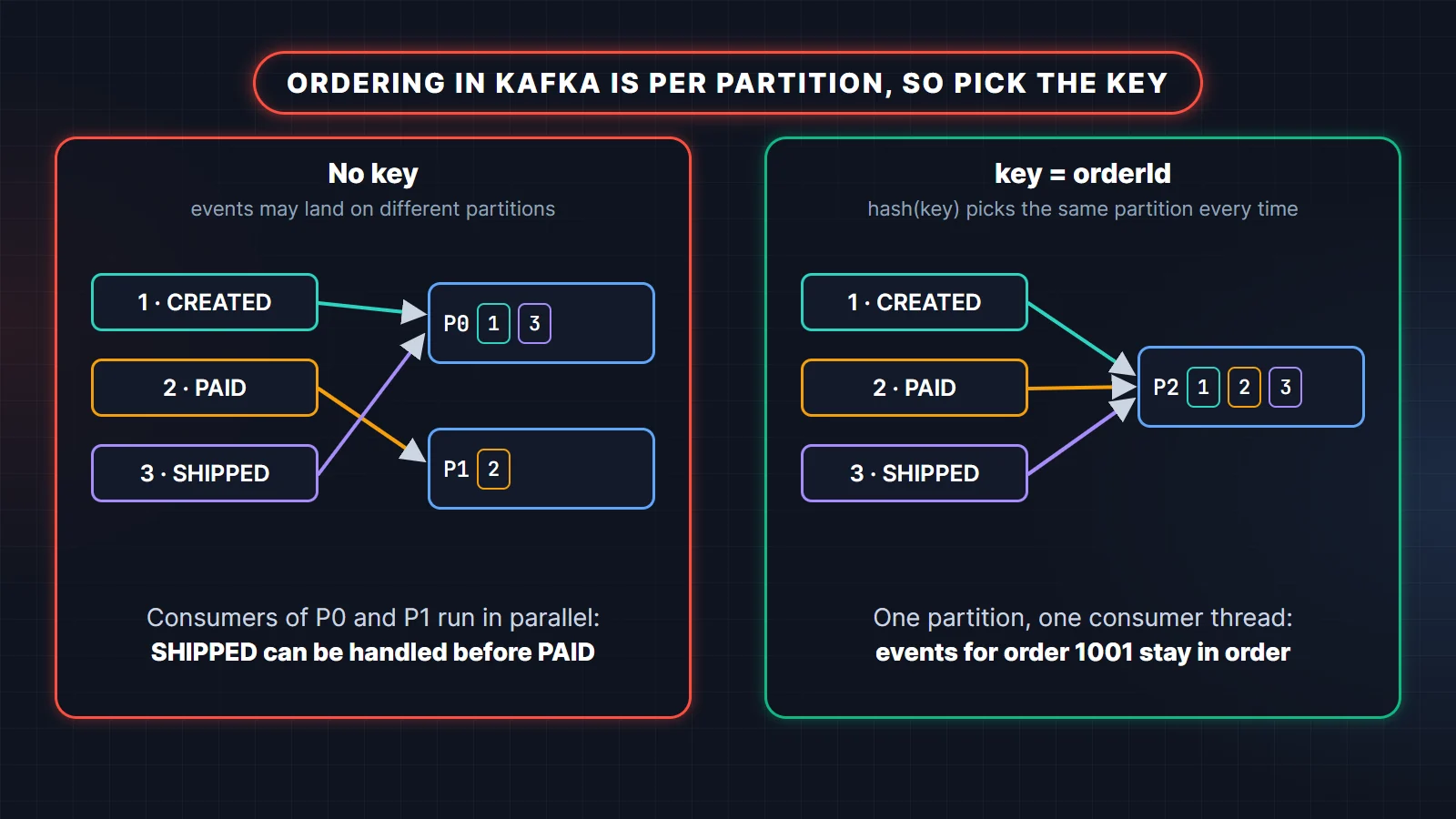
Diagnose: print the key and partition of the related records (Kafka UI, kafka-console-consumer.sh with --formatter-property print.key=true --formatter-property print.partition=true; tools older than Kafka 4.2 call the flag --property). Also check the consumer: handing records to a thread pool breaks ordering even inside one partition.
Fix: use the entity id (orderId) as the key for every event about that entity, keep processing sequential per partition, and keep the idempotent producer on so retries cannot reorder.
Trade-off: one very busy entity can create a hot partition (scenario 12).
8. The business wants every event processed in strict global order. What do you say?
Global order means one partition, which means one consumer at a time and a hard throughput ceiling. Before agreeing, ask what actually needs ordering. It is almost always "per account" or "per order", not the entire stream.
Fix: order per entity with keys. If cross-entity order truly matters, carry a sequence number or timestamp in the event and let the consumer detect and handle gaps, or use a single-partition topic for that narrow stream only.
Trade-off: a single partition limits you to one consumer and one broker's throughput for that topic, and a slow record stalls everything behind it.
What the interviewer is checking: whether you push back on a requirement with a clear cost, instead of saying "Kafka can't do that" or "sure".
9. You increased a topic from 6 to 8 partitions and some customers' events went out of order. Explain.
The default partitioner maps a key to the positive murmur2 hash of its bytes modulo the partition count. Change the count and most keys move. Records for a key written before the change sit in the old partition; new ones go to a different partition, and a consumer of the new partition can process them before the old ones are drained.
The program below uses the same murmur2 formula as Kafka's default partitioner (we verified it against kafka-clients 4.2.1) to measure how many of 10,000 keys move:
import java.nio.charset.StandardCharsets;

public class AddPartitions {

    // Same algorithm as Kafka's Utils.murmur2 (used by the default partitioner for keyed records)
    static int murmur2(byte[] data) {
        int length = data.length;
        int m = 0x5bd1e995;
        int h = 0x9747b28c ^ length;
        for (int i = 0; i < length / 4; i++) {
            int i4 = i * 4;
            int k = (data[i4] & 0xff) + ((data[i4 + 1] & 0xff) << 8)
                    + ((data[i4 + 2] & 0xff) << 16) + ((data[i4 + 3] & 0xff) << 24);
            k *= m;
            k ^= k >>> 24;
            k *= m;
            h *= m;
            h ^= k;
        }
        int tail = length & ~3;
        switch (length % 4) {
            case 3: h ^= (data[tail + 2] & 0xff) << 16;
            case 2: h ^= (data[tail + 1] & 0xff) << 8;
            case 1: h ^= data[tail] & 0xff;
                    h *= m;
        }
        h ^= h >>> 13;
        h *= m;
        h ^= h >>> 15;
        return h;
    }

    static int partitionFor(String key, int partitions) {
        return (murmur2(key.getBytes(StandardCharsets.UTF_8)) & 0x7fffffff) % partitions;
    }

    public static void main(String[] args) {
        int keys = 10_000;
        for (int target : new int[] {8, 12}) {
            int moved = 0;
            for (int i = 0; i < keys; i++) {
                String key = "order-" + i;
                if (partitionFor(key, 6) != partitionFor(key, target)) moved++;
            }
            System.out.printf("6 -> %2d partitions: %,d of %,d keys change partition (%.1f%%)%n",
                    target, moved, keys, moved * 100.0 / keys);
        }
        String key = "order-1001";
        System.out.printf("%s: partition %d with 6, partition %d with 8%n",
                key, partitionFor(key, 6), partitionFor(key, 8));
    }
}
Output on JDK 25:
6 ->  8 partitions: 7,548 of 10,000 keys change partition (75.5%)
6 -> 12 partitions: 5,051 of 10,000 keys change partition (50.5%)
order-1001: partition 0 with 6, partition 6 with 8
Three quarters of the keys move when going from 6 to 8. Doubling to 12 moves about half, because a key stays put only when its hash modulo 12 equals its hash modulo 6.
Fix: size partitions generously up front. If you must grow, pause producers, let consumers drain the topic to zero lag, then add partitions and resume. For strict cases, create a new topic with the new count and migrate.
Trade-off: draining needs a short write pause; over-provisioning partitions costs broker resources.
Consumer lag and performance scenarios
10. Consumer lag keeps growing. How do you troubleshoot it?
Lag is the log-end offset minus the committed offset. Growing lag means records arrive faster than the group finishes them. First find out whether the lag is on every partition or only on some, because the causes are different.
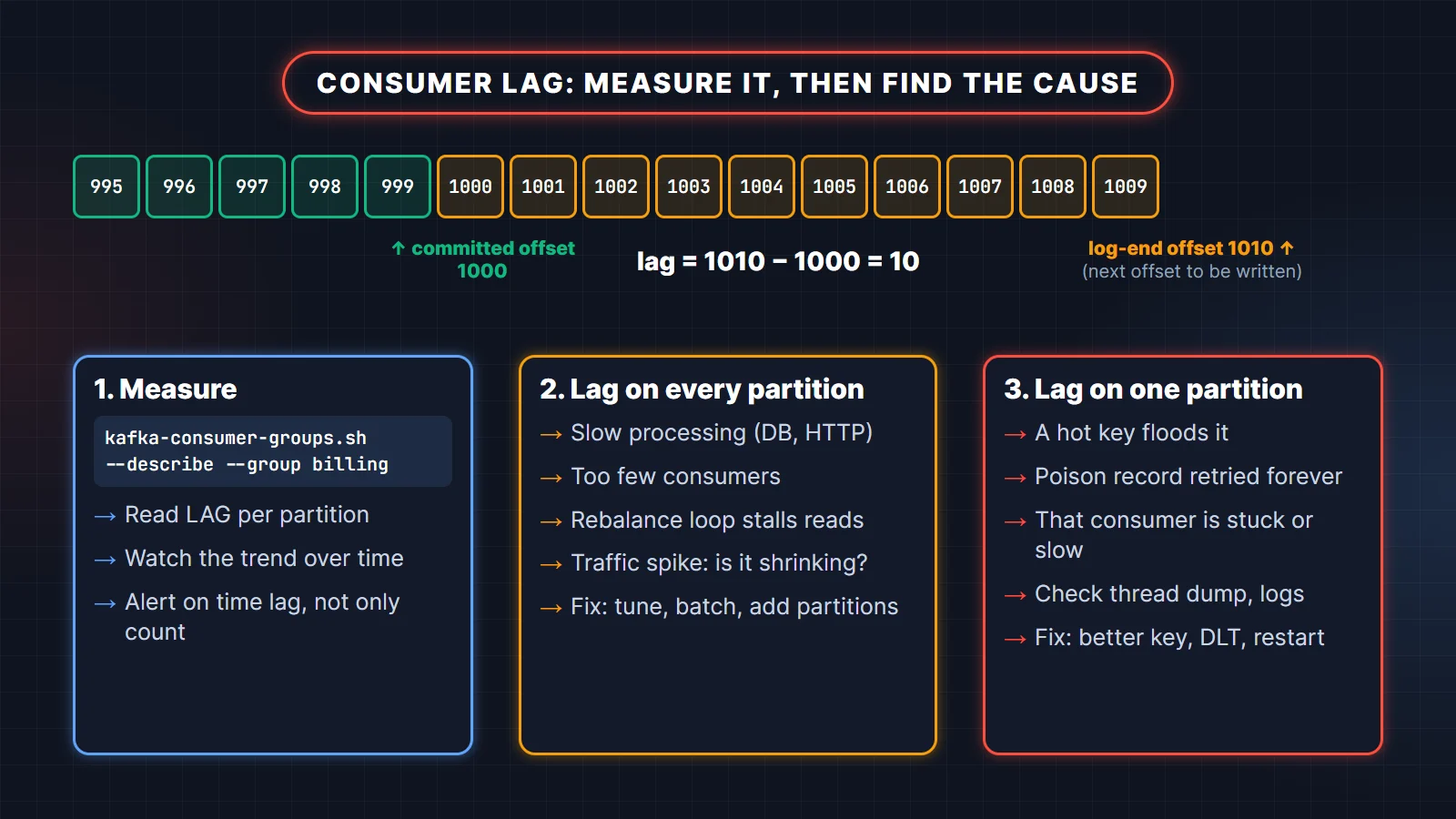
Diagnose: run kafka-consumer-groups.sh --bootstrap-server <broker> --describe --group billing and read the CURRENT-OFFSET, LOG-END-OFFSET and LAG columns per partition. Check the trend in your metrics, the processing time per record, and how often the group rebalances. If a partition shows no consumer id, the group is mid-rebalance or has no members.
Fix: for lag on every partition, speed up processing (batch database writes, cache lookups, remove synchronous HTTP calls) or add consumers up to the partition count. For lag on one partition, see scenarios 12 and 17.
Trade-off: adding consumers beyond the partition count does nothing, and adding partitions changes key placement (scenario 9).
11. You doubled the consumer instances but throughput did not change. Why?
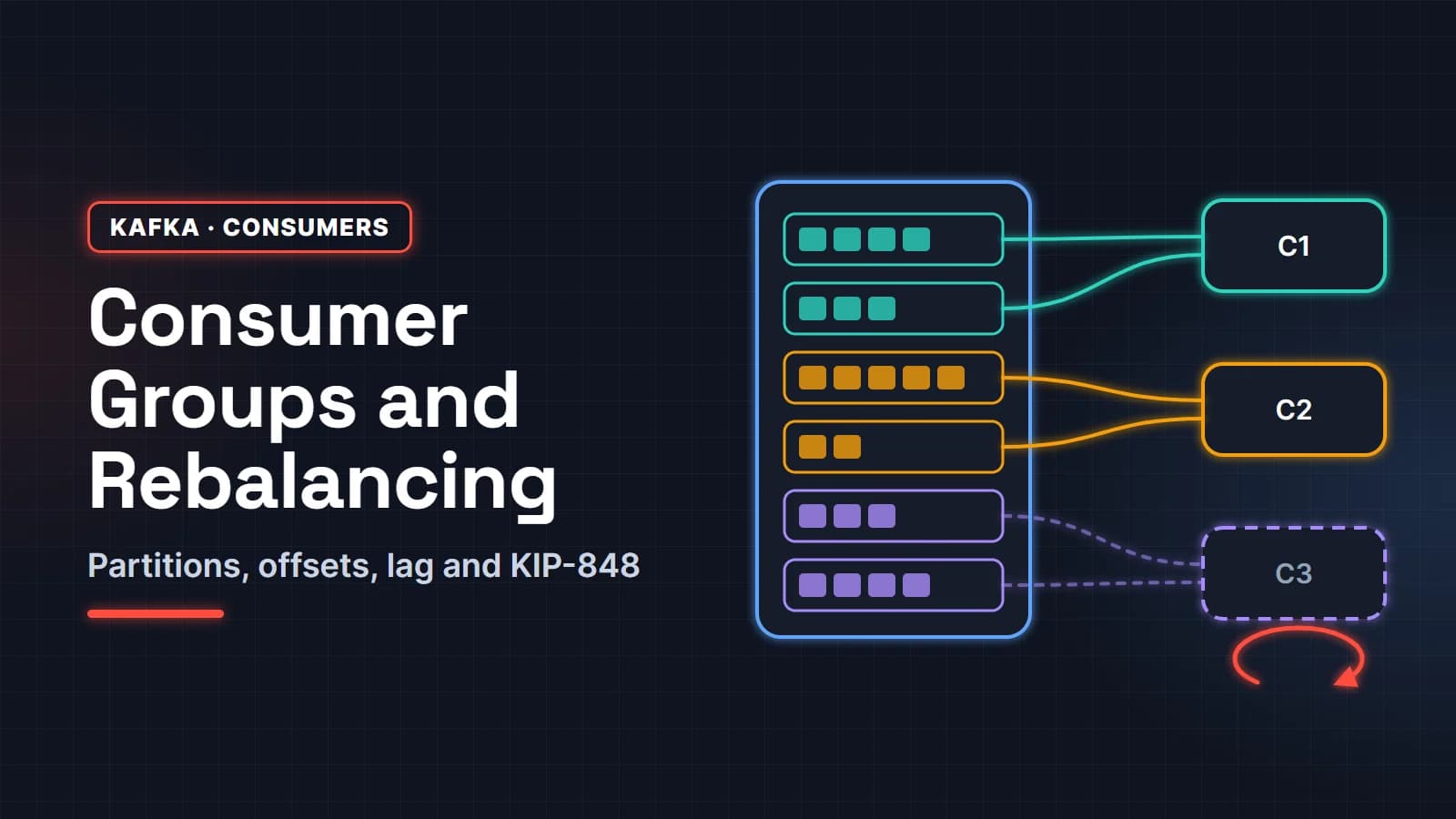
The group already had one consumer per partition. In a consumer group, each partition is read by exactly one consumer, so with 6 partitions and 12 consumers, 6 sit idle. Remember that @KafkaListener(concurrency = "3") on 4 instances already means 12 consumers.
Fix: add partitions (accepting the key reshuffle), or make each consumer faster. For independent jobs where order does not matter, a share group lets many consumers work on the same partitions; Kafka 4.2 made share groups production-ready, and Spring for Apache Kafka 4.1 supports them with ShareKafkaListenerContainerFactory.
Trade-off: share groups give up per-partition ordering and offset-based replay semantics.
12. One partition has huge lag while the others are fine. What is going on?
Most likely a hot partition: one key (a big tenant, a popular product) produces far more traffic than the rest, and since every record with that key goes to the same partition, one consumer does most of the work. The other common cause is a poison record stuck in retries on that partition.
We simulated it with the same partitioner: 100,000 events on 6 partitions, where 60% come from one large tenant.
import java.nio.charset.StandardCharsets;
import java.util.ArrayList;
import java.util.List;
import java.util.Random;

public class HotPartition {

    // murmur2(...) and partitionFor(...) are identical to the AddPartitions program above

    static String percents(int[] counts, int total) {
        List<String> out = new ArrayList<>();
        for (int c : counts) out.add(String.format("%2d%%", Math.round(c * 100.0 / total)));
        return String.join(" ", out);
    }

    public static void main(String[] args) {
        int partitions = 6, events = 100_000;
        Random random = new Random(7);
        int[] byTenant = new int[partitions];
        int[] byOrder = new int[partitions];
        for (int i = 0; i < events; i++) {
            // 60% of the traffic comes from one big tenant; the rest from 500 small ones
            String tenant = random.nextInt(100) < 60 ? "tenant-big" : "tenant-" + random.nextInt(500);
            String orderId = "order-" + i;
            byTenant[partitionFor(tenant, partitions)]++;
            byOrder[partitionFor(orderId, partitions)]++;
        }
        System.out.println("key = tenantId : " + percents(byTenant, events));
        System.out.println("key = orderId  : " + percents(byOrder, events));
    }
}
Output on JDK 25 (the full program, with murmur2 included, runs as a single file):
key = tenantId :  8% 66%  6%  6%  7%  7%
key = orderId  : 17% 17% 17% 17% 17% 17%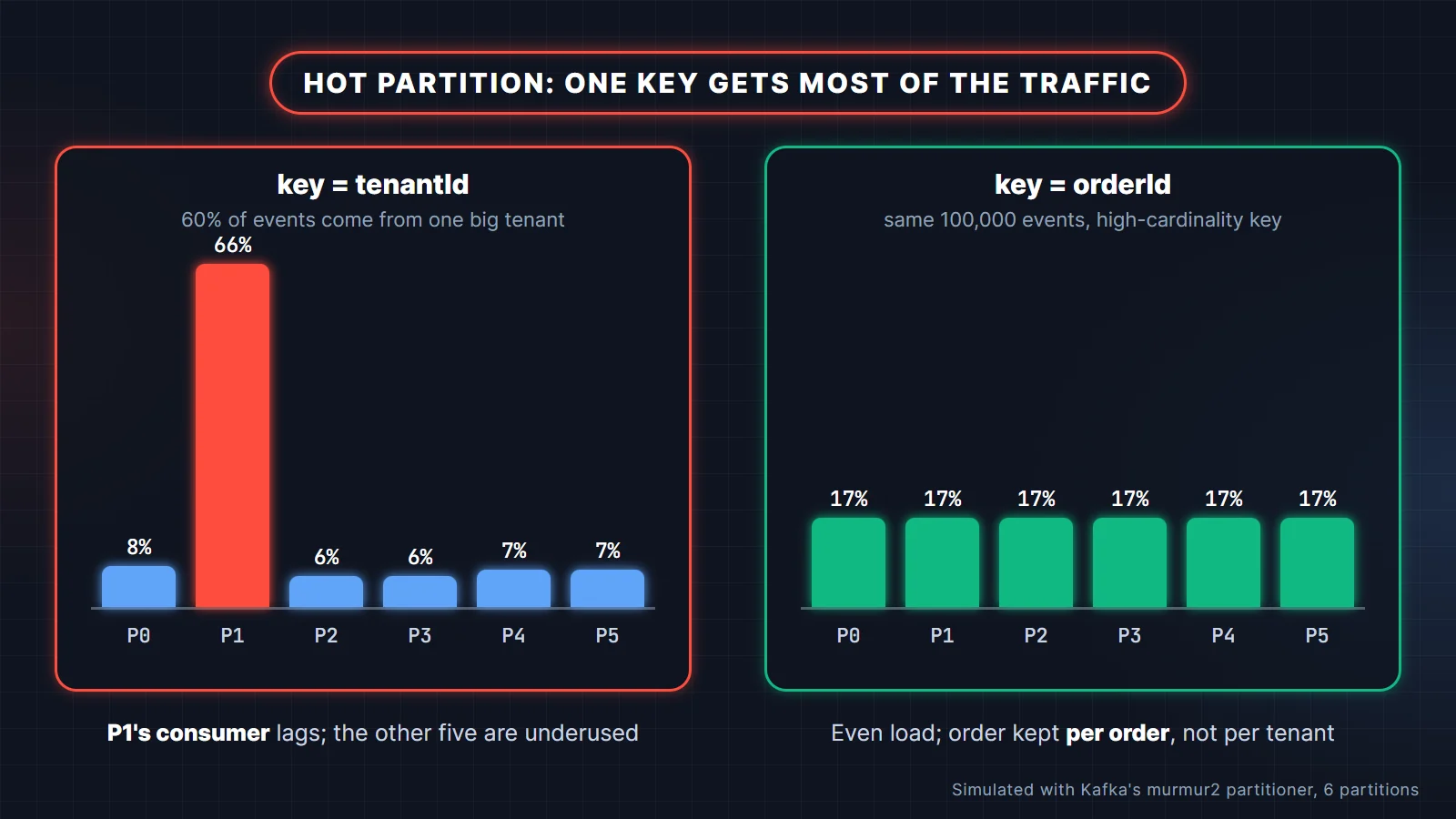
Diagnose: per-partition lag and per-partition bytes-in rate on the broker; sample keys from the hot partition.
Fix: key by something with higher cardinality that still preserves the ordering you need (orderId instead of tenantId). If one tenant's events must stay ordered, split that tenant's traffic into its own topic, or salt the key (tenant-big#3) and accept ordering per sub-key.
Trade-off: every option narrows the ordering guarantee. Make sure the business only needs order at the finer level.
13. The consumer calls a slow external API and the group keeps rebalancing. What do you do?
The consumer is exceeding max.poll.interval.ms (5 minutes by default). If the time between two poll() calls is longer than that, the consumer leaves the group, its partitions are reassigned, and its uncommitted work is redone elsewhere. With 500 records per poll and a 1-second API call each, one batch takes over 8 minutes.
Diagnose: the consumer log says the poll timeout has expired and the member is leaving the group; processing time per batch is close to or above the limit.
Fix: lower max.poll.records so a batch finishes well within the limit, raise max.poll.interval.ms only with a reason, add timeouts and a circuit breaker on the API call, and parallelize calls within a batch only if ordering allows. For truly independent slow jobs, a share group with per-record locks and ShareAcknowledgment.renew() fits better.
Trade-off: a larger interval means a stuck consumer is detected later.
14. Every deployment causes a rebalance storm and lag spikes. How do you stop it?
A rolling restart makes each instance leave and rejoin, and with the classic eager protocol each change pauses the whole group. Several instances restarting in sequence can keep the group rebalancing for minutes.
Fix: move clients to the KIP-848 protocol with group.protocol=consumer; it is generally available since Kafka 4.0 and rebalances incrementally without stopping the group. On the classic protocol, use the CooperativeStickyAssignor. Add static membership (group.instance.id per pod) so a quick restart returns the same partitions without a rebalance, and shut consumers down gracefully so they commit and leave cleanly.
Trade-off: with static membership, a crashed instance's partitions wait for the session timeout before moving.
15. Under load, the producer throws TimeoutException and sends block. What is happening?
The producer's buffer (buffer.memory, 32 MB by default) is full because records are produced faster than they are delivered, so send() blocks for up to max.block.ms and then fails. The same exception appears when the topic's metadata cannot be fetched, for example a misspelled topic with auto-creation off.
Diagnose: producer metrics for buffer available bytes, record queue time, and request latency; broker request latency and disk I/O; and whether the error names metadata or the buffer.
Fix: fix the slow broker or network first. Then improve throughput with batching (linger.ms, batch.size) and compression (lz4 or zstd), and apply back-pressure in the application instead of buffering unbounded data.
Trade-off: more buffer only delays the failure if the broker cannot keep up.
Poison messages, retries and dead-letter topics
16. A single bad message blocks the whole partition. How do you handle a poison pill?
A record that always fails (invalid JSON, a missing field, a bug) is retried forever if nothing stops it, and because a partition is consumed in order, everything behind it waits. Deserialization failures are the worst case because the record fails before your listener even runs.
Fix: wrap the value deserializer in ErrorHandlingDeserializer so a bad payload becomes an exception the container can handle, then configure a DefaultErrorHandler with a DeadLetterPublishingRecoverer. After a few attempts the record goes to <topic>-dlt with headers describing the original topic, partition, offset and exception, and the partition moves on. Mark validation exceptions as not retryable so they skip the retries.
spring:
  kafka:
    consumer:
      value-deserializer: org.springframework.kafka.support.serializer.ErrorHandlingDeserializer
      properties:
        spring.deserializer.value.delegate.class: org.springframework.kafka.support.serializer.JacksonJsonDeserializer
        spring.json.trusted.packages: com.example.orders
Trade-off: a dead-letter topic is only useful if someone watches it. Alert on any record arriving there.
17. The downstream service is down for 10 minutes. How do you retry without blocking the partition?
Blocking retries hold the partition while they wait, so long back-offs stall every record behind the failing one. Non-blocking retries move the failed record to a retry topic and keep consuming the main topic.
Fix: in Spring for Apache Kafka, annotate the listener with @RetryableTopic. It creates retry topics and a dead-letter topic and re-delivers after the back-off:
@RetryableTopic(
        attempts = "6",
        backOff = @BackOff(delay = 10_000, multiplier = 3, maxDelay = 300_000),
        exclude = InvalidOrderException.class)
@KafkaListener(topics = "orders", groupId = "fulfilment")
public void onOrder(OrderPlaced event) {
    warehouse.reserve(event);    // throws when the warehouse API is down
}

@DltHandler
public void onDeadLetter(OrderPlaced event) {
    alerts.orderNeedsAttention(event.orderId());
}
Six attempts means five retries, waiting 10 s, 30 s, 90 s, 270 s and then 300 s (capped by maxDelay): about 11.5 minutes in total, enough to ride out a 10-minute outage. Size the back-off to the outage you expect, not to a round number.
Trade-off: retried records are processed out of order relative to newer ones on the main topic. Use it only where per-key ordering does not matter, or keep blocking retries for ordered flows. For an outage longer than the retry budget, pause the listener container (KafkaListenerEndpointRegistry) behind a circuit breaker instead of filling the dead-letter topic.
18. After fixing a bug, how do you reprocess what landed in the dead-letter topic?
Treat the dead-letter topic as an input you can replay. Because Spring's recoverer adds headers with the original topic, partition and offset, you can trace and replay each record.
Fix: deploy the fix, then run a small replay consumer (or a disabled-by-default listener) that reads the dead-letter topic and republishes records to the original topic, or processes them directly. Commit as you go so a replay can resume.
Trade-off: replayed records arrive after newer events for the same key. The consumer must be idempotent and should ignore stale updates, for example by comparing a version or timestamp.
Data, schema and retention scenarios
19. A producer team changed the event schema and consumers started failing. How do you prevent it?
The change was not backward compatible: a field was renamed, removed, or changed type, and old consumers could not read new records. Kafka itself does not check schemas; that is a contract between teams.
Fix: register schemas (Avro, Protobuf or JSON Schema) in a schema registry, such as Confluent Schema Registry or Apicurio, with a compatibility rule like backward compatibility, so an incompatible change is rejected at build or deploy time. Make changes additive: add optional fields with defaults, never repurpose a field. For a breaking change, publish a new event version or a new topic and run both until all consumers move.
Trade-off: a registry is one more service to run, and teams must agree on rules. It is still far cheaper than an outage across every consumer.
20. A bug corrupted data for three days. How do you reprocess those events?
If the events are still within retention, rewind the consumer group to just before the bug and run it again with the fixed code.
# stop all consumers in the group first; the reset only works on an inactive group
kafka-consumer-groups.sh --bootstrap-server localhost:9092 \
  --group billing --topic orders \
  --reset-offsets --to-datetime 2026-10-27T00:00:00.000 --dry-run

# check the planned offsets, then apply them
kafka-consumer-groups.sh --bootstrap-server localhost:9092 \
  --group billing --topic orders \
  --reset-offsets --to-datetime 2026-10-27T00:00:00.000 --execute
Alternative: start a new consumer group that reads from the earliest offset and writes corrected results to a new table, then switch over. That keeps the live group untouched.
Trade-off: every record in the window is processed again, so the consumer must be idempotent, and downstream systems will see a burst of traffic.
21. A consumer was offline for 10 days and missed data. How did that happen and how do you prevent it?
Retention deleted the data. The default retention is 7 days, and Kafka deletes old segments whether or not a group has read them. When the consumer came back, its committed offset pointed at data that no longer existed. Worse, an empty group's committed offsets are themselves deleted after offsets.retention.minutes (7 days by default). Either way auto.offset.reset applied, and with latest the consumer skipped to the end silently.
Fix: alert on consumer lag measured in time, and on groups that stop committing, so a dead consumer is noticed in hours. Set retention per topic to cover your realistic recovery time, and consider tiered storage (production-ready since Kafka 3.9) to keep long retention cheap. For critical consumers, use auto.offset.reset=none so a missing offset fails loudly instead of skipping data.
Trade-off: longer retention costs storage; none needs a runbook for the day it fires.
22. You need to send 20 MB files through Kafka. Should you?
Usually not. The default maximum message size is about 1 MB, and raising it on the broker (message.max.bytes), topic (max.message.bytes), producer (max.request.size) and consumer fetch settings is possible but hurts memory use, replication and latency for everyone sharing the cluster.
Fix: use the claim-check pattern. Upload the file to object storage, and publish a small event with its location, size and checksum. Consumers fetch the file when they need it.
Trade-off: the file and the event live in different systems, so set a lifecycle on the stored files that outlasts the topic's retention.
Multi-region and disaster recovery
23. Your primary region goes down. How do you keep Kafka-based services running?
A single Kafka cluster usually lives in one region, so you need a second cluster that receives a copy of the data. The common open-source tool is MirrorMaker 2, built on Kafka Connect, which replicates topics and consumer group offsets between clusters.
Fix: run active-passive: replicate the important topics to the standby region continuously. On failover, point producers and consumers at the standby, and start consumers from translated offsets (MirrorMaker 2 emits checkpoints that map source offsets to target offsets). Practise the failover regularly.
Trade-off: replication is asynchronous, so the last seconds of data may not have crossed when the region fails (a non-zero recovery point). Offset translation is approximate, so consumers reprocess some records after failover and must be idempotent.
24. A Kafka-to-Kafka pipeline must not produce duplicates in its output topic. How?
This is the one place exactly-once works end to end inside Kafka. Use a transactional producer that writes the output records and commits the input offsets in one transaction (sendOffsetsToTransaction), and have downstream consumers read with isolation.level=read_committed. In Kafka Streams, set processing.guarantee=exactly_once_v2; in Spring Boot, set spring.kafka.producer.transaction-id-prefix.
Trade-off: extra latency from transaction commits and consumers that cannot read past open transactions. As soon as the pipeline touches a database or an HTTP API, you are back to at-least-once plus idempotency.
What the interviewer is checking: that you know the exact boundary of Kafka exactly-once, and do not apply it where it cannot hold.
Practise with the full question bank
The Apache Kafka with Spring Boot: 100 Interview Questions and Answers guide covers partitions and replication, producers, consumer groups, delivery semantics, Spring Kafka error handling, schemas and operations, so you can drill the fundamentals behind these scenarios.
Many of these scenarios come up again in microservices rounds. Microservices Patterns: 60 Scenario Interview Questions covers service boundaries, sync vs async, sagas and the outbox, retries and circuit breakers, poison messages and duplicate payments.
Related reading
- Kafka interview questions and answers (2026): the fundamentals, from partitions to KRaft and exactly-once.
- Kafka consumer groups, partitions and rebalancing explained.
- Java scenario-based interview questions for the rest of the backend round.
Official references: the Kafka consumer rebalance protocol page, the producer configuration reference and the Spring for Apache Kafka share consumer docs.
FAQ
How do I answer a Kafka scenario question in an interview?
Use four steps: say what is probably happening, how you would confirm it (logs, metrics, commands), what you would change, and what the change costs. Interviewers care more about this structure than about naming every config.
What are the most common Kafka production issues?
Duplicate processing after rebalances, consumer lag from slow processing or hot partitions, poison messages blocking a partition, data loss from weak acks or min.insync.replicas settings, and broken consumers after schema changes.
How do you avoid duplicate messages in Kafka?
Keep the idempotent producer on to stop retry duplicates, and make consumers idempotent with a unique event id stored in the same transaction as the business change. Kafka transactions remove duplicates only for Kafka-to-Kafka processing.
How do you troubleshoot Kafka consumer lag?
Run kafka-consumer-groups.sh --describe to see lag per partition. Lag on all partitions points to slow processing or too few consumers; lag on one partition points to a hot key, a poison record, or a stuck consumer.
Are Kafka scenario questions asked for freshers?
Simpler ones are, usually about duplicates, ordering with keys, and what happens when a consumer crashes. Experienced candidates should expect data loss, multi-region and outbox questions, often followed by "have you seen this in production?".