 Tech Tribers
Java Scenario-Based Interview Questions for 3-5 Years Experience (2026): 25 Production Problems
25 real production scenarios for experienced Java and Spring Boot developers: OOM, high CPU, deadlocks, N+1, @Transactional traps, duplicate payments, with tools, fixes and runnable code.
New27 min read
Java scenario based interview questions describe a production problem ("the API is slow", "a customer was charged twice", "the pod keeps restarting") and ask what you would do. There is no single correct sentence to memorize. The interviewer wants to hear how you investigate, which tools you reach for, what you change, and how you stop it happening again.
This guide covers 25 scenarios that experienced Java and Spring Boot developers (roughly 3 to 8 years) are asked in product and service company interviews: memory leaks, high CPU, deadlocks, slow APIs, N+1 queries, @Transactional surprises, connection pool exhaustion, cache stampedes, duplicate payments, failing downstream services and more. Each answer follows the same shape: symptoms, investigation, fix, and what the interviewer is checking.
Where a scenario can be shown in plain Java, the guide includes a complete program and the real output from running it on JDK 25. Spring examples use current APIs from Spring Boot 4.
In this guide
- How to answer any scenario-based question
- JVM, memory and performance scenarios (1 to 6)
- Concurrency and collections scenarios (7 to 12)
- Spring Boot and database scenarios (13 to 19)
- Microservices and distributed system scenarios (20 to 25)
- FAQ
How to answer any scenario-based question
Strong candidates answer production questions in four steps, out loud:
- Clarify and contain. What changed recently? How many users are affected? Can we roll back, scale out or switch a feature flag off while we investigate?
- Collect evidence before restarting. A restart destroys the thread dump and the heap that explain the problem. Take them first.
- Find the root cause with the right tool. Each symptom has a first tool and a specific thing to look for.
- Fix and prevent. The code fix, plus the alert, test or limit that would have caught it earlier.
The map below is the cheat sheet for step 3. Interviewers notice when you name the exact tool and the exact evidence instead of saying "I would check the logs".
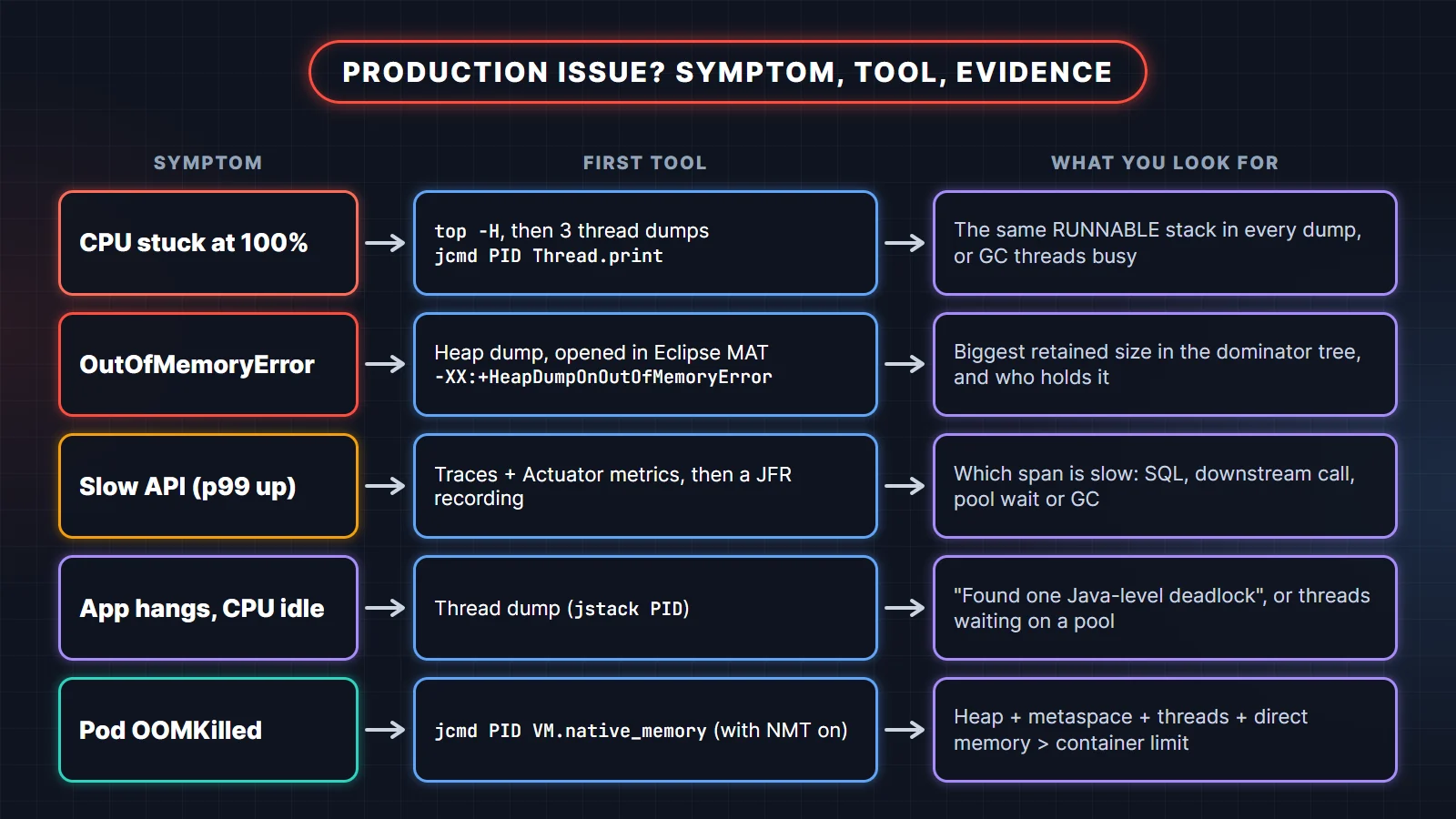
- CPU stuck at 100%:
top -Hplus three thread dumps a few seconds apart; look for the same RUNNABLE stack in each, or busy GC threads. - OutOfMemoryError: a heap dump opened in Eclipse MAT; look at the dominator tree for what retains the most memory.
- Slow API: distributed traces and Actuator metrics, then a JFR recording; find which span is slow.
- Hang with idle CPU: a thread dump; look for a reported deadlock or threads all waiting on the same pool or lock.
- Pod OOMKilled: native memory tracking; add up heap, metaspace, thread stacks and direct memory against the container limit.
JVM, memory and performance scenarios
1. Your service throws OutOfMemoryError: Java heap space in production. What do you do?
First, keep the service available (restart or scale out) but only after capturing a heap dump. Then open the dump in Eclipse MAT, find the objects with the largest retained size, and trace the reference chain to the code that holds them. Finally, decide whether it is a leak or simply an undersized heap.
In production, make the dump automatic so you are not racing the next crash:
java -XX:+HeapDumpOnOutOfMemoryError \
     -XX:HeapDumpPath=/dumps \
     -XX:+ExitOnOutOfMemoryError \
     -jar orders-service.jar
ExitOnOutOfMemoryError makes the JVM exit instead of limping along in a broken state, so your orchestrator restarts it cleanly. If the service is still alive, jcmd <pid> GC.heap_dump /dumps/orders.hprof takes a dump on demand, and jcmd <pid> GC.class_histogram gives a quick count of objects per class without a full dump. Read the error message carefully too: "Java heap space", "Metaspace" and "unable to create native thread" are three different problems with three different fixes.
What the interviewer is checking: that you capture evidence before restarting, and that you can tell a leak (memory grows until it dies, whatever the load) from a capacity problem (memory is fine until traffic grows).
2. Heap usage climbs after every deployment until the service dies. How do you find the memory leak?
A heap that keeps growing even after full garbage collections is a leak: something still references objects you no longer need. Take two heap dumps some time apart, compare them in Eclipse MAT, and look at which collection or cache grows between them. The fix is usually to bound or remove that reference.
The usual suspects in Java backends:
- A
static Mapused as a cache with no size limit or expiry. Replace it with a bounded cache such as Caffeine withmaximumSizeandexpireAfterWrite. ThreadLocalvalues that are never removed on pooled threads. Always callremove()in afinallyblock.- Listeners or callbacks registered and never unregistered.
- Unclosed resources: streams, result sets, HTTP responses. Use try-with-resources.
- A huge Hibernate persistence context in a long batch job. Flush and clear every few hundred entities.
What the interviewer is checking: that you know GC cannot collect reachable objects, and that "leak" in Java means an unwanted reference, not unfreed memory as in C.
3. CPU is at 100% on one instance. How do you find the cause?
Find the hot thread, then find what it is executing. Run top -H -p <pid> to see per-thread CPU, then match the busiest thread id to the nid in a thread dump from jcmd <pid> Thread.print. Take three dumps a few seconds apart; a stack that is RUNNABLE in all three is your culprit.
A detail that trips people up: recent JDKs, including 21 and 25, print nid in decimal (nid=29668), so it matches the id from top directly. JDK 17 and older print it in hex (nid=0x73e4), so you convert the id first.
Typical causes are an infinite or very long loop, a catastrophic regular expression on user input, heavy JSON serialization of huge objects, or the garbage collector itself. If the hot threads are GC threads, the problem is memory pressure, not your code, and you are really in scenario 1 or 2. For problems that come and go, a Java Flight Recorder recording (jcmd <pid> JFR.start duration=60s filename=cpu.jfr) shows the hottest methods with very low overhead, and you can open it in JDK Mission Control.
4. The application hangs, but CPU is idle. How do you confirm a deadlock?
Take a thread dump. When threads are deadlocked on monitors or java.util.concurrent locks, the JVM detects the cycle and prints "Found one Java-level deadlock" at the end of the dump, with each thread and the lock it waits for. The fix is to always acquire locks in the same global order, or use tryLock with a timeout.
Here is a classic transfer deadlock. Two threads lock the same two accounts in opposite order, and the program then asks the JVM which threads are deadlocked, which is the same check a thread dump performs:
import java.lang.management.ManagementFactory;
import java.lang.management.ThreadInfo;
import java.lang.management.ThreadMXBean;

public class DeadlockDemo {
    static final Object accountA = new Object();
    static final Object accountB = new Object();

    public static void main(String[] args) throws InterruptedException {
        Thread t1 = new Thread(() -> transfer(accountA, accountB), "transfer-A-to-B");
        Thread t2 = new Thread(() -> transfer(accountB, accountA), "transfer-B-to-A");
        t1.setDaemon(true);
        t2.setDaemon(true);
        t1.start();
        t2.start();
        Thread.sleep(500);

        ThreadMXBean mx = ManagementFactory.getThreadMXBean();
        long[] ids = mx.findDeadlockedThreads();
        System.out.println("Deadlocked threads: " + (ids == null ? 0 : ids.length));
        for (ThreadInfo info : mx.getThreadInfo(ids)) {
            System.out.println(info.getThreadName() + " is " + info.getThreadState()
                    + ", waiting for a lock held by " + info.getLockOwnerName());
        }
    }

    static void transfer(Object from, Object to) {
        synchronized (from) {
            sleep(100);
            synchronized (to) {
                System.out.println("never printed");
            }
        }
    }

    static void sleep(long ms) {
        try { Thread.sleep(ms); } catch (InterruptedException e) { Thread.currentThread().interrupt(); }
    }
}
Output on JDK 25:
Deadlocked threads: 2
transfer-A-to-B is BLOCKED, waiting for a lock held by transfer-B-to-A
transfer-B-to-A is BLOCKED, waiting for a lock held by transfer-A-to-B
The fix is to lock in a fixed order, for example always the account with the lower id first. In real services, a "hang" is more often pool starvation than a true deadlock: every request thread waiting for a database connection or for a downstream call with no timeout. The thread dump shows that too, as hundreds of threads parked on the same pool.
5. Latency spikes every few minutes. How do you check whether GC is the cause?
Turn on GC logging and line up pause times with the latency spikes. If long pauses match the spikes, tune the heap or the collector; if they do not, look elsewhere (a scheduled job, a downstream dependency, a lock). Never guess: GC logs are cheap to enable in production.
java -Xlog:gc*:file=/logs/gc.log:time,uptime -jar orders-service.jarG1 is the default collector and is a good fit for most services. If you need consistently short pauses on a large heap, ZGC (-XX:+UseZGC) is the usual next step; since JDK 23 it runs in generational mode by default, and JDK 24 removed the old non-generational mode. Before switching collectors, check the boring causes: a heap far too small for the live data, or code that allocates huge temporary objects per request.
6. Kubernetes keeps killing your pod with OOMKilled, but the heap looks fine. Why?
OOMKilled means the whole process exceeded the container's memory limit, and the Java heap is only part of the process. Metaspace, thread stacks, the code cache, GC structures and direct buffers (Netty, NIO) all live outside the heap. If -Xmx is close to the container limit, the total goes over it.
How to investigate and fix:
- Start the JVM with
-XX:NativeMemoryTracking=summaryand runjcmd <pid> VM.native_memory summaryto see each memory area. - Size the heap as a share of the container, for example
-XX:MaxRAMPercentage=75, instead of a fixed-Xmxcopied from a VM. The default is only 25%. - Count threads: each platform thread reserves a stack (1 MB by default on 64-bit Linux). A pool of 500 threads adds up quickly.
- Leave headroom; 70 to 80% of the limit for the heap is a common starting point, then measure.
What the interviewer is checking: that you understand the difference between a Java
OutOfMemoryError(thrown inside the JVM) and an OOMKilled container (the kernel killed the process from outside).
Concurrency and collections scenarios
7. A loop that removes items from a list throws ConcurrentModificationException. How do you fix it?
The enhanced for loop uses an iterator, and removing through the list (not the iterator) changes the list's modification count, so the iterator fails fast on the next step. Use removeIf, Iterator.remove(), or build a new filtered list with a stream. It is a single-threaded bug, not a concurrency bug.
import java.util.ArrayList;
import java.util.ConcurrentModificationException;
import java.util.List;

public class CmeDemo {
    public static void main(String[] args) {
        List<String> orders = new ArrayList<>(List.of("PAID", "CANCELLED", "PAID", "CANCELLED"));
        try {
            for (String status : orders) {
                if (status.equals("CANCELLED")) {
                    orders.remove(status);          // structural change during iteration
                }
            }
        } catch (ConcurrentModificationException e) {
            System.out.println("Caught: " + e.getClass().getSimpleName());
        }

        List<String> fixed = new ArrayList<>(List.of("PAID", "CANCELLED", "PAID", "CANCELLED"));
        fixed.removeIf(status -> status.equals("CANCELLED"));
        System.out.println("After removeIf: " + fixed);
    }
}Caught: ConcurrentModificationException
After removeIf: [PAID, PAID]If several threads really do share the collection, the answer changes: use a concurrent collection such as ConcurrentHashMap or CopyOnWriteArrayList (good for read-mostly lists), whose iterators never throw this exception.
8. HashMap.get() returns null for a key you just put. What is wrong?
The key class breaks the equals/hashCode contract: usually equals is overridden but hashCode is not, or a field used in hashCode was changed after the key was inserted. HashMap finds the bucket by hash first, so an inconsistent hash sends the lookup to the wrong bucket. Use immutable keys; a record is the simplest fix.
import java.util.HashMap;
import java.util.Map;

public class HashMapKeyBug {
    // equals() overridden, hashCode() forgotten
    static final class OrderKey {
        final String customerId;
        final long orderNo;
        OrderKey(String customerId, long orderNo) { this.customerId = customerId; this.orderNo = orderNo; }
        @Override public boolean equals(Object o) {
            return o instanceof OrderKey k && k.orderNo == orderNo && k.customerId.equals(customerId);
        }
    }

    // A record gets consistent equals() and hashCode() for free
    record OrderId(String customerId, long orderNo) {}

    public static void main(String[] args) {
        Map<OrderKey, String> broken = new HashMap<>();
        broken.put(new OrderKey("C42", 1001), "SHIPPED");
        System.out.println("equals() says equal: " + new OrderKey("C42", 1001).equals(new OrderKey("C42", 1001)));
        System.out.println("Broken key lookup:   " + broken.get(new OrderKey("C42", 1001)));

        Map<OrderId, String> fixed = new HashMap<>();
        fixed.put(new OrderId("C42", 1001), "SHIPPED");
        System.out.println("Record key lookup:   " + fixed.get(new OrderId("C42", 1001)));
    }
}equals() says equal: true
Broken key lookup: null
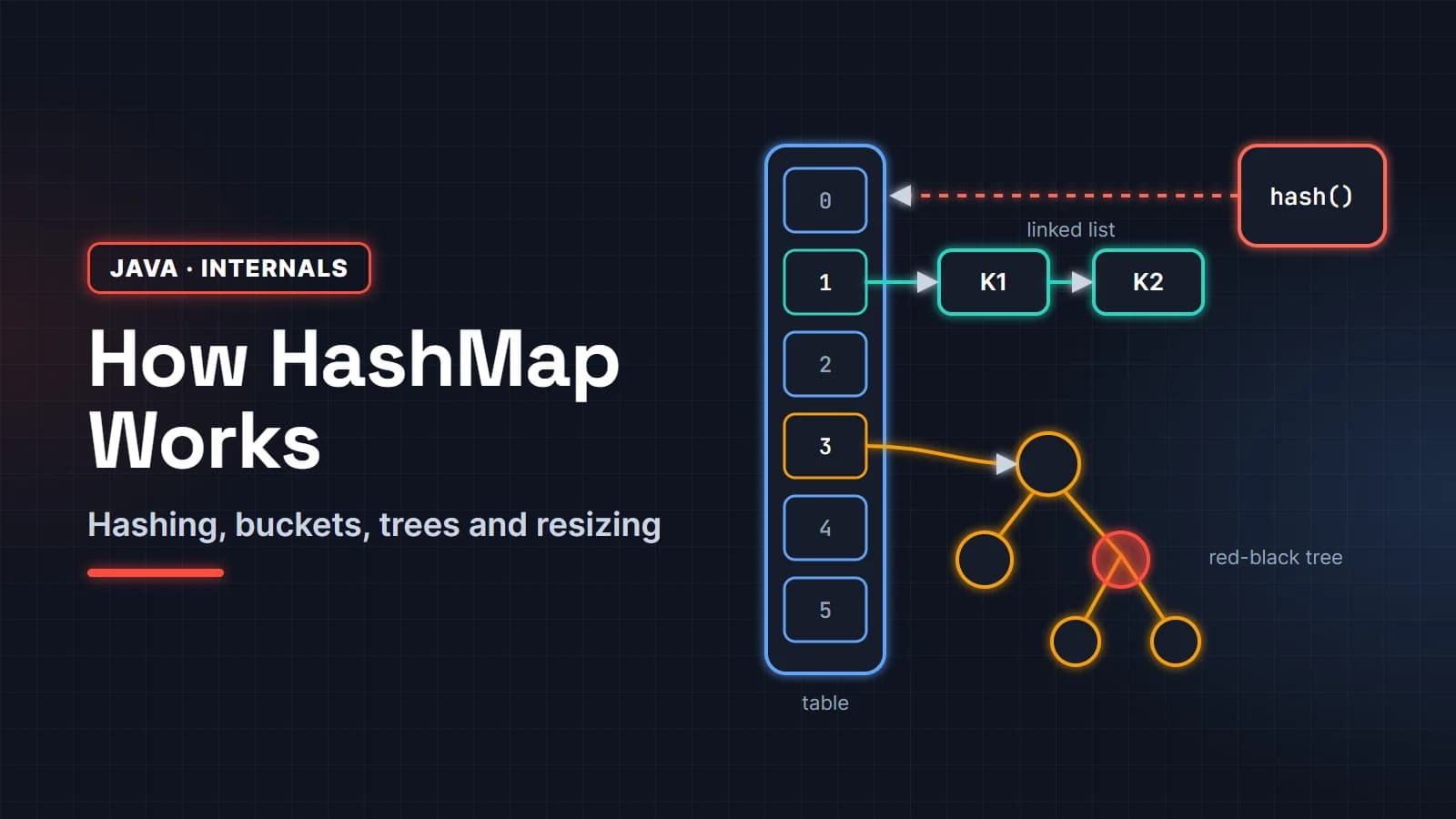
Record key lookup: SHIPPEDThe same bug appears with JPA entities used in a HashSet whose hashCode depends on a generated id that changes from null to a value on save. For how buckets, hashing and treeification work, see how HashMap works internally.
9. A counter in a Spring singleton bean shows wrong numbers under load. Why?
Spring beans are singletons by default, so one instance serves every request thread at the same time. A mutable field such as a long counter is shared state, and count++ is a read, an add and a write, not one atomic step. Two threads can read the same value and one increment is lost. Keep beans stateless, or use thread-safe types.
import java.util.concurrent.ExecutorService;
import java.util.concurrent.Executors;
import java.util.concurrent.atomic.LongAdder;

public class SharedCounterDemo {
    // Imagine this is a @Service: one instance shared by every request thread
    static class StatsService {
        private long unsafeCount = 0;
        private final LongAdder safeCount = new LongAdder();

        void record() {
            unsafeCount++;            // read, add, write: three steps, not atomic
            safeCount.increment();    // thread-safe
        }
    }

    public static void main(String[] args) {
        StatsService service = new StatsService();
        try (ExecutorService pool = Executors.newFixedThreadPool(8)) {
            for (int i = 0; i < 200_000; i++) pool.submit(service::record);
        } // close() waits for every task to finish
        System.out.println("expected  = 200000");
        System.out.println("long++    = " + service.unsafeCount);
        System.out.println("LongAdder = " + service.safeCount.sum());
    }
}expected = 200000
long++ = 198953
LongAdder = 200000The unsafe number changes on every run (a second run printed 199213), which is exactly what makes this bug hard to reproduce. Fixes, in order of preference: remove the state from the bean, use AtomicLong or LongAdder for counters (or better, a Micrometer counter), use ConcurrentHashMap for shared maps, and lock only when you must update several fields together.
10. A popular cache entry expires and the database gets 50 identical queries at once. How do you stop a cache stampede?
A stampede happens when many requests miss the cache at the same moment and all load the same value. Make sure only one caller loads a given key while the others wait for its result. In plain Java, ConcurrentHashMap.computeIfAbsent does this per key; in Spring, @Cacheable(sync = true) asks the cache provider to do the same per key within one instance (Caffeine and the default ConcurrentMapCache honor it).
import java.util.Map;
import java.util.concurrent.ConcurrentHashMap;
import java.util.concurrent.CountDownLatch;
import java.util.concurrent.ExecutorService;
import java.util.concurrent.Executors;
import java.util.concurrent.atomic.AtomicInteger;

public class CacheStampedeDemo {
    static final AtomicInteger dbCalls = new AtomicInteger();

    static String loadFromDb(String key) {
        dbCalls.incrementAndGet();
        try { Thread.sleep(200); } catch (InterruptedException e) { Thread.currentThread().interrupt(); }
        return "price-of-" + key;
    }

    interface Lookup { String get(Map<String, String> cache, String key); }

    public static void main(String[] args) {
        run("check-then-put", (cache, key) -> {
            String v = cache.get(key);
            if (v == null) {
                v = loadFromDb(key);
                cache.put(key, v);
            }
            return v;
        });
        run("computeIfAbsent", (cache, key) -> cache.computeIfAbsent(key, CacheStampedeDemo::loadFromDb));
    }

    static void run(String name, Lookup lookup) {
        dbCalls.set(0);
        Map<String, String> cache = new ConcurrentHashMap<>();
        CountDownLatch start = new CountDownLatch(1);
        try (ExecutorService pool = Executors.newVirtualThreadPerTaskExecutor()) {
            for (int i = 0; i < 50; i++) {
                pool.submit(() -> { start.await(); return lookup.get(cache, "iphone"); });
            }
            start.countDown();   // 50 requests hit an empty cache at the same moment
        }
        System.out.printf("%-16s -> 50 requests, database loads: %d%n", name, dbCalls.get());
    }
}check-then-put -> 50 requests, database loads: 50
computeIfAbsent -> 50 requests, database loads: 1With several instances behind a load balancer, a local lock only protects one instance. Add jitter to expiry times so hot keys do not all expire together, refresh popular keys in the background before they expire, or use a short distributed lock in Redis around the load. Keep the loader fast: computeIfAbsent blocks other writers to that bin while it runs.
11. You switched to virtual threads, and throughput did not improve or got worse. What happened?
Virtual threads make waiting cheap, but they do not create database connections or make CPU-bound work faster. If every request still needs one of 10 pooled connections, 10,000 virtual threads simply queue on the pool. On Java 21, synchronized blocks around blocking I/O could also pin virtual threads to their carrier threads.
What to check:
- The real bottleneck. Connection pools, rate-limited downstream APIs and CPU-heavy code are unchanged by virtual threads. Use Spring Framework 7's
@ConcurrencyLimitor a semaphore to protect fragile resources explicitly. - Pinning. Since Java 24, JEP 491 lets virtual threads block inside
synchronizedwithout pinning, so upgrading to Java 25 removes the most common cause. The JFR eventjdk.VirtualThreadPinnedshows any remaining cases. ThreadLocalcaches. Code that caches expensive objects per thread creates one per virtual thread, which can mean millions.- Pooling virtual threads. They are meant to be created per task. In Spring Boot,
spring.threads.virtual.enabled=trueswitches the web server and task executors over for you.
12. Reports show some orders on the wrong date. How do you fix timezone bugs?
Store and transfer moments in time as UTC (Instant in Java, TIMESTAMP WITH TIME ZONE or UTC values in the database), and convert to a user's zone only when you display or group by "day". Bugs appear when a server's default zone is used implicitly, for example when computing which calendar day an order belongs to.
import java.time.Instant;
import java.time.LocalDate;
import java.time.LocalDateTime;
import java.time.ZoneId;
import java.time.ZoneOffset;

public class TimezoneDemo {
    public static void main(String[] args) {
        // An order placed at 01:30 on 30 October, India time
        ZoneId india = ZoneId.of("Asia/Kolkata");
        Instant placedAt = LocalDateTime.of(2026, 10, 30, 1, 30).atZone(india).toInstant();

        LocalDate serverDay = LocalDate.ofInstant(placedAt, ZoneOffset.UTC);   // server JVM runs in UTC
        LocalDate customerDay = LocalDate.ofInstant(placedAt, india);

        System.out.println("Stored instant       : " + placedAt);
        System.out.println("Order date in UTC    : " + serverDay);
        System.out.println("Order date in India  : " + customerDay);
        System.out.println("Same day?            : " + serverDay.equals(customerDay));
    }
}Stored instant : 2026-10-29T20:00:00Z
Order date in UTC : 2026-10-29
Order date in India : 2026-10-30
Same day? : falseEvery order placed between midnight and 05:30 India time lands on the previous day if the report groups by the server's day. The fix is to pass the business time zone explicitly wherever a "day" is computed, never rely on ZoneId.systemDefault(), and inject a Clock so tests can pin the time. Use LocalDateTime only for values that genuinely have no zone, such as "store opens at 09:00".
Spring Boot and database scenarios
13. An API that used to take 80 ms now takes 3 seconds. How do you find out why?
Break the request into parts and measure each one rather than guessing. A distributed trace shows time spent in the controller, each SQL query and each downstream call. Spring Boot Actuator metrics show request latency percentiles and connection pool waits. The slow part is usually a query, a remote call, or waiting for a pool.
A practical order of checks:
- What changed? A deploy, a data volume jump, a new index or a dependency upgrade.
- Is it every request or only some? Look at p50 against p99 on
http.server.requests. - Traces: which span grew. With Spring Boot 4,
spring-boot-starter-opentelemetryexports traces over OTLP. - Database: the slow query log, then
EXPLAINon the slow query. A missing index on a growing table is the classic cause. - Pools:
hikaricp.connections.pendinggreater than zero means requests are waiting for a connection (scenario 17). - Still unclear: a JFR recording under load.
What the interviewer is checking: a method. "I would add caching" before measuring is a red flag; "I would find the slow span, then fix that" is what they want to hear.
14. A list endpoint fires hundreds of SQL queries. How do you fix the N+1 problem?
The N+1 problem is one query to load N parent rows, then one more query per row to load a lazy association. Fix it by fetching what the endpoint needs in one query: a JOIN FETCH, an @EntityGraph, or a DTO projection. For collections that cannot be joined, enable batch fetching so Hibernate loads children in groups.
public interface OrderRepository extends JpaRepository<Order, Long> {

    // One query instead of 1 + N
    @EntityGraph(attributePaths = "items")
    List<Order> findByCustomerId(Long customerId);

    // Or an explicit fetch join
    @Query("select distinct o from Order o join fetch o.items where o.status = :status")
    List<Order> findWithItemsByStatus(OrderStatus status);
}spring:
jpa:
open-in-view: false
properties:
hibernate:
default_batch_fetch_size: 50Find it first by logging SQL in a test or counting statements, so you can prove the fix. Turning off open-in-view (it defaults to true) makes lazy loading outside a transaction fail loudly instead of quietly running extra queries during JSON serialization. Avoid fetch-joining two collections at once, which multiplies rows.
15. A method annotated with @Transactional does not run in a transaction. Why?
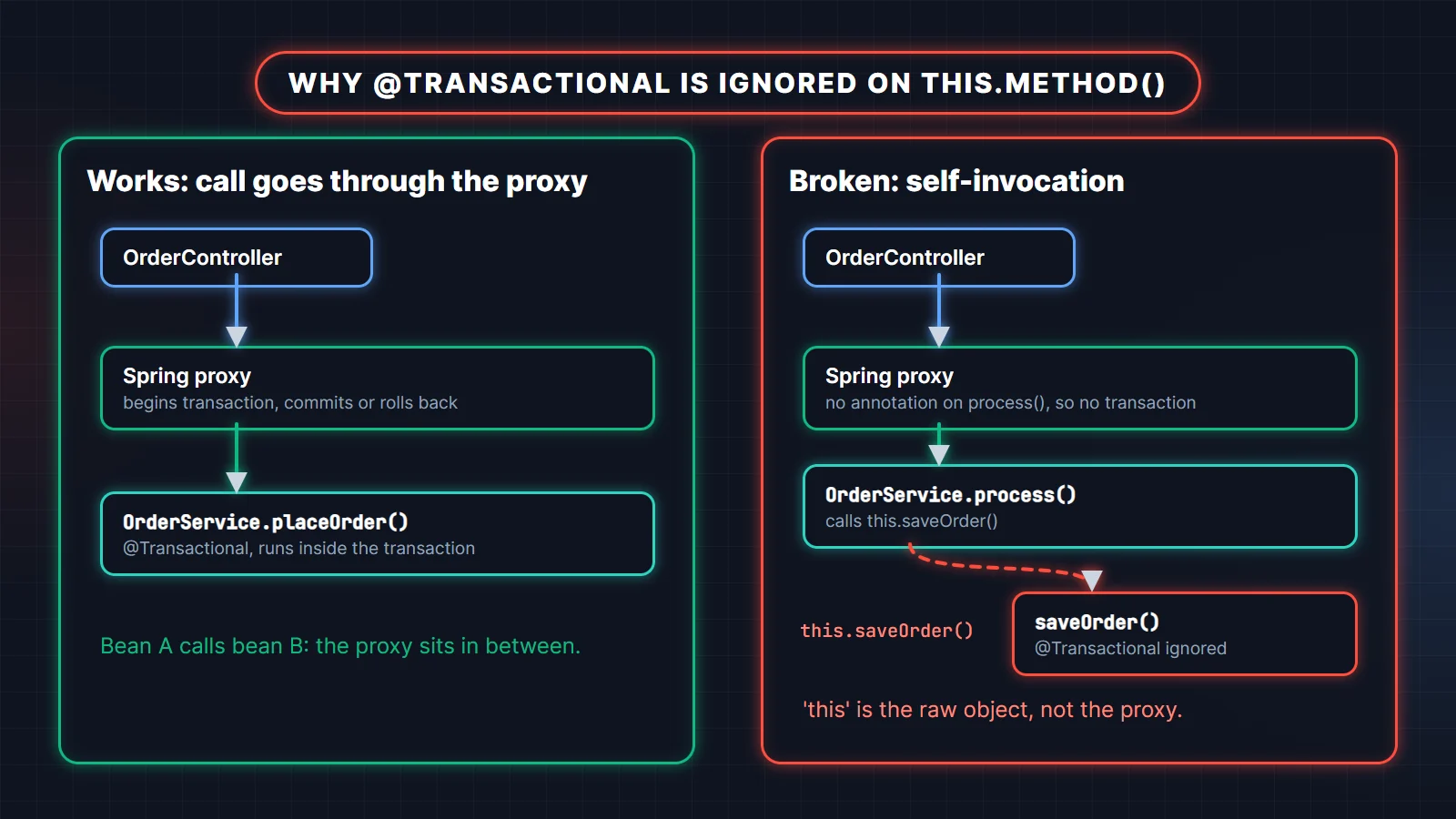
Spring applies @Transactional through a proxy around the bean. Only calls that come in through the proxy get a transaction. When a method in the same class calls this.saveOrder(), the call goes straight to the object and skips the proxy, so the annotation is ignored. The Spring reference calls this self-invocation.
@Service
public class OrderService {

    public void process(OrderRequest request) {
        validate(request);
        saveOrder(request);          // this.saveOrder(): no proxy, no transaction
    }

    @Transactional
    public void saveOrder(OrderRequest request) { ... }
}
Fixes: put @Transactional on the public entry method that callers use, move the transactional method into a separate bean, or use TransactionTemplate for a programmatic transaction around exactly the code that needs it. Other reasons the annotation is ignored: the method is private, the class is created with new instead of being a Spring bean, or the call happens in a constructor or @PostConstruct before the proxy is ready.
16. An exception was thrown, but the data was still saved. Why did @Transactional not roll back?
By default Spring rolls back only on unchecked exceptions (RuntimeException and Error). A checked exception such as IOException commits the transaction. Also, if your code catches the exception and does not rethrow it, Spring never sees it and commits. Use rollbackFor or throw an unchecked exception.
@Transactional(rollbackFor = Exception.class)
public void importInvoices(Path file) throws IOException { ... }
A related trap: an inner method with REQUIRED propagation throws, the outer method catches it and continues, and the commit fails with UnexpectedRollbackException because the shared transaction was already marked rollback-only. If the inner work really should commit or fail independently, it needs REQUIRES_NEW in a separate bean.
17. Requests fail with "Connection is not available, request timed out after 30000ms". What now?
The HikariCP pool is exhausted: every connection is in use and new requests waited the full connection timeout. Either connections are held too long (slow queries, remote calls inside a transaction, leaks) or the pool is too small for the load. Find out which before raising the pool size.
- Watch
hikaricp.connections.activeandhikaricp.connections.pendingin Actuator metrics. - Set
spring.datasource.hikari.leak-detection-threshold(for example 20000 ms) to log the stack trace of code that holds a connection too long. - Look for HTTP calls or message sends inside
@Transactionalmethods: the connection stays checked out while you wait for the network. - Remember
open-in-viewkeeps a connection for the whole web request once it is used. - Only then size the pool. Bigger is not automatically better, because the database has its own limit and every instance multiplies the pool.
What the interviewer is checking: that you treat "increase maximum-pool-size" as the last step, not the first, and that you know a transaction holds a connection for its whole duration.
18. Two users edit the same record and one update silently disappears. How do you prevent lost updates?
Use optimistic locking. Add a @Version field to the entity; Hibernate includes it in the WHERE clause of every update and increments it. If someone else updated the row first, no row matches and the save fails with an optimistic locking exception, which you turn into a 409 Conflict or a retry.
@Entity
public class Product {
    @Id
    private Long id;
    private int stock;

    @Version
    private long version;   // UPDATE ... WHERE id = ? AND version = ?
}
Use pessimistic locking (SELECT ... FOR UPDATE, or @Lock(LockModeType.PESSIMISTIC_WRITE) in Spring Data) only for short, highly contended updates such as decrementing stock in a flash sale. For a simple counter, an atomic SQL update (UPDATE product SET stock = stock - 1 WHERE id = ? AND stock > 0) avoids read-modify-write entirely.
19. You need to import a 5 GB CSV file. How do you process it without running out of memory?
Stream it instead of loading it. Read line by line with a BufferedReader or Files.lines, collect rows into small batches (say 1,000), write each batch with a JDBC batch insert, and commit per batch. Memory stays flat regardless of file size, and a failure loses one batch, not the whole import.
try (Stream<String> lines = Files.lines(path)) {
    Iterator<String> it = lines.skip(1).iterator();           // skip the header
    List<Object[]> batch = new ArrayList<>(1_000);
    while (it.hasNext()) {
        batch.add(parse(it.next()));
        if (batch.size() == 1_000) {
            jdbcTemplate.batchUpdate(INSERT_SQL, batch);
            batch.clear();
        }
    }
    if (!batch.isEmpty()) jdbcTemplate.batchUpdate(INSERT_SQL, batch);
}
Follow-ups to expect: make it restartable (record the last committed line, or use Spring Batch with chunk-oriented steps), run it off the request thread, and enable driver-level batching (reWriteBatchedInserts=true for PostgreSQL, rewriteBatchedStatements=true for MySQL). With JPA, flush and clear the persistence context every batch, and note that IDENTITY id generation disables Hibernate's insert batching.
Microservices and distributed system scenarios
20. A downstream service is down, and your service is going down with it. What do you do?
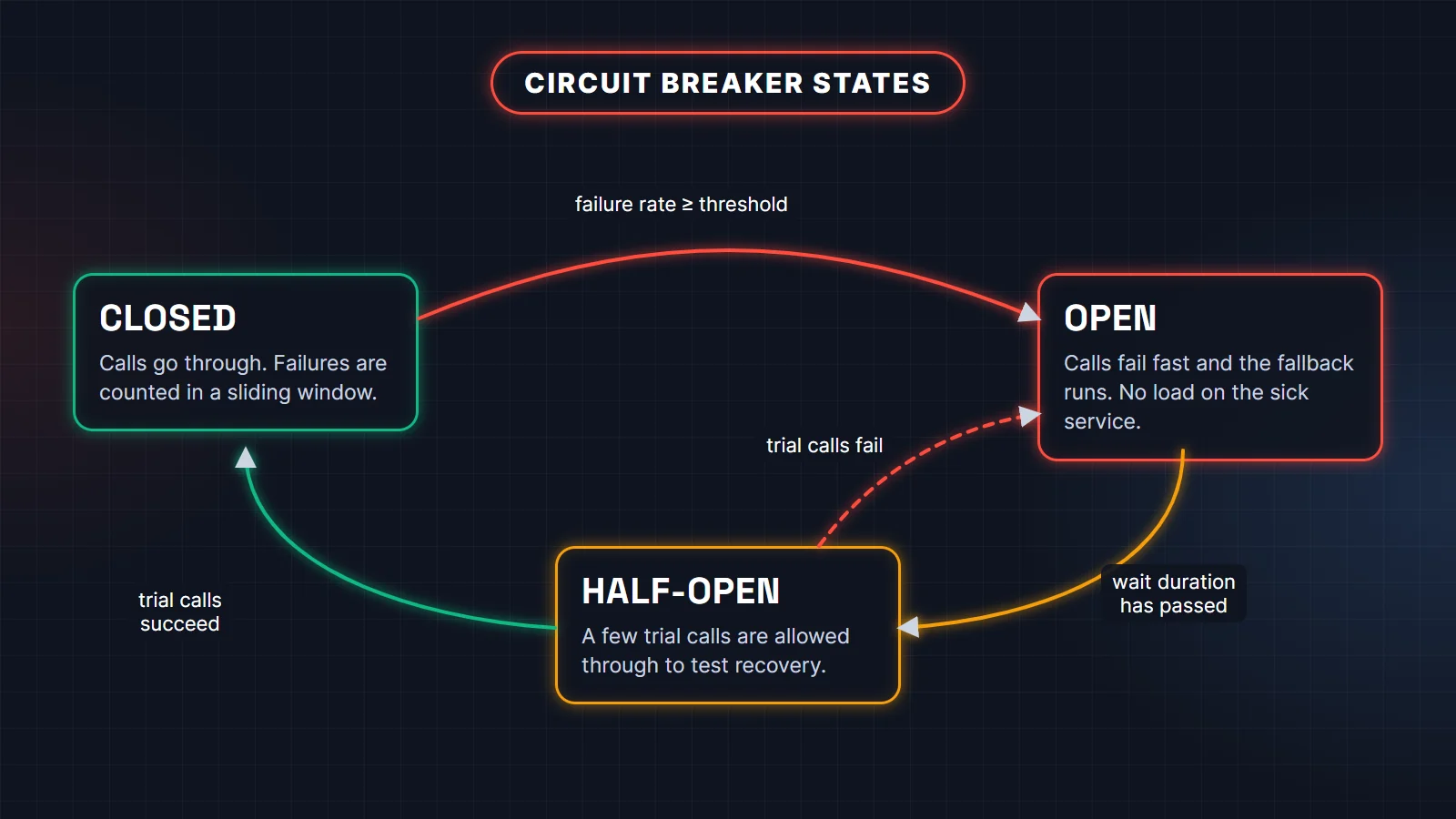
Your threads are piling up waiting on a dead dependency. Set timeouts on every remote call, then add a circuit breaker: after the failure rate passes a threshold, it stops calling the dependency for a while and returns a fallback immediately. That frees your threads, protects the sick service, and lets it recover.
@Service
class PricingClient {

    @CircuitBreaker(name = "pricing", fallbackMethod = "cachedPrice")
    public Price currentPrice(String sku) {
        return pricingApi.price(sku);              // HTTP call with a timeout
    }

    private Price cachedPrice(String sku, Throwable cause) {
        return priceCache.lastKnown(sku);         // degrade, do not fail
    }
}resilience4j:
circuitbreaker:
instances:
pricing:
sliding-window-size: 20
minimum-number-of-calls: 10
failure-rate-threshold: 50
wait-duration-in-open-state: 30s
permitted-number-of-calls-in-half-open-state: 3This uses Resilience4j (the resilience4j-spring-boot4 module plus spring-boot-starter-aspectj for the annotations), which is still the standard choice: Spring Framework 7 added retry and concurrency limits to the core, but not a circuit breaker. A good answer also covers the fallback itself (cached data, a default, or a clear error), a bulkhead so one slow dependency cannot take every thread, and an alert when the breaker opens.
21. After an incident, your retries made the outage worse. How should retries be designed?
Retry only errors that can succeed on a second try (timeouts, 503s), not 400s or validation failures. Use exponential backoff with jitter so thousands of clients do not retry in lockstep, cap the number of attempts, and only retry operations that are idempotent. Retrying at every layer multiplies the load: retry in one place.
Spring Framework 7 has this built in, so a small service does not need an extra library:
@Retryable(includes = { ResourceAccessException.class },
           maxRetries = 3, delay = 200, multiplier = 2, jitter = 50, maxDelay = 2000)
public Invoice fetchInvoice(String id) {
    return billingClient.invoice(id);
}
Enable it with @EnableResilientMethods on a configuration class. The details are in the Spring resilience docs. Combine retries with a circuit breaker so that when a dependency is truly down you stop retrying altogether.
22. A customer was charged twice for one order. How do you make a payment API idempotent?
Make the client send an idempotency key (one per logical payment attempt) and store it with a unique constraint before charging. A repeated request with the same key gets the stored result back instead of a new charge. The database constraint, not an in-memory check, is what makes this safe across threads and instances.
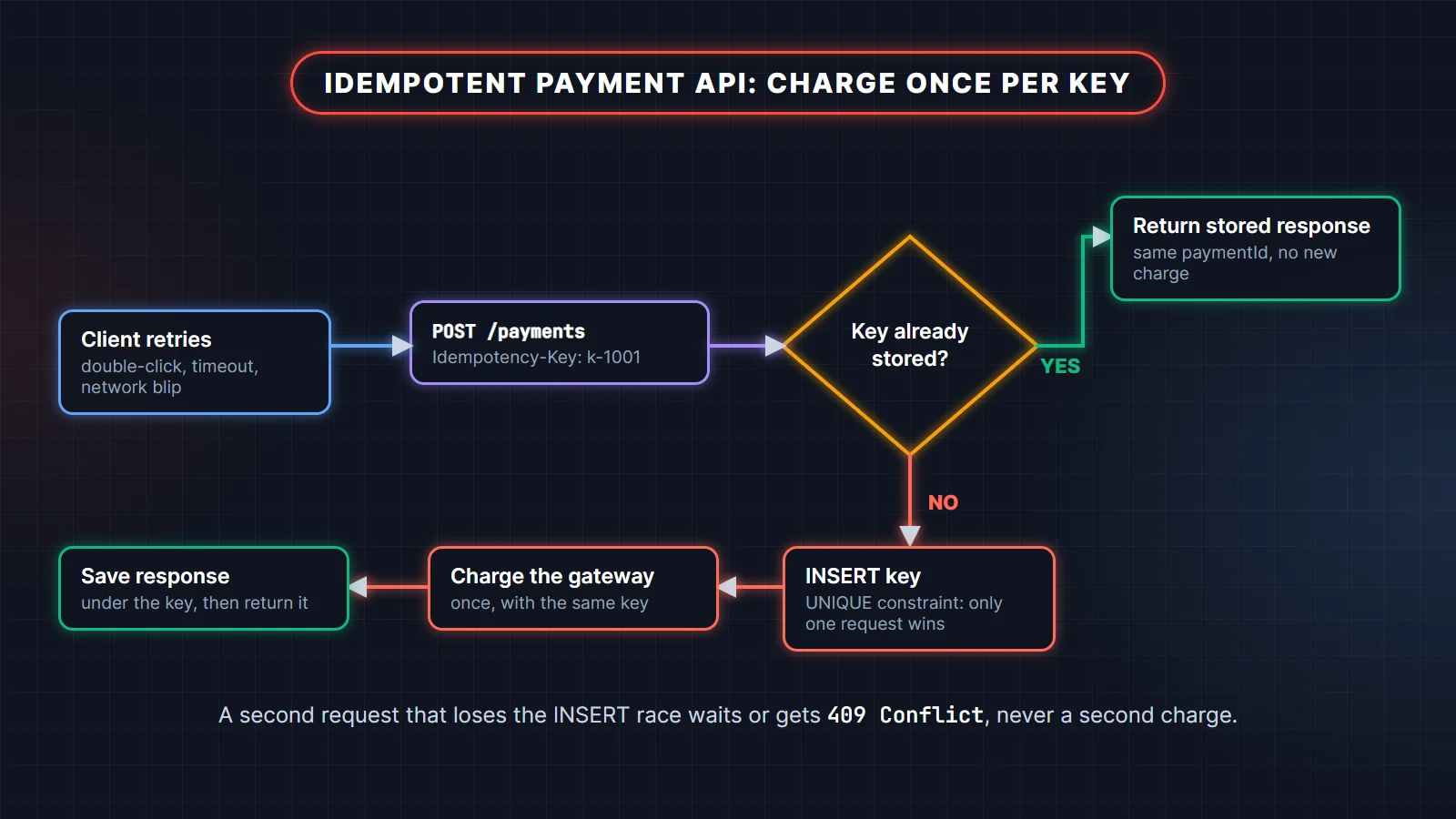
The program below shows the core idea with five concurrent duplicate requests. In production the map is a table with a unique index on the key, and the second request either waits for the first to finish or gets a 409.
import java.util.Map;
import java.util.concurrent.ConcurrentHashMap;
import java.util.concurrent.ExecutorService;
import java.util.concurrent.Executors;
import java.util.concurrent.atomic.AtomicInteger;

public class IdempotentPaymentDemo {
    record PaymentResult(String paymentId, String status) {}

    static final AtomicInteger gatewayCharges = new AtomicInteger();
    // In production this is a table with a UNIQUE constraint on idempotency_key, not a map
    static final Map<String, PaymentResult> byIdempotencyKey = new ConcurrentHashMap<>();

    static PaymentResult pay(String idempotencyKey, long amountPaise) {
        return byIdempotencyKey.computeIfAbsent(idempotencyKey, key -> {
            int n = gatewayCharges.incrementAndGet();   // the real charge happens once per key
            return new PaymentResult("pay_" + n, "CAPTURED");
        });
    }

    public static void main(String[] args) {
        String key = "order-1001-attempt-1";   // sent by the client in an Idempotency-Key header
        try (ExecutorService pool = Executors.newVirtualThreadPerTaskExecutor()) {
            for (int i = 0; i < 5; i++) {      // double-click, client retry after a timeout...
                pool.submit(() -> System.out.println("response: " + pay(key, 49_900)));
            }
        }
        System.out.println("gateway charges: " + gatewayCharges.get());
    }
}response: PaymentResult[paymentId=pay_1, status=CAPTURED]
response: PaymentResult[paymentId=pay_1, status=CAPTURED]
response: PaymentResult[paymentId=pay_1, status=CAPTURED]
response: PaymentResult[paymentId=pay_1, status=CAPTURED]
response: PaymentResult[paymentId=pay_1, status=CAPTURED]
gateway charges: 1Also pass the same key, or your order id, to the payment gateway, since most gateways deduplicate on their side too. Handle the webhook path the same way: gateways can deliver the same "payment succeeded" event more than once, so record processed event ids and ignore repeats.
23. A Kafka consumer processed the same message twice. How do you handle duplicates?
Kafka consumers normally give at-least-once delivery: if a consumer crashes or a rebalance happens after processing but before committing the offset, the message is delivered again. Design consumers to be idempotent: store a processed message id (or business key) with a unique constraint in the same database transaction as the side effect, and skip ids you have seen.
Other tools: upserts instead of inserts, natural business keys such as order id plus event type, and Kafka transactions for read-process-write pipelines that stay inside Kafka. Exactly-once does not extend to emails, payments or third-party APIs, so idempotent handlers remain necessary. The Kafka scenario-based interview questions post covers rebalancing, lag and poison messages in depth.
24. An order must reserve stock and take payment in different services. How do you keep data consistent?
You cannot use one database transaction across services, so use a saga: a sequence of local transactions, each publishing an event, with a compensating action (release stock, refund payment) when a later step fails. To publish events reliably, use the transactional outbox: write the event to an outbox table in the same transaction as the business change, and relay it to the broker separately.
Without the outbox you hit the dual-write problem: the database commit succeeds and the message send fails (or the reverse), and the services disagree forever. Mention orchestration (one coordinator tells each service what to do) against choreography (services react to each other's events), and say when you would pick each: orchestration for long flows that need visibility, choreography for a few loosely coupled steps.
25. Every deployment causes a burst of 502 errors. How do you deploy without dropping requests?
The old instance is being killed while it still has in-flight requests, or traffic reaches the new instance before it is ready. Use graceful shutdown so the server stops taking new requests and finishes current ones, readiness probes so traffic arrives only when the app is ready, and a rolling update that keeps enough instances up.
- Graceful shutdown has been the default since Spring Boot 3.4 (
server.shutdown=graceful), with a 30-secondspring.lifecycle.timeout-per-shutdown-phase. Make sure Kubernetes'terminationGracePeriodSecondsis longer than that. - Point the Kubernetes readiness probe at
/actuator/health/readinessand the liveness probe at/actuator/health/liveness. Do not include the database in liveness, or a database blip restarts every pod. - Add a short
preStopsleep so the load balancer removes the pod before shutdown starts. - Make database migrations backward compatible (expand, then contract), because old and new versions run side by side during a rollout.
Practise with the full question bank
Scenario rounds build on fundamentals. If any answer above felt shaky, these guides go deeper:
- JVM Internals, GC & Performance Tuning: 95 Interview Questions: senior-level questions on JVM internals, the memory model, garbage collectors, JVM flags, containers and performance tuning (scenarios 1 to 6).
- Microservices Patterns: 60 Scenario Interview Questions: boundaries, sync vs async, sagas and the outbox, retries and circuit breakers, tracing, safe deploys, poison messages and duplicate payments (scenarios 20 to 25).
- Core Java Fundamentals: 74 Interview Questions: the basics interviewers check before the scenarios, from JDK vs JRE vs JVM to classes, polymorphism, interfaces, static and final.
- For scenarios 14 to 18, Hibernate & Spring Data JPA: 60 Interview Questions covers the persistence context, N+1, transactions and locking.
Related reading
- Java 21 to 25 features interview questions: virtual threads, records, pattern matching and what changed in Java 25.
- Kafka scenario-based interview questions: consumer lag, rebalancing, duplicates and poison messages.
- How HashMap works internally in Java: hashing, buckets, resizing and why the
equals/hashCodecontract matters.
FAQ
What are scenario-based questions in a Java interview?
They describe a realistic problem, usually from production, and ask how you would handle it. They test troubleshooting method, tool knowledge and design judgment rather than definitions, which is why they dominate interviews for developers with 3 or more years of experience.
How should I prepare for Java scenario questions with 5 years of experience?
Practise the four-step answer (contain, collect evidence, find the cause, fix and prevent) on the scenarios here, and actually run the tools once: take a thread dump with jcmd, open a heap dump in Eclipse MAT, record a JFR file. Then prepare two or three real incidents from your own work in the same format.
Which tools should a Java developer know for production issues?
jcmd (thread dumps, heap dumps, JFR, native memory), jstack, Eclipse MAT for heap analysis, JDK Mission Control for JFR files, GC logs, Spring Boot Actuator metrics and health endpoints, and a tracing tool fed by OpenTelemetry.
Are Spring Boot scenario based interview questions different from Java ones?
They overlap. Spring rounds focus more on proxies (@Transactional, @Async, @Cacheable), bean scope and thread safety, JPA performance, configuration and Actuator, while Java rounds lean on the JVM, concurrency and collections. Expect both in a backend interview.
What is the most common mistake in answering production issue questions?
Jumping to a fix before gathering evidence: "increase the heap", "add a cache", "restart the server". Interviewers want to hear what you would measure first and how you would confirm the root cause.