 Tech Tribers
CrashLoopBackOff in Kubernetes: How to Find the Cause and Fix It
What CrashLoopBackOff really means, the order of checks, what exit codes 1, 137 and 128 tell you, and six common causes with fixes, shown with real kubectl output.
New12 min read
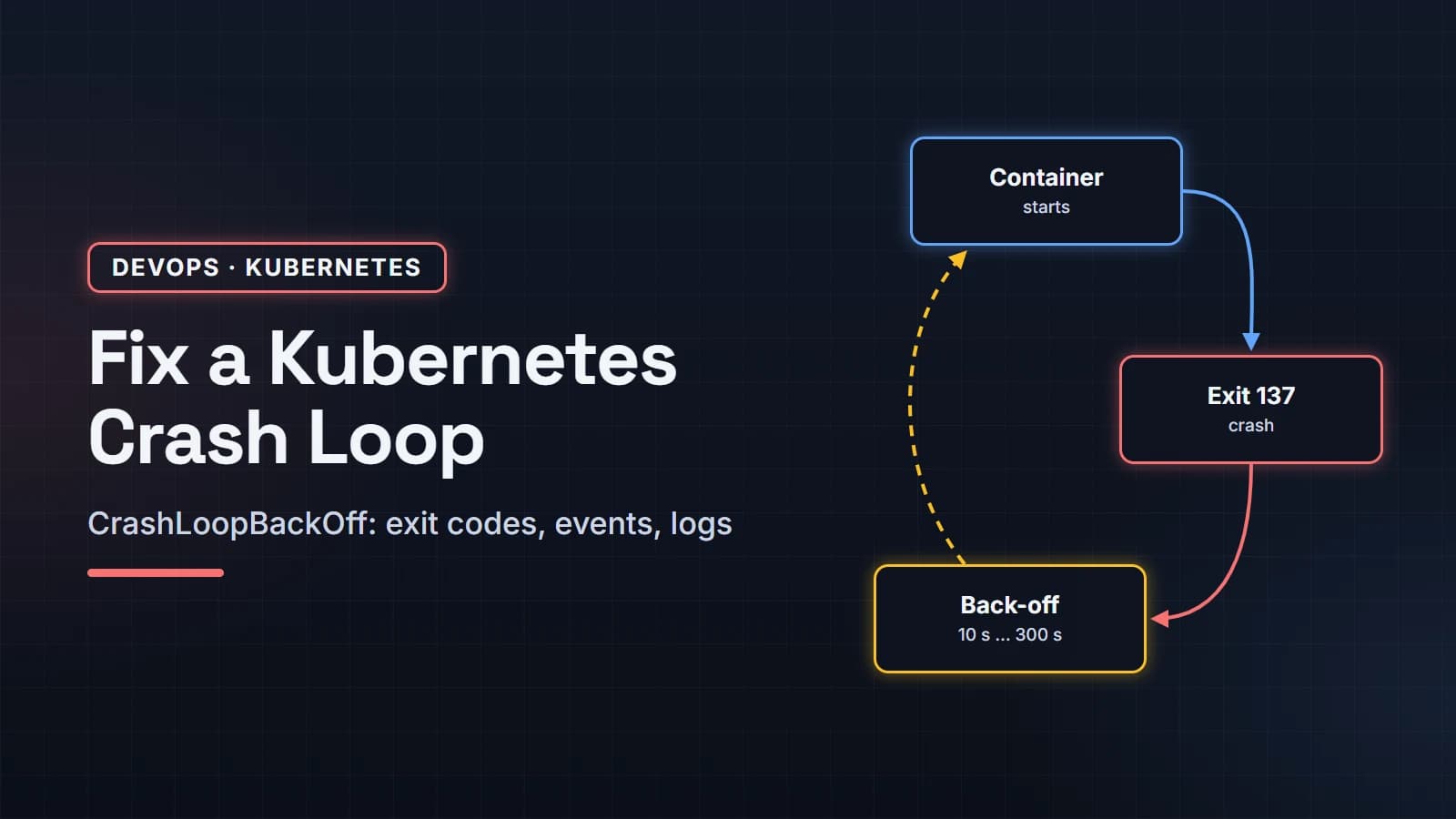
CrashLoopBackOff in Kubernetes means a container keeps exiting, and the kubelet (the agent on each node that runs containers) waits longer and longer before starting it again. It is a symptom, not a cause. The cause sits in three places: the exit code, the last log lines and the pod's events.
This guide is for developers who deploy their own services, often Spring Boot apps, and for anyone preparing for DevOps interviews, where "a pod is in CrashLoopBackOff, what do you do?" comes up all the time. You will learn the order of checks, what the common exit codes mean, six causes with their fixes, and how to tell a crash loop apart from ImagePullBackOff, CreateContainerConfigError and Pending.
Every kubectl output below is real. It comes from the runs behind our Kubernetes troubleshooting guide, on a kind cluster (Kubernetes running inside Docker containers) with Kubernetes 1.37.0. Where that test cluster behaves differently from a normal one, the post says so.
In this guide
- What CrashLoopBackOff means
- The order of checks
- What the exit code tells you
- Six common causes and how to fix each
- CrashLoopBackOff vs ImagePullBackOff, CreateContainerConfigError and Pending
- Stop crash loops before they reach the cluster
From the guide: this article draws on the pods-not-starting, resources and probes sections of Kubernetes Troubleshooting: 60 Real Scenarios, where every command and output was really run. Read the free 5-page sample on the guide page.
What CrashLoopBackOff means
A pod's restartPolicy is Always, OnFailure or Never. The default is Always, and Deployment pods must use it. With Always, the kubelet restarts a container after any exit, even a clean one.
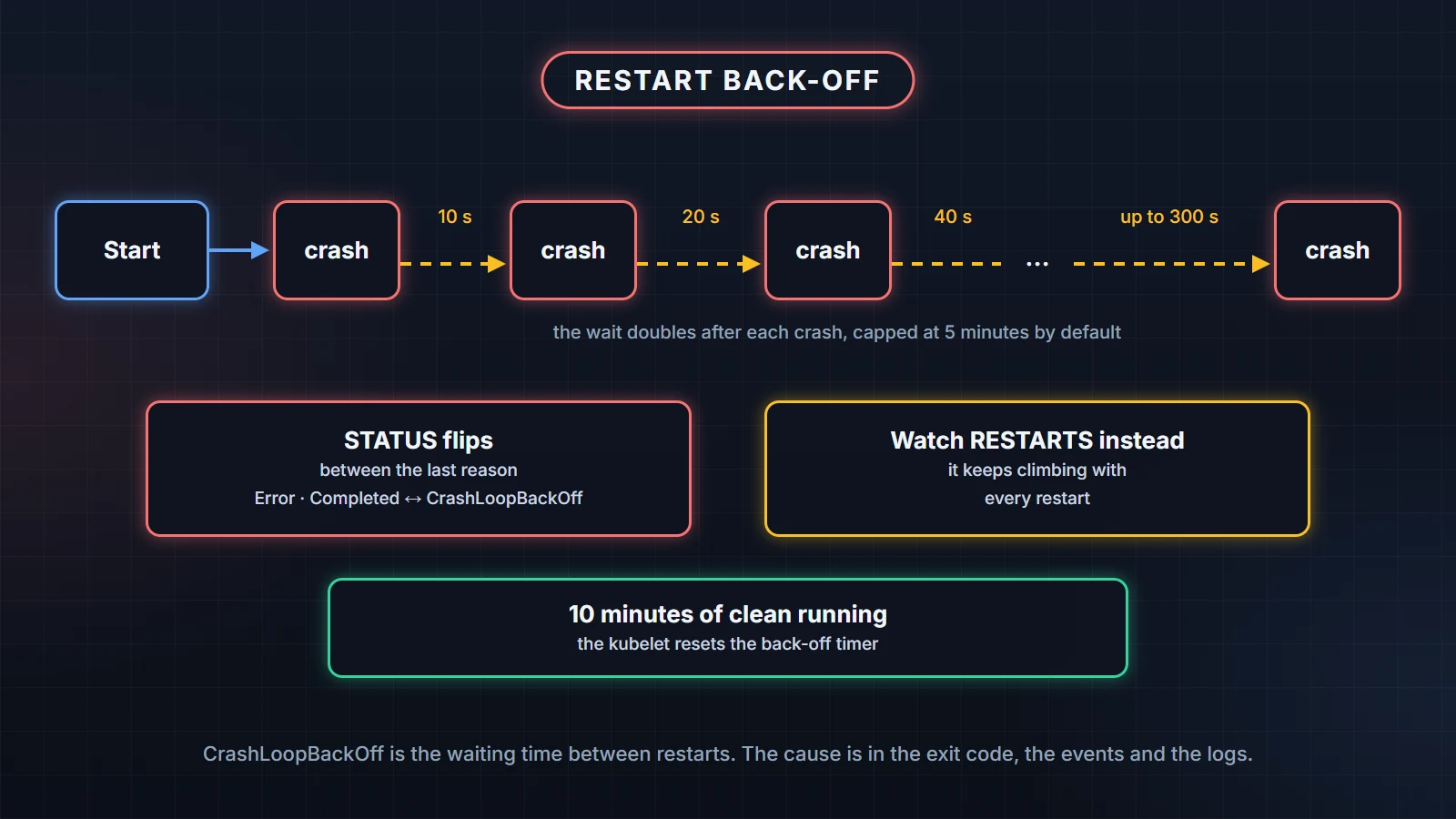
The pod lifecycle documentation describes the delay: 10 seconds, then 20, then 40, capped by default at 300 seconds (5 minutes). After 10 minutes of running without problems, the timer resets. CrashLoopBackOff is the name of that state: the back-off is in effect for the container.
Do not expect STATUS to hold still. It flips between the last termination reason, such as Error or Completed, and CrashLoopBackOff. In one of the guide's runs, polling every five seconds showed one pod switching between Completed and CrashLoopBackOff. Which word you happen to catch means little; watch the RESTARTS column instead.
The order of checks
kubectl get pods: STATUS, RESTARTS and READY.READY 1/2means one of two containers is ready; RESTARTS adds up all containers.kubectl describe pod: each container'sLast State,ReasonandExit Code, then the events:BackOff,Killing,Unhealthy,Failed.kubectl logs: the crash output. Add-c <container>in a multi-container pod, and try--previousfor the instance before the current one.- Match the exit code to a cause, using the next section.
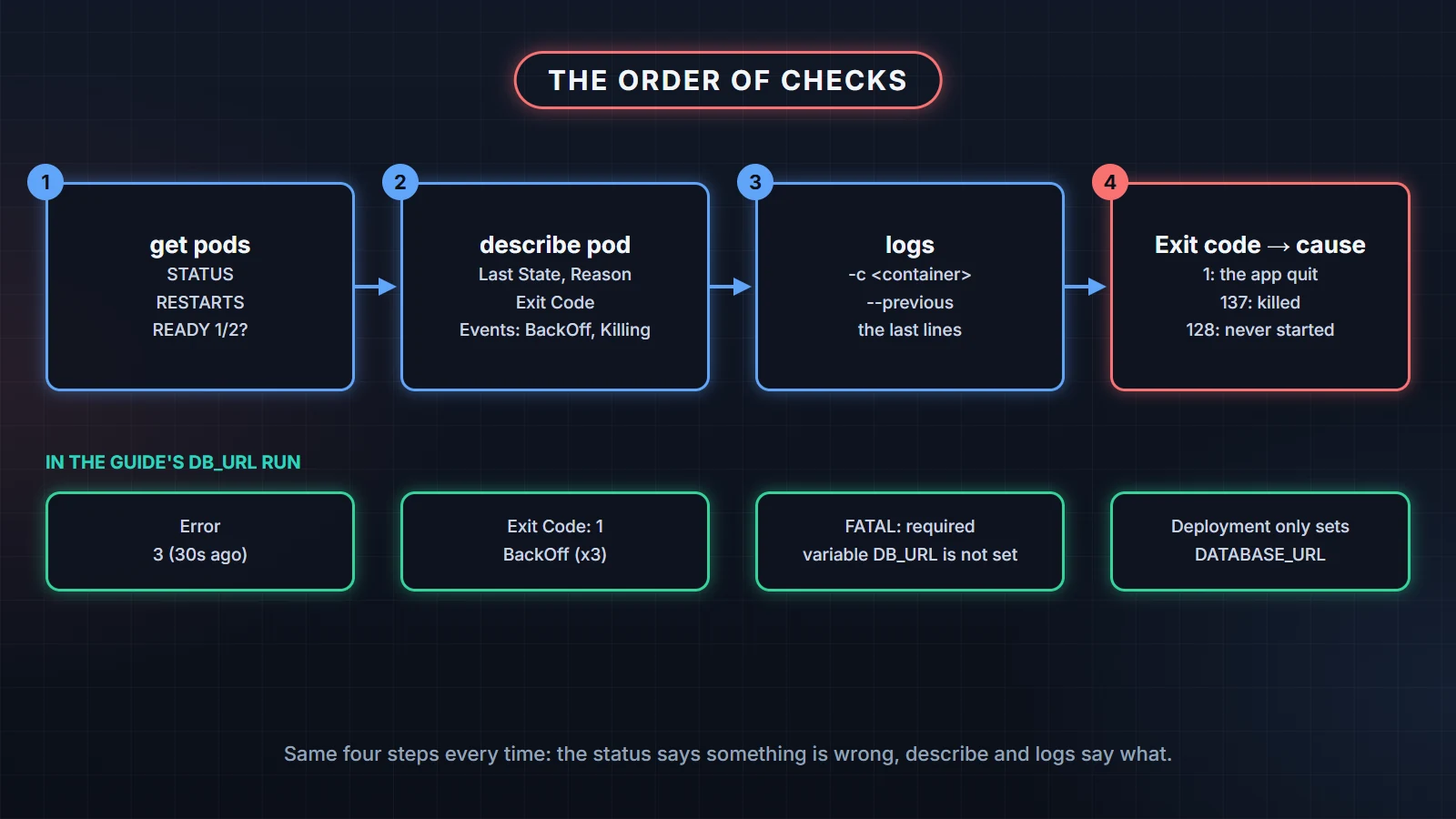
Here it is on a real crash. A refactor renamed DB_URL to DATABASE_URL in the Deployment, but the service (a small busybox stand-in) still reads DB_URL and exits without it:
$ kubectl get pods -n shop -l app=orders
NAME                      READY   STATUS   RESTARTS      AGE
orders-865bb98c4b-pjz9g   0/1     Error    3 (30s ago)   46s
$ kubectl logs -n shop deploy/orders --previous
unable to retrieve container logs for containerd://2cc5a9f5933a2cebfeaa1c0d73681ae4edd20546e0a4141824b90cdd1b89fc69
$ kubectl logs -n shop deploy/orders
FATAL: required variable DB_URL is not set
orders 2.4.1 starting
$ kubectl describe pod -n shop -l app=orders | sed -n '/State:/,/Restart Count:/p'
    State:          Terminated
      Reason:       Error
      Exit Code:    1
...
    Restart Count:  3
$ kubectl describe pod -n shop -l app=orders | sed -n '/Events:/,$p'
...
  Warning  BackOff    8s (x3 over 45s)  kubelet            spec.containers{orders}: Back-off restarting failed container orders in pod orders-865bb98c4b-pjz9g_shop(466682f8-7003-443a-a98d-85c2b1d809ba)
$ kubectl set env deployment/orders -n shop --list
# Deployment orders, container orders
DATABASE_URL=jdbc:postgresql://orders-db:5432/orders
Exit code 1: the application decided to stop. The log names the variable, and set env --list shows the Deployment only sets DATABASE_URL. Note that --previous failed: while the pod waited in back-off, the crashed container was still the current one, so plain kubectl logs showed its output. Try both.
What the exit code tells you
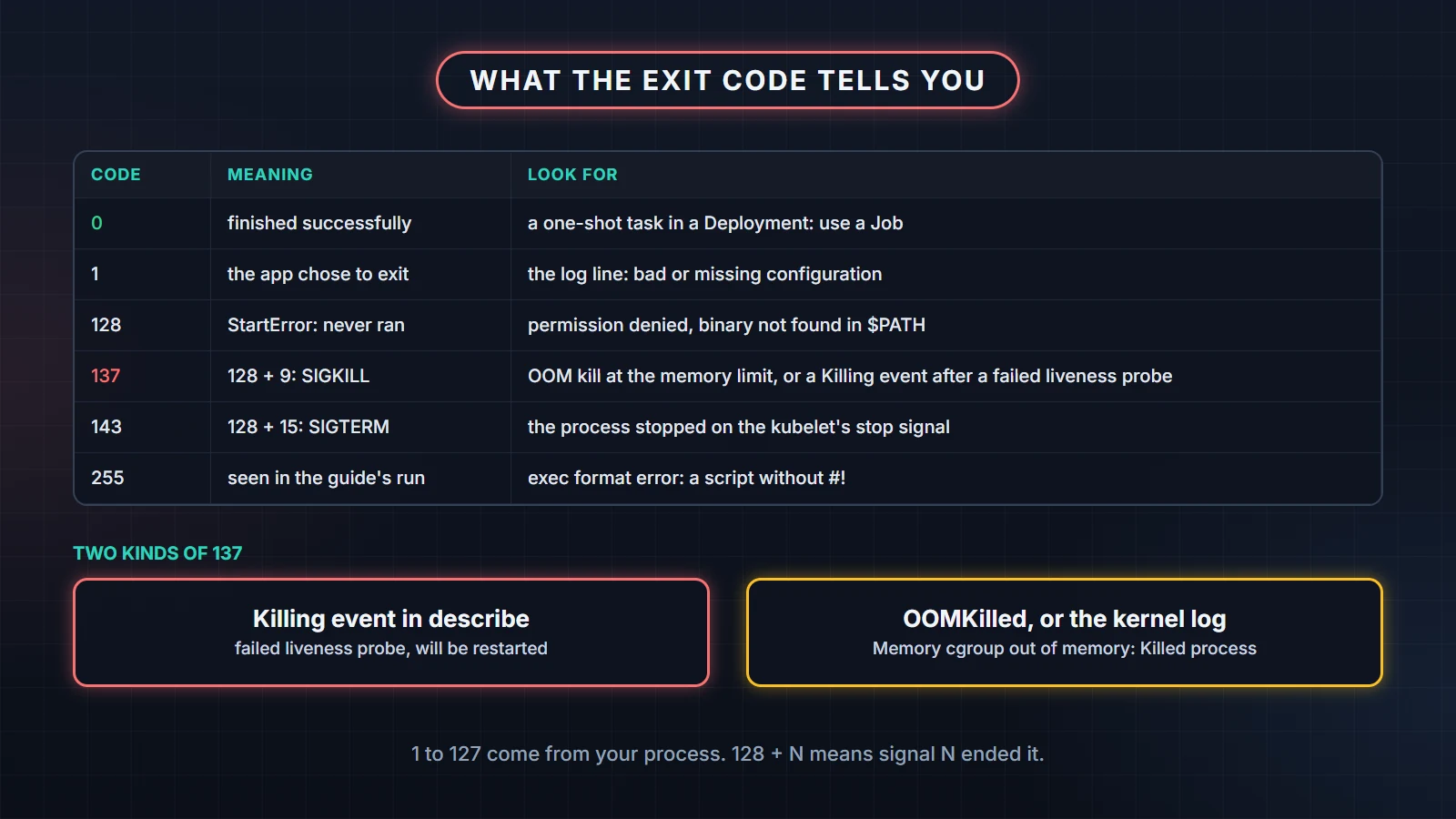
Codes from 1 to 127 come from your process. 128 plus N means signal N ended it. The signal(7) manual gives the two you need: SIGTERM is 15, and SIGKILL is 9, which cannot be caught or ignored.
- 0: success, restarted anyway. Wrong workload type (cause 6).
- 1: the application exited on its own. Read the log (cause 1).
- 128 with
StartError: the runtime could not start the process at all (cause 5). - 137 = 128 + 9: SIGKILL, from an out-of-memory kill or from the kubelet after a failed liveness probe (causes 3 and 4).
- 143 = 128 + 15: SIGTERM, the stop signal the kubelet sends first. The guide's runs have no 143 example.
- 255: in the guide's run it came with
exec format error, a script the kernel could not execute (cause 5).
Six common causes and how to fix each
1. The application exits on bad or missing configuration
Signs: exit code 1, a crash within a second, and a log line naming the problem, as in the DB_URL example. Fix the manifest in Git: a live kubectl set env is only a stopgap, because the next apply or GitOps sync brings the old manifest back. In Spring Boot, bind settings with @ConfigurationProperties and @Validated, so a missing value fails with one clear line instead of a NullPointerException deep in a connection pool.
2. A missing ConfigMap or Secret (usually not a crash loop)
If a container reads a variable from a ConfigMap or Secret that does not exist, the kubelet cannot create the container. The pod shows CreateContainerConfigError with RESTARTS 0. Events from the guide's runs:
Error: configmap "checkout-config" not foundError: couldn't find key db.url in ConfigMap shop/checkout-config(the key wasdb-url)Error: couldn't find key password in Secret cfg/orders-db
The kubelet keeps retrying: when the ConfigMap arrived 20 seconds late, the same pod started on its own. A wrong key or namespace never heals, though; a ConfigMap must be in the pod's namespace. Ship it in the same apply as the Deployment.
3. A liveness probe kills a slow start
When a liveness probe fails, the probes documentation says the kubelet kills the container and restarts it. Here the service needed about 25 seconds to listen, while the probe began at 5 seconds and allowed three failures:
$ kubectl get pods -n shop -l app=inventory
NAME                        READY   STATUS    RESTARTS      AGE
inventory-68f6b57d4-z6gz9   1/1     Running   3 (10s ago)   76s
$ kubectl describe pod -n shop -l app=inventory | sed -n '/Last State:/,/Restart Count:/p'
    Last State:     Terminated
      Reason:       Error
      Exit Code:    137
...
$ kubectl describe pod -n shop -l app=inventory | sed -n '/Events:/,$p'
...
  Normal   Killing    16s (x3 over 56s)  kubelet            spec.containers{inventory}: Container inventory failed liveness probe, will be restarted
...
  Warning  Unhealthy  1s (x11 over 66s)  kubelet            spec.containers{inventory}: Liveness probe failed: Get "http://10.244.0.55:8080/health": dial tcp 10.244.0.55:8080: connect: connection refused
$ kubectl logs -n shop deploy/inventory
starting, loading caches
$ kubectl apply -f s3-01-fixed.yaml
deployment.apps/inventory configured
$ kubectl get pods -n shop -l app=inventory
NAME                         READY   STATUS    RESTARTS   AGE
inventory-5f77c65f8f-hv9bl   1/1     Running   0          70s
The Killing event names the probe. The exit code is 137 because the shell ignored the kubelet's SIGTERM and was killed after the grace period (5 seconds in this manifest, 30 by default). The fix adds a startupProbe on the same endpoint with periodSeconds: 5 and failureThreshold: 12, a 60-second budget; liveness and readiness wait until it has succeeded once. Give it about twice the real start time under bad conditions, such as a JVM with a small CPU limit. Do not read this 137 as an OOM kill: an OOM kill has no Killing event.
4. The container is OOM-killed at its memory limit
Memory limits are per container. This pod had nginx with a 128Mi limit and a log-shipper sidecar with 32Mi whose buffer kept growing:
$ kubectl get pods -n shop -l app=catalog
NAME                       READY   STATUS   RESTARTS      AGE
catalog-5d6fd98dd8-g7lpb   1/2     Error    2 (37s ago)   71s
$ kubectl get pod -n shop -l app=catalog -o jsonpath='{range .items[0].status.containerStatuses[*]}{.name}{"  ready="}{.ready}{"  restarts="}{.restartCount}{"  last="}{.lastState.terminated.reason}{"/"}{.lastState.terminated.exitCode}{"\n"}{end}'
catalog  ready=true  restarts=0  last=/
log-shipper  ready=false  restarts=2  last=Error/137
$ docker exec tt-k8s-a-control-plane sh -c 'dmesg | grep -E "Memory cgroup out of memory" | tail -n 1'
[ 2512.785098] Memory cgroup out of memory: Killed process 81995 (tail) total-vm:36780kB, anon-rss:32224kB, file-rss:2012kB, shmem-rss:0kB, UID:0 pgtables:112kB oom_score_adj:999
Only the sidecar has restarts, and the node's kernel log confirms a memory cgroup kill of its process.
Why does it say Error and not OOMKilled? That is a quirk of the test cluster. Docker Desktop on the guide's machine still runs cgroup v1, which Kubernetes has deprecated since 1.35; the 1.37 kubelet refuses to start on it unless failCgroupV1 is set to false, as the kind config did. On that node, containerd 2.3 reported the kill as Reason: Error, exit code 137. A normal node runs cgroup v2 (check with stat -fc %T /sys/fs/cgroup/: cgroup2fs means v2, tmpfs means v1), and there you would expect Reason: OOMKilled with the same 137; the guide states this but could not reproduce it on its setup. The lesson holds on both: a 137 without OOMKilled is not proof that memory was fine.
Fix the container that was killed: raise its limit or bound its memory. Also check for a new LimitRange: in another run, its 64Mi default limit reached an old service only when a restart re-created the pod, and the kubernetes.io/limit-ranger annotation showed it.
5. The command or entrypoint cannot run
Two pods used scripts mounted from a ConfigMap as their command:
$ kubectl get pods -n shop
NAME            READY   STATUS              RESTARTS      AGE
orders-start    0/1     RunContainerError   2 (24s ago)   40s
orders-warmup   0/1     Error               2 (38s ago)   40s
$ kubectl describe pod orders-start -n shop | sed -n '/State:/,/Restart Count:/p'
    State:          Waiting
      Reason:       RunContainerError
    Last State:     Terminated
      Reason:       StartError
      Message:      failed to create containerd task: failed to create shim task: OCI runtime create failed: runc create failed: unable to start container process: error during container init: exec: "/scripts/start.sh": permission denied
      Exit Code:    128
...
$ kubectl describe pod orders-warmup -n shop | sed -n '/State:/,/Restart Count:/p'
    State:          Terminated
      Reason:       Error
      Exit Code:    255
...
$ kubectl logs orders-warmup -n shop
exec /scripts/warmup.sh: exec format error
Permission denied: ConfigMap files are mounted with mode 0644 by default, so the script has no execute bit and never starts (no logs, but still back-off). Set defaultMode: 0755 or run sh /scripts/start.sh. A missing binary gives executable file not found in $PATH, also exit 128.
Exec format error: the script has no #!/bin/sh line. A binary for another CPU architecture fails with the same message; the guide could not reproduce that, because Docker Desktop emulates arm64 with QEMU.
6. The process exits 0 because it is a one-shot task
A price-import Deployment printed "done" and exited. describe showed Reason: CrashLoopBackOff with a last state of Completed, Exit Code: 0. Patching it to OnFailure failed: spec.template.spec.restartPolicy: Unsupported value: "OnFailure": supported values: "Always". Run it as a Job (it finished as Complete 1/1 in 4 seconds) or a CronJob. The same happens when the main process forks into the background, such as java -jar app.jar & at the end of a script: keep it in the foreground.
Finally, Init:CrashLoopBackOff means an init container keeps failing; read it with kubectl logs <pod> -c <init-container>.
CrashLoopBackOff vs ImagePullBackOff, CreateContainerConfigError and Pending
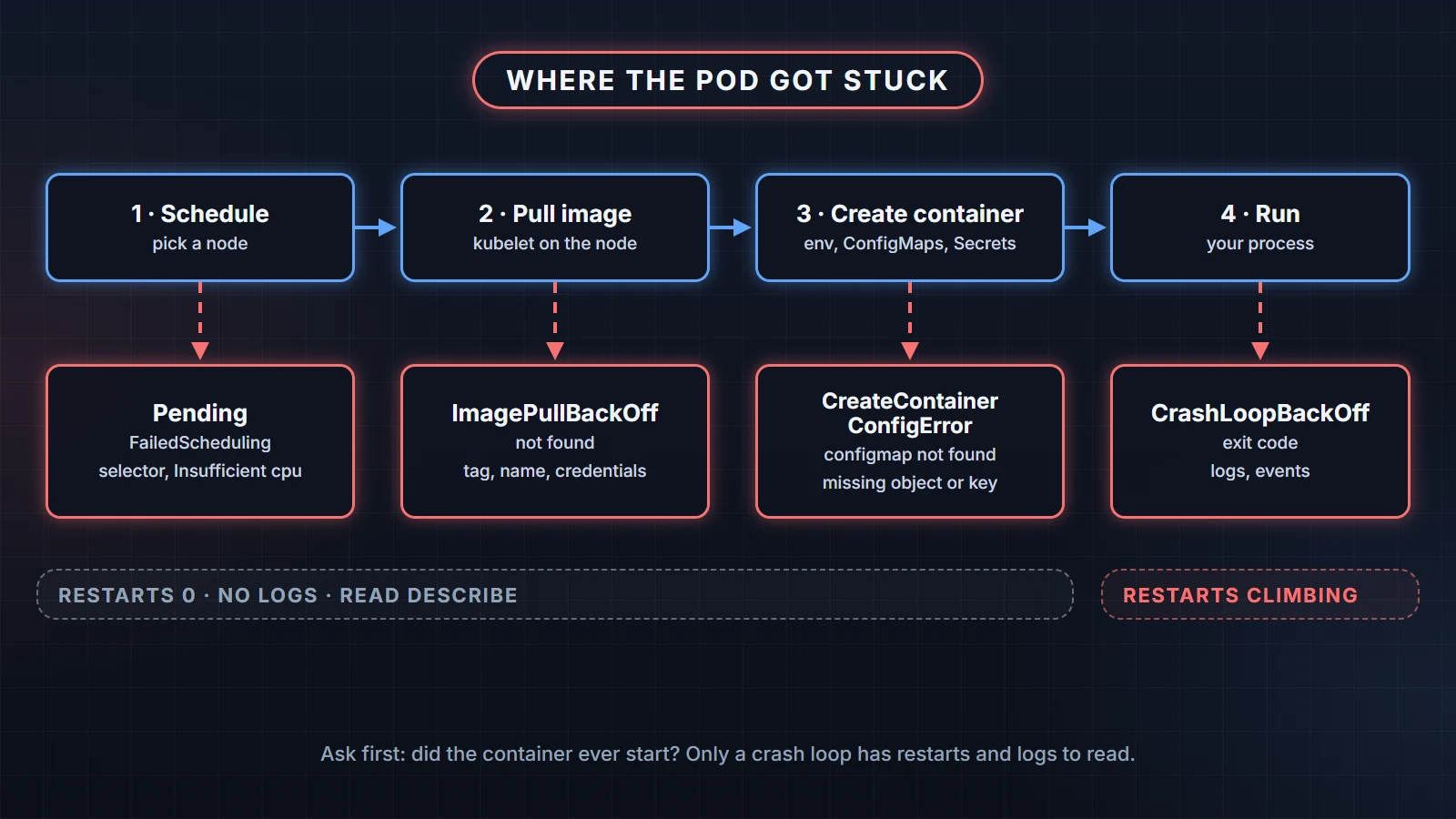
All four keep a pod from running, at different stages. Ask first: did the container ever start?
- Pending: never placed on a node. Event
FailedScheduling, for example anodeSelectornothing matches orInsufficient cpu. - ImagePullBackOff: the image cannot be pulled.
not foundmeans a wrong tag;pull access deniedmeans a wrong repository name or missing credentials. - CreateContainerConfigError: the kubelet cannot build the container's configuration: an environment variable that refers to a missing ConfigMap, Secret or key, or
runAsNonRootwith a root image. - CrashLoopBackOff: the container started, or the runtime tried, and exited. RESTARTS climbs.
Three separate runs from the guide:
$ kubectl get pods -n shop
NAME       READY   STATUS             RESTARTS   AGE
web-name   0/1     ImagePullBackOff   0          26s
web-tag    0/1     ImagePullBackOff   0          26s
$ kubectl get pods -n shop -l app=checkout
NAME                       READY   STATUS                       RESTARTS   AGE
checkout-f5899b7b8-dq6bq   0/1     CreateContainerConfigError   0          21s
$ kubectl describe pod -n shop -l app=checkout | sed -n '/Events:/,$p'
...
  Warning  Failed     5s (x3 over 20s)  kubelet            spec.containers{checkout}: Error: configmap "checkout-config" not found
$ kubectl get pods -n shop -l app=orders
NAME                      READY   STATUS    RESTARTS   AGE
orders-5c5f44757d-jx4wc   0/1     Pending   0          8s
$ kubectl describe pod -n shop -l app=orders | sed -n '/Node-Selectors:/,/Tolerations:/p;/Events:/,$p'
...
  Warning  FailedScheduling  9s    default-scheduler  0/1 nodes are available: 1 node(s) didn't match Pod's node affinity/selector. preemption: 0/1 nodes are available: 1 Preemption is not helpful for scheduling.
RESTARTS 0 in all three: none ran your code, so kubectl describe holds the answer, not the logs.
Stop crash loops before they reach the cluster
- Fail fast: validate required settings at start-up and name the missing one.
- Render manifests in CI (
kubectl kustomizeorhelm template) and check every required variable is set. - Treat API warnings as failures:
kubectl apply --dry-run=serverflags mistakes such as memory512m(0.512 bytes). - Set
minReadySeconds: in the guide, 30 seconds stopped a release that crashed 20 seconds after becoming Ready, and the old pods kept serving.
Go deeper
This post covers the crash-loop slice of Kubernetes Troubleshooting Scenarios: 60 failure scenarios in nine sections, from pods not starting, resources and probes to networking, storage, config and Secrets, nodes, Helm and Argo CD, and RBAC. Each was reproduced on kind with Kubernetes 1.37.0, every output in it was really run, and each adds the common trap, a tip and an interview follow-up.
See the Kubernetes troubleshooting guide; its product page has a free 5-page sample. To see where it fits with Linux, CI/CD and Terraform, follow the DevOps and Cloud learning path.
Related reading
- Linux commands for DevOps interviews
- GitHub Actions CI/CD for a Spring Boot app
- Spring Boot production checklist
FAQ
What does CrashLoopBackOff mean in Kubernetes?
A container keeps exiting, and the kubelet is waiting before restarting it again. The status does not say why; the exit code, the logs and the events do.
How do I see the logs of a pod in CrashLoopBackOff?
Run kubectl logs <pod> (with -c <container> for multi-container pods) and also kubectl logs <pod> --previous. During the back-off wait, the crashed container may still be the current one, so plain kubectl logs can be the one that shows the crash.
What does exit code 137 mean in Kubernetes?
128 + 9: the process got SIGKILL. Usually an out-of-memory kill (OOMKilled on a cgroup v2 node) or a kill after a failed liveness probe, which leaves a Killing event.
How long does Kubernetes wait before restarting a crashed container?
By default 10 seconds, then double each time, up to 300 seconds (5 minutes). After 10 minutes of clean running, the delay resets. The cap can be lowered per node in the kubelet configuration.
What is the difference between CrashLoopBackOff and ImagePullBackOff?
ImagePullBackOff means the image could not be pulled, so nothing started: check the name, tag and pull credentials. CrashLoopBackOff means the container started and exited: check the exit code and logs.