 Tech Tribers
GitHub Actions for Spring Boot: CI/CD Pipeline with Maven
Build and test a Spring Boot app with Maven in GitHub Actions, then deploy it safely: caching, test reports, least privilege, pinned actions, concurrency and OIDC.
New13 min read
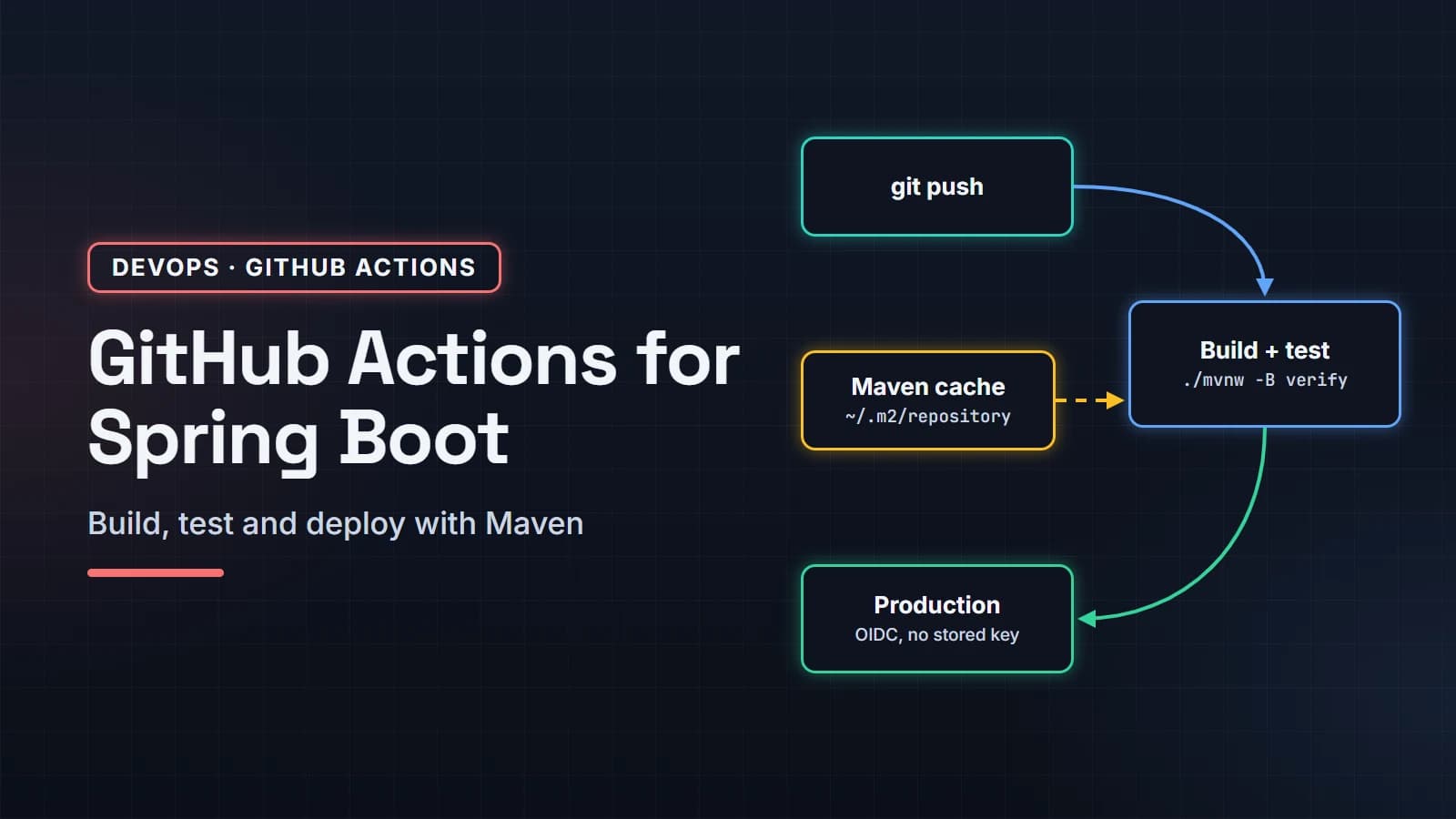
Setting up GitHub Actions for a Spring Boot app takes one YAML file to start, then a few deliberate choices: build and test with Maven, cache dependencies, keep test reports, lock the workflow down, and deploy without storing a cloud key in GitHub.
It is for Java and Spring developers moving towards DevOps, or expecting "walk me through your CI/CD pipeline" in an interview. You will learn how to split unit and integration tests (and why -DskipTests changed meaning in Failsafe 3.6.0), how !cancelled() saves your test reports, and how permissions, pinned actions, concurrency, environments and OIDC protect the path to production.
Every workflow below passed actionlint 1.7.12, a linter for workflow files. The outputs come from real runs: workflows with act 0.2.98, which runs GitHub Actions workflows locally in Docker, and builds with Maven 3.10.2 on Temurin 25. The example project is a small plain Maven service called orders, not a Spring Boot app. Nothing in the pipeline depends on Spring Boot itself, so a Spring Boot app built with Maven goes through the same steps.
In this guide
- The pipeline at a glance
- Step 1: build and test on every push
- Step 2: run unit and integration tests separately
- Step 3: keep test reports when tests fail
- Step 4: lock the workflow down
- Step 5: deploy with environments and OIDC
From the guide: this article draws on the GitHub Actions, supply-chain security, Java CI and deployment sections of CI/CD Interview Questions: GitHub Actions and Jenkins, where every command and output was really run. Read the free 5-page sample on the guide page.
The pipeline at a glance
Continuous integration (CI) means every change is built and tested automatically, so main stays in a working state. Continuous delivery (CD) adds that every passing change can go to production at any time, and a person decides when. Here CI runs on every push; CD runs only for commits on main.
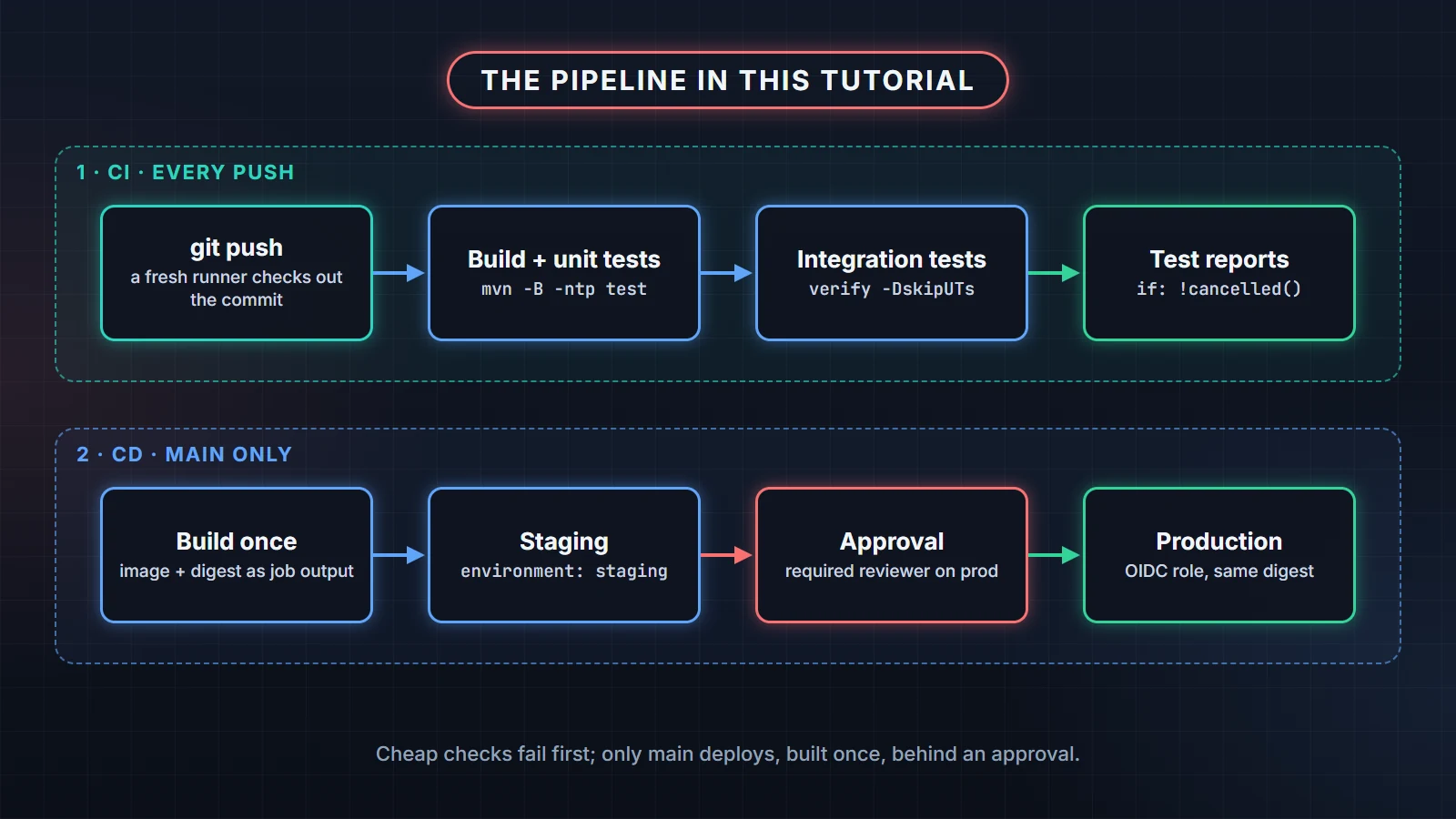
The order is about fast feedback. A job that lists other jobs under needs runs only if they succeeded, so a failed unit test stops the expensive stages behind it. Give every job a timeout-minutes too; the default is 360 minutes, so a hung test can hold a runner for six hours.
Step 1: build and test on every push
Workflows live in .github/workflows/. This is the guide's minimal Java CI workflow:
name: ci
on: push

permissions:
  contents: read

jobs:
  build:
    runs-on: ubuntu-latest
    steps:
      # full 40-character commit SHA, with the tag as a comment for humans and Dependabot
      - uses: actions/checkout@3d3c42e5aac5ba805825da76410c181273ba90b1 # v7.0.1
      - uses: actions/setup-java@d1374f8ac74474200d16ef8ecee22c7ae7a51880 # v6.3.0
        with:
          distribution: temurin
          java-version: "25"
      - run: ./mvnw -B verify
permissions: contents: readlimits the job's automatic token to reading the code (more in Step 4).actions/checkoutandactions/setup-javafetch the commit and install Temurin JDK 25. The long hashes pin each action to one exact commit../mvnw -B verifyruns the Maven Wrapper, which pins the Maven version in.mvn/wrapper/maven-wrapper.properties, so CI and laptops build with the same Maven.-Bis batch mode (no colours or prompts).
This workflow is a static check only (actionlint): running it needs a real repository.
Cache Maven dependencies
Downloads take most of the time in many Java builds. setup-java has a cache built in: add cache: maven under its with:. In v6.3.0 it caches ~/.m2/repository under a key made from the runner OS, the architecture and a hash of every pom.xml, .mvn/wrapper/maven-wrapper.properties and .mvn/extensions.xml, so a dependency change gives a new key.
- A cache is only for speed. Entries unused for 7 days are removed and a repository gets 10 GB by default. The build must still work on a miss.
- Scope: a run restores caches from its own branch, the pull request's base branch and the default branch.
- Keep your own SNAPSHOT jars out, or a build can stay green with a module that no longer builds from source.
- Never pass the built jar through the cache. Build outputs travel as artifacts or as an image in a registry.
Step 2: run unit and integration tests separately
Maven runs unit tests with the Surefire plugin in the test phase. Integration tests, such as ContainerIT here (it starts a container with Testcontainers), run with the Failsafe plugin, whose verify goal fails the build if any of them failed.
One ./mvnw verify is often enough. Split it when integration tests are slow. Run both commands as steps of one job, so the second reuses target/ and compiles nothing twice:
# pom.xml: Surefire reads a property of its own, so integration tests are not affected
#   <properties><skipUTs>false</skipUTs></properties>
#   <plugin><artifactId>maven-surefire-plugin</artifactId>
#     <configuration><skipTests>${skipUTs}</skipTests></configuration></plugin>
#   <plugin><artifactId>maven-failsafe-plugin</artifactId> ... integration-test + verify goals

# stage "Unit tests" (fresh checkout)
mvn -B -ntp test

# stage "Integration tests" (same workspace)
mvn -B -ntp verify -DskipUTs
skipUTs is not a Maven or Surefire property: it is a name this pom defines (default false) and passes to Surefire's skipTests, so -DskipUTs on the command line turns off only the unit tests. The real run, with Surefire and Failsafe 3.6.1 (filtered with grep; -ntp hides download progress):
$ mvn -B -ntp test | grep -E "^\[INFO\] --- |Tests run:|Tests are skipped|Nothing to compile|Compiling|BUILD"
...
[INFO] Compiling 1 source file with javac [debug release 25] to target/classes
...
[INFO] Compiling 2 source files with javac [debug release 25] to target/test-classes
[INFO] --- surefire:3.6.1:test (default-test) @ orders ---
[INFO] Tests run: 1, Failures: 0, Errors: 0, Skipped: 0, Time elapsed: 0.204 s -- in com.acme.orders.PriceTest
...
[INFO] BUILD SUCCESS
$ mvn -B -ntp verify -DskipUTs | grep -E "^\[INFO\] --- |Tests run:|Tests are skipped|Nothing to compile|Compiling|BUILD"
...
[INFO] Nothing to compile - all classes are up to date.
...
[INFO] Nothing to compile - all classes are up to date.
[INFO] --- surefire:3.6.1:test (default-test) @ orders ---
[INFO] Tests are skipped.
[INFO] --- jar:3.5.1:jar (default-jar) @ orders ---
[INFO] --- failsafe:3.6.1:integration-test (default) @ orders ---
[INFO] Tests run: 1, Failures: 0, Errors: 0, Skipped: 0, Time elapsed: 9.953 s -- in com.acme.orders.ContainerIT
...
[INFO] BUILD SUCCESS
The first command compiled and ran PriceTest. The second compiled nothing, skipped Surefire and ran only ContainerIT.
The -DskipTests trap since Failsafe 3.6.0
Why a custom property instead of -DskipTests? Before Failsafe 3.6.0, -DskipTests skipped integration tests as well. Since 3.6.0 it skips only Surefire, as the Failsafe page on skipping tests says. An old "package only, skip tests" step now quietly runs every integration test: a check against this project with -DskipTests ran ContainerIT.
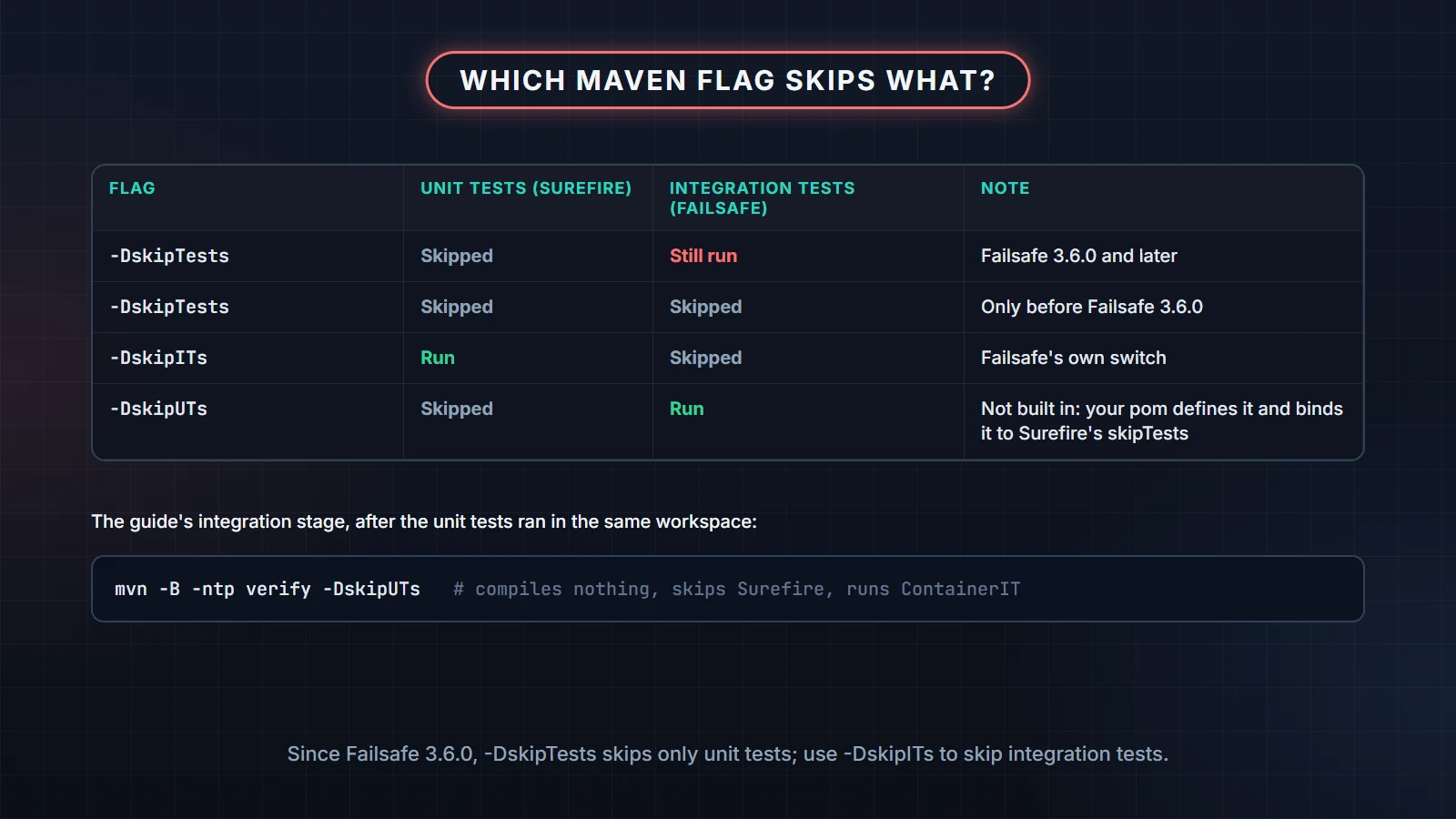
-DskipTests: skips unit tests; with Failsafe 3.6.0 or later, integration tests still run.-DskipITs: Failsafe's own switch; skips only integration tests.-DskipUTs: works only because the pom above defines it, the same on any Failsafe version.-Dmaven.test.skip=truealso skips compiling the tests.
Step 3: keep test reports when tests fail
A step without a status function in its if gets an implicit success(). So when the tests fail, every later step is skipped, including the report upload you need. GitHub's docs recommend !cancelled() over always() for reporting, because always() keeps running even after someone presses cancel. The guide's run, shortened:
name: ci
on: push
jobs:
  test:
    runs-on: ubuntu-latest
    steps:
      - name: Unit tests
        id: tests
        run: exit 1
      - name: Build jar                      # implicit if: success()
        run: echo "not printed"
      - name: Upload test report
        if: ${{ !cancelled() }}              # failed or succeeded, but not cancelled
        run: echo "uploading report"
  deploy:
    needs: test                              # implicit success(): skipped
    runs-on: ubuntu-latest
    steps:
      - run: echo "not printed"
  notify:
    needs: [test, deploy]
    if: ${{ always() }}
    runs-on: ubuntu-latest
    steps:
- run: echo "test=${{ needs.test.result }} deploy=${{ needs.deploy.result }}"$ act push -W .github/workflows/ci.yml
...
[ci/test] exitcode '1': failure
...
[ci/test] | uploading report
...
[ci/notify] | test=failure deploy=skipped
...
Error: Job 'test' failedBuild jar never ran, the report step did, deploy was skipped, and notify reported both results. In a real workflow the report step is actions/upload-artifact@v7 with target/surefire-reports and target/failsafe-reports; act 0.2.98 rejects v7, so these points are documented, not run:
- Set
if-no-files-found: error; the default only warns, so a wrong path gives a green job and no report. - Artifacts are immutable since v4 (see GitHub's docs on storing data), so matrix jobs need unique names. Retention is 90 days by default.
- GitHub has no built-in test report view: upload the XML and show failures with a test reporter action or the job summary.
Step 4: lock the workflow down
A pipeline runs third-party code with access to your repository and, later, production. Four habits limit the damage.
Give GITHUB_TOKEN least privilege
GITHUB_TOKEN is a token GitHub creates for each job, scoped to the repository, that expires when the job ends. Its default rights come from a repository or organisation setting (read-only since February 2023 for new setups; older organisations may still grant write). The permissions key sets them explicitly.
- Start from
permissions: {}at workflow level and grant each job what it needs:contents: readto check out,packages: writeonly for the job that pushes an image,id-token: writeonly for the OIDC deploy job. - Once you list any scope, every unlisted scope becomes
none. Adding onlyid-token: writeat workflow level therefore breaksactions/checkoutin every job. - In pull requests from forks the token is read-only, whatever the workflow asks for.
Pin actions to a full commit SHA
Whoever controls an action's repository can point a tag such as @v7 at different code. That happened to tj-actions/changed-files in March 2025 (CVE-2025-30066): its tags were repointed to a commit that dumped secrets into workflow logs, and only workflows pinned to an older SHA were safe.
- Pin with the full 40-character SHA and the tag as a comment, as in Step 1. A short SHA or a branch such as
@mainis not a pin. - A
package-ecosystem: github-actionsentry in.github/dependabot.ymlkeeps pins current: Dependabot updates the SHA and the comment together, andcooldown.default-dayslets a release age first. - Since October 28, 2026, workflow lockfiles (
.github/workflows/actions.lock, made with thegh actions-lockextension) are generally available: workflows keep readable tags while runs use locked commits. - Pinning freezes code; it does not vet it. Review action updates like dependency updates.
Keep untrusted text out of run scripts
A ${{ }} expression is pasted into the script text before bash runs, without escaping. A pull request title is written by its author, so run: echo "${{ github.event.pull_request.title }}" lets a crafted title run commands on your runner. Pass such values through env: and use "$TITLE" in the script, so the shell sees data, not code. actionlint flags the unsafe pattern, and GitHub's secure use reference covers it.
Cancel outdated runs, never a deploy
concurrency takes a group name and lets only one run (or job) of that group run at a time. One more can wait behind it; if another arrives, it takes the waiting slot. cancel-in-progress: true stops the running one instead. The guide uses both levels:
- Workflow level:
group: ${{ github.workflow }}-${{ github.event.pull_request.number || github.ref }}withcancel-in-progress: ${{ github.event_name == 'pull_request' }}. A new push to a pull request cancels its outdated run; runs onmainare never cancelled. - Job level on the deploy job:
group: deploy-prodwithcancel-in-progress: false. One deploy at a time, across every workflow that uses that name.
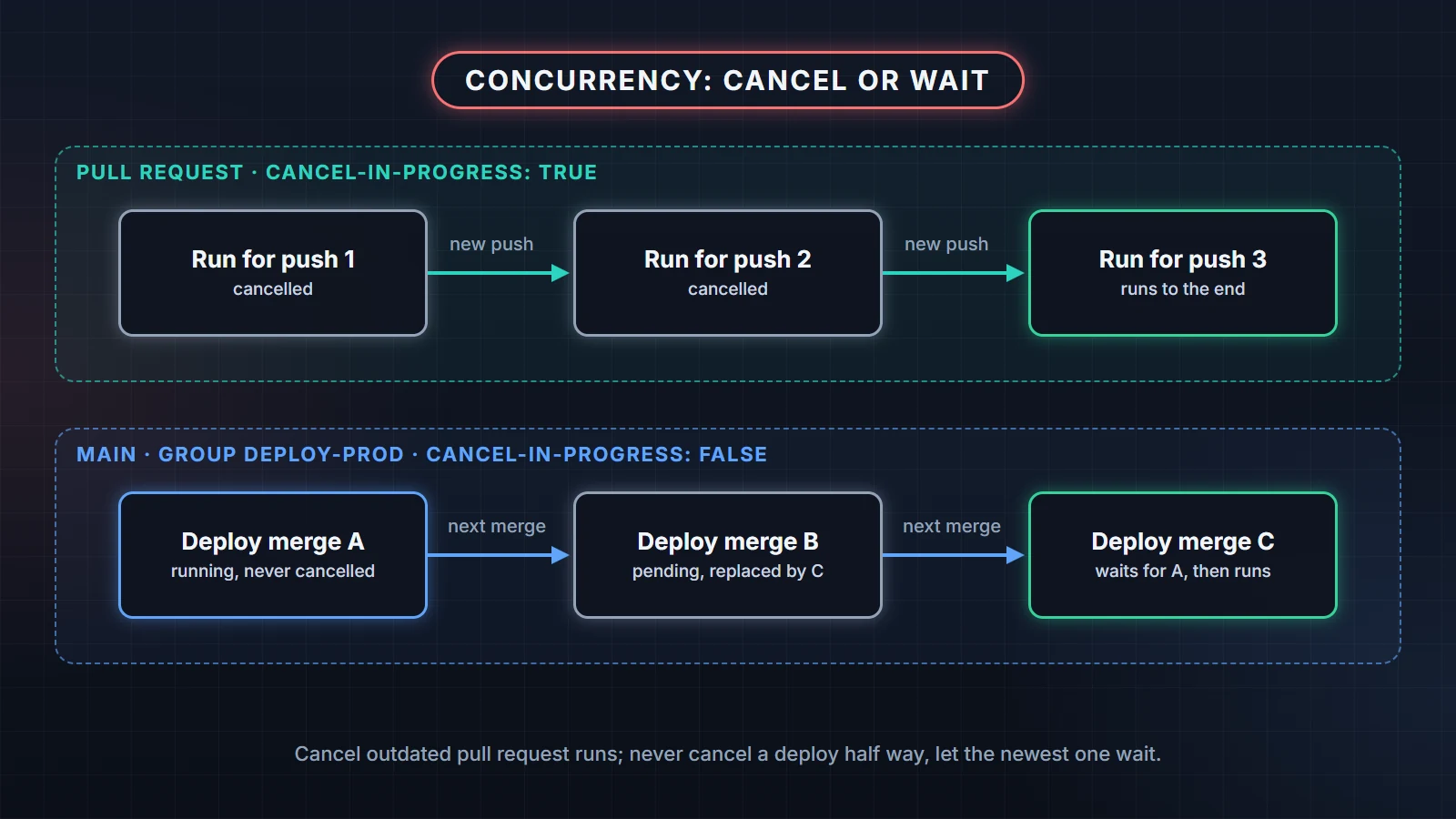
A deploy cancelled half way can leave an environment or a migration in an unknown state. Use the same deploy-prod group in the pipeline, hotfix and rollback workflows: a lock only helps when everyone takes it. (Static check only; cancellation needs real GitHub.)
Step 5: deploy with environments and OIDC
Build once, deploy the same artifact
Build the image once per commit and identify it by its digest, the content hash. The build job exposes the digest as a job output; each deploy job reads it from needs.build.outputs and deploys image@sha256:.... Only configuration (environment variables, Spring profiles) changes between environments. Rebuilding per environment means production runs bytes that were never tested.
Gate production with an environment
A job that names an environment waits until that environment's protection rules pass. Here staging deploys straight away, and prod waits for a reviewer before it gets its own variables and secrets:
name: deploy
on:
  push:
    branches: [main]

jobs:
  staging:
    runs-on: ubuntu-latest
    environment: staging
    steps:
      - run: echo "deploy to ${{ vars.CLUSTER_NAME }}"

  prod:
    needs: staging
    runs-on: ubuntu-latest
    environment:
      name: prod                       # required reviewers, branch rule, prod secrets
      url: https://orders.example.com  # shown on the run and the deployment
    steps:
      - name: Deploy
        env:
          DEPLOY_TOKEN: ${{ secrets.DEPLOY_TOKEN }}   # environment secret
run: ./deploy.sh --cluster "${{ vars.CLUSTER_NAME }}"- Required reviewers: up to six users or teams; one approval is enough. A wait timer can add up to 43,200 minutes (30 days).
- Deployment branches and tags: none, protected branches only, or selected patterns.
- Environment secrets reach only jobs that use the environment, after approval. Keep the production key there, not in repository secrets, which every job can read.
Availability in private repositories depends on your GitHub plan. Static check only: approvals and environment secrets exist only on GitHub.
Replace the stored key with OIDC
DEPLOY_TOKEN above is still a long-lived secret that can leak. With OpenID Connect (OIDC), the deploy job asks GitHub for a signed token that describes the job (this needs id-token: write). The cloud checks the token against a trust policy and returns short-lived credentials. Nothing is stored, so nothing can leak. AWS, Azure and Google Cloud support it.
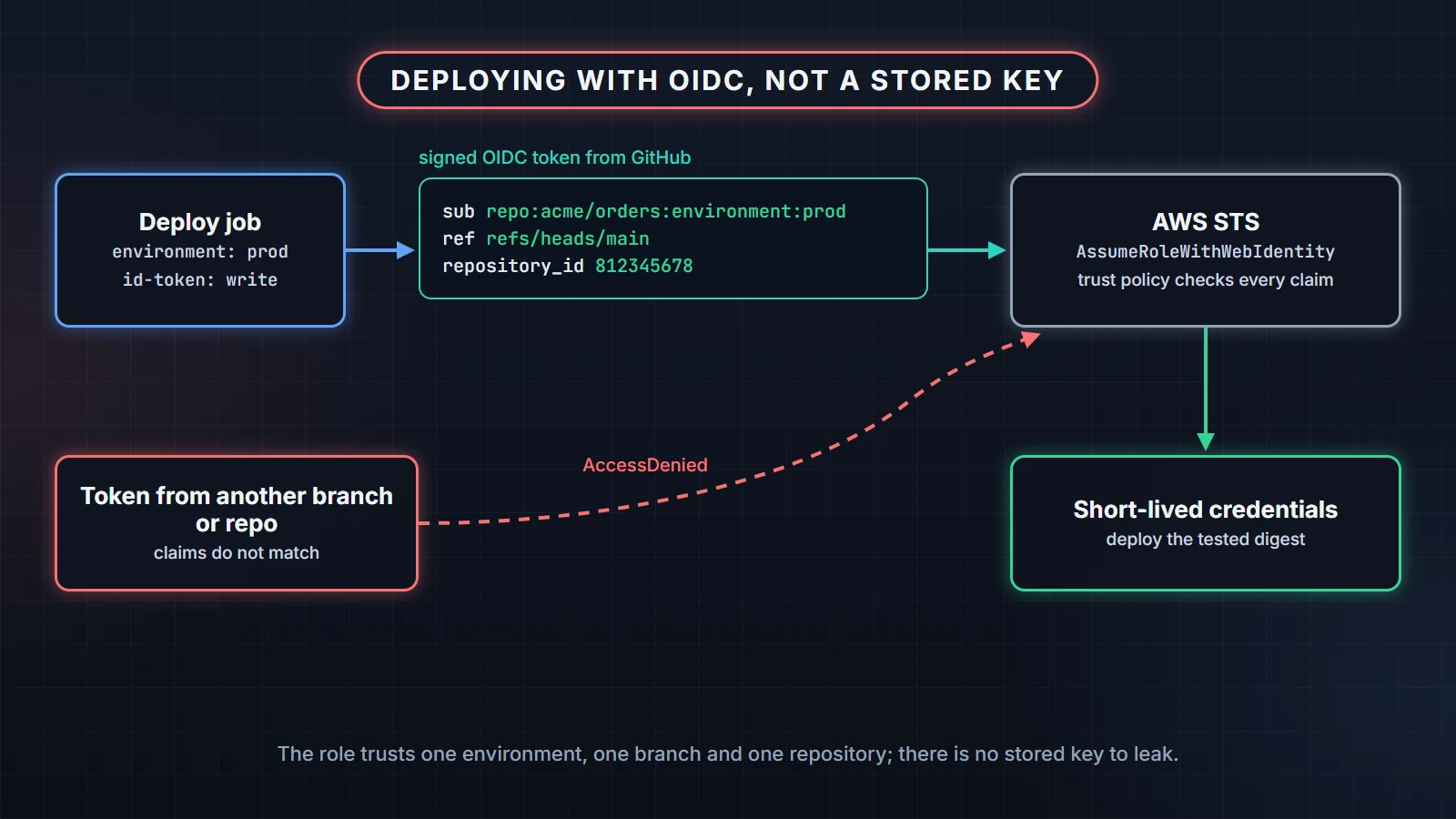
The trust policy is where the security lives. This is the guide's policy for an AWS production role (the IDs are examples; the JSON was validated for syntax only):
{
  "Version": "2012-10-17",
  "Statement": [
    {
      "Effect": "Allow",
      "Principal": {
        "Federated": "arn:aws:iam::111122223333:oidc-provider/token.actions.githubusercontent.com"
      },
      "Action": "sts:AssumeRoleWithWebIdentity",
      "Condition": {
        "StringEquals": {
          "token.actions.githubusercontent.com:aud": "sts.amazonaws.com",
          "token.actions.githubusercontent.com:sub": "repo:acme/orders:environment:prod",
          "token.actions.githubusercontent.com:ref": "refs/heads/main",
          "token.actions.githubusercontent.com:repository_id": "812345678",
          "token.actions.githubusercontent.com:job_workflow_ref": "acme/platform-workflows/.github/workflows/deploy.yml@refs/heads/main"
        }
      }
    }
  ]
}subfollows the environment. When a job usesenvironment: prod, the subject isrepo:ORG/REPO:environment:prodand no longer names the branch, so asubcondition expectingref:refs/heads/mainnever matches.- Check the branch separately with the
refclaim, pin the repository by its immutablerepository_id, and, with a central deploy workflow, requirejob_workflow_ref. AWS STS accepts these claims as condition keys (announced February 2, 2026). - Repositories created after July 15, 2026 use a default subject that includes owner and repository IDs. Print the claims of a real token before you write the policy; a guessed subject is the usual cause of
AccessDenied. - Never match only
audor a wildcard such asrepo:acme/*. The audience is the same public value for everyone, so it says nothing about your repository.
GitHub's OIDC reference documents the claims and subject formats.
Plan the rollback before you need it
A rollback redeploys the exact artifact that ran before, by digest, with no checkout and no build. Reverting the commit and rerunning the pipeline is really a roll forward: it builds new bytes with today's base image and dependencies. Rollback also needs registry retention for release images and schema changes that stay backward compatible for a release.
Go deeper
The guide CI/CD Interview Questions: GitHub Actions and Jenkins has 75 questions in eight sections, adding reusable workflows, artifact attestations, Jenkins declarative pipelines and shared libraries, Testcontainers in containerised agents, blue-green and canary deployments, and troubleshooting scenarios. Every output in it was really run: workflows with act, pipelines on Jenkins 2.580.2 LTS, builds with Maven 3.10.2.
See the guide on its product page, which has a free 5-page sample. For the route from Linux to Terraform and Kubernetes, follow the DevOps and Cloud learning path.
Related reading
- Spring Boot production checklist
- Kubernetes CrashLoopBackOff: how to fix it
- Terraform interview questions
FAQ
How do I cache Maven dependencies in GitHub Actions?
Add cache: maven to the actions/setup-java step. It caches ~/.m2/repository under a key that changes when your pom.xml files or wrapper settings change. The build must still work on a miss.
Does -DskipTests skip integration tests?
Not any more. Since Maven Failsafe 3.6.0, -DskipTests skips only the Surefire unit tests. Use -DskipITs to skip Failsafe's integration tests. Before 3.6.0, -DskipTests skipped both.
What permissions does GITHUB_TOKEN need to build a Maven project?
Only contents: read, to check out the code. Grant packages: write only to the job that pushes an image and id-token: write only to the OIDC deploy job. Listing any scope sets every unlisted scope to none.
Why should you pin GitHub Actions to a commit SHA?
A tag can be moved to different code, as happened with tj-actions/changed-files in March 2025; a full commit SHA cannot. Keep the version as a comment and let Dependabot update both, or use a workflow lockfile.
How does OIDC work between GitHub Actions and AWS?
The job requests a signed token from GitHub (it needs id-token: write) and calls sts:AssumeRoleWithWebIdentity. AWS checks claims such as sub, ref and repository_id against the role's trust policy and returns short-lived credentials. No key is stored in GitHub.