 Tech Tribers
Terraform Interview Questions: 20 Most Asked, With Real Outputs
The 20 Terraform questions interviews ask most, from init, plan and apply to state locking, modules, workspaces, moved blocks and drift, with short answers.
New14 min read
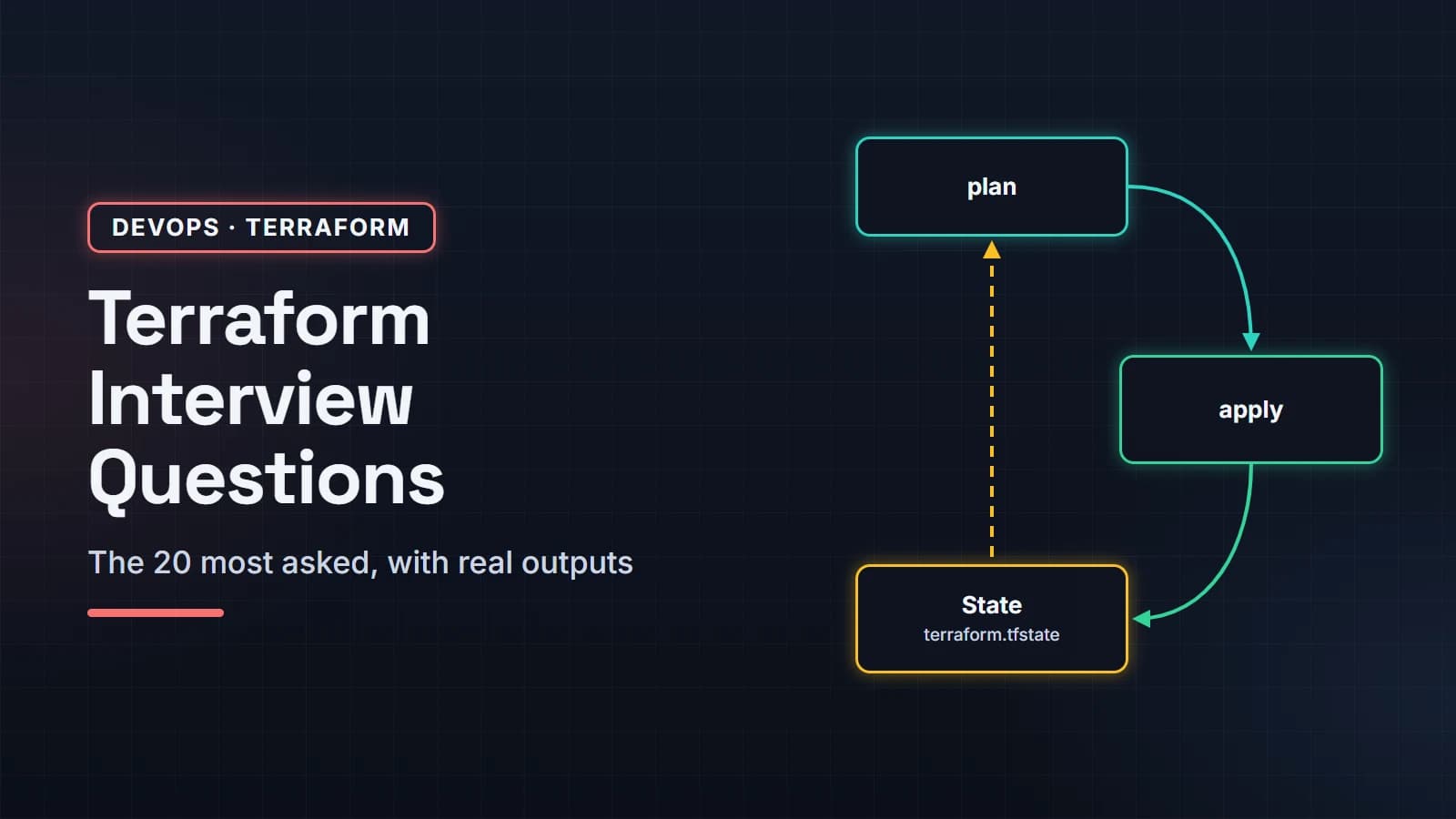
Terraform interview questions follow a pattern: almost every DevOps or cloud interview checks the same twenty or so ideas, from init, plan and apply to state locking, modules, workspaces and refactoring without downtime. Explain those clearly, with one real example each, and you are ready for most rounds.
This post is for developers moving into DevOps or platform work, including Java and Spring developers who have used Terraform a little. Each question gets a short, correct answer and the point interviewers listen for. The real terminal outputs come from runs with Terraform 1.17.2.
In this guide
- Core workflow: init, plan, apply and reading a plan
- State, backends and locking
- Variables, loops and modules
- Environments: workspaces or directories
- Lifecycle, refactoring and drift
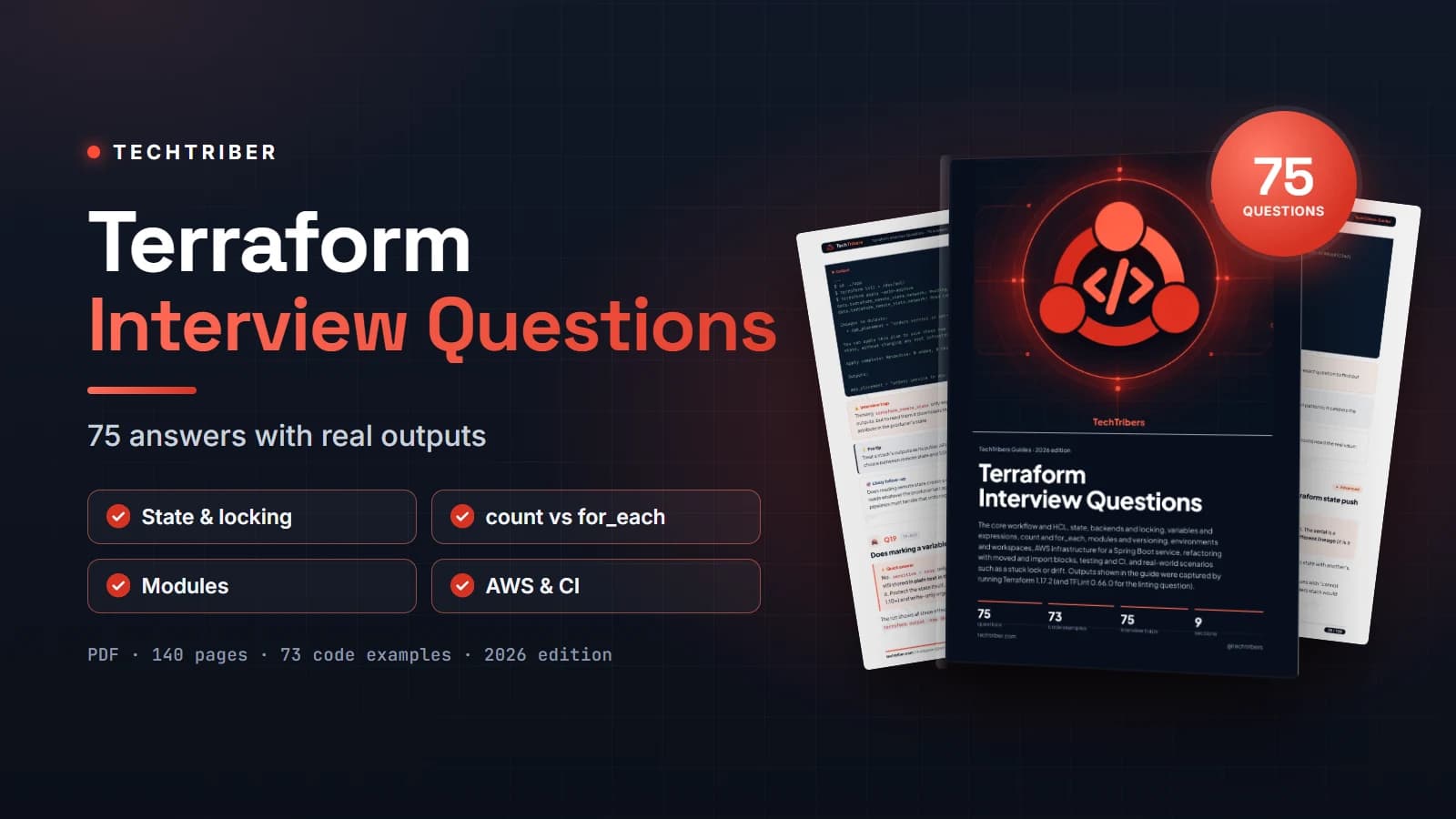
From the guide: this article draws on the core workflow, state, modules, workspaces and refactoring sections of Terraform Interview Questions, where every command and output was really run. Read the free 5-page sample on the guide page.
Core workflow: init, plan, apply and reading a plan
1. What is Terraform, and how is it different from Ansible and CloudFormation?
Terraform is a declarative infrastructure-as-code tool. You write the end state in HCL (HashiCorp Configuration Language); Terraform diffs it against its state file and the live APIs and changes only what differs. Plugins called providers connect it to AWS, Azure, Kubernetes, GitHub and many more.
- Ansible connects to machines, usually over SSH, and runs tasks in order. It keeps no record of what it created, so removing a task does not remove anything.
- CloudFormation is declarative too, but AWS-only, and AWS holds the state for you.
The key difference: remove a resource block and Terraform plans to destroy it, because the state says it owns it.
2. What do terraform init, plan and apply each do?
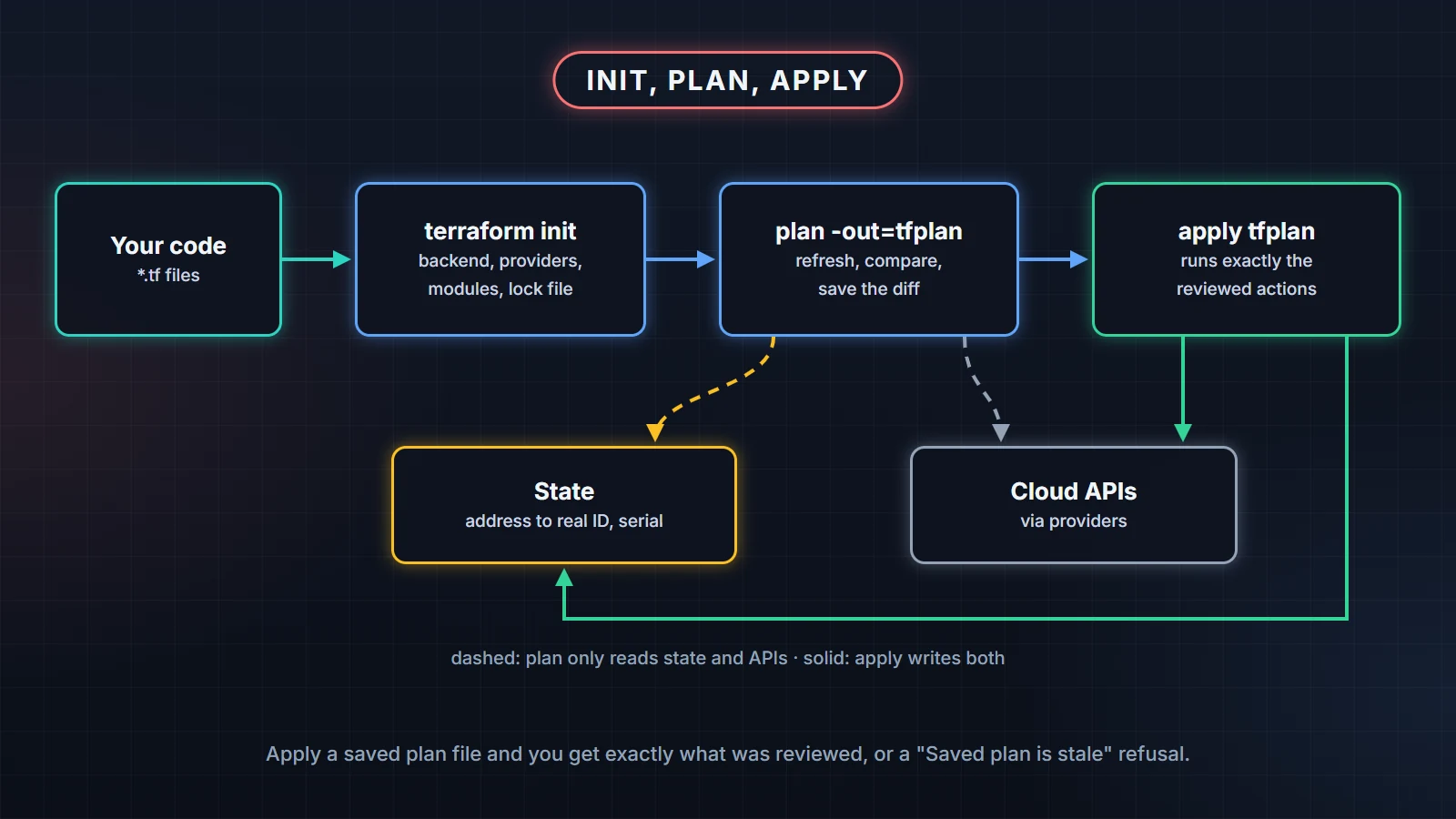
init prepares the working directory: it configures the backend (where state lives), downloads providers and modules, and writes the lock file. plan refreshes what Terraform knows about real resources, compares that with the code and prints the changes. It changes nothing. apply carries out a plan: a fresh one that asks for yes, or a saved plan file exactly as it was reviewed.
$ terraform init
...
- Installing hashicorp/random v3.9.1...
- Installed hashicorp/random v3.9.1 (signed by HashiCorp)
...
Terraform has been successfully initialized!
...
$ terraform plan -out=tfplan
...
  # random_pet.server will be created
  + resource "random_pet" "server" {
      + id        = (known after apply)
      + length    = 2
      + separator = "-"
    }

Plan: 1 to add, 0 to change, 0 to destroy.
...
Saved the plan to: tfplan
...
$ terraform apply tfplan
random_pet.server: Creating...
random_pet.server: Creation complete after 0s [id=stirring-drake]

Apply complete! Resources: 1 added, 0 changed, 0 destroyed.
(known after apply) marks a value, such as an ID, that exists only after creation. Applying the saved file asked no question: the review happened at plan time.
3. What is a provider, and how does Terraform know which one to download?
A provider is a plugin that knows one API and exposes its objects as resource and data source types. Terraform finds the plugin through the source address in required_providers, for example hashicorp/aws, which means registry.terraform.io/hashicorp/aws. init then installs a version that satisfies the constraint and pins it in .terraform.lock.hcl.
Trap: the provider "aws" {} block installs nothing; it only configures the provider (region, credentials, default tags).
4. What is the difference between a resource and a data source?
Terraform owns a resource: it creates, changes and destroys it and records it in state. A data block only looks up an existing object, such as an AMI, another team's VPC or the current account ID. Delete a data block and nothing in the cloud is touched.
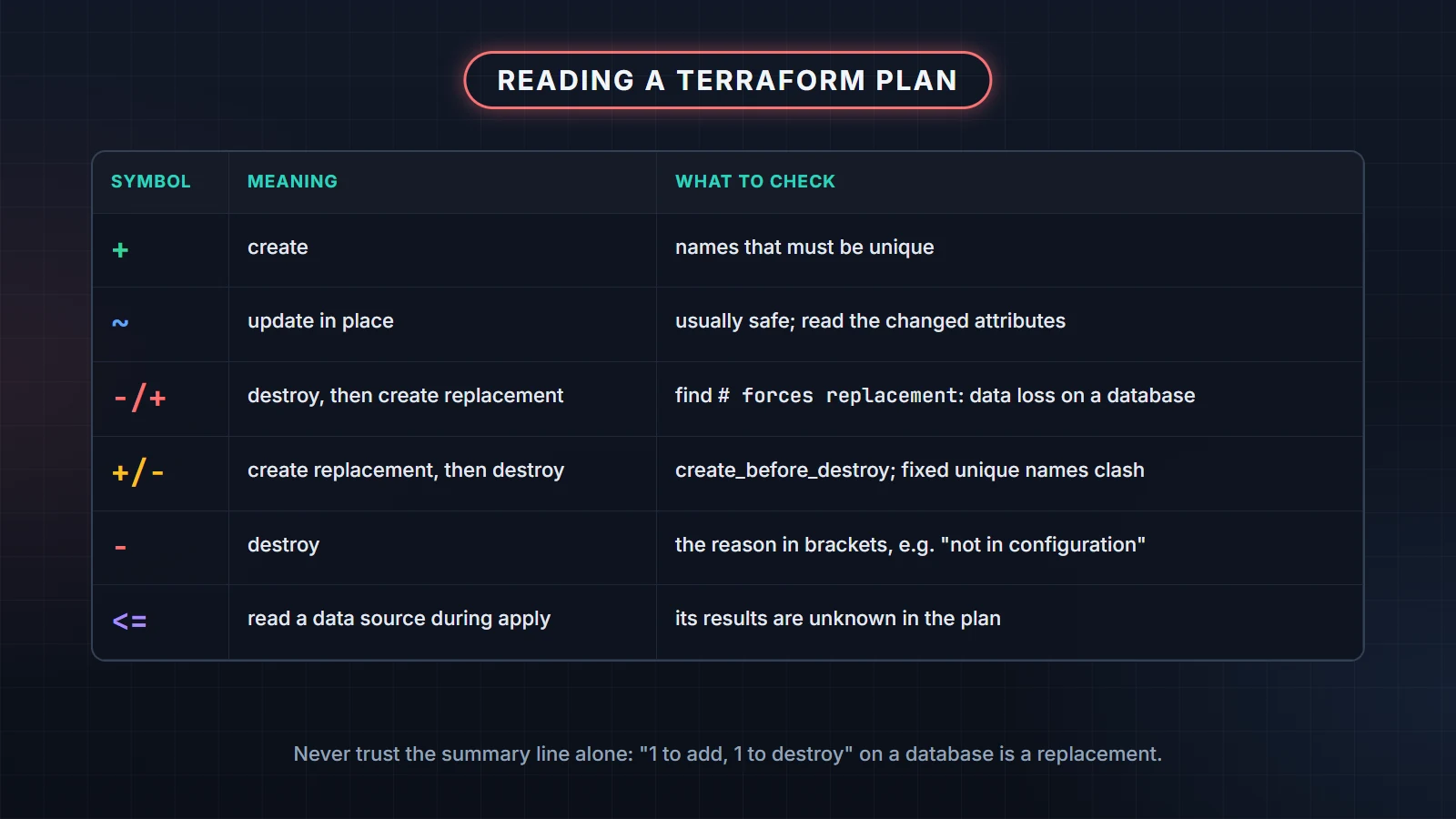
5. How do you read a plan, and what does "forces replacement" mean?
The symbol before each resource is the action:
+create,-destroy,~update in place.-/+destroy first, then create a replacement (the default order).+/-create the replacement first, then destroy the old one (withcreate_before_destroy).<=a data source that will be read during apply.
Inside a replaced resource, # forces replacement marks the argument that cannot change in place. The plan below was made by the real AWS provider 6.74.0, offline with dummy credentials, against a hand-written state for an existing unencrypted RDS instance. Turning on encryption means a new database:
$ terraform plan -refresh=false -var storage_encrypted=true
...
  # aws_db_instance.orders must be replaced
-/+ resource "aws_db_instance" "orders" {
      + address                               = (known after apply)
...
      ~ storage_encrypted                     = false -> true # forces replacement
...
        # (9 unchanged attributes hidden)
    }

Plan: 1 to add, 0 to change, 1 to destroy.
Do not stop at the summary line: on a database, one add plus one destroy means data loss. Find each must be replaced line and the argument behind it before anyone approves.
6. Why save a plan with -out, and what is a stale plan?
Without a saved plan, apply plans again and may pick up changes nobody reviewed: a teammate's merge, a new provider version, drift. terraform plan -out=tfplan stores the exact actions, and terraform apply tfplan runs only those. If the state changed after the plan was made, Terraform refuses with Error: Saved plan is stale. That refusal is the guarantee you want.
In CI, plan on the pull request with a read-only role, post the plan for review and apply the saved file after approval. plan -detailed-exitcode returns 0 for no changes, 1 for an error and 2 for changes. Store the plan file like a secret: it holds sensitive values in plain form.
State, backends and locking
7. What is Terraform state, and why does Terraform need it?
State is a JSON document that maps each resource address in your code to the real object's ID, with the attributes Terraform last saw. Without it, Terraform could not tell a new resource from one it created yesterday, or know what to destroy when a block is removed. Two fields to name: serial goes up on every write, and lineage is a UUID fixed when the state was created. Together they stop an older or unrelated state file from overwriting the current one. Never edit the state by hand.
8. Why should state live in a remote backend instead of Git or a laptop?
A remote backend such as S3, Azure Blob Storage, Google Cloud Storage or HCP Terraform gives one shared copy with locking, encryption at rest, access control and usually versioning. Git offers none of these: two people can apply from different commits, and every secret in the state lives on in the history. On AWS, use a dedicated, versioned, encrypted S3 bucket, created by its own bootstrap configuration, not by the stack it serves.
9. How does state locking work, and what changed in the S3 backend?
Terraform locks the state in the backend before any operation that might write it, and unlocks when done. A competing run fails immediately and prints the lock holder; with -lock-timeout it keeps retrying for that long instead.
Terraform 1.10 added a lock file for the S3 backend (use_lockfile = true): a .tflock object next to the state, written with an S3 conditional write, so no DynamoDB table is needed. It was experimental in 1.10. Terraform 1.11 made it generally available and deprecated dynamodb_table, and init now warns "Deprecated Parameter" if you still set it. Per the S3 backend documentation, locking stays opt-in (use_lockfile defaults to false): a backend that sets neither argument does not lock.
Here a long apply holds the lock while a second terminal plans. This run used LocalStack 3.8.1 in place of real S3; the 412 PreconditionFailed text is LocalStack's, and real S3 may word it differently:
$ terraform plan
╷
│ Error: Error acquiring the state lock
│
│ Error message: operation error S3: PutObject, https response error
│ StatusCode: 412, RequestID: 66759891-385e-4cc9-845a-2bcf836ede47, HostID:
...
│ api error PreconditionFailed: At least one of the pre-conditions you
│ specified did not hold
│ Lock Info:
│   ID:        8c788739-4732-f521-6ad0-7f6076cda2b2
│   Path:      tt-tfstate/orders/lockdemo/terraform.tfstate
│   Operation: OperationTypeApply
│   Who:       root@cacebe8ad354
│   Version:   1.17.2
│   Created:   2026-11-25 13:13:36.145309602 +0000 UTC
...
$ terraform plan -lock-timeout=60s
Acquiring state lock. This may take a few moments...
...
No changes. Your infrastructure matches the configuration.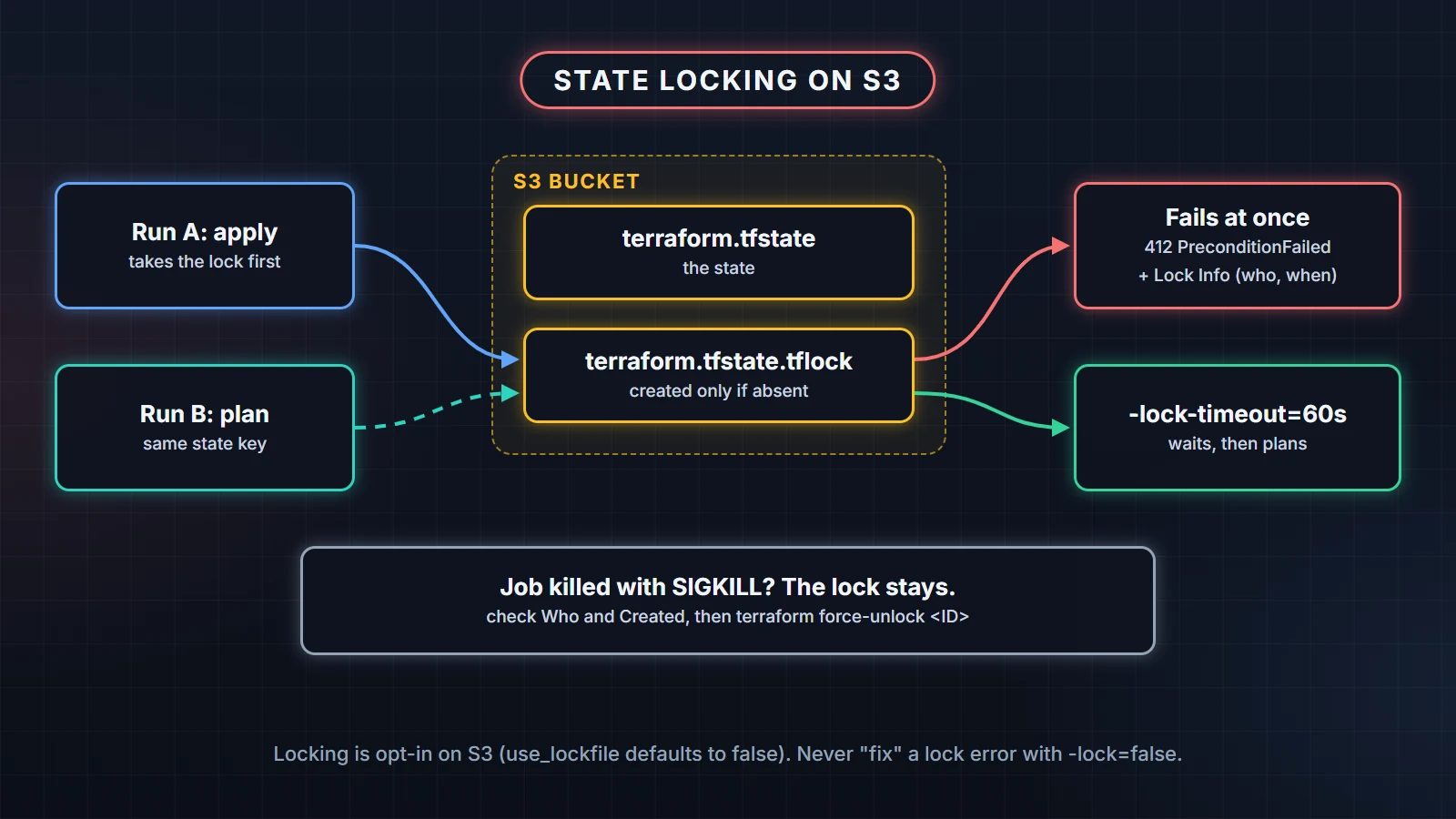
10. A CI job was killed and every plan now fails with a lock error. What do you do?
A job killed with SIGKILL, or a runner that vanishes, never releases its lock. Confirm the holder is really gone, using the CI system and the lock's Who and Created fields. Only then run terraform force-unlock <ID> with the ID from the error; it answers Terraform state has been successfully unlocked!. Then plan and read carefully: the killed apply may have created objects it never recorded. The wrong answer is -lock=false, which lets two writers save state over each other.
11. Does marking a variable sensitive keep it out of the state file?
No. The question checks whether you know the state itself holds secrets. sensitive = true only hides the value in CLI output:
$ export TF_VAR_db_password=S3cr3t-Pa55
...
$ terraform output
db_password = <sensitive>
$ terraform output -raw db_password; echo
S3cr3t-Pa55
$ grep -n "S3cr3t" terraform.tfstate
8:      "value": "S3cr3t-Pa55",
27:                "password": "S3cr3t-Pa55"
40:                "password": "S3cr3t-Pa55"
What does protect them: encrypted remote state that few people can read, letting RDS keep the master password in Secrets Manager (manage_master_user_password = true), and, for values that must never be stored, ephemeral values (Terraform 1.10+) fed to write-only arguments (1.11+), which plan and state never record.
Variables, loops and modules
12. What is the difference between a variable, a local and an output?
Think of a module as a function. A variable is a parameter, set from outside (tfvars, -var, TF_VAR_ environment variables or the calling module). A local is a named expression used inside the module, such as a name prefix or a tag map; callers cannot set it. An output is the return value: printed after apply and read by a parent module as module.name.output.
13. count or for_each: why does removing one item touch other resources?
count addresses instances by position ([0], [1]). Remove the first item of a three-item list and every later item shifts down: in the guide's run, Terraform plans to update [0] and [1] and destroy [2] "because index [2] is out of range for count". With a real resource whose name forces replacement, such as a queue, those updates become replacements. for_each addresses instances by key (["orders"]), so removing one key destroys only that instance.
Use for_each for collections of distinct things and count for "zero or one" toggles. for_each needs a map or a set of strings; pass a list and Terraform rejects it with Invalid for_each argument, so wrap it in toset().
14. What is a module, and how does a root module call a child module?
Any folder of .tf files is a module. The one you run Terraform from is the root module; its module blocks, each with a source and input values, call child modules. A child's resources get addresses like module.orders_queue.terraform_data.queue, and the caller can read only the child's outputs. Variables and locals are not inherited: pass in every value the child needs.
15. What is .terraform.lock.hcl, and should you commit it?
The dependency lock file records the exact provider version chosen and the checksums of its packages. Commit it, as the lock file documentation recommends, so every machine installs the same build. Plain init keeps the locked version even when newer ones match the constraint (Reusing version 3.6.3 of hashicorp/random from the dependency lock file); init -upgrade picks the newest allowed version and rewrites the file. It covers providers only; module versions are pinned by version or a Git ref.
Expect a follow-up on ~>, the pessimistic operator: only the rightmost given part may grow, so ~> 3.6 means >= 3.6, < 4.0 and ~> 3.6.0 means >= 3.6.0, < 3.7.0.
Environments: workspaces or directories
16. Workspaces or one directory per environment: how do you choose?
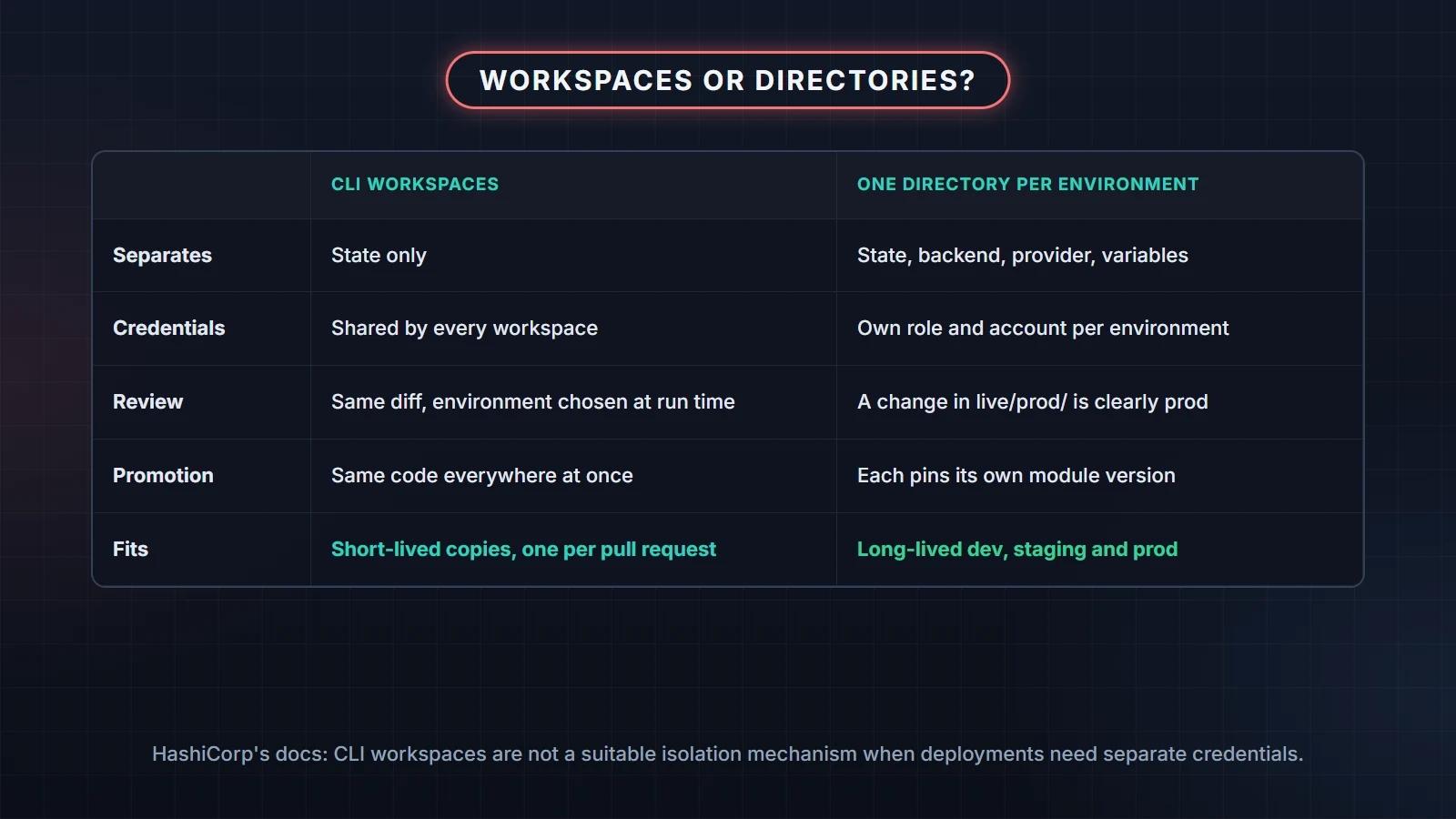
A CLI workspace gives one directory an extra, named state: terraform workspace new staging starts with an empty one, and terraform.workspace tells the code which is active. Only the state is separated; code, backend, credentials and variables stay shared. The workspaces documentation says they are not a suitable isolation mechanism when deployments need separate credentials and access controls.
- One directory per environment (dev, staging, prod): each has its own backend, AWS role and variables, a prod change is obvious in review, and each can pin a different module version for promotion.
- Workspaces: many short-lived, identical copies of one stack, such as one per pull request, where shared credentials are fine.
Cleanup tip: Terraform refuses to delete a workspace whose state still holds resources (Workspace is not empty), so destroy first, then delete.
Lifecycle, refactoring and drift
17. What do create_before_destroy, prevent_destroy and ignore_changes do?
create_before_destroybuilds the replacement before removing the old object (+/-), avoiding a gap for things like launch templates and security groups. It fails if both cannot exist at once, usually because of a fixed unique name, so pair it withname_prefix.prevent_destroymakes any plan that would destroy the resource fail withInstance cannot be destroyed, includingterraform destroy. It lives in code: delete the block and the protection is gone, so also use AWS-side settings such as RDSdeletion_protection.ignore_changesmakes Terraform leave the listed arguments alone after creation, for values another system sets, such as an autoscaler's desired count.
Lifecycle arguments take literal values only; prevent_destroy = var.protect fails with Variables may not be used here.
18. How do you rename a resource or move it into a module without destroying it?
Write a moved block from the old address to the new one (Terraform 1.1+). The plan then only re-labels the object in state; nothing is destroyed. The same block handles renames, moves into a module and count to for_each changes:
# the database now lives in a module
module "database" {
  source = "./modules/database"
  name   = "orders-db"
}

moved {
  from = terraform_data.db
  to   = module.database.terraform_data.this
}

# count -> for_each: map each old index to its new key
moved {
  from = terraform_data.queue[0]
  to   = terraform_data.queue["orders"]
}
The plan in the guide's run reports # terraform_data.db has moved to module.database.terraform_data.this and ends with Plan: 0 to add, 0 to change, 0 to destroy. After a pure refactoring, that is the only acceptable summary. Unlike terraform state mv, a moved block is reviewed and works for everyone who applies the code. The refactoring documentation advises shared modules to keep old moved blocks: removing one is a breaking change.
19. How do you bring existing resources under Terraform, or let go of one?
Since Terraform 1.5, an import block names the target address and the ID the provider imports by (a bucket name, for example). Write matching configuration, or let terraform plan -generate-config-out=generated.tf draft it, until the plan shows imports and nothing else. Terraform 1.7 added for_each on import blocks and the removed block: with lifecycle { destroy = false } it drops an object from state and leaves it running.
20. Someone changed a resource outside Terraform. How do you find and handle drift?
terraform plan -refresh-only lists what changed outside Terraform and proposes no fix. A normal plan shows what Terraform would change to make reality match the code. In the guide's run a managed file was deleted by hand: the refresh-only plan reported # local_file.app_config has been deleted and exited with code 2, and the normal plan wanted to recreate it. An AWS resource edited in the console would show ~ attribute changes instead.
Then choose per change: undo it by applying the normal plan, keep it by editing the code until the plan is empty, or accept it into state with terraform apply -refresh-only. Ask why first: a console fix made during an incident may be what keeps production up.
Go deeper
The Terraform Interview Questions guide has 75 questions in nine sections. Beyond this post it covers Terraform on AWS for a Spring Boot service (VPC, ECR, ECS on Fargate, RDS, EKS), terraform test with mock providers, TFLint, OIDC from GitHub Actions, keeping secrets out of state and more troubleshooting scenarios. Every plan and output in it was really run with Terraform 1.17.2 (against LocalStack for the S3-backend questions).
The product page has a free 5-page sample. To see where Terraform fits next to CI/CD, Linux and Kubernetes, follow the DevOps & Cloud learning path.
Related reading
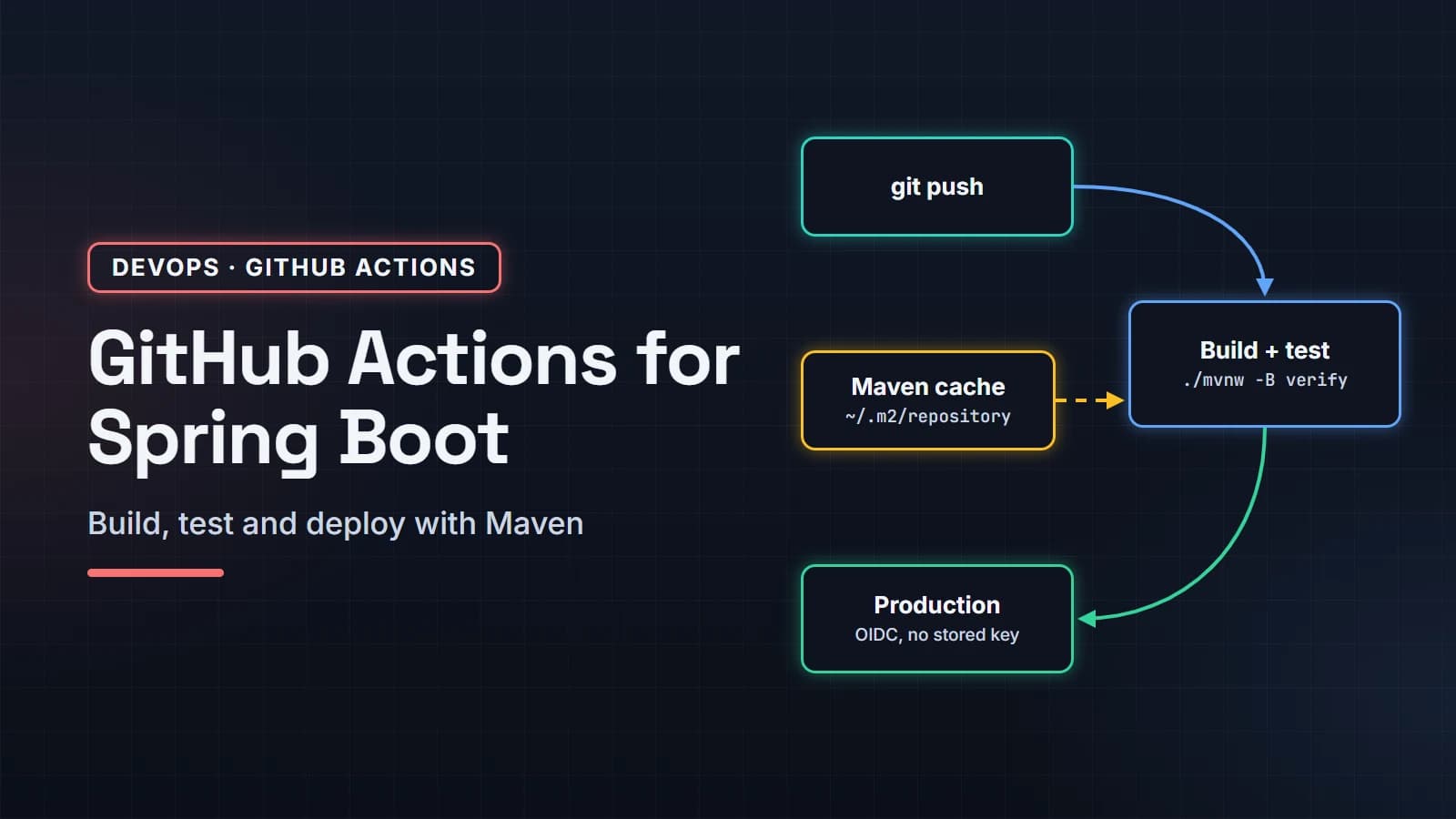
- GitHub Actions CI/CD for a Spring Boot app
- Linux commands for DevOps interviews
- Spring Boot production checklist
FAQ
What are the most asked Terraform interview questions?
init, plan and apply, state and locking, count versus for_each, modules and the lock file, workspaces, lifecycle arguments, moved and import blocks, and drift. Expect at least one scenario, such as a stuck lock or a plan that replaces a database.
Is Terraform state safe to store in Git?
No. Git gives no locking, and the plain-text secrets in the state stay in its history forever. Use a remote backend with encryption, access control, versioning and locking.
Does Terraform still need DynamoDB for S3 state locking?
No. The S3 backend can lock with a lock file in the bucket (use_lockfile = true), added in Terraform 1.10 and generally available since 1.11, which also deprecated dynamodb_table. During a migration you can set both until every pipeline runs a version with lock-file support.
What is the difference between terraform plan and terraform apply?
plan prints the changes without making them. apply makes them, from a fresh plan after you confirm or from a saved plan file exactly as reviewed.
When should I use Terraform workspaces?
For short-lived, identical copies of one stack, such as one per pull request. For dev, staging and prod, prefer one directory per environment, because workspaces share the backend and credentials.