 Tech Tribers
Spring AI RAG Tutorial: Chat with Your Documents Using PGVector
Build a Spring Boot 4 RAG service with Spring AI 2.0 and pgvector: ingest PDFs and Markdown, answer with cited sources, run on OpenAI or local Ollama, and test it.
New16 min read
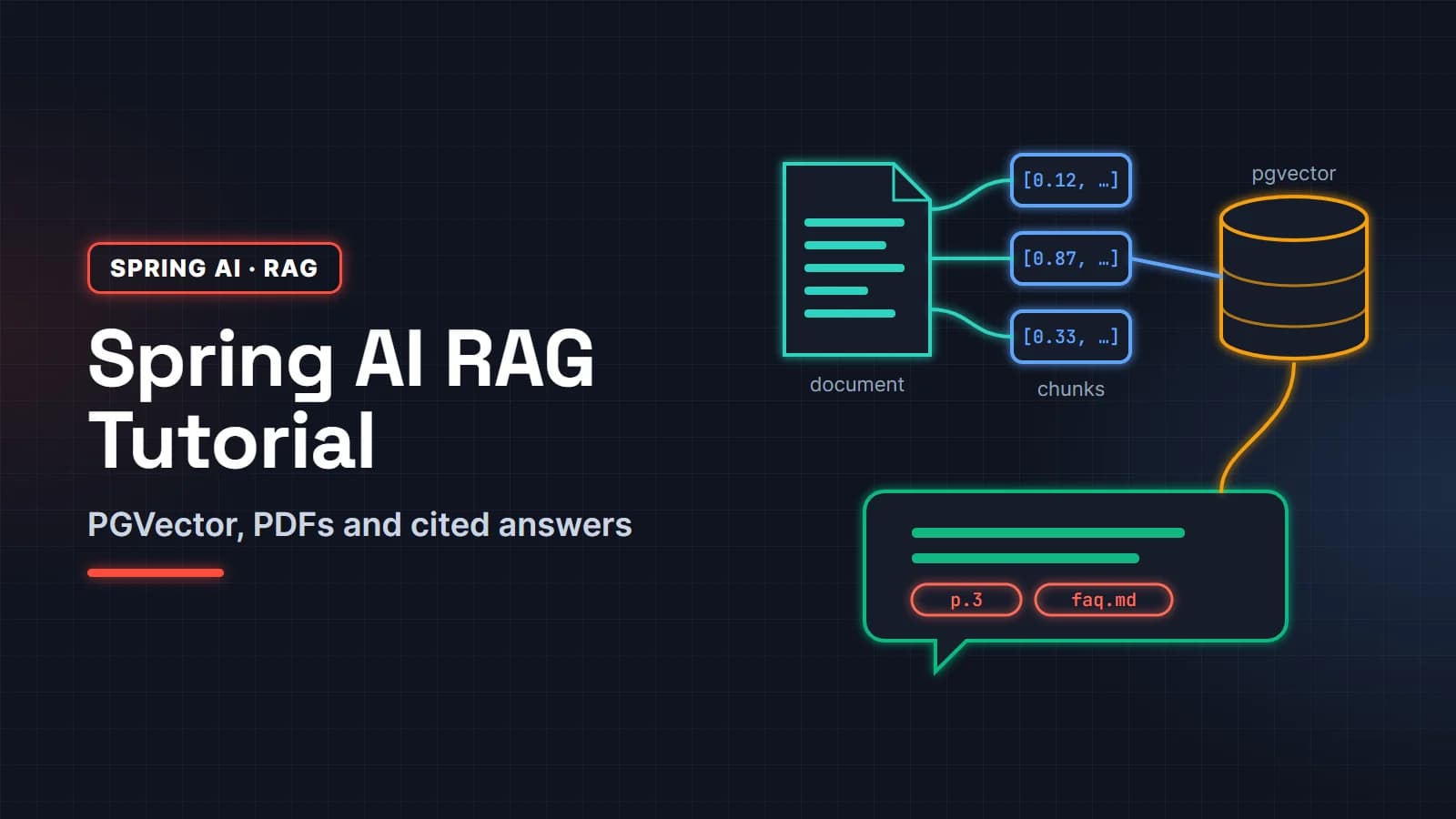
This Spring AI RAG tutorial builds a working "chat with your documents" service in Java: Spring Boot 4, Spring AI 2.0 and PostgreSQL with the pgvector extension, started by Docker Compose. You will ingest PDF and Markdown files, store their embeddings in pgvector, answer questions with a retrieval advisor, and return the source file and page with every answer.
It is written for Spring Boot developers who know REST controllers and application.yml but have not shipped retrieval augmented generation yet. Every step works with a hosted model (OpenAI) or a local one (Ollama), switched by a Spring profile, so you can build it without sending a single document to a third party.
By the end you will also know how to pick a chunk size, top-k and similarity threshold, how to test answer quality, and which mistakes make RAG answers wrong.
In this guide
- What you will build
- How retrieval augmented generation works in Java
- Step 1: Create the Spring Boot project
- Step 2: Run PostgreSQL with pgvector in Docker Compose
- Step 3: Configure a hosted or local (Ollama) model
- Step 4: Ingest documents with Spring AI document readers
- Step 5: Answer questions with the RAG advisor and cite sources
- Step 6: Tune retrieval: top-k, threshold and metadata filters
- Step 7: Test and evaluate the answers
- Common mistakes and a production checklist
What you will build
A small Spring Boot service with two endpoints. POST /ingest reads the files in src/main/resources/docs, splits them into chunks, embeds each chunk and stores it in pgvector. GET /ask?q=... answers a question using only those documents and lists the sources it used. PostgreSQL runs in a container that Spring Boot starts for you; the models are either OpenAI's API or an Ollama server on your machine.
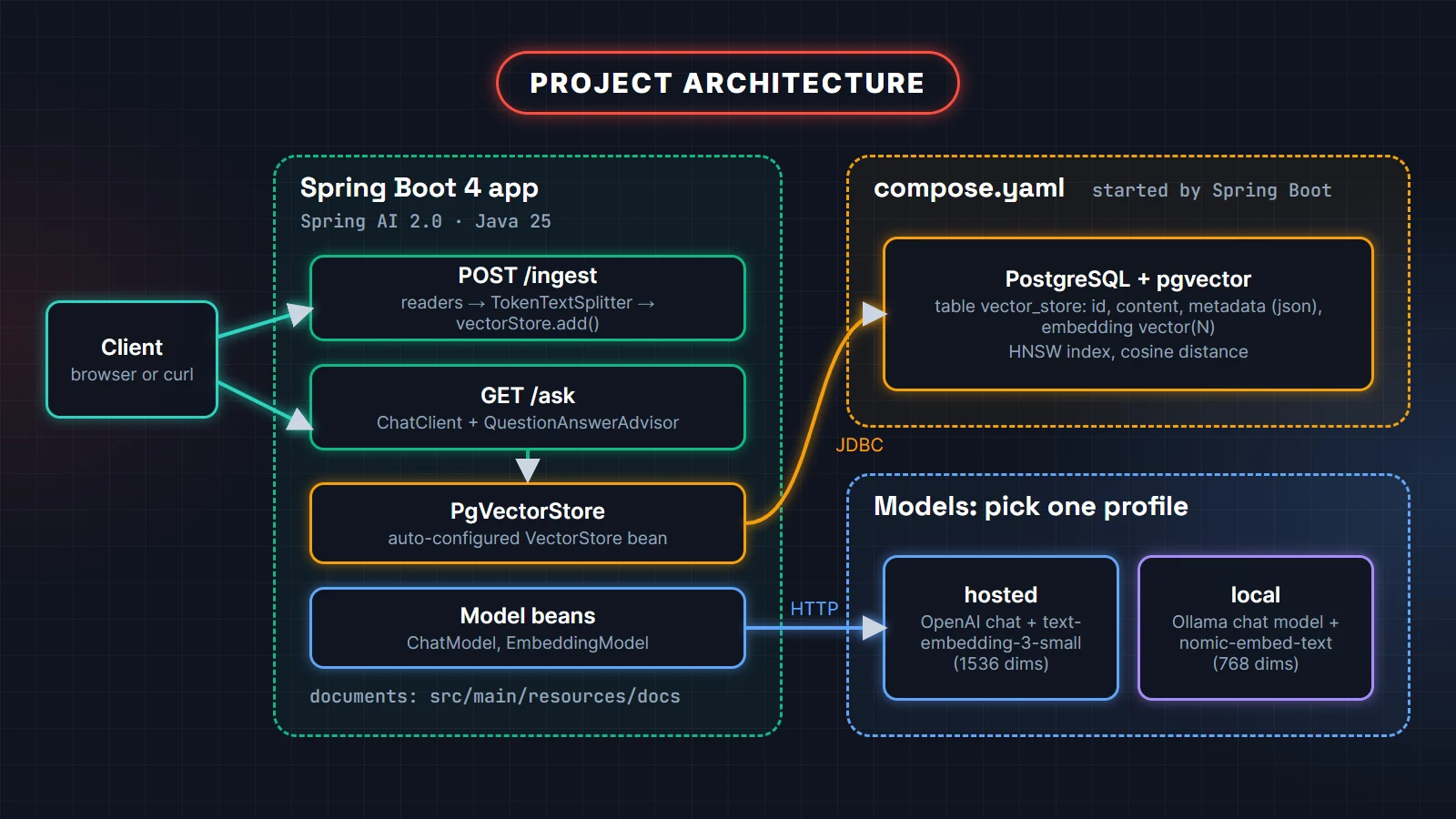
Versions used: Java 25, Spring Boot 4.1, Spring AI 2.0.2 (the current stable release in October 2026) and the pgvector/pgvector:pg17 image. The same structure is what we would use in a production Spring Boot service; only the documents and the prompts change.
How retrieval augmented generation works in Java
A language model only knows what it was trained on plus what you put in the prompt. RAG fills the prompt with the few passages of your own documents that relate to the question, and tells the model to answer from them. That has two halves that run at different times.
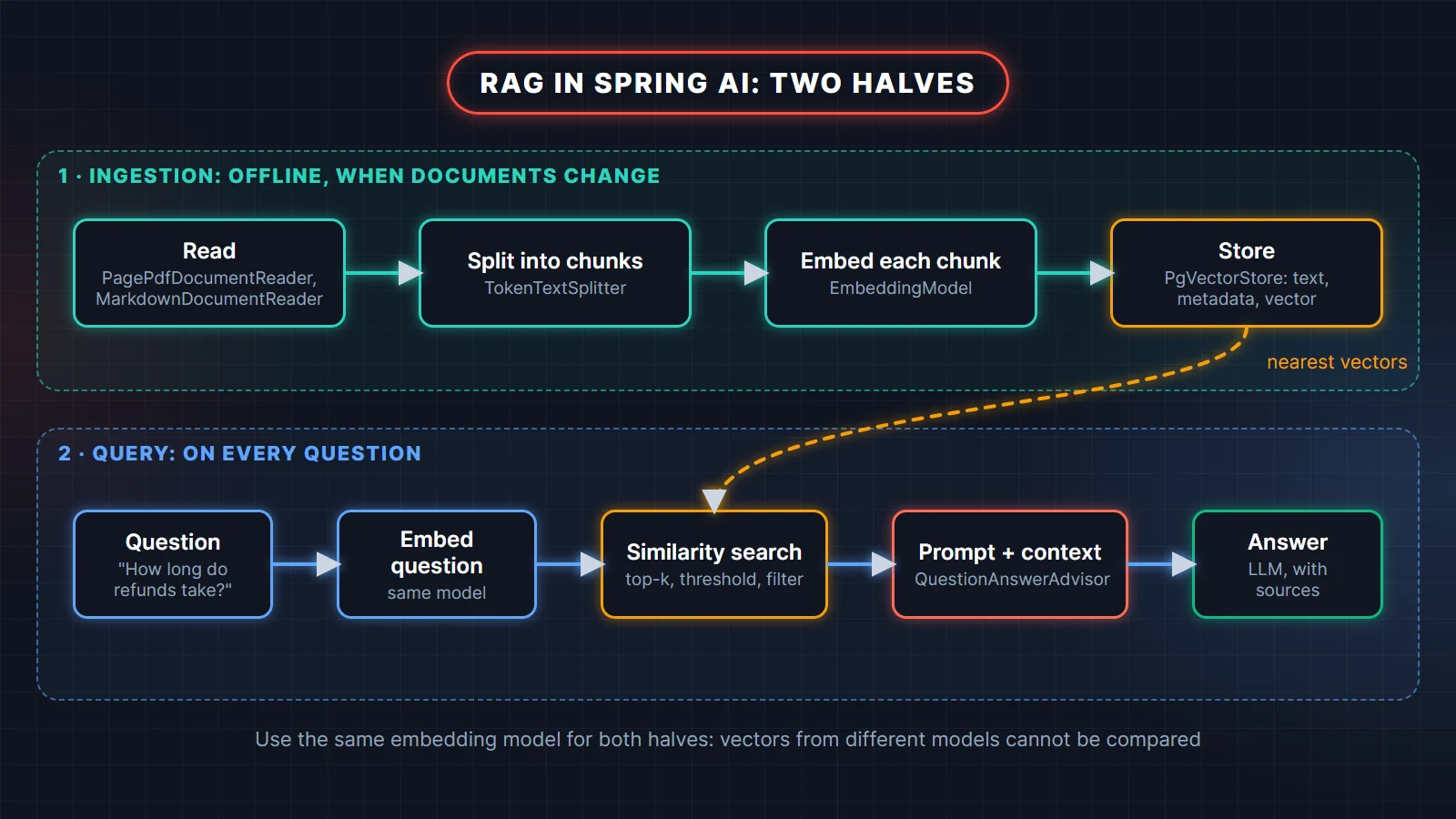
- Ingestion (offline, whenever documents change): read files into
Documentobjects, split them into chunks, turn each chunk into an embedding vector, store text, metadata and vector together. - Query (every request): embed the question with the same embedding model, find the nearest chunks, put them in the prompt, and let the chat model write the answer.
Spring AI has an interface for every box: DocumentReader, DocumentTransformer (the splitter), EmbeddingModel, VectorStore and an advisor that does the query half inside ChatClient. You mostly wire them together.
Step 1: Create the Spring Boot project
Create a Maven project on Spring Boot 4.1 with Java 25 (start.spring.io works), then import the Spring AI BOM so every Spring AI artifact gets a matching version.
<properties>
    <java.version>25</java.version>
    <spring-ai.version>2.0.2</spring-ai.version>
</properties>

<dependencyManagement>
    <dependencies>
        <dependency>
            <groupId>org.springframework.ai</groupId>
            <artifactId>spring-ai-bom</artifactId>
            <version>${spring-ai.version}</version>
            <type>pom</type>
            <scope>import</scope>
        </dependency>
    </dependencies>
</dependencyManagement>

<dependencies>
    <dependency>
        <groupId>org.springframework.boot</groupId>
        <artifactId>spring-boot-starter-webmvc</artifactId>
    </dependency>
    <!-- vector store: PgVectorStore, JDBC and the PostgreSQL driver -->
    <dependency>
        <groupId>org.springframework.ai</groupId>
        <artifactId>spring-ai-starter-vector-store-pgvector</artifactId>
    </dependency>
    <!-- QuestionAnswerAdvisor -->
    <dependency>
        <groupId>org.springframework.ai</groupId>
        <artifactId>spring-ai-vector-store-advisor</artifactId>
    </dependency>
    <!-- document readers -->
    <dependency>
        <groupId>org.springframework.ai</groupId>
        <artifactId>spring-ai-pdf-document-reader</artifactId>
    </dependency>
    <dependency>
        <groupId>org.springframework.ai</groupId>
        <artifactId>spring-ai-markdown-document-reader</artifactId>
    </dependency>
    <!-- models: keep both, a profile picks one -->
    <dependency>
        <groupId>org.springframework.ai</groupId>
        <artifactId>spring-ai-starter-model-openai</artifactId>
    </dependency>
    <dependency>
        <groupId>org.springframework.ai</groupId>
        <artifactId>spring-ai-starter-model-ollama</artifactId>
    </dependency>
    <!-- starts compose.yaml when the app starts -->
    <dependency>
        <groupId>org.springframework.boot</groupId>
        <artifactId>spring-boot-docker-compose</artifactId>
        <optional>true</optional>
    </dependency>
</dependencies>
Two artifacts trip people up. QuestionAnswerAdvisor lives in spring-ai-vector-store-advisor (renamed from spring-ai-advisors-vector-store in 2.0), and each document reader is its own artifact, so a missing PagePdfDocumentReader class means a missing dependency, not a wrong import.
Step 2: Run PostgreSQL with pgvector in Docker Compose
Put a compose.yaml in the project root. Spring Boot's Docker Compose support starts it with the app and creates the DataSource for you, so there is no JDBC URL to configure.
services:
  pgvector:
    image: 'pgvector/pgvector:pg17'
    environment:
      - 'POSTGRES_DB=rag'
      - 'POSTGRES_USER=rag'
      - 'POSTGRES_PASSWORD=rag'
    ports:
      - '5432'
    labels:
      org.springframework.boot.service-connection: postgres
The label matters. Spring Boot recognizes PostgreSQL containers by the image name postgres; the pgvector image has a different name, so the org.springframework.boot.service-connection label tells Boot to treat it as PostgreSQL. Without it, Boot starts the container but creates no connection details for it, and startup fails because no DataSource URL is configured.
When the vector store initializes its schema, it runs CREATE EXTENSION IF NOT EXISTS vector (plus hstore and uuid-ossp), creates a vector_store table with id, content, metadata (json) and embedding vector(N) columns, and adds an HNSW index using cosine distance.
Step 3: Configure a hosted or local (Ollama) model
RAG needs two models: an embedding model for the vectors and a chat model for the answer. With both provider starters on the classpath, spring.ai.model.chat and spring.ai.model.embedding decide which beans get created. Put the shared settings first and one profile per provider.
spring:
  ai:
    vectorstore:
      pgvector:
        initialize-schema: true
        index-type: HNSW
        distance-type: COSINE_DISTANCE
---
spring:
  config:
    activate:
      on-profile: openai
  ai:
    model:
      chat: openai
      embedding: openai
    openai:
      api-key: ${OPENAI_API_KEY}
      chat:
        model: gpt-5-mini
      embedding:
        model: text-embedding-3-small
    vectorstore:
      pgvector:
        dimensions: 1536
---
spring:
  config:
    activate:
      on-profile: ollama
  ai:
    model:
      chat: ollama
      embedding: ollama
      image: none            # the OpenAI starter also auto-configures these
      moderation: none
      audio:
        speech: none
        transcription: none
    ollama:
      base-url: http://localhost:11434
      init:
        pull-model-strategy: when_missing
      chat:
        model: llama3.2
      embedding:
        model: nomic-embed-text
    vectorstore:
      pgvector:
        dimensions: 768
        table-name: vector_store_768
Run with --spring.profiles.active=openai or ollama, and always pick one: with no profile, both chat models are created. Four details in this file prevent real bugs:
- Dimensions must match the embedding model.
text-embedding-3-smallreturns 1536 numbers per vector,nomic-embed-textreturns 768. The column is created asvector(N), so storing a 768-dimension vector in a 1536 column fails. If you leavedimensionsout, PgVectorStore asks the embedding model, but setting it makes the choice visible. - One table per embedding model. Vectors from different models live in different spaces and cannot be compared, so the Ollama profile writes to its own table. Switching models later means re-ingesting everything.
- Switch off what you don't use. The OpenAI starter also brings image, audio and moderation models, each enabled unless its
spring.ai.model.*property says otherwise. Setting them tononein the Ollama profile keeps those OpenAI beans, and their need for an API key, out of a fully local run. - Mind the HNSW limit. pgvector's HNSW index supports at most 2000 dimensions for the
vectortype, so a 3072-dimension model needs a different index or a model setting that returns fewer dimensions.
Since Spring AI 2.0 the .options segment is gone from these keys: it is spring.ai.openai.chat.model, not spring.ai.openai.chat.options.model. Older tutorials still show the 1.x form.
Step 4: Ingest documents with Spring AI document readers
Ingestion reads each file into Document objects, tags them with the file name, splits them into chunks and adds them to the vector store, which calls the embedding model for you. Re-running it for the same file should replace that file's chunks, not duplicate them.
@Service
public class IngestionService {

    private final VectorStore vectorStore;
    private final TokenTextSplitter splitter = TokenTextSplitter.builder()
            .withChunkSize(500)          // tokens per chunk (default 800)
            .withMinChunkSizeChars(300)  // do not cut at a sentence end before this many characters
            .build();

    public IngestionService(VectorStore vectorStore) {
        this.vectorStore = vectorStore;
    }

    public int ingest(Resource file) {
        String source = Objects.requireNonNull(file.getFilename());
        List<Document> pages = read(file, source);
        pages.forEach(page -> page.getMetadata().put("source", source));

        List<Document> chunks = splitter.apply(pages);   // metadata is copied to every chunk

        vectorStore.delete("source == '" + source + "'"); // replace the old version of this file
        vectorStore.add(chunks);                          // embeds and inserts in batches
        return chunks.size();
    }

    private List<Document> read(Resource file, String name) {
        if (name.endsWith(".pdf")) {
            return new PagePdfDocumentReader(file).get();  // one Document per page, adds page_number
        }
        if (name.endsWith(".md")) {
            return new MarkdownDocumentReader(file, MarkdownDocumentReaderConfig.defaultConfig()).get();
        }
        throw new IllegalArgumentException("Unsupported file type: " + name);
    }
}@RestController
class IngestController {
private final IngestionService ingestion;
private final Resource[] docs;
IngestController(IngestionService ingestion, @Value("classpath:docs/*") Resource[] docs) {
this.ingestion = ingestion;
this.docs = docs;
}
@PostMapping("/ingest")
Map<String, Integer> ingest() {
Map<String, Integer> chunksPerFile = new LinkedHashMap<>();
for (Resource doc : docs) {
chunksPerFile.put(doc.getFilename(), ingestion.ingest(doc));
}
return chunksPerFile;
}
}PagePdfDocumentReader (Apache PDFBox) creates one document per page and records page_number and file_name in the metadata, which is what lets you cite pages later. MarkdownDocumentReader follows the Markdown structure and records headings in the metadata (title and category). For Word, PowerPoint or HTML files, TikaDocumentReader from spring-ai-tika-document-reader handles all of them.
How to choose chunk size and overlap
A chunk is the unit you retrieve and the unit the embedding describes. Too small and a chunk loses the context that makes it meaningful; too large and one vector has to represent several topics, so it matches everything weakly and fills the prompt with irrelevant text. For policy documents, FAQs and manuals, 300 to 800 tokens per chunk is a sensible starting range; tune it with the evaluation in Step 7.
Overlap repeats the end of one chunk at the start of the next so a sentence cut in half still makes sense in at least one chunk. This plain-Java program shows the effect with 12-word chunks:
import java.util.ArrayList;
import java.util.Arrays;
import java.util.List;

public class ChunkingDemo {

    // Split a text into chunks of `size` words; each chunk repeats the last `overlap` words of the previous one.
    static List<String> chunk(String text, int size, int overlap) {
        if (overlap >= size) throw new IllegalArgumentException("overlap must be smaller than size");
        String[] words = text.trim().split("\\s+");
        List<String> chunks = new ArrayList<>();
        int step = size - overlap;
        for (int start = 0; start < words.length; start += step) {
            int end = Math.min(start + size, words.length);
            chunks.add(String.join(" ", Arrays.copyOfRange(words, start, end)));
            if (end == words.length) break;
        }
        return chunks;
    }

    public static void main(String[] args) {
        String policy = """
                Orders can be cancelled before they ship. Once shipped, an order must be returned instead.
                Returns are accepted within 30 days if the item is unopened. Refunds go back to the
                original payment method within 5 working days of the return reaching our warehouse.
                """;

        System.out.println("size=12, overlap=0");
        chunk(policy, 12, 0).forEach(c -> System.out.println("  [" + c + "]"));

        System.out.println("size=12, overlap=4");
        chunk(policy, 12, 4).forEach(c -> System.out.println("  [" + c + "]"));
    }
}
Output (run on JDK 25):
size=12, overlap=0
  [Orders can be cancelled before they ship. Once shipped, an order must]
  [be returned instead. Returns are accepted within 30 days if the item]
  [is unopened. Refunds go back to the original payment method within 5]
  [working days of the return reaching our warehouse.]
size=12, overlap=4
  [Orders can be cancelled before they ship. Once shipped, an order must]
  [shipped, an order must be returned instead. Returns are accepted within 30]
  [are accepted within 30 days if the item is unopened. Refunds go]
  [is unopened. Refunds go back to the original payment method within 5]
  [payment method within 5 working days of the return reaching our warehouse.]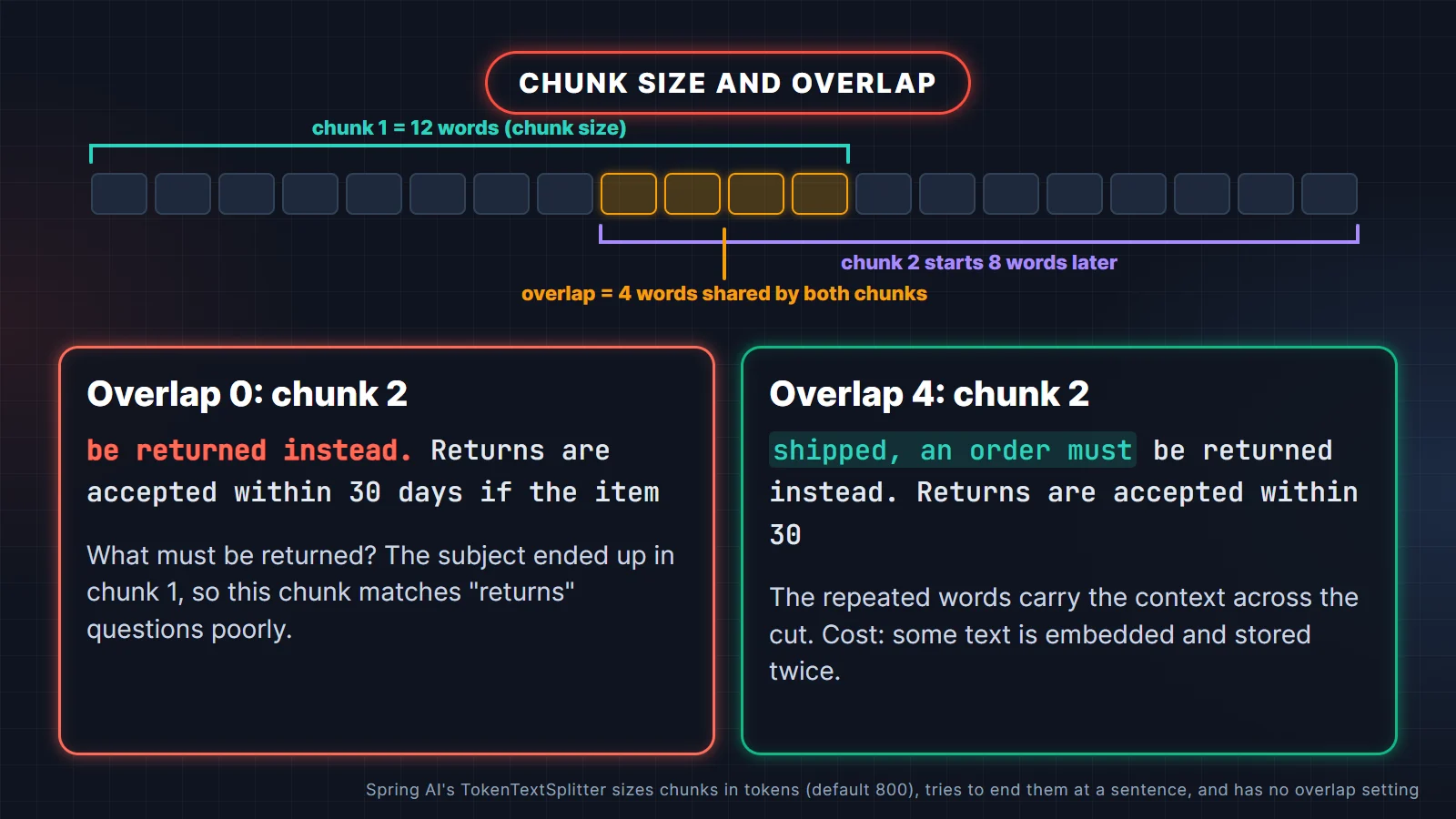
Without overlap, the second chunk starts with "be returned instead", and the subject ("an order") is stranded in the first chunk. With four words of overlap, the second chunk reads as a complete thought.
Spring AI's TokenTextSplitter works differently from this demo, and it is worth knowing how: it counts tokens (with the CL100K_BASE encoding by default), cuts at roughly chunkSize tokens, and then tries to end the chunk at the last sentence boundary (., ?, ! or a newline) after minChunkSizeChars. Ending on sentences removes most of the damage overlap is meant to repair. It has no overlap setting in 2.0.2; if your evaluation shows answers failing at chunk boundaries, write a small DocumentTransformer that prepends the tail of the previous chunk, the same idea as the demo.
Step 5: Answer questions with the RAG advisor and cite sources
Define a ChatClient bean with a strict system prompt and a QuestionAnswerAdvisor. On every call the advisor embeds the question, searches pgvector, appends the matching chunks to the user message and records them in the response context, where you can read them to list sources.
@Configuration
class RagConfig {

    @Bean
    ChatClient ragClient(ChatClient.Builder builder, VectorStore vectorStore) {
        return builder
                .defaultSystem("""
                        You answer questions about ACME's customer policies.
                        Use only the context provided with the question.
                        If the context does not contain the answer, say you don't know.
                        Keep answers under 120 words.
                        """)
                .defaultAdvisors(QuestionAnswerAdvisor.builder(vectorStore)
                        .searchRequest(SearchRequest.builder()
                                .topK(4)
                                .similarityThreshold(0.60)
                                .build())
                        .build())
                .build();
    }
}@RestController
class AskController {
record Source(String file, Object page) {}
record Answer(String answer, List<Source> sources) {}
private final ChatClient ragClient;
AskController(ChatClient ragClient) {
this.ragClient = ragClient;
}
@GetMapping("/ask")
Answer ask(@RequestParam String q) {
ChatClientResponse response = ragClient.prompt()
.user(q)
.call()
.chatClientResponse();
String text = response.chatResponse().getResult().getOutput().getText();
@SuppressWarnings("unchecked")
List<Document> used = (List<Document>) response.context()
.getOrDefault(QuestionAnswerAdvisor.RETRIEVED_DOCUMENTS, List.of());
List<Source> sources = used.stream()
.map(d -> new Source(String.valueOf(d.getMetadata().get("source")),
d.getMetadata().getOrDefault("page_number", "-")))
.distinct()
.toList();
return new Answer(text, sources);
}
}Start the app, ingest, then ask:
curl -X POST localhost:8080/ingest
curl "localhost:8080/ask?q=How%20long%20do%20refunds%20take%3F"
The answer comes back as JSON with an answer string and a sources list such as {"file":"refund-policy.pdf","page":3}. The wording varies between runs and models; the sources should not, because they come from the database, not from the model. That is the main reason to build citations from the retrieved documents instead of asking the model to cite: a model can invent a page number, the vector store cannot.
Use stream() instead of call() when you serve a chat UI and want words to appear as they are generated; for an API that returns sources in the same response, call() keeps things simple.
Step 6: Tune retrieval: top-k, threshold and metadata filters
Two numbers decide what reaches the model. topK caps how many chunks you send. similarityThreshold drops chunks whose similarity score is too low, however few are left. PgVectorStore reports the score as 1 minus the cosine distance, so 1 means the same direction and higher is more similar; the range that separates good matches from noise depends on the embedding model.
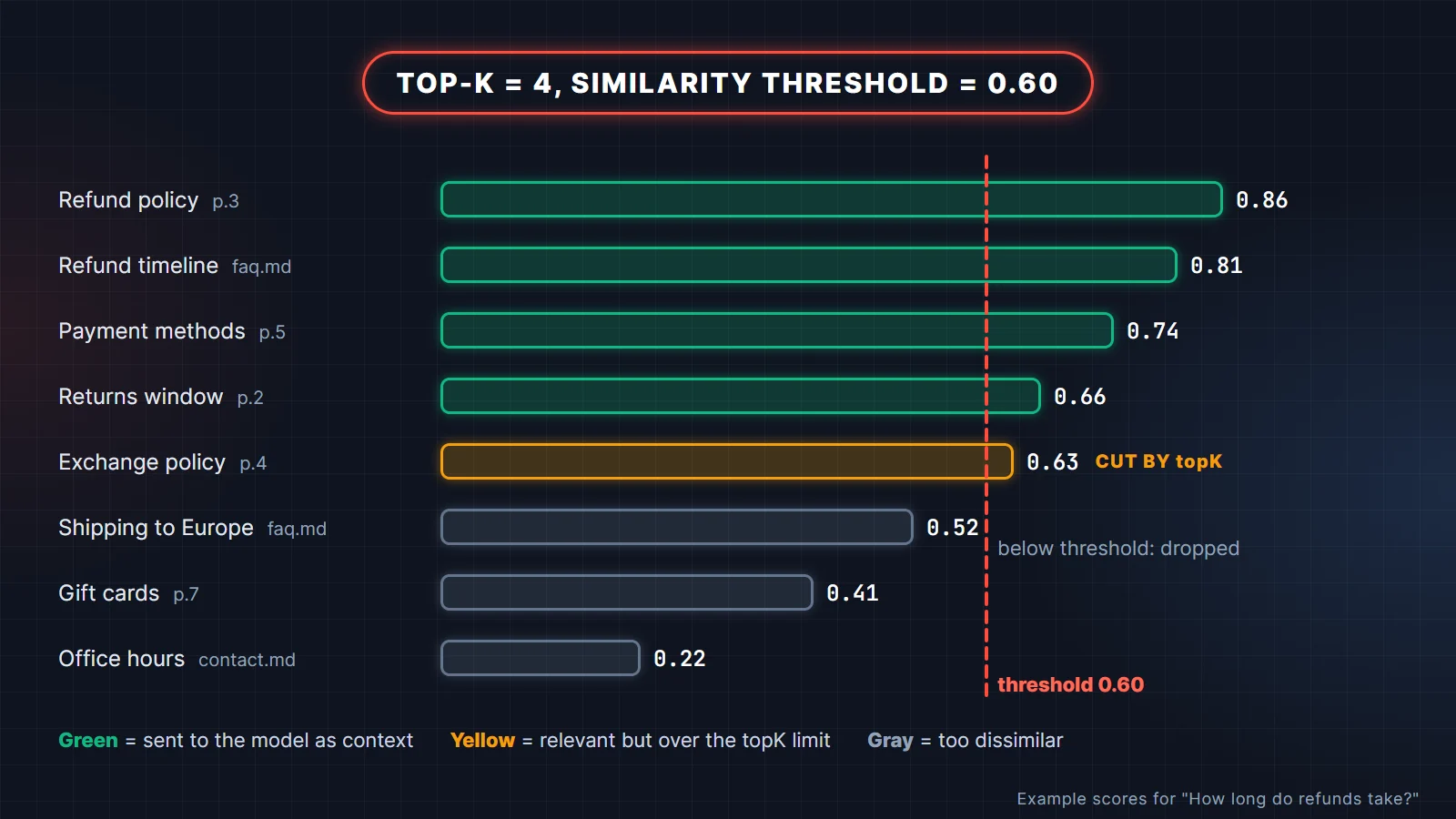
- Start with topK 3 to 5. More chunks cost tokens on every request and give the model more irrelevant text to be distracted by.
- Set the threshold from data, not by feel. Log scores for 20 real questions with known answers. Scores depend on the embedding model, so a threshold that works for one model is wrong for another.
- Prefer an empty context to a wrong one. With a strict system prompt, no chunks means "I don't know", which is the correct answer for a question your documents do not cover.
Metadata filters restrict which chunks can come back. Use them for tenants, document types, languages or versions. Set a fixed filter on the SearchRequest, or pass one per request:
String answer = ragClient.prompt()
        .user(question)
        .advisors(a -> a.param(QuestionAnswerAdvisor.FILTER_EXPRESSION,
                "source in ['refund-policy.pdf', 'faq.md']"))
        .call()
        .content();
Spring AI translates this portable syntax into a PostgreSQL JSON path query on the metadata column. Build filters from server-side state (the logged-in user's tenant), never from text the user typed. One pgvector detail: with an HNSW index the filter is applied to the candidates the index scan returns, so a very selective filter (one small tenant in a large table) can return fewer than topK chunks. If that happens, check the pgvector documentation on iterative index scans or partition by tenant.
When users ask follow-up questions ("and for gift cards?"), a single similarity search on the raw question retrieves poorly. Move to RetrievalAugmentationAdvisor from the spring-ai-rag artifact, which can rewrite or compress the question with a QueryTransformer before retrieval. It also refuses by default when nothing is retrieved, the behavior you want for a policy bot.
Step 7: Test and evaluate the answers
Test the plumbing with an integration test against a real pgvector container, and test answer quality with an evaluator, a second model call that judges whether the answer is supported by the retrieved context. On Spring Boot 4 the container definition uses Testcontainers 2:
@TestConfiguration(proxyBeanMethods = false)
class PgVectorContainerConfig {

    @Bean
    @ServiceConnection
    PostgreSQLContainer pgvector() {
        return new PostgreSQLContainer(DockerImageName.parse("pgvector/pgvector:pg17")
                .asCompatibleSubstituteFor("postgres"));
    }
}@SpringBootTest
@Import(PgVectorContainerConfig.class)
@ActiveProfiles("openai")
class RagQualityTest {
@Autowired IngestionService ingestion;
@Autowired ChatClient ragClient;
@Autowired ChatClient.Builder judgeBuilder;
@Value("classpath:docs/refund-policy.pdf")
Resource refundPolicy;
@ParameterizedTest
@ValueSource(strings = {"How long do refunds take?", "Can I cancel an order after it ships?"})
void answersAreSupportedByTheRetrievedContext(String question) {
ingestion.ingest(refundPolicy);
ChatClientResponse response = ragClient.prompt().user(question).call().chatClientResponse();
String answer = response.chatResponse().getResult().getOutput().getText();
@SuppressWarnings("unchecked")
List<Document> context = (List<Document>) response.context().get(QuestionAnswerAdvisor.RETRIEVED_DOCUMENTS);
EvaluationResponse verdict = new RelevancyEvaluator(judgeBuilder)
.evaluate(new EvaluationRequest(question, context, answer));
assertThat(context).isNotEmpty();
assertThat(verdict.isPass()).as(verdict.getFeedback()).isTrue();
}
}RelevancyEvaluator asks the judge model whether the answer is in line with the question and the context and returns pass or fail. FactCheckingEvaluator checks whether a claim is supported by the documents, which catches answers that add facts the documents do not contain. These tests call real models, so they are slow and cost money: tag them and run them nightly or before changing prompts, models, chunk size or threshold, not on every commit.
The most useful asset is a list of 30 to 50 real questions with the document and page that answers each one. Measure two things separately: did retrieval return the right chunk (you can check that without any LLM), and was the answer grounded in it. Most fixes are retrieval fixes.
Common mistakes in Spring AI RAG apps
- Changing the embedding model without re-ingesting. Old and new vectors are not comparable; search quality collapses silently, or inserts fail on a dimension mismatch.
- Duplicating chunks on every restart. Ingesting at startup without deleting the previous version of a file doubles every result. Delete by a
sourcefilter first, or ingest only when a file's checksum changes. - Sending too many chunks. topK 20 "to be safe" costs more and makes answers worse.
- Letting the model cite sources. Build citations from the retrieved documents' metadata.
- Using the 1.x property names. In 2.0,
spring.ai.openai.chat.options.modelbecamespring.ai.openai.chat.model. - Splitting scanned PDFs. PDFBox extracts text, not images; a scanned PDF yields empty pages. Run OCR before ingestion.
- Trusting retrieved text. A document can contain instructions ("ignore previous rules"). Treat it as data, keep tools least-privilege, and keep the system prompt strict.
Production checklist
- Create the
vectorextension and table with your migration tool (Liquibase or Flyway) and setinitialize-schema: false; the app's database user should not need superuser rights. - Run ingestion as a separate job or admin endpoint, protected by authentication, not on every app start.
- Store
source, page, document version and tenant in metadata from day one; adding them later means re-ingesting. - Keep API keys in environment variables or a secret manager, never in
application.yml. - Enable Actuator metrics: Spring AI records
gen_ai.client.token.usageand operation timers for model and vector store calls. Keep prompt and completion logging off in production. - Set request timeouts and a fallback message for when the model provider is slow or down.
- Re-run the evaluation set before every change to prompts, models, chunking or threshold.
For the full Spring AI reference, see the RAG, ETL pipeline and PGvector pages, and the Spring Boot dev services page for Docker Compose and Testcontainers.
Go further with MCP and Spring AI
RAG gives a model your documents; MCP gives it your tools and live data. MCP for Java and Spring Developers is a step-by-step guide to the Model Context Protocol for Java developers: you build a Spring AI MCP server and client, connect Claude Code, test with the Inspector, secure it and finish a capstone project.
Related reading
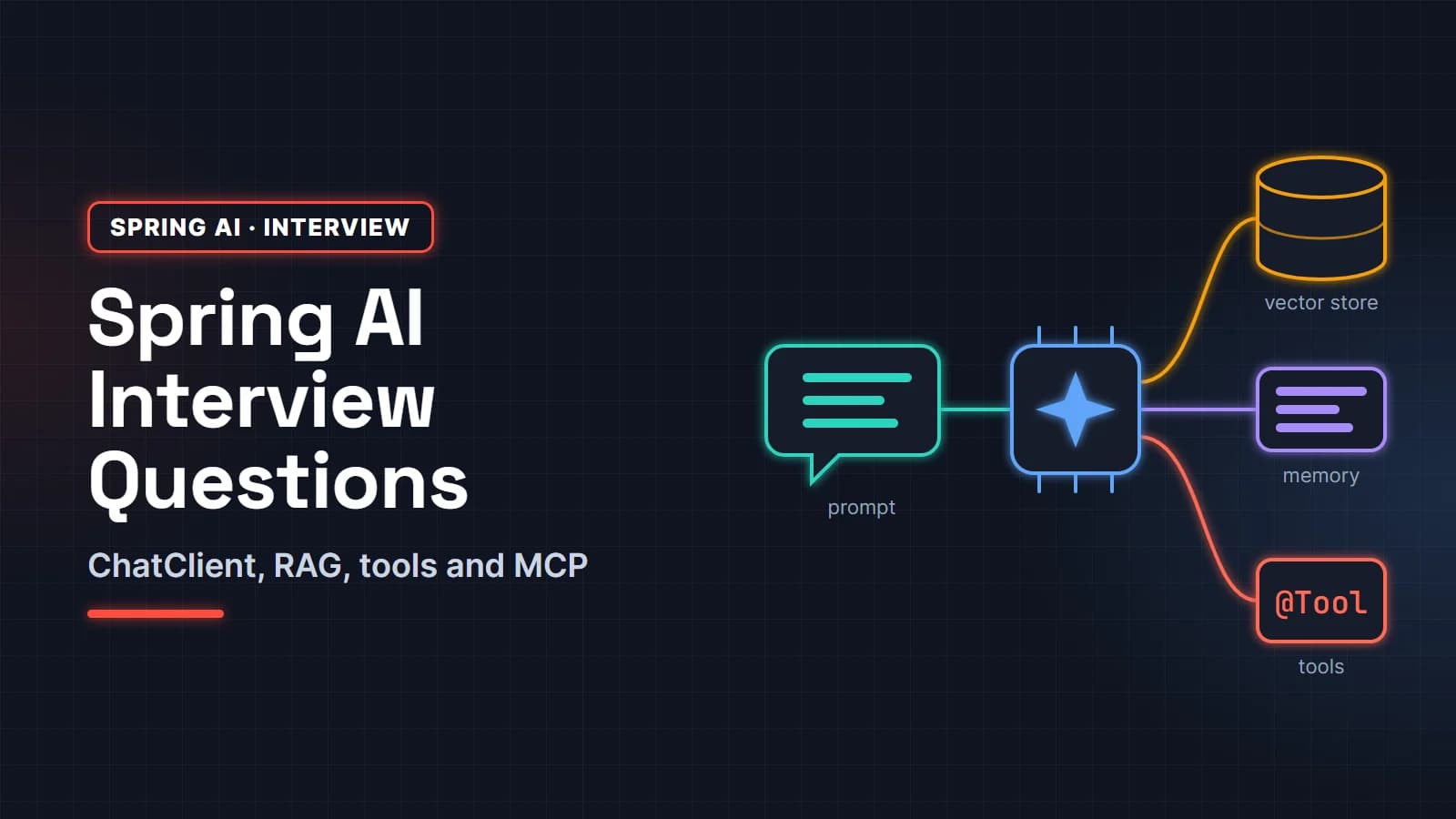
- Spring AI interview questions: ChatClient, RAG, tool calling and MCP
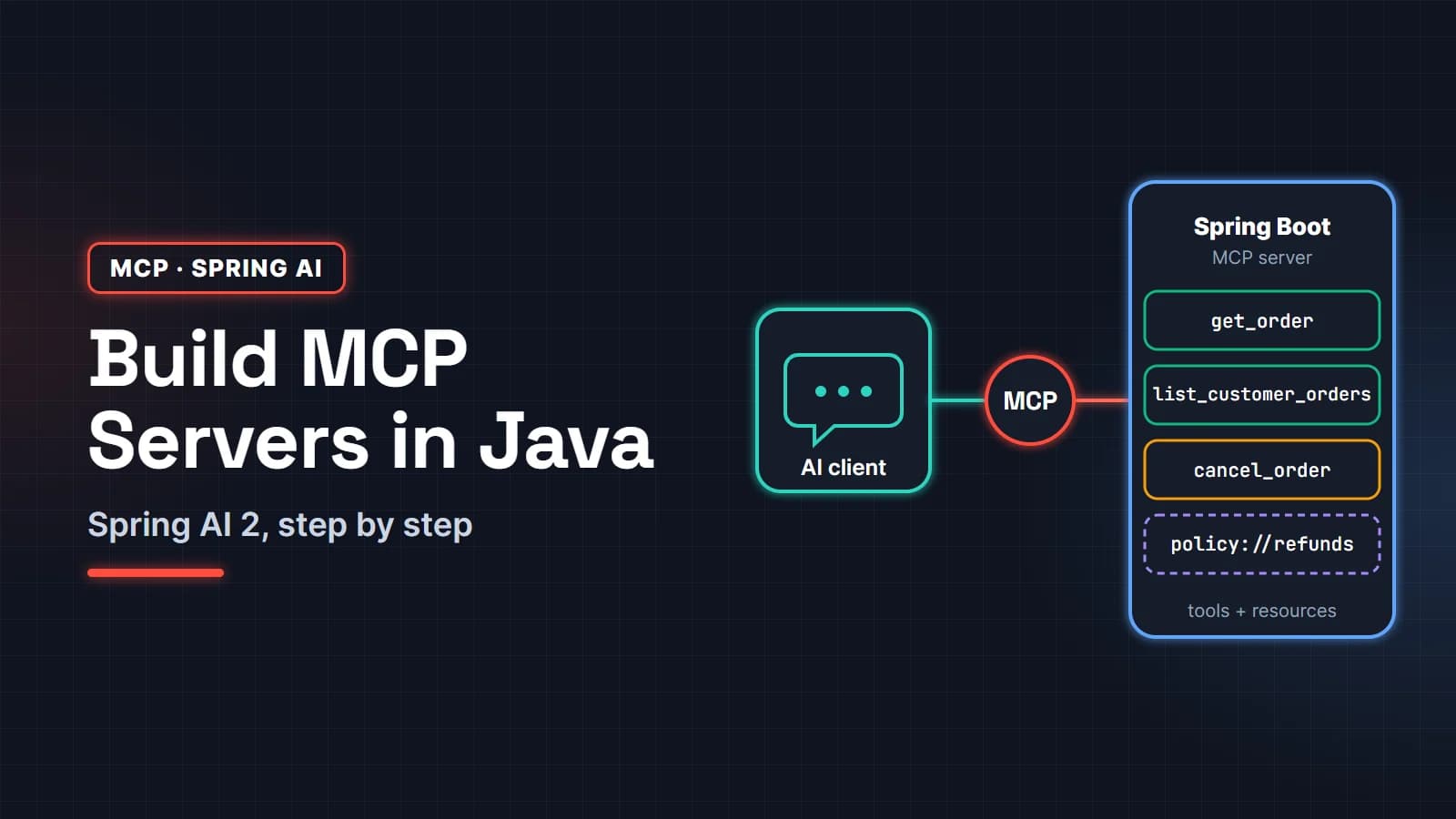
- Build an MCP server in Java with Spring AI
- LLM token optimization: cut AI cost and latency
FAQ
Can I use Spring AI RAG without OpenAI?
Yes. Use the Ollama profile from Step 3 to run both the chat and embedding models locally, or any other supported provider such as Anthropic, Amazon Bedrock or Mistral for chat. Note that the embedding model and chat model can come from different providers.
Is pgvector good enough for production RAG?
For most business document sets, yes. You get transactions, backups, SQL filtering and one less system to run. Consider a dedicated vector database only when measured latency or scale requires it.
What is the difference between QuestionAnswerAdvisor and RetrievalAugmentationAdvisor?
QuestionAnswerAdvisor is a ready-made, single-step RAG: search, then add the results to the prompt. RetrievalAugmentationAdvisor is modular, with pluggable query transformers, expanders, retrievers and augmenters, for follow-up questions and multi-query retrieval.
How many documents can I put in a Spring AI vector store?
There is no Spring AI limit; it depends on the database. PgVectorStore inserts in batches (max-document-batch-size, default 10,000), and an HNSW index keeps similarity search fast as the table grows. The embedding API's rate limits are usually the first bottleneck during ingestion.
Why does my RAG app return answers that are not in my documents?
Either retrieval returned the wrong chunks or the prompt lets the model use its own knowledge. Log the retrieved chunks and scores, raise the threshold, fix chunking, and make the system prompt say to answer only from context and to say "I don't know" otherwise.