 Tech Tribers
Build an MCP Server in Java with Spring AI 2 (Step by Step)
Build a real MCP server in Java with Spring AI 2.0 and @McpTool: stdio vs Streamable HTTP, testing with curl and the Inspector, connecting Claude, a Spring AI client and security.
New19 min read
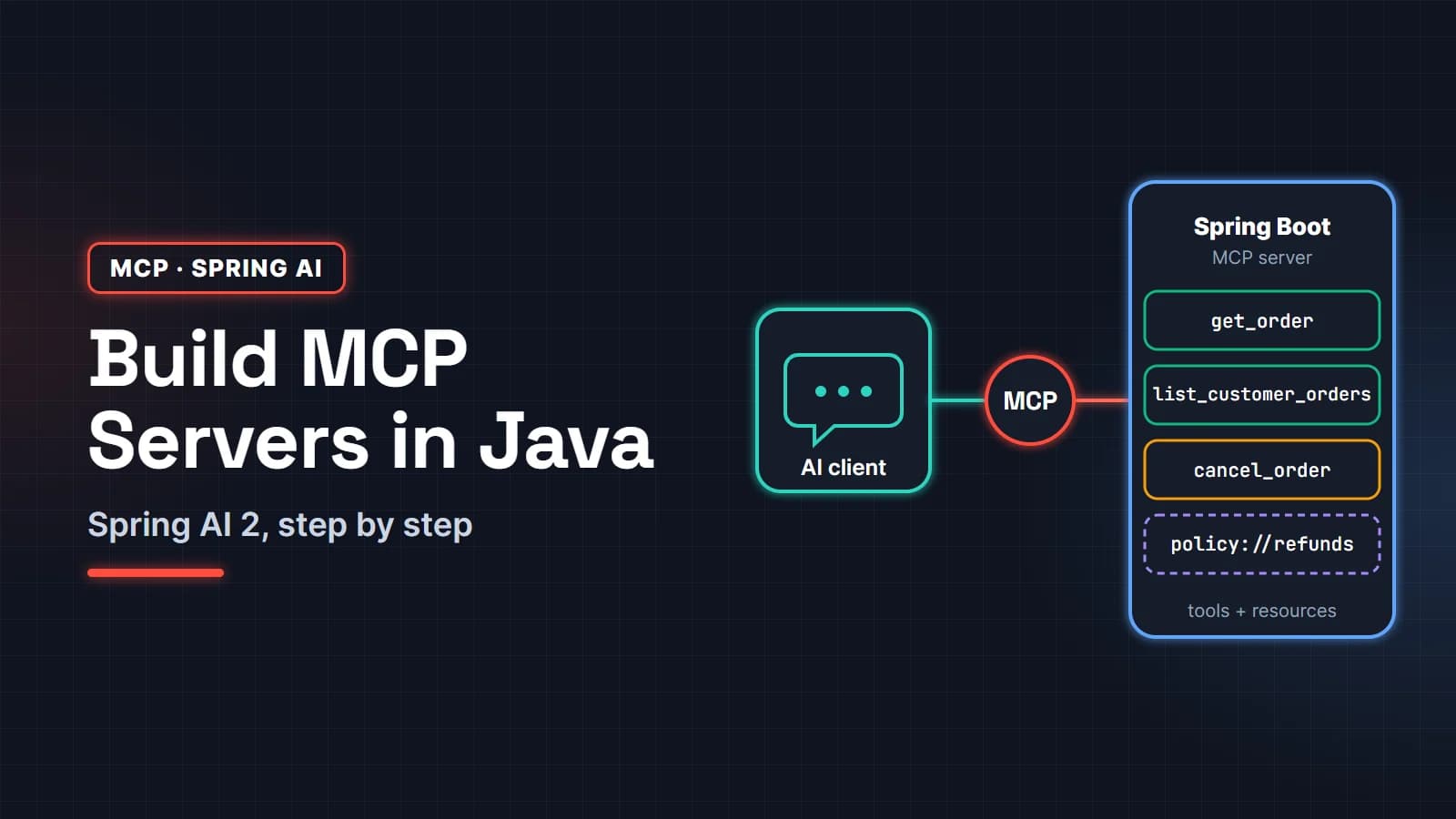
To build an MCP server in Java with Spring AI, you add one Spring AI starter, put @McpTool on methods of an ordinary Spring bean, and pick a transport: stdio for a tool that runs on your laptop, or Streamable HTTP for a server your whole team shares. Spring AI writes the JSON Schema, handles the JSON-RPC protocol and registers everything at startup. You write normal Spring code.
This guide is for Java and Spring Boot developers who know what an LLM is but have not shipped an MCP server yet. We build a small order-lookup server step by step, test it with curl and the MCP Inspector, connect it to Claude Code and Claude Desktop, call it from a Spring AI client, and then lock it down. Every response shown below is real output from the code in this post, built with Spring AI 2.0.2, Spring Boot 4.1 and Java 25.
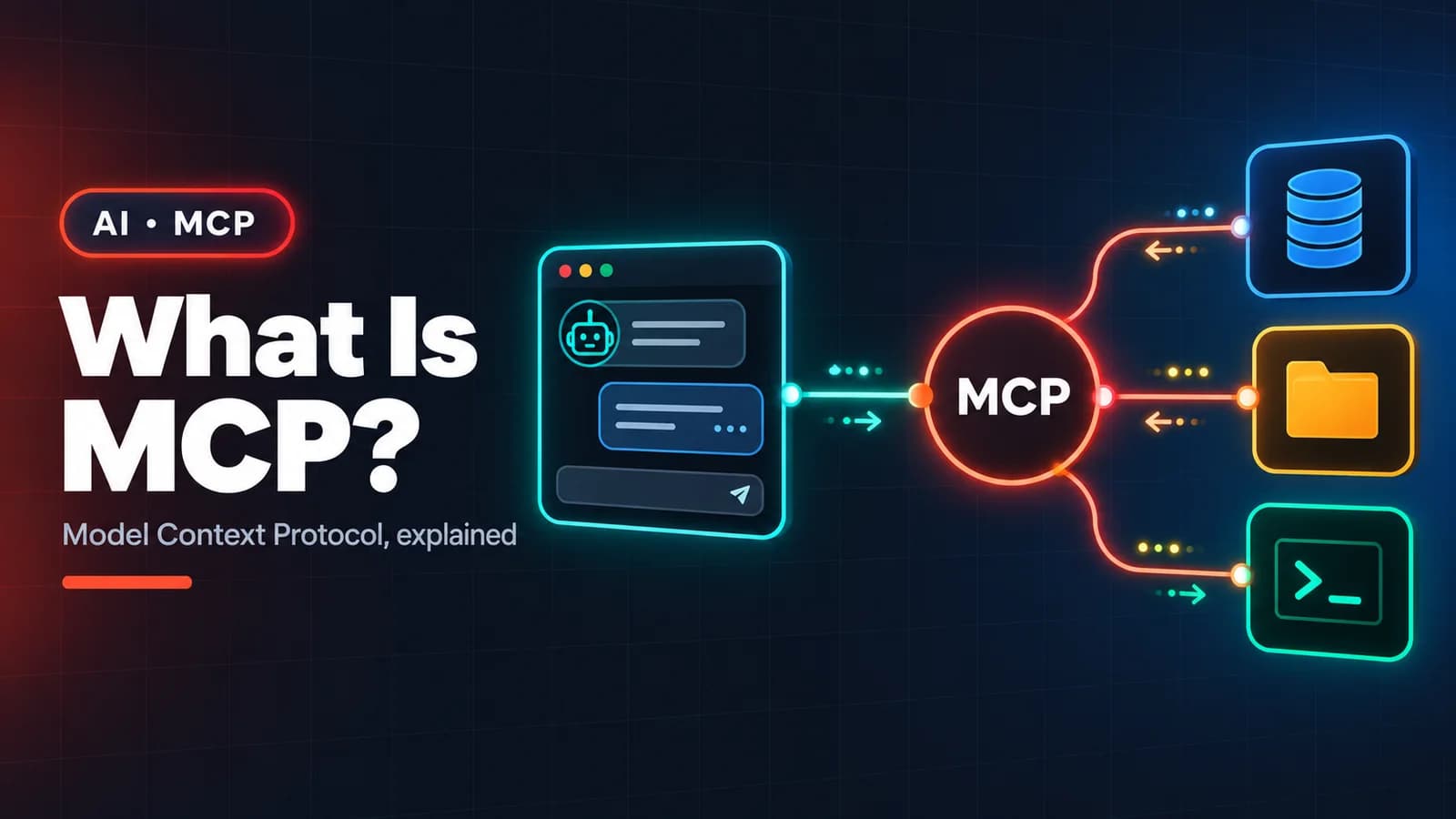
If you need the concepts first (what a tool, resource and prompt are, and why MCP exists at all), read What Is MCP? and come back.
In this guide
- What you are building, and how MCP fits together
- Step 1: Create the Spring Boot project
- Step 2: Write tools with @McpTool
- Step 3: Add a resource
- Step 4: Choose a transport: stdio or Streamable HTTP
- Step 5: Test the server with curl and the MCP Inspector
- Step 6: Connect it to Claude Code and Claude Desktop
- Step 7: Call it from a Spring AI MCP client
- Securing a Spring AI MCP server
- Common errors and how to fix them
- FAQ
What you are building, and how MCP fits together
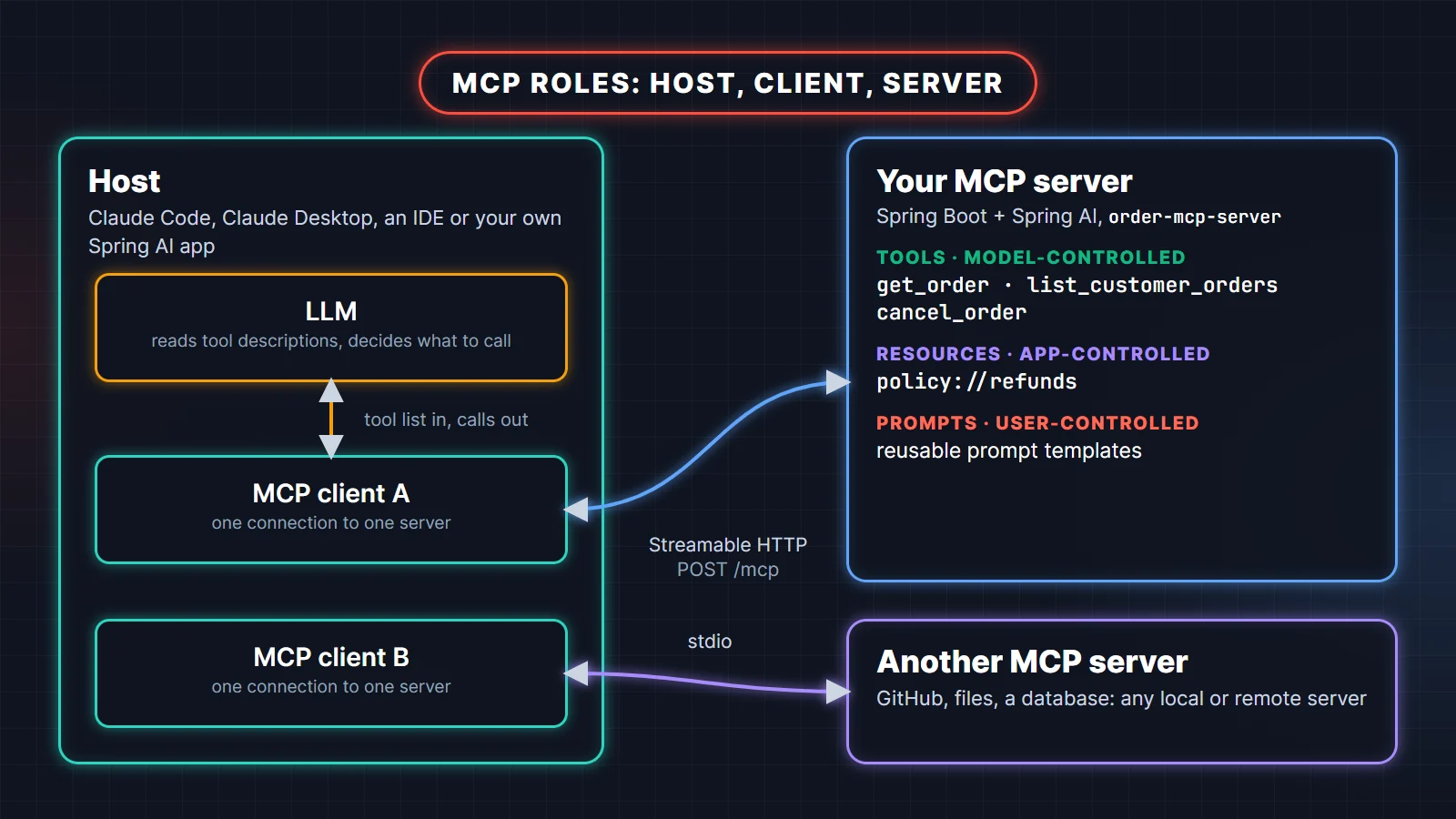
The Model Context Protocol (MCP) is an open protocol that lets an AI application discover and call capabilities that live in another process. Three roles matter:
- Host: the AI application the user talks to, such as Claude Code, Claude Desktop, an IDE, or your own Spring AI app. It owns the LLM and decides what the model can see.
- Client: a connector inside the host. Each client holds one connection to one server, so a host with three servers runs three clients.
- Server: your program. It exposes tools (functions the model can call), resources (read-only data the application can attach as context) and prompts (reusable templates the user can pick).
Our server is a small order desk for a store. It has three tools (get_order, list_customer_orders, cancel_order) and one resource (the refund policy). The same idea works for any internal system you want an assistant to use: a library catalog, a ticket queue, a deployment status page.
Versions matter here because this ecosystem moves fast. Spring AI 2.0.0 went GA in June 2026 and 2.0.2 is the current stable release as I write this (October 2026). Spring AI 2.0 targets Spring Boot 4.0 and 4.1, ships the MCP Java SDK 2.0, and moved the MCP annotations and the WebMVC/WebFlux transports into Spring AI itself. Our server negotiated MCP protocol version 2025-11-25 with every client we tried.
The MCP specification has since published a newer revision, 2026-07-28, which removes the initialize handshake and the Mcp-Session-Id header and makes the protocol stateless. When I sent an initialize asking for 2026-07-28, the Spring AI 2.0.2 server answered with 2025-11-25, which is how version negotiation is supposed to work. Clients such as the MCP Inspector speak both. Your @McpTool methods do not depend on the wire format, as you will see when we switch the same jar from HTTP to stdio with two properties.
Step 1: Create the Spring Boot project
Start from a Spring Boot 4.1 project on Java 17 or newer (I use Java 25, the current LTS). Import the Spring AI BOM and add one MCP server starter. Spring AI offers three:
spring-ai-starter-mcp-server: stdio only, no web server. Good for a tool that a desktop app launches.spring-ai-starter-mcp-server-webmvc: Streamable HTTP (plus stdio) on Spring MVC. Pick this for a normal servlet app.spring-ai-starter-mcp-server-webflux: the same on WebFlux, for reactive apps.
We use the WebMVC starter because it gives us both transports from one jar:
<properties>
  <java.version>25</java.version>
  <spring-ai.version>2.0.2</spring-ai.version>
</properties>

<dependencyManagement>
  <dependencies>
    <dependency>
      <groupId>org.springframework.ai</groupId>
      <artifactId>spring-ai-bom</artifactId>
      <version>${spring-ai.version}</version>
      <type>pom</type>
      <scope>import</scope>
    </dependency>
  </dependencies>
</dependencyManagement>

<dependencies>
  <dependency>
    <groupId>org.springframework.ai</groupId>
    <artifactId>spring-ai-starter-mcp-server-webmvc</artifactId>
  </dependency>
</dependencies>
Notice what is missing: no model starter, no API key. An MCP server never talks to an LLM. It only answers requests from a client, and the host decides which model reads the answers. That separation is the whole point of the protocol.
Step 2: Write tools with @McpTool
A tool is a method the model may call. First, some ordinary domain code. Nothing here knows about MCP:
public record Order(String id, String customerEmail, String product, BigDecimal amount,
                    String currency, OrderStatus status, LocalDate placedOn) {

    public enum OrderStatus { PENDING, PAID, SHIPPED, DELIVERED, CANCELLED }

    Order withStatus(OrderStatus newStatus) {
        return new Order(id, customerEmail, product, amount, currency, newStatus, placedOn);
    }
}

@Service
public class OrderService {

    private final Map<String, Order> orders = new ConcurrentHashMap<>(); // a repository in real life

    public Optional<Order> findById(String id) { return Optional.ofNullable(orders.get(id)); }

    public List<Order> findByCustomer(String email) {
        return orders.values().stream()
                .filter(o -> o.customerEmail().equalsIgnoreCase(email))
                .sorted(Comparator.comparing(Order::placedOn).reversed())
                .toList();
    }

    public Order cancel(String id) {
        Order current = findById(id)
                .orElseThrow(() -> new IllegalArgumentException("No order with id " + id));
        if (current.status() != OrderStatus.PENDING) {
            throw new IllegalStateException(
                    "Only PENDING orders can be cancelled; " + id + " is " + current.status());
        }
        Order cancelled = current.withStatus(OrderStatus.CANCELLED);
        orders.put(id, cancelled);
        return cancelled;
    }
}
Now the MCP layer. It is a thin adapter, the same way a @RestController is a thin adapter over a service:
import org.springframework.ai.mcp.annotation.McpTool;
import org.springframework.ai.mcp.annotation.McpToolParam;

@Component
public class OrderTools {

    private final OrderService orders;

    public OrderTools(OrderService orders) {
        this.orders = orders;
    }

    @McpTool(name = "get_order",
            description = """
                    Look up one order by its id (format ORD-1234). Returns the product, amount, \
                    currency, status and order date. Use it when the user gives an order id.""",
            annotations = @McpTool.McpAnnotations(readOnlyHint = true, openWorldHint = false))
    public Order getOrder(
            @McpToolParam(description = "Order id, for example ORD-1001") String orderId) {
        return orders.findById(orderId)
                .orElseThrow(() -> new IllegalArgumentException("No order with id " + orderId));
    }

    @McpTool(name = "list_customer_orders",
            description = """
                    List the orders placed with a customer email address, newest first. \
                    Use it when the user does not know the order id.""",
            annotations = @McpTool.McpAnnotations(readOnlyHint = true, openWorldHint = false))
    public List<Order> listCustomerOrders(
            @McpToolParam(description = "Customer email address") String email) {
        return orders.findByCustomer(email);
    }

    @McpTool(name = "cancel_order",
            description = """
                    Cancel an order that is still PENDING (not paid). Fails for any other \
                    status. Confirm with the user before calling it.""",
            annotations = @McpTool.McpAnnotations(destructiveHint = true, idempotentHint = true,
                    openWorldHint = false))
    public Order cancelOrder(
            @McpToolParam(description = "Order id to cancel, for example ORD-1003") String orderId) {
        return orders.cancel(orderId);
    }
}
That is the whole server. At startup the annotation scanner (on by default through spring.ai.mcp.server.annotation-scanner.enabled) finds the bean and logs Registered tools: 3. Here is what each part does:
nameis the identifier the model uses. It defaults to the method name; set it explicitly so a refactor does not silently rename your public API.descriptionis the only documentation the model reads. More on writing it below.@McpToolParamdescribes a parameter. Parameters are required unless you sayrequired = false, soorderIdlands in the schema'srequiredlist.annotationsare hints for the client:readOnlyHint,destructiveHint,idempotentHintandopenWorldHint. A client can use them to decide when to ask the user for confirmation.- The return value is serialized to JSON and sent back as text content. Records work well. Set
generateOutputSchema = trueif you also want a JSON output schema for a non-primitive return type.
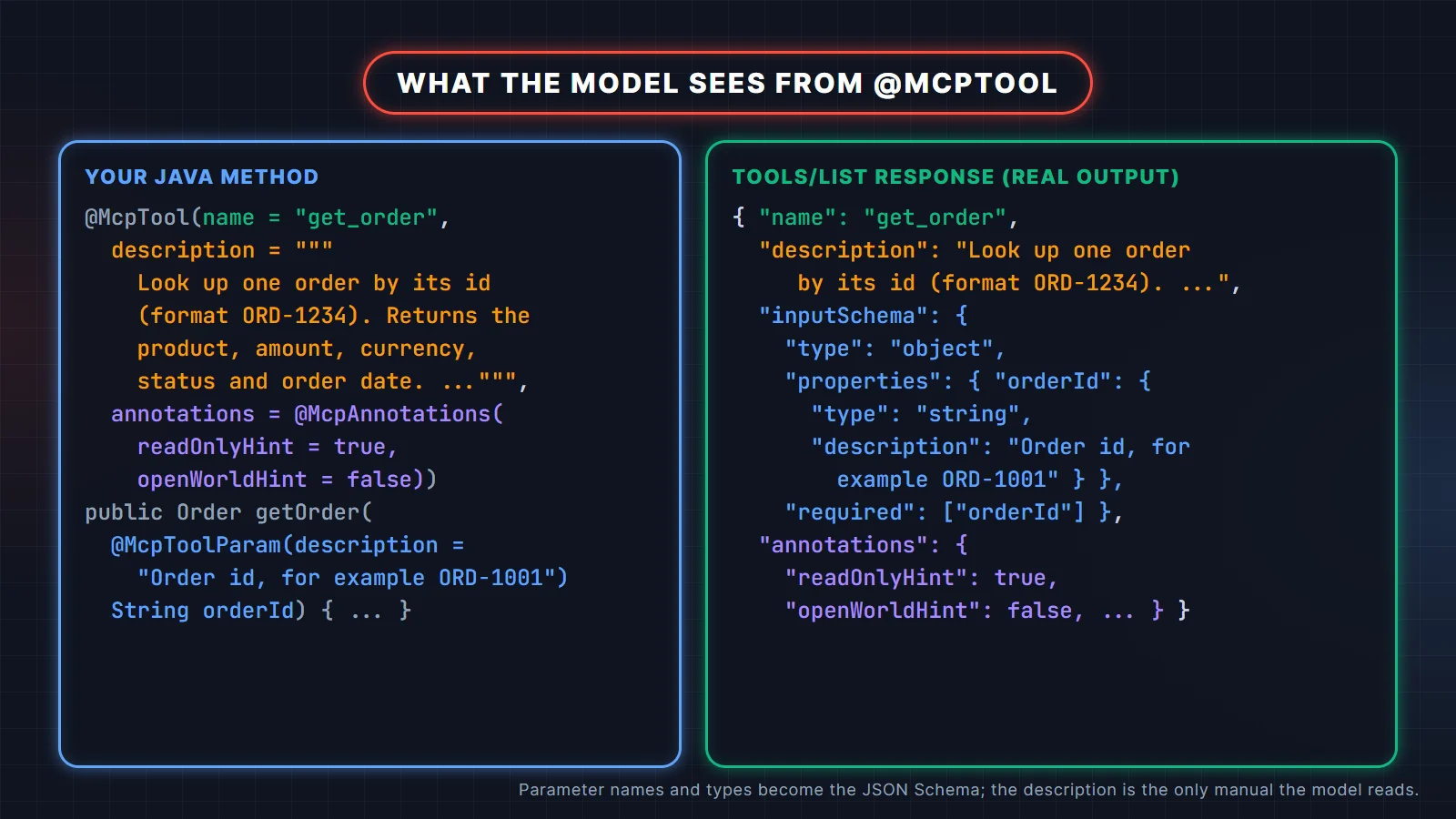
One detail from the real output: for the two read-only tools, the server still reports "destructiveHint": true, because that is the attribute's default. The MCP spec says destructiveHint only means something when readOnlyHint is false, so this is harmless, but it shows that hints are hints. Never rely on them for security.
What happens when a tool throws an exception?
Spring AI catches it and returns a normal result with isError: true and the exception message as text. The model reads that message and can recover, for example by asking the user for the right id. Calling cancel_order on a paid order returned this (trimmed):
{"jsonrpc":"2.0","id":4,"result":{"content":[{"type":"text",
 "text":"Only PENDING orders can be cancelled; ORD-1002 is PAID ..."}],"isError":true}}
So write exception messages for a reader that will act on them: say what was wrong and what a valid input looks like. Do not put stack traces, SQL or internal hostnames in them, because they end up in the model's context and maybe in the user's chat. Calling a tool that does not exist is different: that is a protocol error (-32602, "Unknown tool"), not a tool result.
How do you write a good MCP tool description?
The model picks tools by reading names and descriptions, so a vague description causes wrong calls and missed calls. What works in practice:
- Start with a verb and say what the tool returns: "Look up one order by its id ... Returns the product, amount, currency, status and order date."
- Say when to use it, especially when two tools overlap: "Use it when the user does not know the order id."
- Give formats and examples for parameters: "format ORD-1234", "for example ORD-1001". This cuts down on guessed ids.
- State the rules the tool enforces ("Fails for any other status") and any human step ("Confirm with the user before calling it").
- Keep one job per tool. A
manage_order(action, id)tool is harder for the model to use correctly and impossible to permission separately.
Should you use @McpTool or Spring AI's @Tool?
Both work. @Tool is Spring AI's general tool-calling annotation, also used when your own ChatClient calls local methods. The MCP server auto-configuration converts any ToolCallback or ToolCallbackProvider bean into MCP tools, so you can expose existing @Tool methods like this:
@Bean
ToolCallbackProvider orderToolCallbacks(LegacyOrderTools tools) {
    return MethodToolCallbackProvider.builder().toolObjects(tools).build();
}
For a new server I prefer @McpTool: it is detected automatically with no extra bean, and it supports MCP-only features such as tool annotations, titles and access to the request context (McpSyncRequestContext lets a tool send log and progress notifications to the client). Give every tool a unique name: when two tool callbacks share a name, Spring AI keeps the first one and silently drops the other.
Step 3: Add a resource
Tools are for actions the model decides to take. Resources are read-only content that the host application or the user chooses to attach, identified by a URI. The refund policy is a good fit: the assistant should be able to quote it, but it is not an action.
@Component
public class OrderResources {

    @McpResource(uri = "policy://refunds", name = "refund-policy",
            description = "The store's refund and cancellation policy", mimeType = "text/markdown")
    public String refundPolicy() {
        return """
                # Refund policy
                - PENDING orders can be cancelled at any time.
                - PAID digital products can be refunded within 7 days if not downloaded.
                """;
    }
}
URIs can be templates such as orders://{id}, with the variable passed to a method parameter of the same name. A @McpPrompt method works the same way for prompt templates. Start with tools; add resources and prompts when you have a real use for them, because not every host shows them in its UI.
Step 4: Choose a transport: stdio or Streamable HTTP
MCP messages are JSON-RPC 2.0. The transport decides how they travel. Spring AI 2.0 supports stdio and two HTTP flavors, and has deprecated the old HTTP+SSE transport in favor of Streamable HTTP.
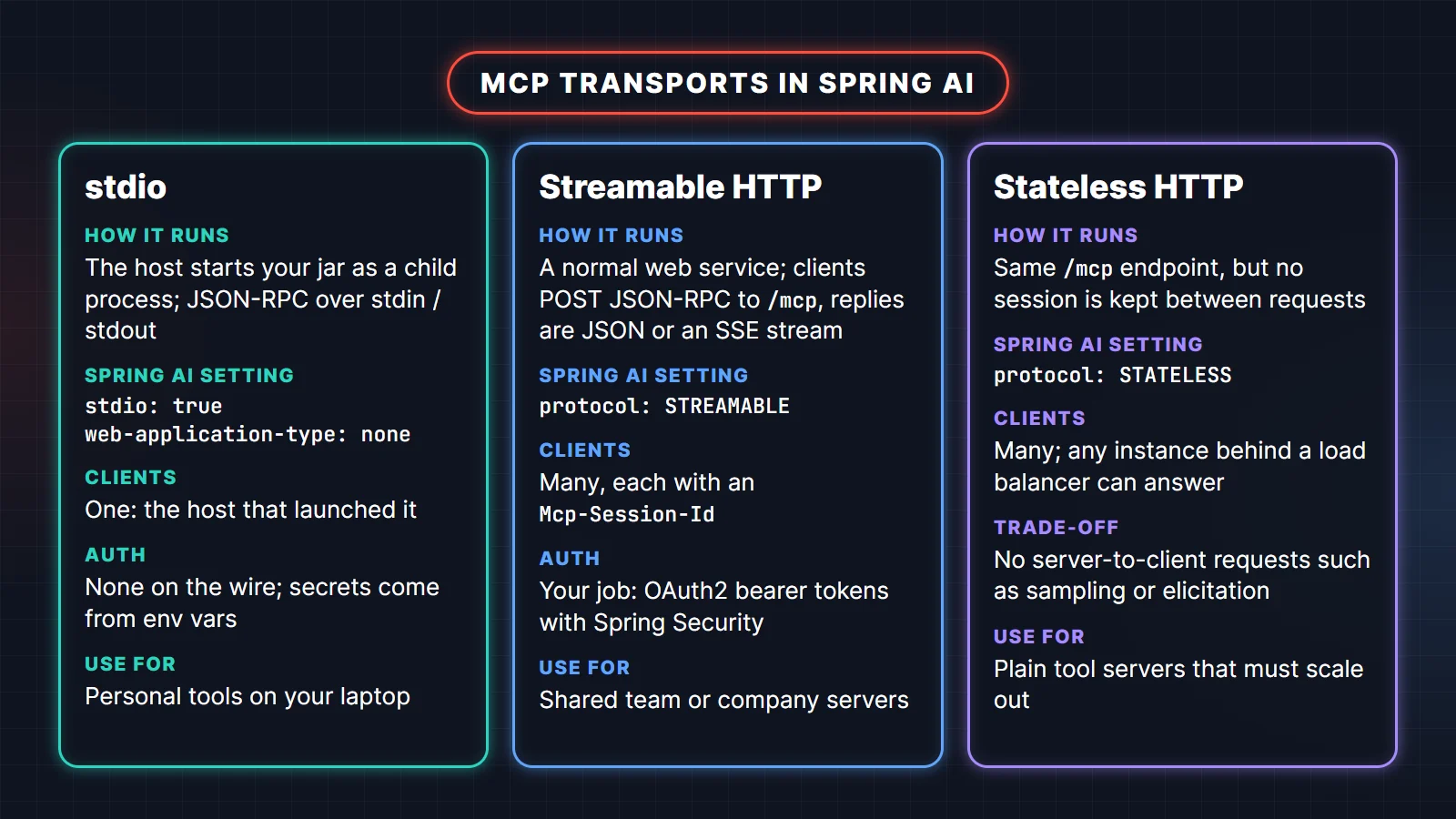
Here is the same information as a list:
- stdio: the host starts your jar as a child process and talks over stdin and stdout. One client, no network, secrets come from environment variables. Best for personal tools on your own machine.
- Streamable HTTP (
protocol: STREAMABLE): a normal web service. Clients POST JSON-RPC to/mcpand get back JSON or a Server-Sent Events stream. Many clients, each with its own session. Authentication is your job. - Stateless HTTP (
protocol: STATELESS): the same endpoint without server-side sessions, so any instance behind a load balancer can answer. The trade-off is that the server cannot send requests back to the client, such as sampling or elicitation.
For Streamable HTTP, this is all the configuration we need:
spring:
  ai:
    mcp:
      server:
        name: order-mcp-server
        version: 1.0.0
        type: SYNC
        protocol: STREAMABLE
        instructions: "Look up and cancel orders in the demo store."
        # streamable-http:
        #   mcp-endpoint: /mcp        # the default path
type: SYNC (the default) registers normal blocking methods. With ASYNC, Spring AI registers only methods that return reactive types, so a plain blocking method does not show up in the tool list. Keep SYNC unless you are on WebFlux end to end.
To run the same jar over stdio, turn off the web server and keep stdout clean:
java -jar target/order-mcp-server-0.0.1.jar \
  --spring.ai.mcp.server.stdio=true \
  --spring.main.web-application-type=none \
  --spring.main.banner-mode=off \
  --logging.console.enabled=false
The last two flags are not optional. With stdio, stdout is the protocol channel, so the Spring banner or a single log line on the console corrupts the JSON-RPC stream and the client disconnects. Log to a file instead. I piped an initialize and a tools/call into that command and got clean JSON lines back (trimmed here):
{"jsonrpc":"2.0","id":1,"result":{"protocolVersion":"2025-11-25","capabilities":{...},
 "serverInfo":{"name":"order-mcp-server","version":"1.0.0"},
 "instructions":"Look up and cancel orders in the demo store."}}
{"jsonrpc":"2.0","id":2,"result":{"content":[{"type":"text","text":"[{\"id\":\"ORD-1002\",
 \"product\":\"Kafka Interview Guide\",\"status\":\"PAID\", ...},{\"id\":\"ORD-1001\", ...}]"}],
 "isError":false}}
Step 5: Test the server with curl and the MCP Inspector
Start the app (mvn spring-boot:run) and talk to it by hand once. It is the fastest way to understand the protocol, and the same requests are what a client sends. A Streamable HTTP client must accept both JSON and an event stream:
curl -i http://localhost:8080/mcp \
  -H "Content-Type: application/json" \
  -H "Accept: application/json, text/event-stream" \
  -d '{"jsonrpc":"2.0","id":1,"method":"initialize","params":{"protocolVersion":"2025-11-25",
       "capabilities":{},"clientInfo":{"name":"curl","version":"1.0"}}}'
The server answers with its capabilities and, in a response header, a session id:
HTTP/1.1 200
Mcp-Session-Id: e7644fbf-a2e7-452e-910f-711f76bfa255
Content-Type: application/json

{"jsonrpc":"2.0","id":1,"result":{"protocolVersion":"2025-11-25","capabilities":{"completions":{},
"logging":{},"prompts":{"listChanged":true},"resources":{"subscribe":false,"listChanged":true},
"tools":{"listChanged":true}},"serverInfo":{"name":"order-mcp-server","version":"1.0.0"}, ...}}
Send notifications/initialized (the server replies 202), then call a tool with the session header. Responses to requests come back as a short SSE stream:
curl http://localhost:8080/mcp \
  -H "Content-Type: application/json" \
  -H "Accept: application/json, text/event-stream" \
  -H "Mcp-Session-Id: e7644fbf-a2e7-452e-910f-711f76bfa255" \
  -d '{"jsonrpc":"2.0","id":3,"method":"tools/call",
       "params":{"name":"get_order","arguments":{"orderId":"ORD-1002"}}}'

id:e7644fbf-a2e7-452e-910f-711f76bfa255
event:message
data:{"jsonrpc":"2.0","id":3,"result":{"content":[{"type":"text","text":"{\"id\":\"ORD-1002\",
\"customerEmail\":\"asha@example.com\",\"product\":\"Kafka Interview Guide\",\"amount\":599.00,
\"currency\":\"INR\",\"status\":\"PAID\",\"placedOn\":\"2026-10-27\"}"}],"isError":false}}
For day-to-day testing, use the MCP Inspector, the reference debugging tool. It needs Node 22.19 or newer and runs through npx with a web UI, a scriptable CLI and a terminal UI:
# browser UI, connected to the running HTTP server
npx @modelcontextprotocol/inspector --server-url http://localhost:8080/mcp --transport http

# browser UI, launching the jar over stdio (arguments after -- go to java)
npx @modelcontextprotocol/inspector java -- -jar target/order-mcp-server-0.0.1.jar \
  --spring.ai.mcp.server.stdio=true --spring.main.web-application-type=none \
  --spring.main.banner-mode=off --logging.console.enabled=false

# CLI mode, handy in CI
npx @modelcontextprotocol/inspector --cli http://localhost:8080/mcp --transport http \
  --method tools/call --tool-name get_order --tool-arg orderId=ORD-1002
The bare -- matters: without it the Inspector tries to read -jar and the --spring... flags as its own options. In the UI, open the Tools tab, check that every description reads well, and call each tool with good and bad input. If a description confuses you, it will confuse the model.
Step 6: Connect it to Claude Code and Claude Desktop
To connect an MCP server to Claude Code over HTTP, register it with one command. The name is yours to choose:
claude mcp add --transport http orders http://localhost:8080/mcpFor stdio, everything after -- is the command Claude Code runs:
claude mcp add orders-local -- java -jar /abs/path/order-mcp-server-0.0.1.jar \
  --spring.ai.mcp.server.stdio=true --spring.main.web-application-type=none \
  --spring.main.banner-mode=off --logging.console.enabled=false
Run /mcp inside Claude Code (or claude mcp list in a shell) to see whether it connected. To share the server with your team, commit a project-scoped .mcp.json. Claude Code expands ${VAR} and ${VAR:-default} inside it, which keeps tokens out of git:
{
  "mcpServers": {
    "orders": {
      "type": "http",
      "url": "${ORDERS_MCP_URL:-http://localhost:8080}/mcp",
      "headers": { "Authorization": "Bearer ${ORDERS_MCP_TOKEN}" }
    }
  }
}
Claude Desktop reads local servers from claude_desktop_config.json (Settings, Developer, Edit Config). On macOS it lives in ~/Library/Application Support/Claude/, on Windows in %APPDATA%\Claude\. Use absolute paths, because the app does not start in your project folder:
{
  "mcpServers": {
    "orders": {
      "command": "java",
      "args": ["-jar", "/Users/you/mcp/order-mcp-server-0.0.1.jar",
               "--spring.ai.mcp.server.stdio=true",
               "--spring.main.web-application-type=none",
               "--spring.main.banner-mode=off",
               "--logging.console.enabled=false"]
    }
  }
}
Restart Claude Desktop after editing the file. Then ask "Can order ORD-1002 still be cancelled?" and watch the sequence below happen: the model reads the tool list, chooses get_order, the client sends tools/call, your Spring code runs, and the JSON result goes back into the model's context.
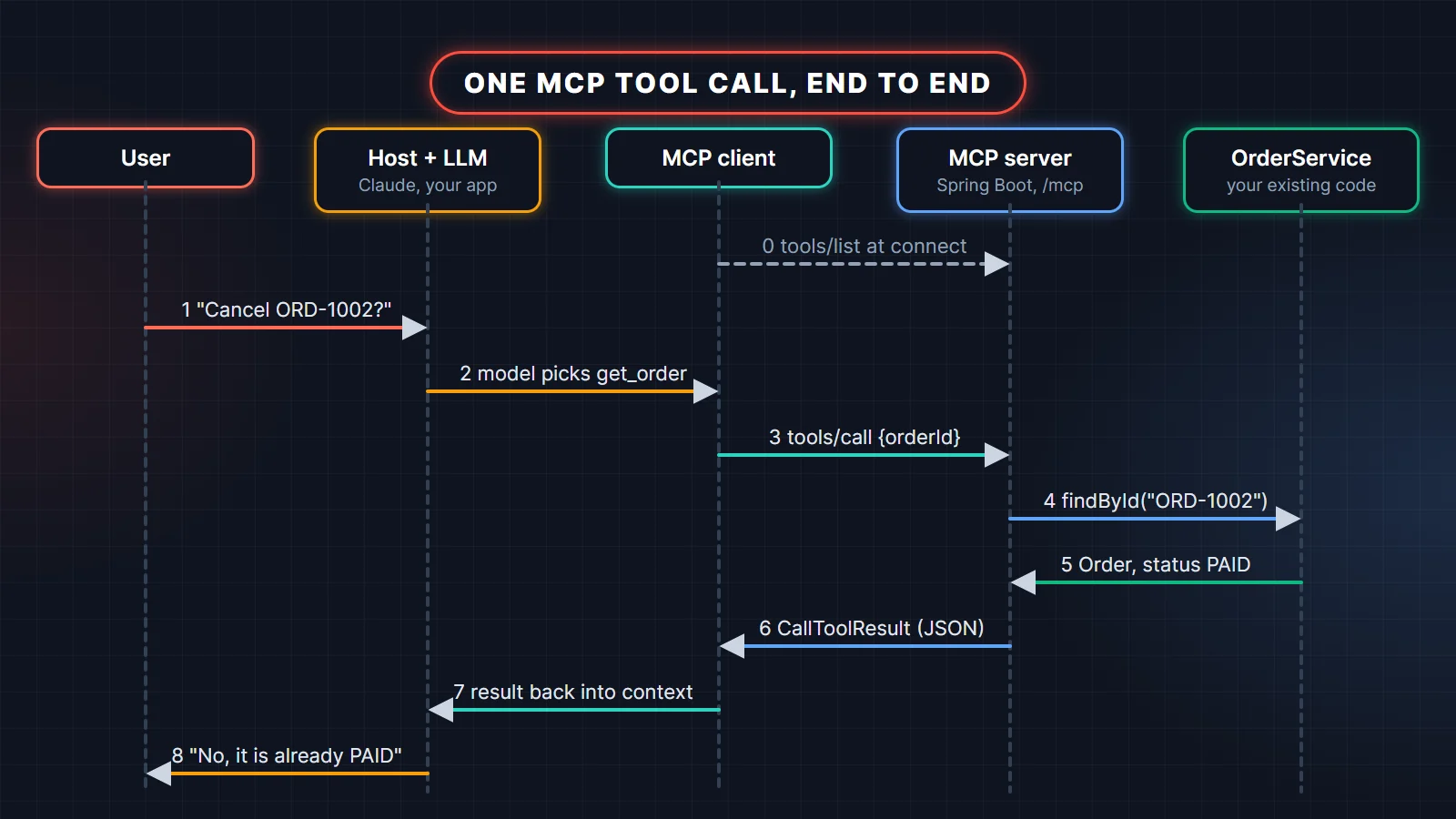
The Claude Code MCP docs cover scopes, OAuth login for remote servers and the other options. If you want a full course on these workflows, see the products section near the end.
Step 7: Call it from a Spring AI MCP client
The other side of the protocol is just as short in Spring AI. A client app adds spring-ai-starter-mcp-client (it uses the JDK HttpClient; the docs recommend spring-ai-starter-mcp-client-webflux for production) plus a model starter, and lists its connections in YAML:
spring:
  ai:
    mcp:
      client:
        type: SYNC
        request-timeout: 30s
        streamable-http:
          connections:
            orders:
              url: http://localhost:8080      # endpoint defaults to /mcp
Spring AI creates one McpSyncClient per connection and also a SyncMcpToolCallbackProvider that turns every remote tool into a Spring AI tool callback. You can use either:
@Bean
ApplicationRunner listAndCall(List<McpSyncClient> clients) {
    return args -> {
        McpSyncClient orders = clients.getFirst();
        orders.listTools().tools()
                .forEach(t -> System.out.println("tool: " + t.name()));
        CallToolResult result = orders.callTool(
                new CallToolRequest("get_order", Map.of("orderId", "ORD-1001")));
        System.out.println("result: " + result.content());
    };
}

@Bean
ApplicationRunner askModel(ChatClient.Builder chat, SyncMcpToolCallbackProvider mcpTools) {
    return args -> {
        String answer = chat.build()
                .prompt("What is the status of order ORD-1002, and can it still be cancelled?")
                .tools(mcpTools)               // the model may now call the remote MCP tools
                .call()
                .content();
        System.out.println(answer);
    };
}
The first runner needs no LLM at all. Its real output against our server:
tool: cancel_order
tool: get_order
tool: list_customer_orders
result: [TextContent[annotations=null, text={"id":"ORD-1001","customerEmail":"asha@example.com",
"product":"Spring Boot Interview Guide","amount":499.00,"currency":"INR","status":"DELIVERED",
"placedOn":"2026-10-02"}, meta=null]]
The second runner hands the tools to whatever chat model you configured; Spring AI runs the tool-calling loop for you. This is how you give an existing Spring AI app access to any MCP server, including third-party ones. A client can also run a stdio server as a child process with spring.ai.mcp.client.stdio.connections.<name>.command and args.
Securing a Spring AI MCP server
The Spring AI docs are blunt about this: the HTTP transports have no authentication by default, and any client that can reach the endpoint can list and call every tool. Before your server leaves localhost, work through these points.
Put the endpoint behind OAuth2
The MCP authorization spec models an HTTP MCP server as an OAuth 2.1 resource server: clients send Authorization: Bearer <token> on every request, and the server must check that the token was issued for it (its audience). In Spring that is the standard resource server setup:
@Bean
SecurityFilterChain mcpSecurity(HttpSecurity http) throws Exception {
    http
        .authorizeHttpRequests(auth -> auth
            .requestMatchers("/mcp/**").hasAuthority("SCOPE_orders.read")
            .anyRequest().denyAll())
        .csrf(csrf -> csrf.disable())                  // bearer tokens, no cookies
        .sessionManagement(s -> s.sessionCreationPolicy(SessionCreationPolicy.STATELESS))
        .oauth2ResourceServer(rs -> rs.jwt(Customizer.withDefaults()));
    return http.build();
}spring:
security:
oauth2:
resourceserver:
jwt:
issuer-uri: https://login.example.com/realms/tools
audiences: https://mcp.example.com # reject tokens minted for other servicesThe spec also requires an MCP server to publish OAuth Protected Resource Metadata (RFC 9728), so clients can discover which authorization server to log in with. In my Spring Security 7.1 test app, a 401 already carried WWW-Authenticate: Bearer resource_metadata=".../.well-known/oauth-protected-resource" and that URL served a metadata document. Check that document lists your authorization server before you rely on it. The MCP authorization spec has the full flow, and the Spring docs point to the community MCP Security project if you want more of it handled for you. Our Spring Security JWT guide walks through the resource server pieces in detail.
Design tools for least privilege
- Expose the smallest useful operations.
get_orderandcancel_orderare fine;run_sqlis not. - Enforce rules in the service, not in the description. Our
cancelmethod refuses non-PENDING orders whatever the model asks for. - Authorize per user. With OAuth in place, use the authenticated user to filter data, so one customer's assistant cannot read another customer's orders.
- Split read and write tools so a client can allow one and require confirmation for the other.
- Treat text from tools as untrusted data. An order note that says "ignore previous instructions" goes into the model's context like everything else.
- Do not pass the caller's token through to downstream APIs. The spec forbids token passthrough; get a separate token for each upstream service.
One more reason to keep the raw endpoint private: when I sent malformed requests to the 2.0.2 WebMVC transport, the 400 response body included a serialized Java stack trace. That is fine on localhost and not something to show the internet.
Common errors and how to fix them
These are the failures I hit or provoked while writing this post, with the real messages:
400 Invalid Accept headers. Expected TEXT_EVENT_STREAM and APPLICATION_JSON: the client sent onlyAccept: application/json. Streamable HTTP clients must accept both.400 Session ID missing: a request afterinitializedid not carry theMcp-Session-Idheader. Real clients handle this; it bites when testing with curl or a gateway that strips headers. If you run several instances, either use sticky sessions or switch toprotocol: STATELESS.- A plain GET on
/mcpreturns 400 ("Expected TEXT_EVENT_STREAM"): normal. The endpoint is not a web page. - stdio server connects, then dies or "invalid JSON": something printed to stdout. Turn off the banner and console logging, and never use
System.out.printlnin a stdio server. - Tools missing from
tools/list: the class is not a Spring bean, the method is non-reactive whiletype: ASYNCis set, the annotation scanner is disabled, or two tools share a name and the second was dropped. Check theRegistered tools: Nlog line. - Claude Desktop shows the server as failed: usually a relative jar path or
javanot on the app's PATH. Use absolute paths (or the full path tojava) and read themcp-server-<name>.logfile in Claude's logs folder. - Old tutorials use the SSE transport and
/sseendpoints: SSE is deprecated since Spring AI 2.0. Useprotocol: STREAMABLE.
The Spring AI MCP server reference and the MCP annotations page list every property and annotation attribute used above.
Practise and go deeper
If you want to keep building after this tutorial, these two guides go further:
- MCP for Java & Spring Developers: A Hands-On Guide: a step-by-step guide to the Model Context Protocol for Java developers: build a Spring AI MCP server and client, connect Claude Code, test with the Inspector, secure it, and finish a capstone project.
- Claude Code Workflows: A Step-by-Step Guide for Developers: 53 short lessons on CLAUDE.md, context, plan mode and permissions, skills, subagents, hooks, MCP, git and Actions, with a sample project and a cheat sheet.
Related reading
- What Is MCP (Model Context Protocol)? A Practical Guide for Developers
- Spring AI Interview Questions
- AI Connectors Explained: Plug Your Assistant into GitHub, Drive, Jira and More
FAQ
Which Spring AI version should I use for an MCP server?
Use the latest Spring AI 2.0.x (2.0.2 in October 2026) with Spring Boot 4.0 or 4.1. Spring AI 1.x tutorials still work in spirit, but the annotation packages, transports and starters changed in 2.0, so code copied from 2025 posts often will not compile.
What is the difference between @McpTool and @Tool in Spring AI?
@Tool is Spring AI's generic tool annotation for model tool calling; MCP servers expose it through a MethodToolCallbackProvider bean. @McpTool is MCP-specific, needs no extra bean, and supports tool annotations, titles and the MCP request context.
Can one Spring Boot app be both an MCP server and an MCP client?
Yes. Add both starters. The server property expose-mcp-client-tools (off by default) can even re-expose the tools of downstream servers, which turns your app into an aggregating gateway. Do that deliberately, because it widens what your server can do.
Do I need an LLM API key to run an MCP server?
No. The server only answers protocol requests. The host (Claude Code, Claude Desktop or your Spring AI client) owns the model and its key.
Should I use stdio or Streamable HTTP?
Use stdio for a tool that runs on the same machine as the AI app and serves one person. Use Streamable HTTP when several people or services share one server, and put OAuth2 in front of it before exposing it beyond localhost.
How do I connect an MCP server to Claude?
In Claude Code, run claude mcp add --transport http <name> <url> or add a stdio command after --. In Claude Desktop, add the server under mcpServers in claude_desktop_config.json and restart the app.