 Tech Tribers
Spring Security JWT Authentication in Spring Boot 4 (Step by Step, 2026)
Spring Security 7 JWT auth the current way: SecurityFilterChain, JwtEncoder login, resource server validation, roles, @PreAuthorize, refresh token rotation, tests and 12 interview questions.
New20 min read
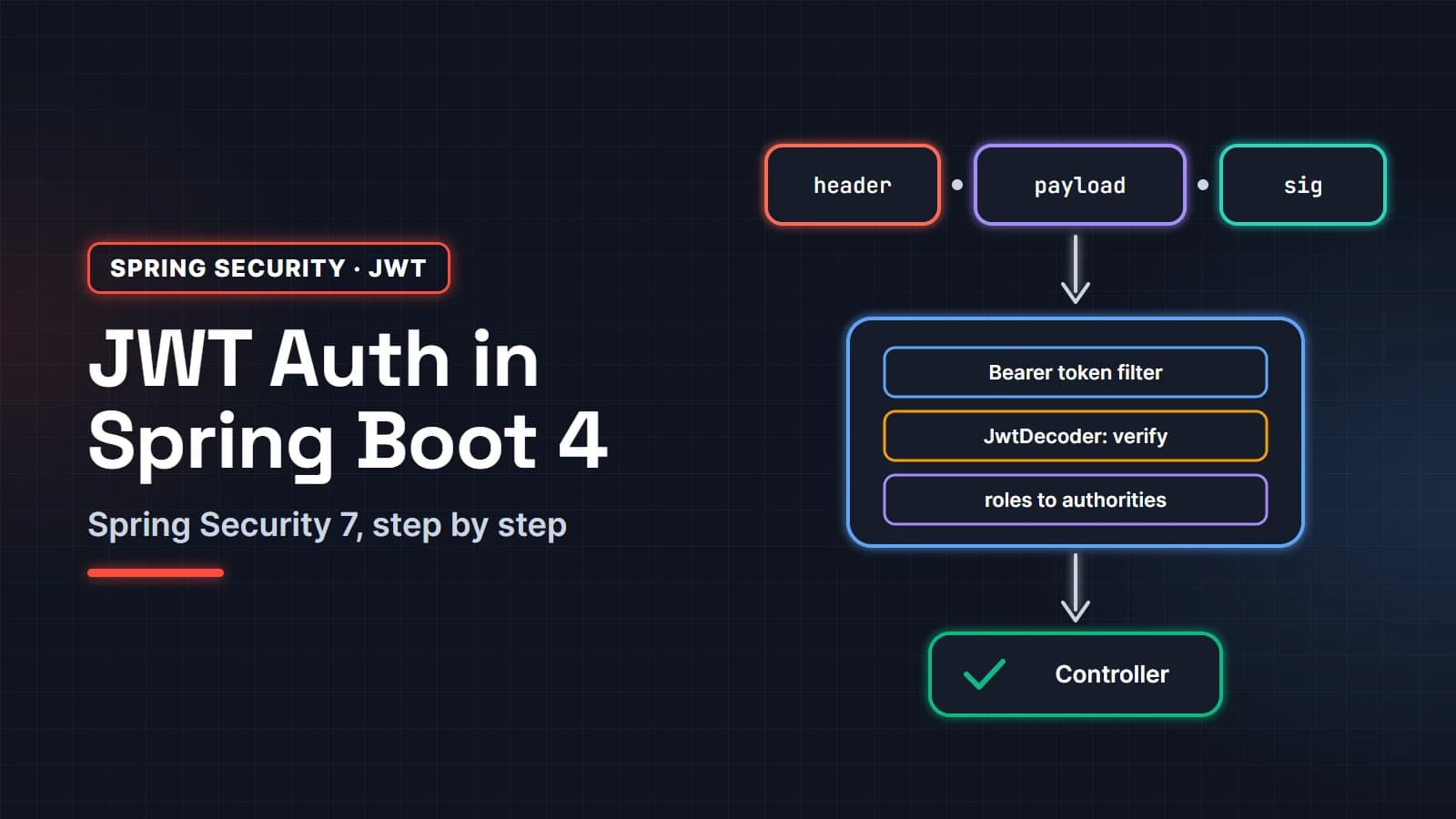
Spring Security JWT authentication in Spring Boot 4 takes three pieces: a login endpoint that checks the password and signs a token with JwtEncoder, a SecurityFilterChain that turns on the built-in OAuth2 resource server so every request's bearer token is verified by NimbusJwtDecoder, and a converter that maps a roles claim to Spring authorities. You do not need a hand-written JWT filter or a third-party JWT library.
This guide is for Java developers who have seen older JWT tutorials (the ones that extend WebSecurityConfigurerAdapter) and want the current way on Spring Boot 4 and Spring Security 7. We build a small stateless API with login, role-based access, @PreAuthorize, refresh tokens with rotation and reuse detection, CORS for a single-page app, and tests. Every request and response shown is real output from the sample, run on Spring Boot 4.1 (Spring Security 7.1) and Java 25. The post ends with 12 Spring Security interview questions.
In this guide
- How JWT authentication works in Spring Security
- What is inside a JWT
- Step 1: Dependencies
- Step 2: Signing keys: JwtEncoder and JwtDecoder
- Step 3: The SecurityFilterChain
- Step 4: A login endpoint that issues tokens
- Step 5: Roles from JWT claims
- Step 6: Method security with @PreAuthorize
- Step 7: Refresh tokens with rotation
- Step 8: Try it with curl
- Step 9: Test it with spring-security-test
- CORS and CSRF for single-page apps
- Outdated patterns to avoid
- 12 Spring Security interview questions
- FAQ
How JWT authentication works in Spring Security
There are two separate moments. At login, the client sends a username and password once; the server checks them with an AuthenticationManager and returns a short-lived signed access token (plus a refresh token). After that, every API call carries Authorization: Bearer <token>. Spring Security's bearer token filter extracts it, a JwtDecoder verifies the signature and the time and issuer claims, a converter builds the user's authorities, and the normal authorization rules decide between 200, 401 and 403.
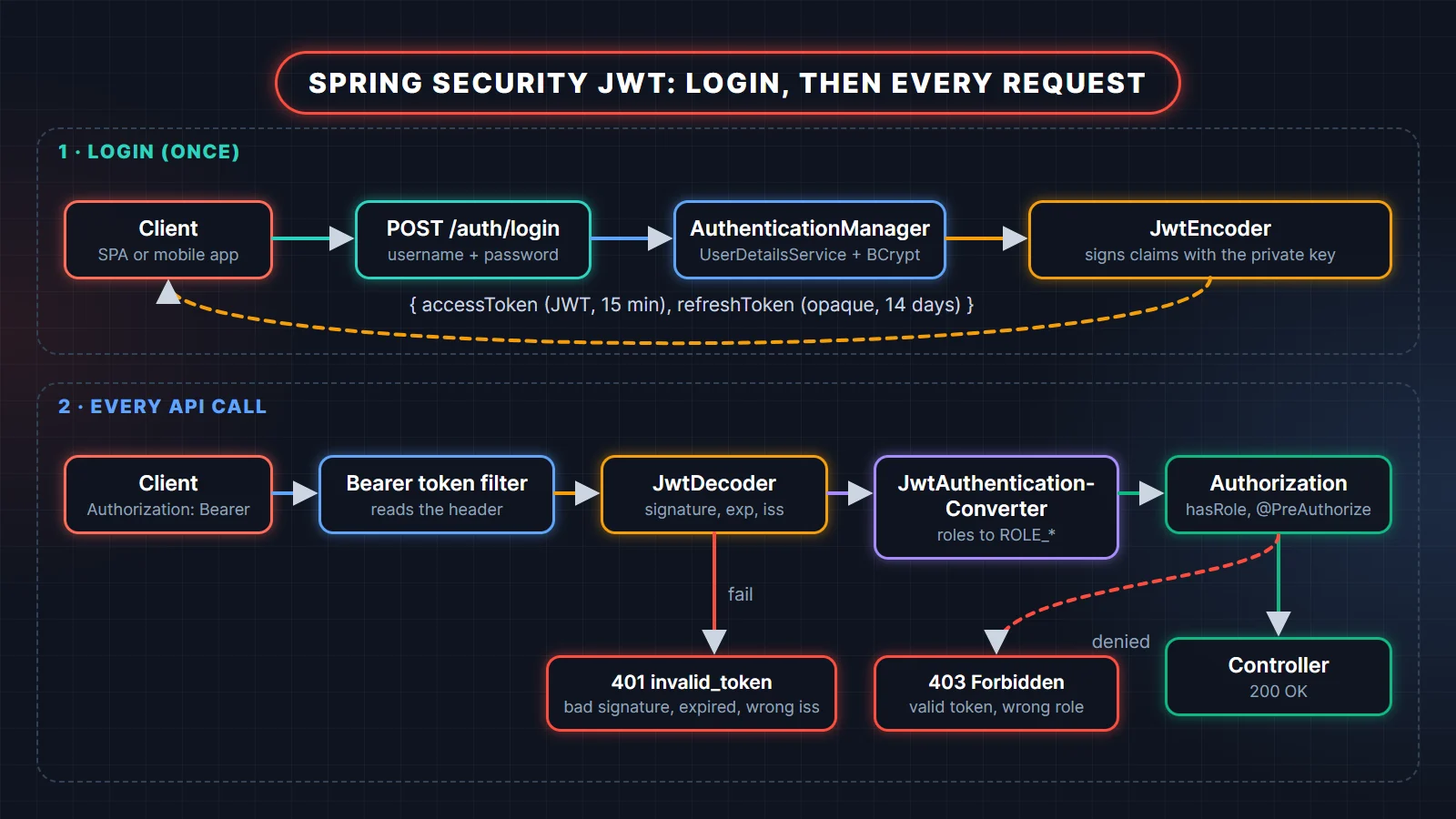
The key point is that the second half, validating tokens, is exactly what Spring Security's OAuth2 Resource Server support already does. It was built for tokens from Keycloak, Okta, Cognito or Spring Authorization Server, but it does not care who signed the token as long as it has the key. So we use it for our own tokens too, and keep our code to the part that is really ours: checking passwords and choosing claims.
What is inside a JWT
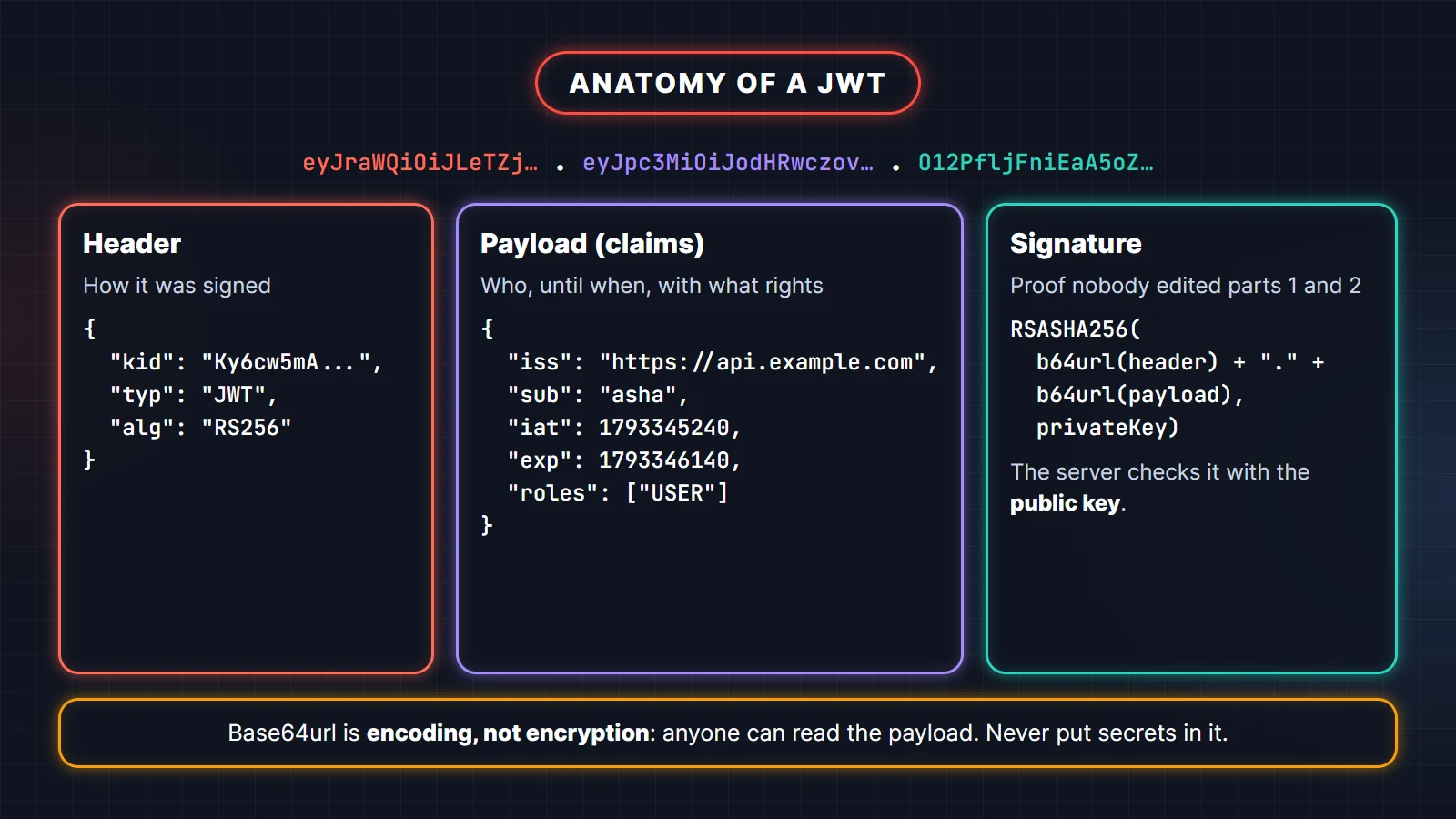
A JSON Web Token (RFC 7519) is three Base64url-encoded parts joined by dots: a header that says how it was signed, a payload of claims, and a signature over the first two. Here is a real access token from the sample app, decoded:
To make this concrete, the program below builds and verifies an HS256 token with nothing but the JDK, then edits the payload to pretend to be an admin. Save it as JwtAnatomy.java and run it with java JwtAnatomy.java:
import java.nio.charset.StandardCharsets;
import java.security.MessageDigest;
import java.util.Base64;
import javax.crypto.Mac;
import javax.crypto.spec.SecretKeySpec;

public class JwtAnatomy {

    static final Base64.Encoder B64URL = Base64.getUrlEncoder().withoutPadding();
    static final Base64.Decoder B64URL_DEC = Base64.getUrlDecoder();

    static String b64(String json) {
        return B64URL.encodeToString(json.getBytes(StandardCharsets.UTF_8));
    }

    static String sign(String data, byte[] key) throws Exception {
        Mac mac = Mac.getInstance("HmacSHA256");
        mac.init(new SecretKeySpec(key, "HmacSHA256"));
        return B64URL.encodeToString(mac.doFinal(data.getBytes(StandardCharsets.UTF_8)));
    }

    static boolean verify(String token, byte[] key) throws Exception {
        String[] parts = token.split("\\.");
        String expected = sign(parts[0] + "." + parts[1], key);
        return MessageDigest.isEqual(expected.getBytes(), parts[2].getBytes()); // constant-time compare
    }

    public static void main(String[] args) throws Exception {
        byte[] key = "this-demo-secret-is-32-bytes-ok!".getBytes(StandardCharsets.UTF_8);

        String header = "{\"alg\":\"HS256\",\"typ\":\"JWT\"}";
        String payload = "{\"sub\":\"asha\",\"roles\":[\"USER\"],\"iat\":1793345240,\"exp\":1793346140}";
        String signingInput = b64(header) + "." + b64(payload);
        String token = signingInput + "." + sign(signingInput, key);

        String[] parts = token.split("\\.");
        System.out.println("header    = " + parts[0]);
        System.out.println("payload   = " + parts[1]);
        System.out.println("signature = " + parts[2]);
        System.out.println();
        System.out.println("decoded header  : " + new String(B64URL_DEC.decode(parts[0]), StandardCharsets.UTF_8));
        System.out.println("decoded payload : " + new String(B64URL_DEC.decode(parts[1]), StandardCharsets.UTF_8));
        System.out.println("valid signature : " + verify(token, key));

        // Anyone can decode and edit the payload, but they cannot re-sign it without the key
        String forgedPayload = b64(payload.replace("[\"USER\"]", "[\"ADMIN\"]"));
        String forged = parts[0] + "." + forgedPayload + "." + parts[2];
        System.out.println("forged payload  : " + new String(B64URL_DEC.decode(forgedPayload), StandardCharsets.UTF_8));
        System.out.println("forged valid?   : " + verify(forged, key));
    }
}
Output on JDK 25:
header    = eyJhbGciOiJIUzI1NiIsInR5cCI6IkpXVCJ9
payload   = eyJzdWIiOiJhc2hhIiwicm9sZXMiOlsiVVNFUiJdLCJpYXQiOjE3OTMzNDUyNDAsImV4cCI6MTc5MzM0NjE0MH0
signature = Zd01UG1qkErQspdYmzfsR1LF9Epxn4ravUqIRZJRdx0

decoded header  : {"alg":"HS256","typ":"JWT"}
decoded payload : {"sub":"asha","roles":["USER"],"iat":1793345240,"exp":1793346140}
valid signature : true
forged payload  : {"sub":"asha","roles":["ADMIN"],"iat":1793345240,"exp":1793346140}
forged valid?   : false
Two lessons fall out of that output. First, the payload is readable by anyone: Base64url is an encoding, not encryption, so never put passwords, card numbers or personal data in claims. Second, the signature is the whole security model. A server that skips verification, accepts "alg": "none", or lets the token choose its own algorithm is broken. That is the main reason not to hand-roll JWT parsing.
Step 1: Dependencies
Spring Boot 4 split its starters into smaller modules, and test support now has its own starters too. For this API you need:
<dependency>
  <groupId>org.springframework.boot</groupId>
  <artifactId>spring-boot-starter-webmvc</artifactId>
</dependency>
<dependency>
  <groupId>org.springframework.boot</groupId>
  <artifactId>spring-boot-starter-security</artifactId>
</dependency>
<dependency>
  <groupId>org.springframework.boot</groupId>
  <artifactId>spring-boot-starter-security-oauth2-resource-server</artifactId>
</dependency>

<dependency>
  <groupId>org.springframework.boot</groupId>
  <artifactId>spring-boot-starter-webmvc-test</artifactId>
  <scope>test</scope>
</dependency>
<dependency>
  <groupId>org.springframework.boot</groupId>
  <artifactId>spring-boot-starter-security-test</artifactId>
  <scope>test</scope>
</dependency>
Spring Boot 4 renamed the OAuth2 starters: the old spring-boot-starter-oauth2-resource-server still resolves but is deprecated in favor of spring-boot-starter-security-oauth2-resource-server. It brings spring-security-oauth2-jose, which contains NimbusJwtEncoder, NimbusJwtDecoder and the validators. No jjwt or java-jwt dependency is needed.
Step 2: Signing keys: JwtEncoder and JwtDecoder
Use an asymmetric key pair (RS256 or ES256) when you can. The private key signs and stays in the auth service; the public key verifies and can be shared with every service that accepts the token, so a leak on a downstream service does not let anyone mint tokens. Spring Security 7 added builders to NimbusJwtEncoder that make this short:
@Configuration
public class JwtKeyConfig {

    static final String ISSUER = "https://api.example.com";

    // Demo only: a fresh key on every start. In production load it from a keystore or secret manager.
    @Bean
    KeyPair jwtSigningKey() throws Exception {
        KeyPairGenerator generator = KeyPairGenerator.getInstance("RSA");
        generator.initialize(2048);
        return generator.generateKeyPair();
    }

    @Bean
    JwtEncoder jwtEncoder(KeyPair key) {
        return NimbusJwtEncoder
            .withKeyPair((RSAPublicKey) key.getPublic(), (RSAPrivateKey) key.getPrivate())
            .build();
    }

    @Bean
    JwtDecoder jwtDecoder(KeyPair key) {
        NimbusJwtDecoder decoder = NimbusJwtDecoder.withPublicKey((RSAPublicKey) key.getPublic()).build();
        decoder.setJwtValidator(JwtValidators.createDefaultWithIssuer(ISSUER)); // exp, nbf and iss
        return decoder;
    }
}
The encoder signs with RS256 and adds a kid (key id) header, which you can see in the decoded token above. The decoder trusts RS256 by default, rejects expired tokens and tokens used before nbf (with 60 seconds of clock skew), and, because we set it, rejects tokens whose iss is not ours.
If one service both issues and checks tokens, an HMAC secret is acceptable: NimbusJwtEncoder.withSecretKey(key) and NimbusJwtDecoder.withSecretKey(key). Use at least 256 random bits, and know that every service holding the secret can also forge tokens.
When tokens come from an external identity provider instead, delete both beans and let Spring Boot build the decoder from configuration. Boot reads the provider's metadata and JWK set, which handles key rotation for you:
spring:
  security:
    oauth2:
      resourceserver:
        jwt:
          issuer-uri: https://login.example.com/realms/shop
          audiences: https://api.example.com
Step 3: The SecurityFilterChain
This is the heart of the configuration. In Spring Security 7 you declare a SecurityFilterChain bean and configure HttpSecurity with the lambda DSL; it is the only style left.
@Configuration
@EnableMethodSecurity
public class SecurityConfig {

    @Bean
    SecurityFilterChain apiSecurity(HttpSecurity http) throws Exception {
        http
            .csrf(csrf -> csrf.disable())                 // no cookies, so no CSRF risk
            .cors(Customizer.withDefaults())              // uses the CorsConfigurationSource bean
            .sessionManagement(s -> s.sessionCreationPolicy(SessionCreationPolicy.STATELESS))
            .authorizeHttpRequests(auth -> auth
                .requestMatchers(HttpMethod.POST, "/auth/login", "/auth/refresh", "/auth/logout").permitAll()
                .requestMatchers("/api/admin/**").hasRole("ADMIN")
                .anyRequest().authenticated())
            .oauth2ResourceServer(rs -> rs.jwt(Customizer.withDefaults()));
        return http.build();
    }

    @Bean
    PasswordEncoder passwordEncoder() {
        return PasswordEncoderFactories.createDelegatingPasswordEncoder();  // bcrypt by default
    }

    @Bean
    AuthenticationManager authenticationManager(UserDetailsService users, PasswordEncoder encoder) {
        DaoAuthenticationProvider provider = new DaoAuthenticationProvider(users);
        provider.setPasswordEncoder(encoder);
        return new ProviderManager(provider);
    }
}
Line by line:
csrf.disable()is safe here only because the token travels in theAuthorizationheader, which a browser never attaches on its own. If you move the token into a cookie, CSRF protection comes back (see the SPA section).STATELESStells Spring Security not to create anHttpSessionor store the security context in one. Each request is authenticated from its token alone.authorizeHttpRequestsrules are checked in order, so put specific matchers first andanyRequest()last.hasRole("ADMIN")checks for the authorityROLE_ADMIN.oauth2ResourceServer(rs -> rs.jwt(...))adds the bearer token filter and wires in ourJwtDecoderbean. This one line replaces the 60-lineOncePerRequestFilterfound in older tutorials.- The
DaoAuthenticationProviderconstructor takes theUserDetailsServicedirectly in Spring Security 7; the old no-argument constructor andsetUserDetailsServiceare gone.
For the demo, users live in an InMemoryUserDetailsManager with bcrypt hashes. In a real app, implement UserDetailsService over your user table.
Step 4: A login endpoint that issues tokens
The login endpoint authenticates the credentials with the AuthenticationManager, then builds the claims and asks JwtEncoder to sign them:
@Service
public class TokenService {

    static final Duration ACCESS_TTL = Duration.ofMinutes(15);

    private final JwtEncoder encoder;

    public TokenService(JwtEncoder encoder) {
        this.encoder = encoder;
    }

    public String accessToken(String username, List<String> roles) {
        Instant now = Instant.now();
        JwtClaimsSet claims = JwtClaimsSet.builder()
            .issuer(JwtKeyConfig.ISSUER)
            .subject(username)
            .issuedAt(now)
            .expiresAt(now.plus(ACCESS_TTL))
            .claim("roles", roles)                      // e.g. ["USER", "ADMIN"]
            .build();
        return encoder.encode(JwtEncoderParameters.from(claims)).getTokenValue();
    }

    // ROLE_USER, ROLE_ADMIN  ->  ["USER", "ADMIN"]
    public static List<String> rolesOf(Authentication auth) {
        return auth.getAuthorities().stream()
            .map(GrantedAuthority::getAuthority)
            .filter(a -> a.startsWith("ROLE_"))
            .map(a -> a.substring("ROLE_".length()))
            .toList();
    }
}

@RestController
@RequestMapping("/auth")
public class AuthController {

    record LoginRequest(String username, String password) {}
    record TokenResponse(String accessToken, String refreshToken, String tokenType, long expiresIn) {}

    // constructor injection of AuthenticationManager, TokenService, RefreshTokenService omitted

    @PostMapping("/login")
    public TokenResponse login(@RequestBody LoginRequest req) {
        Authentication auth = authManager.authenticate(
            UsernamePasswordAuthenticationToken.unauthenticated(req.username(), req.password()));
        String access = tokens.accessToken(auth.getName(), TokenService.rolesOf(auth));
        return new TokenResponse(access, refreshTokens.issue(auth.getName()), "Bearer",
                TokenService.ACCESS_TTL.toSeconds());
    }

    @ExceptionHandler(AuthenticationException.class)
    @ResponseStatus(HttpStatus.UNAUTHORIZED)
    public ProblemDetail onAuthFailure(AuthenticationException ex) {
        return ProblemDetail.forStatusAndDetail(HttpStatus.UNAUTHORIZED, ex.getMessage());
    }
}
The token carries short role names such as ["USER", "ADMIN"]; Step 5 adds the prefix back when the token is read. Keep access tokens short-lived (5 to 15 minutes is common) and the claim set small: identity, expiry, and coarse roles. Do not copy the whole user profile into the token. Return the same generic message for "unknown user" and "wrong password" so the endpoint does not reveal which usernames exist, and put rate limiting in front of it.
Step 5: Roles from JWT claims
By default the resource server reads the scope or scp claim and creates authorities like SCOPE_orders.read. Our token uses a roles claim, so we tell Spring Security where to look and which prefix to add:
@Bean
JwtAuthenticationConverter jwtAuthenticationConverter() {
    JwtGrantedAuthoritiesConverter roles = new JwtGrantedAuthoritiesConverter();
    roles.setAuthoritiesClaimName("roles");
    roles.setAuthorityPrefix("ROLE_");
    JwtAuthenticationConverter converter = new JwtAuthenticationConverter();
    converter.setJwtGrantedAuthoritiesConverter(roles);
    return converter;
}
Spring Boot can build the same converter from two properties, so you can skip the bean entirely. I swapped the bean for these in the sample and all tests still passed:
spring:
  security:
    oauth2:
      resourceserver:
        jwt:
          authorities-claim-name: roles
          authority-prefix: ROLE_
Now a token with "roles": ["ADMIN"] satisfies hasRole("ADMIN"). In a controller, inject the verified token with @AuthenticationPrincipal Jwt jwt and read jwt.getSubject() or any claim.
Step 6: Method security with @PreAuthorize
URL rules are coarse. For rules that depend on the data, such as "users may read only their own orders", use method security. @EnableMethodSecurity (on the config class above) turns on @PreAuthorize and friends:
@GetMapping("/api/users/{username}/orders")
@PreAuthorize("hasRole('ADMIN') or #username == authentication.name")
public List<String> orders(@PathVariable String username) {
    return List.of(username + "-order-1", username + "-order-2");
}
authentication.name is the JWT's sub claim, because JwtAuthenticationConverter uses sub as the principal name by default. Asha can read /api/users/asha/orders and gets 403 for /api/users/li/orders; an admin can read both. Our tests below check exactly that.
Step 7: Refresh tokens with rotation
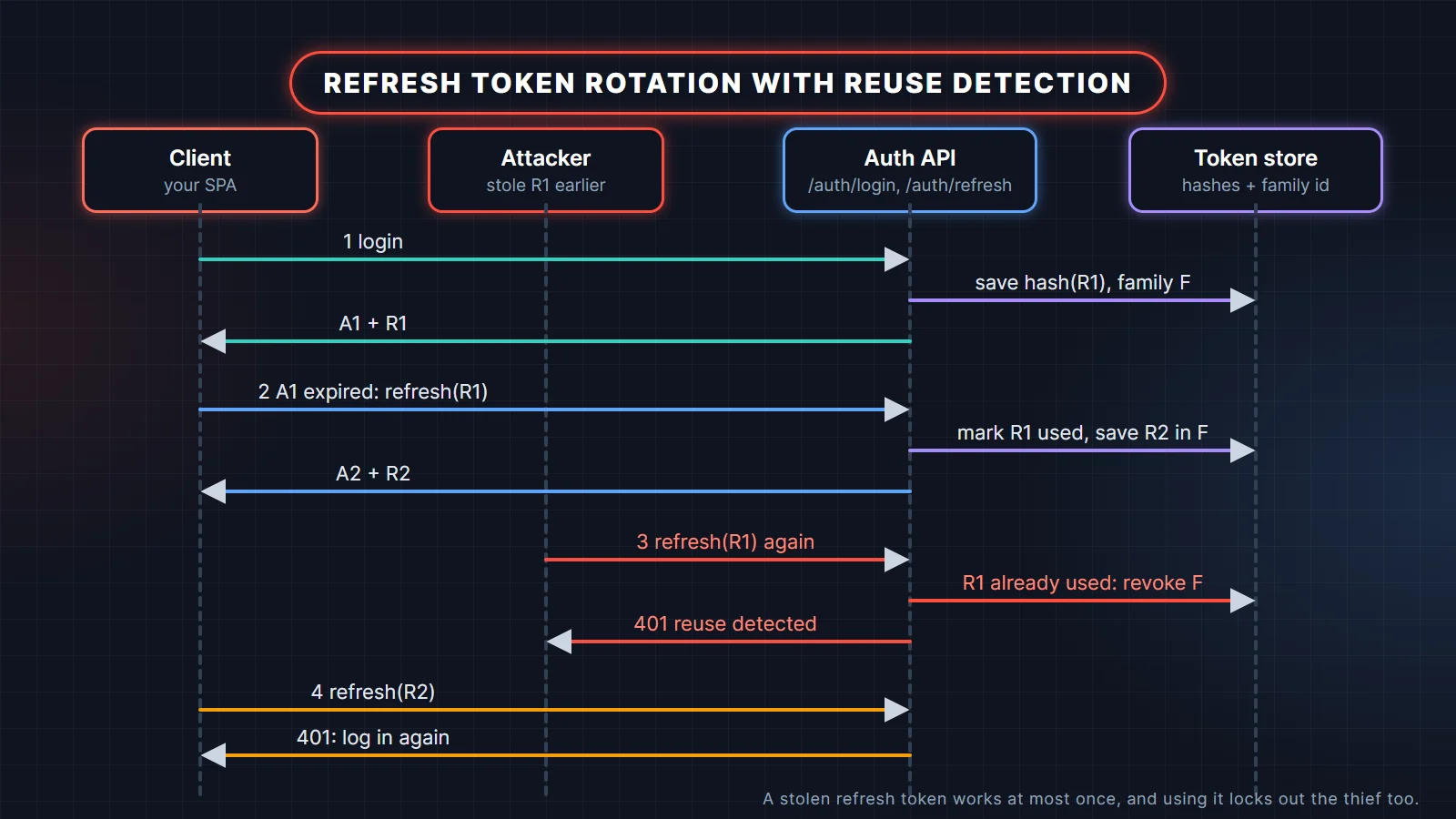
A short access token limits damage if it leaks, but users should not log in every 15 minutes. A refresh token solves that: a long-lived, single-purpose credential the client sends only to /auth/refresh to get a new access token. Make it opaque (a random string, not a JWT) and store only its hash on the server, so you can revoke it.
Then rotate it: every refresh returns a new refresh token and marks the old one used. If a used token ever comes back, someone has a copy, so revoke the whole token family and force a new login. The OAuth 2.1 draft requires either this rotation or sender-constrained tokens for refresh tokens issued to public clients such as SPAs.
@Service
public class RefreshTokenService {

    static final Duration REFRESH_TTL = Duration.ofDays(14);

    record StoredToken(String username, String familyId, Instant expiresAt, boolean used) {}
    record Rotation(String username, String newRefreshToken) {}

    private final Map<String, StoredToken> byHash = new ConcurrentHashMap<>(); // a DB table in real life
    private final SecureRandom random = new SecureRandom();

    public String issue(String username) {
        return issue(username, UUID.randomUUID().toString());
    }

    public synchronized Rotation rotate(String rawToken) {
        String hash = sha256(rawToken);
        StoredToken stored = byHash.get(hash);
        if (stored == null) {
            throw new BadCredentialsException("Unknown refresh token");
        }
        if (stored.used()) {                       // replay of an old token: assume it was stolen
            revokeFamily(stored.familyId());
            throw new BadCredentialsException("Refresh token reuse detected; please log in again");
        }
        if (stored.expiresAt().isBefore(Instant.now())) {
            throw new BadCredentialsException("Refresh token expired");
        }
        byHash.put(hash, new StoredToken(stored.username(), stored.familyId(), stored.expiresAt(), true));
        return new Rotation(stored.username(), issue(stored.username(), stored.familyId()));
    }

    private String issue(String username, String familyId) {
        byte[] bytes = new byte[32];
        random.nextBytes(bytes);
        String raw = Base64.getUrlEncoder().withoutPadding().encodeToString(bytes);
        byHash.put(sha256(raw), new StoredToken(username, familyId, Instant.now().plus(REFRESH_TTL), false));
        return raw;
    }

    private void revokeFamily(String familyId) {
        byHash.values().removeIf(t -> t.familyId().equals(familyId));
    }

    // sha256(String) and revoke(String) for logout omitted
}
The refresh endpoint calls rotate, then reloads the user through UserDetailsService before minting the new access token. That way a role change or a disabled account takes effect at the next refresh instead of living on in old claims. Logout calls revoke, which deletes the family. In production, store the hashes in a table with a unique index and do the "mark used" step in one transaction (or with a conditional update) so two parallel refreshes cannot both succeed.
Step 8: Try it with curl
Start the app and log in:
curl -s -H "Content-Type: application/json" \
  -d '{"username":"asha","password":"asha-pass"}' http://localhost:8080/auth/login

{"accessToken":"eyJraWQiOiJLeTZjdzVtQUg3NFFrTk1xYXdZVlBDNW0tLXZuQlc5azZ2WUVsLW5VeE13IiwidHlwIjoiSldUIiwi...",
 "refreshToken":"cRe7Gqnnv5BT3izZpB9fgRss5SEWIP2Pf4BIwFkfe8Q","tokenType":"Bearer","expiresIn":900}
Call a protected endpoint with the token:
curl -s -H "Authorization: Bearer $ACCESS" http://localhost:8080/api/me
{"user":"asha","expiresAt":"2026-10-30T07:42:20Z","roles":["USER"]}
The failure cases are where the built-in resource server shines. Each one returns a standard WWW-Authenticate header (RFC 6750) without any code from us:
# no token
HTTP/1.1 401
WWW-Authenticate: Bearer resource_metadata="http://localhost:8080/.well-known/oauth-protected-resource"

# garbage or tampered token
HTTP/1.1 401
WWW-Authenticate: Bearer error="invalid_token", error_description="An error occurred while attempting
  to decode the Jwt: Malformed token", error_uri="https://tools.ietf.org/html/rfc6750#section-3.1", ...

# valid USER token on an ADMIN endpoint
HTTP/1.1 403
WWW-Authenticate: Bearer error="insufficient_scope", error_description="The request requires higher
  privileges than provided by the access token.", error_uri="https://tools.ietf.org/html/rfc6750#section-3.1"
Note the resource_metadata parameter on the 401. With Spring Security 7.1 the resource server also served /.well-known/oauth-protected-resource (OAuth 2.0 Protected Resource Metadata, RFC 9728) in my run, which returned {"resource":"http://localhost:8080","bearer_methods_supported":["header"], ...}. Clients that follow that standard, such as MCP clients, use it to discover how to get a token. If your tests compare the header to exactly "Bearer", as many older tests do, they will fail after the upgrade; match on the prefix instead.
Finally, refresh, then replay the old refresh token:
curl -s -H "Content-Type: application/json" -d "{\"refreshToken\":\"$REFRESH\"}" \
  http://localhost:8080/auth/refresh
{"accessToken":"eyJraWQiOi...","refreshToken":"...","tokenType":"Bearer","expiresIn":900}

# same request again
{"detail":"Refresh token reuse detected; please log in again","instance":"/auth/refresh",
 "status":401,"title":"Unauthorized"}
Step 9: Test it with spring-security-test
You do not need real tokens to test authorization rules. The jwt() request post-processor from spring-security-test puts a ready-made JwtAuthenticationToken into the request, skipping the decoder, so each test states exactly the claims and authorities it needs. For the full login and refresh flow, use real tokens through MockMvc.
import static org.springframework.security.test.web.servlet.request.SecurityMockMvcRequestPostProcessors.jwt;

@SpringBootTest
@AutoConfigureMockMvc   // org.springframework.boot.webmvc.test.autoconfigure in Boot 4
class SecurityTests {

    @Autowired MockMvc mvc;

    @Test
    void noTokenGives401WithBearerChallenge() throws Exception {
        mvc.perform(get("/api/me"))
            .andExpect(status().isUnauthorized())
            .andExpect(header().string("WWW-Authenticate", containsString("Bearer")));
    }

    @Test
    void userCannotCallAdminEndpoint() throws Exception {
        mvc.perform(get("/api/admin/stats")
                .with(jwt().authorities(new SimpleGrantedAuthority("ROLE_USER"))))
            .andExpect(status().isForbidden());
    }

    @Test
    void preAuthorizeLetsUsersReadOnlyTheirOwnOrders() throws Exception {
        mvc.perform(get("/api/users/asha/orders").with(jwt().jwt(j -> j.subject("asha"))))
            .andExpect(status().isOk());
        mvc.perform(get("/api/users/li/orders").with(jwt().jwt(j -> j.subject("asha"))))
            .andExpect(status().isForbidden());
    }

    @Test
    void refreshRotatesAndReuseKillsTheFamily() throws Exception {
        String first = JsonPath.read(login("asha", "asha-pass"), "$.refreshToken");
        String second = JsonPath.read(refresh(first, 200), "$.refreshToken");
        refresh(first, 401);   // replaying the old token: reuse detected
        refresh(second, 401);  // ...and the whole family is revoked
    }

    // plus: wrong password, admin allowed, real token from /auth/login, tampered token rejected
}Tests run: 8, Failures: 0, Errors: 0, Skipped: 0 -- in com.example.jwt.SecurityTestsThe tampered-token test is worth copying: it swaps the payload of a real token for one with "roles":["ADMIN"] and asserts a 401 with invalid_token. It proves the signature check is actually wired in, which is the one thing a misconfigured JWT setup most often gets wrong. The Spring Security testing docs cover jwt() and the other OAuth2 post-processors.
CORS and CSRF for single-page apps
A React or Angular app on http://localhost:5173 calling an API on port 8080 is a cross-origin request, and the browser sends a preflight OPTIONS first because of the Authorization header. Declare a CorsConfigurationSource bean and enable cors(...) in the filter chain so preflights are answered before authentication runs:
@Bean
CorsConfigurationSource corsConfigurationSource() {
    CorsConfiguration cors = new CorsConfiguration();
    cors.setAllowedOrigins(List.of("http://localhost:5173"));
    cors.setAllowedMethods(List.of("GET", "POST", "PUT", "DELETE"));
    cors.setAllowedHeaders(List.of("Authorization", "Content-Type"));
    UrlBasedCorsConfigurationSource source = new UrlBasedCorsConfigurationSource();
    source.registerCorsConfiguration("/**", cors);
    return source;
}
The real preflight from the sample returned 200 with Access-Control-Allow-Origin: http://localhost:5173 and Access-Control-Allow-Headers: authorization. List exact origins; never combine * with credentials.
Where the SPA keeps the token is a real trade-off:
- In memory, sent as a bearer header: no CSRF risk, but any XSS on your page can read and steal the token. Keep the access token short-lived and the refresh token out of JavaScript's reach.
- In an HttpOnly cookie: scripts cannot read it, but the browser sends it automatically, so CSRF is back. Keep CSRF enabled. Spring Security 7 added
http.csrf(csrf -> csrf.spa()), which sets up a cookie-based CSRF token (XSRF-TOKEN, sent back in theX-XSRF-TOKENheader) with a request handler suited to SPAs. - A backend-for-frontend: the browser holds only a session cookie to your own BFF, and the BFF holds the tokens. More moving parts, but tokens never reach the browser. Many teams now prefer this for sensitive apps.
Avoid localStorage for long-lived tokens: it combines the XSS exposure of in-memory storage with persistence across tabs and restarts.
Outdated patterns to avoid
Most Spring Security JWT tutorials online were written for Spring Boot 2. Their code no longer compiles on Spring Security 6 or 7:
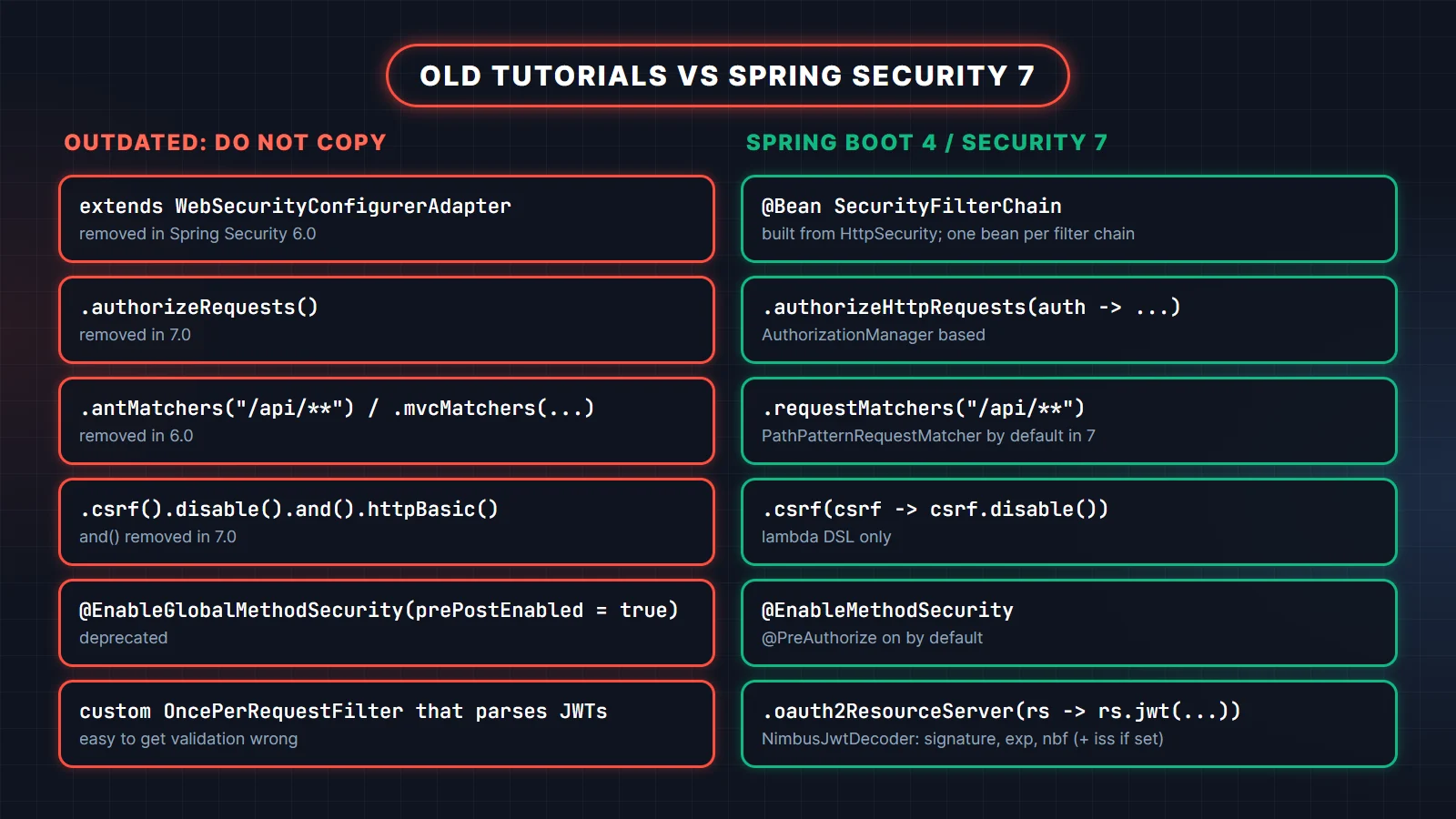
extends WebSecurityConfigurerAdapterwas removed in Spring Security 6.0. Declare aSecurityFilterChainbean.authorizeRequests()was removed in 7.0. UseauthorizeHttpRequests().antMatchers()andmvcMatchers()were removed in 6.0. UserequestMatchers(); in 7.0 the oldAntPathRequestMatcherandMvcRequestMatcherare gone in favor ofPathPatternRequestMatcher..and()chaining was removed in 7.0. Use the lambda DSL everywhere.@EnableGlobalMethodSecurityis deprecated. Use@EnableMethodSecurity, which enables@PreAuthorizeby default.- A custom
OncePerRequestFilterplus jjwt that parses the header, checks expiry and sets theSecurityContextHolderby hand still works, but it is more code to own and easy to get subtly wrong (missing algorithm pinning, no issuer check, swallowed exceptions that turn into 500s). Useoauth2ResourceServer().jwt().
The Spring Security 7.0 release notes list the full set of removals and new features.
Production checklist
- Load the signing key from a keystore or secret manager, publish the public key (or a JWK set), and plan for rotation by
kid. - Validate
issand, when several services share an issuer,aud. - Access tokens: 5 to 15 minutes. Refresh tokens: opaque, hashed, rotated, revocable.
- HTTPS everywhere; never send tokens in URLs or logs.
- Rate-limit
/auth/loginand/auth/refresh. - Reload user status and roles on refresh so revocations take effect.
- Keep a test that sends a tampered token and expects 401.
The resource server JWT reference covers custom validators, audiences and multi-tenant setups. For the wider pre-deploy list, see our Spring Boot production checklist.
12 Spring Security interview questions
1. What is the SecurityFilterChain and how does a request pass through it?
The servlet container calls a DelegatingFilterProxy, which hands the request to Spring's FilterChainProxy. That proxy picks the first SecurityFilterChain whose matcher fits the request and runs its ordered filters: CORS, CSRF, authentication filters such as the bearer token filter, exception translation, and finally authorization.
You can declare several chains, for example one stateless chain for /api/** and one session-based chain for an admin UI, ordered with @Order.
What the interviewer is checking: that you know security runs as servlet filters before the DispatcherServlet, so controller advice cannot catch most security errors.
2. Why use the OAuth2 resource server instead of a custom JWT filter?
Because token validation is security-critical code that Spring Security already provides and tests: signature verification with a pinned algorithm, exp and nbf checks with clock skew, optional issuer and audience validation, JWK set fetching and key rotation, and standard 401/403 responses. A custom filter has to reimplement all of that, and mistakes there are silent.
3. What is the difference between 401 and 403 in Spring Security?
401 Unauthorized means the request is not authenticated: no token, or an invalid or expired one. The AuthenticationEntryPoint sends it. 403 Forbidden means the user is authenticated but lacks the required authority. The AccessDeniedHandler sends it. With a resource server, both carry a WWW-Authenticate: Bearer header; an invalid token adds error="invalid_token" and a 403 adds error="insufficient_scope", while a request with no token gets no error code at all.
4. Why is CSRF disabled for a stateless JWT API, and when is that wrong?
CSRF attacks rely on the browser attaching credentials automatically, like cookies. A bearer token in the Authorization header is never attached automatically, so a forged cross-site request has no credentials. The moment you store the token in a cookie, the browser does attach it, and you need CSRF protection again.
5. HS256 or RS256: which should you use?
HS256 uses one shared secret to both sign and verify, so every verifier can also forge tokens. RS256 (or ES256) signs with a private key and verifies with a public key that can be shared safely. Use asymmetric keys when more than one service verifies tokens or when an identity provider issues them; HS256 is acceptable when one service does both.
6. How do you revoke a JWT before it expires?
A self-contained JWT cannot be revoked by itself; any server with the key accepts it until exp. The practical answers are short access-token lifetimes plus revocable refresh tokens, a deny list of token ids (jti) checked by a custom validator, or opaque tokens checked by introspection when instant revocation is a hard requirement.
7. What is the difference between hasRole and hasAuthority?
hasAuthority("ROLE_ADMIN") checks the exact authority string. hasRole("ADMIN") adds the ROLE_ prefix for you. With JWTs, the default converter creates SCOPE_ authorities from the scope claim, so hasRole fails until you map a roles claim with the ROLE_ prefix, as in Step 5.
8. When do you use @PreAuthorize instead of URL rules?
Use URL rules in authorizeHttpRequests for coarse, path-based decisions such as "everything under /api/admin needs ADMIN". Use @PreAuthorize when the decision needs method arguments or domain data, like #username == authentication.name. It needs @EnableMethodSecurity, and it works through proxies, so self-invocation inside the same bean skips the check.
9. How do refresh tokens work, and why rotate them?
The client trades a long-lived refresh token for a new short-lived access token at a dedicated endpoint. Rotation issues a new refresh token on every use and invalidates the old one. If an old token is replayed, the server knows a copy exists and revokes the whole family, which limits the damage of a stolen refresh token to one use.
10. What does SessionCreationPolicy.STATELESS change?
Spring Security will not create an HttpSession and will not save or load the SecurityContext from one. Each request must authenticate itself, here with its bearer token. It does not stop other code from creating sessions, and it is wrong for form-login apps that depend on a session.
11. What changed in Spring Security 7 that affects JWT APIs?
The lambda DSL is now the only configuration style (and() and authorizeRequests() were removed), PathPatternRequestMatcher replaced the ant and MVC matchers, NimbusJwtEncoder gained key-pair and secret-key builders, csrf.spa() arrived, and Spring Authorization Server became part of Spring Security. Core multi-factor authentication support was added too.
12. How do you test endpoints secured by JWT?
Use MockMvc with the jwt() post-processor from spring-security-test to set claims and authorities per test without real tokens. Add a few end-to-end tests that log in, use the real token, refresh, and send a tampered token, so the decoder configuration itself is covered. @WithMockUser works for method-security unit tests.
What the interviewer is checking: that your tests cover the failure paths (401, 403, tampered and expired tokens), not just the happy path.
Practise with the full question bank
If you are preparing for interviews, these two guides go deeper than one article can:
- Spring Security, JWT & OAuth2: 75 Interview Questions: the filter chain, SecurityFilterChain configuration, passwords and sessions, JWT, OAuth2 and OIDC, method security, CSRF/CORS, testing and common misconfigurations.
- REST API Design with Spring Boot: 60 Interview Questions and Answers: HTTP semantics, resource design, validation and errors, pagination, idempotency, retries and testing for Spring Boot APIs.
Related reading
- What's New in Spring Boot 4
- Spring Boot in Production: A Pre-Deploy Checklist
- Spring Boot Annotations Cheat Sheet (2026)
FAQ
Do I need jjwt or another JWT library with Spring Boot 4?
No. spring-boot-starter-security-oauth2-resource-server includes Spring Security's JOSE module with NimbusJwtEncoder and NimbusJwtDecoder, which both issue and verify tokens.
Is WebSecurityConfigurerAdapter still available in Spring Boot 4?
No. It was removed in Spring Security 6.0, and Spring Boot 4 uses Spring Security 7. Configure security with one or more SecurityFilterChain beans.
How long should a JWT access token live?
Usually 5 to 15 minutes, paired with a refresh token that lives days or weeks and is rotated on every use. Shorter access tokens shrink the window in which a stolen token is useful.
Can Spring Security validate tokens from Keycloak, Okta or Cognito?
Yes. Set spring.security.oauth2.resourceserver.jwt.issuer-uri to the provider's issuer, and Spring Boot discovers the JWK set and validates signature, expiry and issuer. Map the provider's role claim with authorities-claim-name.
Should I put the JWT in localStorage?
Avoid it for long-lived tokens, because any XSS can read it. Prefer an in-memory access token with a rotated refresh token, an HttpOnly cookie with CSRF protection, or a backend-for-frontend that keeps tokens off the browser.