 Tech Tribers
Spring AI Structured Output: Turn LLM Replies into Java Records
Turn a free-text email into a typed Java record with ChatClient entity(), handle lists and nested records, and switch on schema validation with retry.
New11 min read
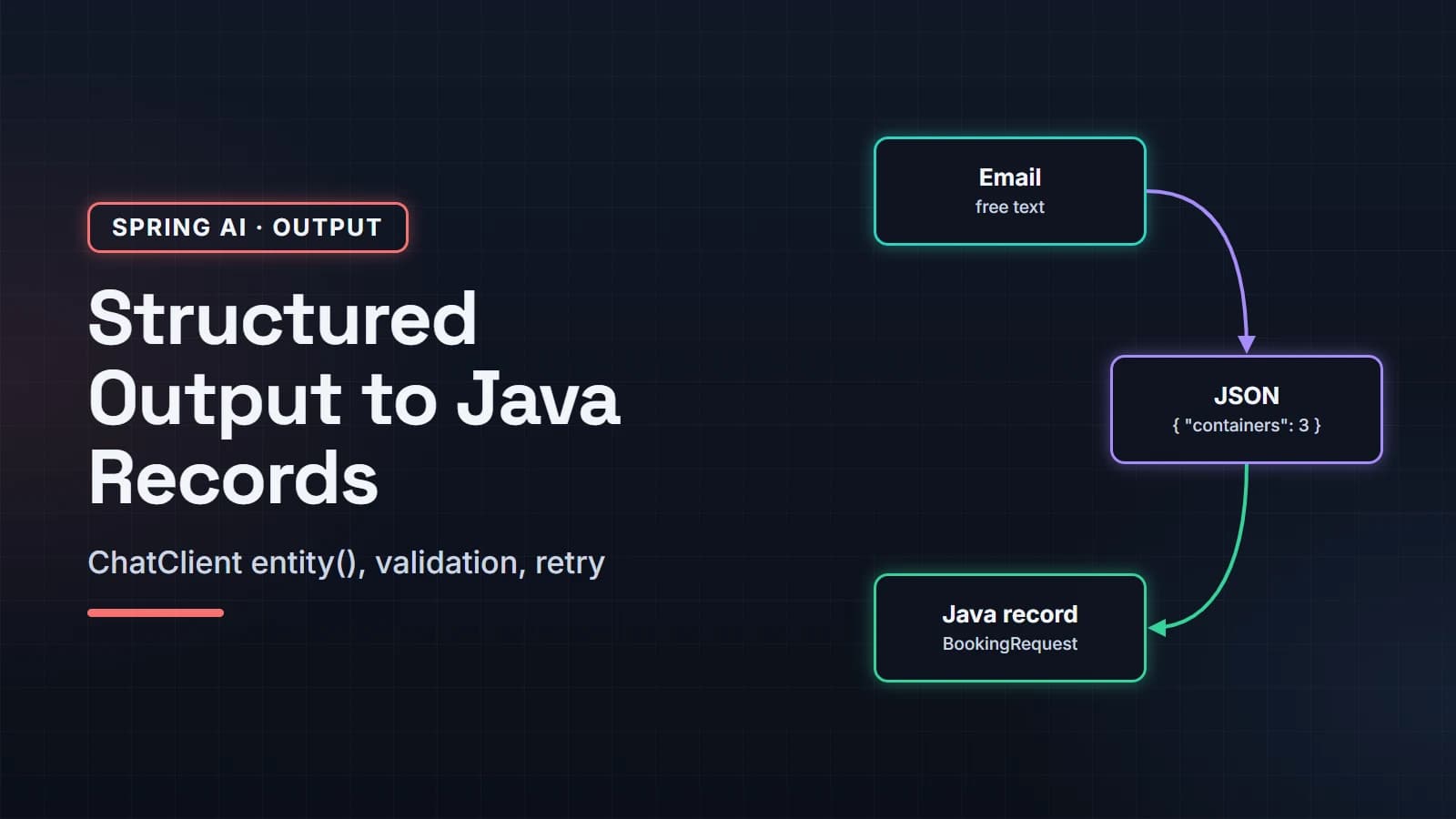
Spring AI structured output lets you ask a language model for a Java record instead of a block of text. You describe the answer you want as a record, end the ChatClient call with .entity(...), and Spring AI asks the model for JSON in that shape and converts it for you. No regular expressions, no hunting for the number 3 in a sentence.
This guide is for Java and Spring Boot developers who already call a model with ChatClient and now need the answer in a form their code can use. You will turn a free-text booking email into a typed record, see what Spring AI adds to your prompt, extract lists and nested records, and switch on schema validation with automatic retry. You will also see where validation stops helping, with the real failures from the book's runs.
The examples come from AI Engineering with Java (TechTribers Guide Series, Book 1), built on Spring AI 2.0.2, Spring Boot 4.1.2 and Java 25, with llama3.2:3b running locally on Ollama.
In this guide
- Why free text is hard for your code
- Describe the answer as a Java record
- LLM to Java record with ChatClient entity()
- What Spring AI adds to your prompt
- Lists, enums and nested records
- Validate the JSON and let Spring AI retry
- What validation cannot fix
From the book: this guide is based on Chapter 4 of AI Engineering with Java, where you build a complete Spring AI app step by step, with real output for every run. Read the free 5-page sample on the book page.
Why free text is hard for your code
Picture a shipping company that receives booking emails all day. A customer writes a friendly paragraph: who they are, what they ship, where from, where to, and when the cargo is ready. The booking system cannot use a paragraph. It needs a customer name, two ports, a number of containers and a date.
A paper form is a good mental model. However long the story a customer tells at the counter, what ends up on file is a set of fixed boxes. Structured output works the same way. The record defines the boxes, the model fills them in as JSON, and Spring AI turns the JSON into an object.
There are three stages, and it helps to keep them apart in your head:
- Free text: easy for people, but your code would need fragile string searches.
- JSON from the model: the same facts with fixed field names. It is still text, and it is still written by a model, so it can be wrong.
- A Java record: typed fields. A container count is an
intand a date is aLocalDate.
Describe the answer as a Java record
Start with the shape, not the prompt. Each record component is one box on the form, and its Java type says what kind of value belongs there. Here is the record from Chapter 4 of the book:
public record BookingRequest(
        String customerName,
        @JsonPropertyDescription("Company the sender works for")
        String company,
        String origin,
        String destination,
        int containers,
        String cargo,
        @JsonPropertyDescription("Date the cargo is ready, yyyy-MM-dd")
        LocalDate readyDate) {
}
Three details matter. containers is an int, so you get a number you can do arithmetic on, not the word "three". readyDate is a real date type, so the model must write year, month and day. And @JsonPropertyDescription attaches a short description to a field. That description travels to the model with the field, which turns out to be important, as you will see below.
LLM to Java record with ChatClient entity()
If you have used ChatClient before, you probably ended the call with .content() and got a String. To get a record, change that one last line:
public BookingRequest readBooking(String email) {
    return chatClient.prompt()
            .user(email)
            .call()
            .entity(BookingRequest.class);
}
That is the whole ChatClient entity call. Spring AI adds format instructions to the prompt, calls the model and converts the reply. In the book's run, the sample email from "Priya Nair from Kaveri Textiles" about 3 containers of cotton fabric from Chennai to Rotterdam came back as a record with containers=3 and readyDate=2026-12-02. The runner then doubled containers() and asked readyDate() for its day of the week. No string parsing anywhere.
What Spring AI adds to your prompt
The converter behind .entity() is BeanOutputConverter. It turns your record into a JSON Schema, which is a standard way to describe fields and their types. The Spring AI 2.0 reference on output converters says the schema follows the DRAFT_2020_12 version of the standard and that a JsonMapper then reads the reply into your class. You can print the instructions yourself with new BeanOutputConverter<>(BookingRequest.class).getFormat().
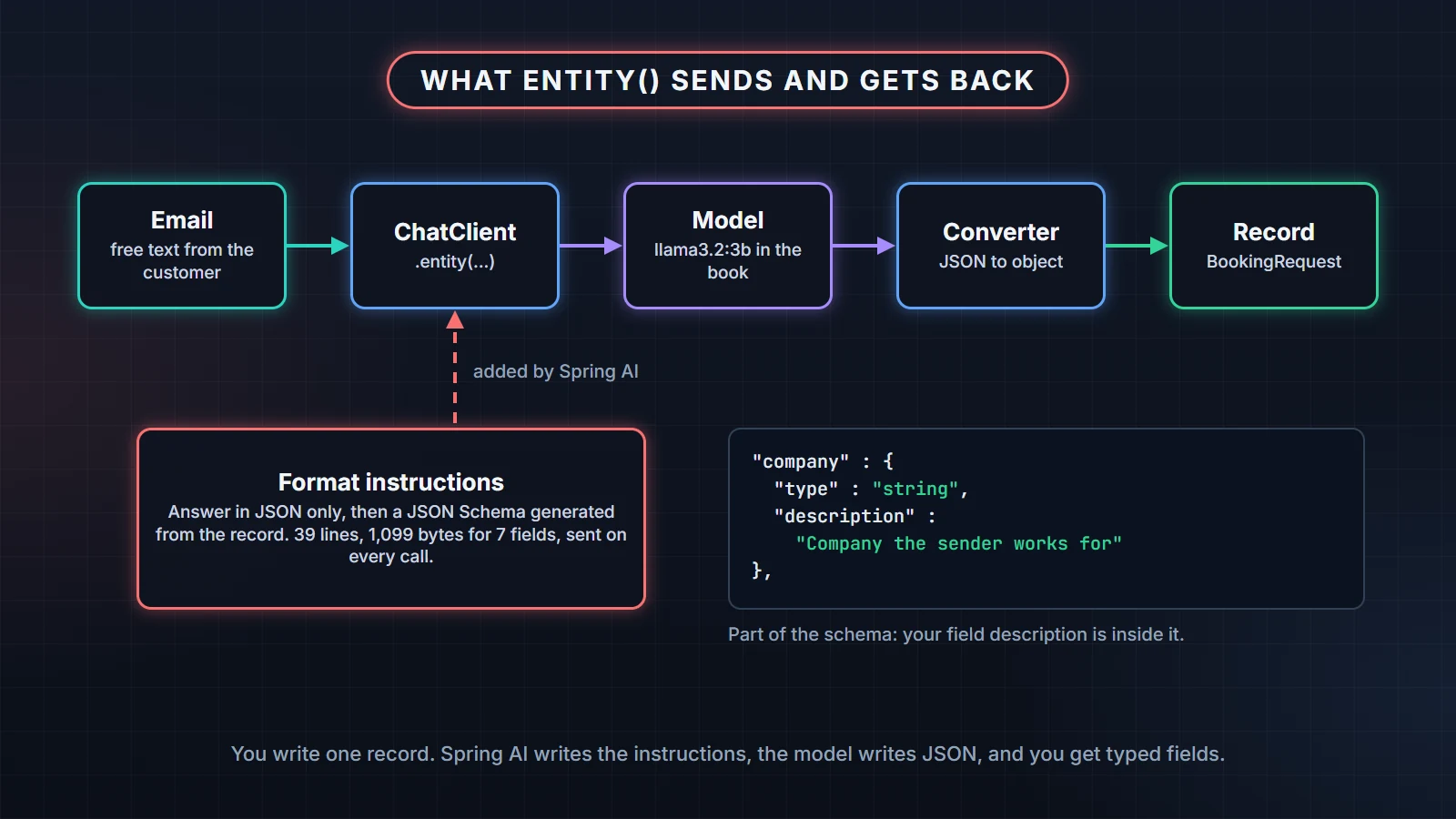
In the book's printout, a short "reply with JSON only" preamble comes first and the schema follows. Look at the company entry and you find your field description there: that is the only way the model ever sees it. For the seven-field record above, the printed text came to 39 lines and 1,099 bytes. Those bytes are prompt tokens, and they are sent again on every .entity() call, so a lean record with only the fields you need is also a cheaper record.
Why the field description is there
The first version of the record had no description on company. The email opens with "Hello BlueHarbor team", and in three out of three runs the model put the shipping company's own name, BlueHarbor, into that field. Nothing failed: the JSON was valid and the type was right. Two changes fixed it, the field description and a system prompt that no longer mentions BlueHarbor. With both in place, every one of the three runs found the sender's company, Kaveri Textiles.
This is the first lesson of structured output: a valid shape does not mean a correct value. A description is the cheapest way to steer a field that keeps coming back wrong.
Lists, enums and nested records
Limit a field with an enum
A port agent's morning report covers several containers, each with a status. If only four states exist, say so with an enum. The enum names go into the schema as the only allowed values:
public record ContainerUpdate(
        String containerNumber,
        State state,
        String location) {

    public enum State { AT_SEA, IN_PORT, CUSTOMS_HOLD, DELIVERED }
}
A list has no .class
You want a List<ContainerUpdate>, but Java has no List<ContainerUpdate>.class to pass. Use Spring's ParameterizedTypeReference instead. The call is the same as before with a new last line:
.entity(new ParameterizedTypeReference<List<ContainerUpdate>>() { })
The empty braces create an anonymous subclass, which keeps the full generic type at runtime so Spring AI can read it and build the right schema. In the book's run, the report came back as two typed updates, one AT_SEA in the Arabian Sea and one CUSTOMS_HOLD at a Nhava Sheva terminal.
Records inside records
One email can carry two kinds of cargo. Model that with nested records and a list: a Booking record holding a Customer, a Route and a List<CargoItem>, each defined as a small record inside Booking. The call does not change. You end it with .entity(Booking.class), and Spring AI writes one JSON Schema covering the outer record and the three inside it. In the book's run, an email from a spice exporter came back with two cargo items: black pepper in 2 containers and cardamom in 1.
Validate the JSON and let Spring AI retry
So far the code trusts the model. The Spring AI reference is honest about this: the output converter is a best effort, and the model is not guaranteed to return the structure you asked for. The book shows what that looks like. One of three identical runs of the booking example crashed with a Jackson UnexpectedEndOfInputException. The reply simply ended in the middle of the JSON object, so there was nothing complete to parse.
Switch on schema validation
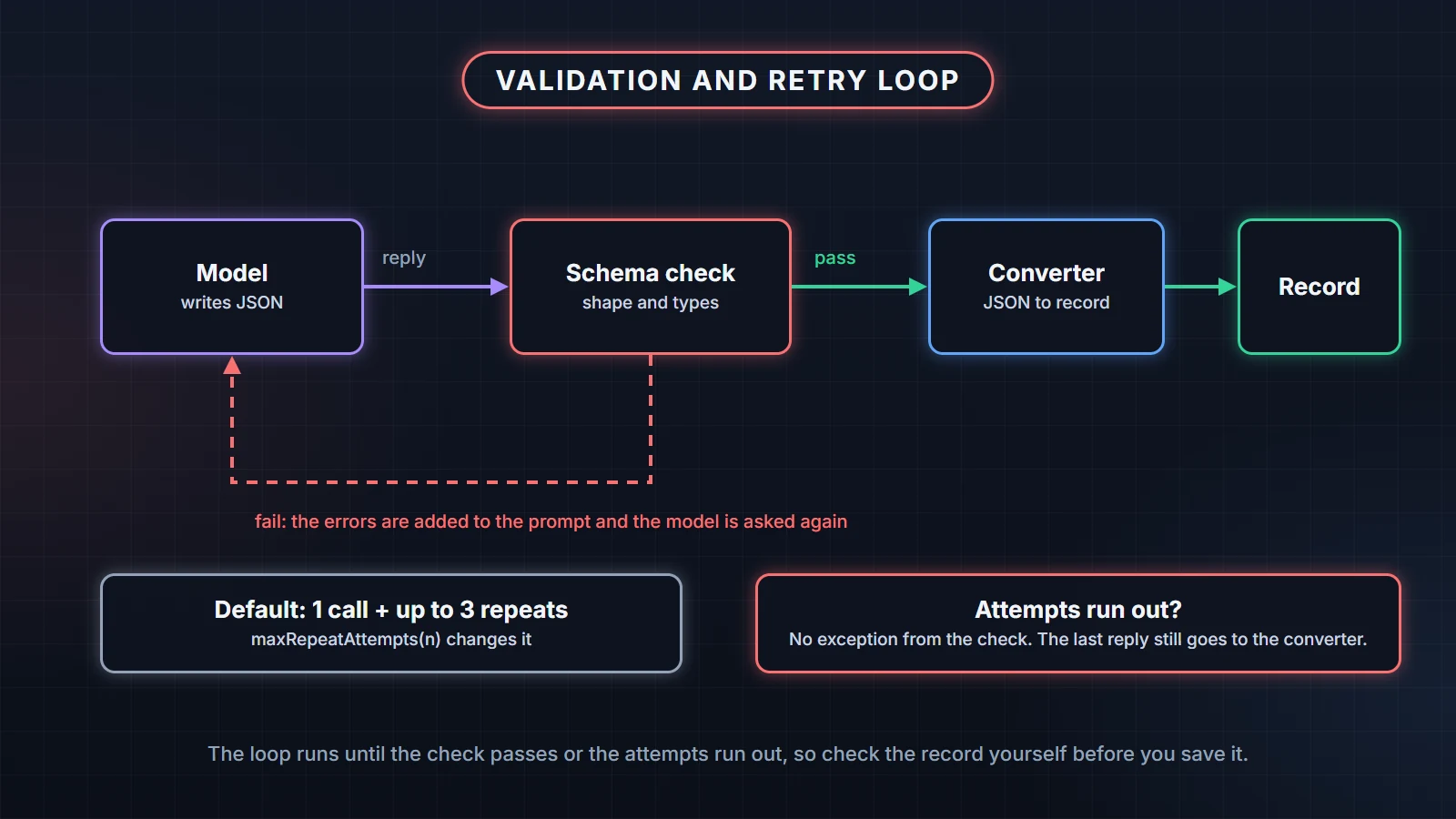
Schema validation checks every reply against the JSON Schema before conversion. When the check fails, Spring AI adds the validation error to the user prompt and calls the model again. Turning it on is one extra argument:
.entity(BookingRequest.class, spec -> spec.validateSchema())
Behind that switch is StructuredOutputValidationAdvisor, an advisor (a hook that wraps the model call) that Spring AI registers for you. By default it allows three repeat attempts, so one request can call the model up to four times. The schema validation and self-correction page for Spring AI 2.0 also notes two things worth knowing: streaming is not supported while validateSchema() is active, and token usage is added up across all attempts.
Tune the number of attempts
To change the limit, build the advisor yourself and pass it to the request. With the advisor in place, a plain .entity(...) is enough:
public Booking readNestedBookingChecked(String email) {
    var validation = StructuredOutputValidationAdvisor.builder()
            .outputType(Booking.class)
            .maxRepeatAttempts(5)
            .build();
    return chatClient.prompt()
            .user(email)
            .advisors(validation)
            .call()
            .entity(Booking.class);
}
That is one call plus up to five repeats: six model calls at most. More attempts mean more tokens and more waiting, so raise the limit only when you have seen retries actually rescue answers.
New in Spring AI 2.0
validateSchema() and StructuredOutputValidationAdvisor arrived with Spring AI 2.0. The 2.0 line also moved to Jackson 3, so the exceptions you see start with tools.jackson. The @JsonPropertyDescription annotation still comes from com.fasterxml.jackson.annotation, so do not go looking for it in the new package.
What validation cannot fix
Validation checks shape and types. It does not check whether a value is true. The book makes this concrete with a vague email: "we need to move some pepper to Hamburg soon", signed Arjun. There is no company, no origin port and no container count in it.
With validation on, Spring AI called the model four times: one call and three repeats. Every reply failed the check, with errors such as "null found, integer expected" and "string found, integer expected". The run took about two minutes on a busy machine, and then the application failed anyway.
When the attempts run out
This is the gotcha to remember. Running out of attempts does not raise a validation error of its own. The advisor returns whatever the final reply was, and conversion goes ahead with it. What happens next depends on the field type. A primitive int cannot hold null, so Jackson stops with a MismatchedInputException, which is the crash the vague email produced. A String, an Integer or a nested record just ends up null, with no error at all, and the half-empty record flows on into your code. So check the record yourself before you store it.
The honest result
Across the book's live runs with llama3.2:3b, not one answer was saved by a retry: when the first reply was wrong, every repeat was wrong too. The book still shows that the loop itself works, using a unit test instead of a live model. A stub returns broken JSON on the first call and valid JSON on the second, and the test checks that there were exactly two calls and that the validation error was added to the second user message. So the mechanism is sound, but with a small model you should not count on it.
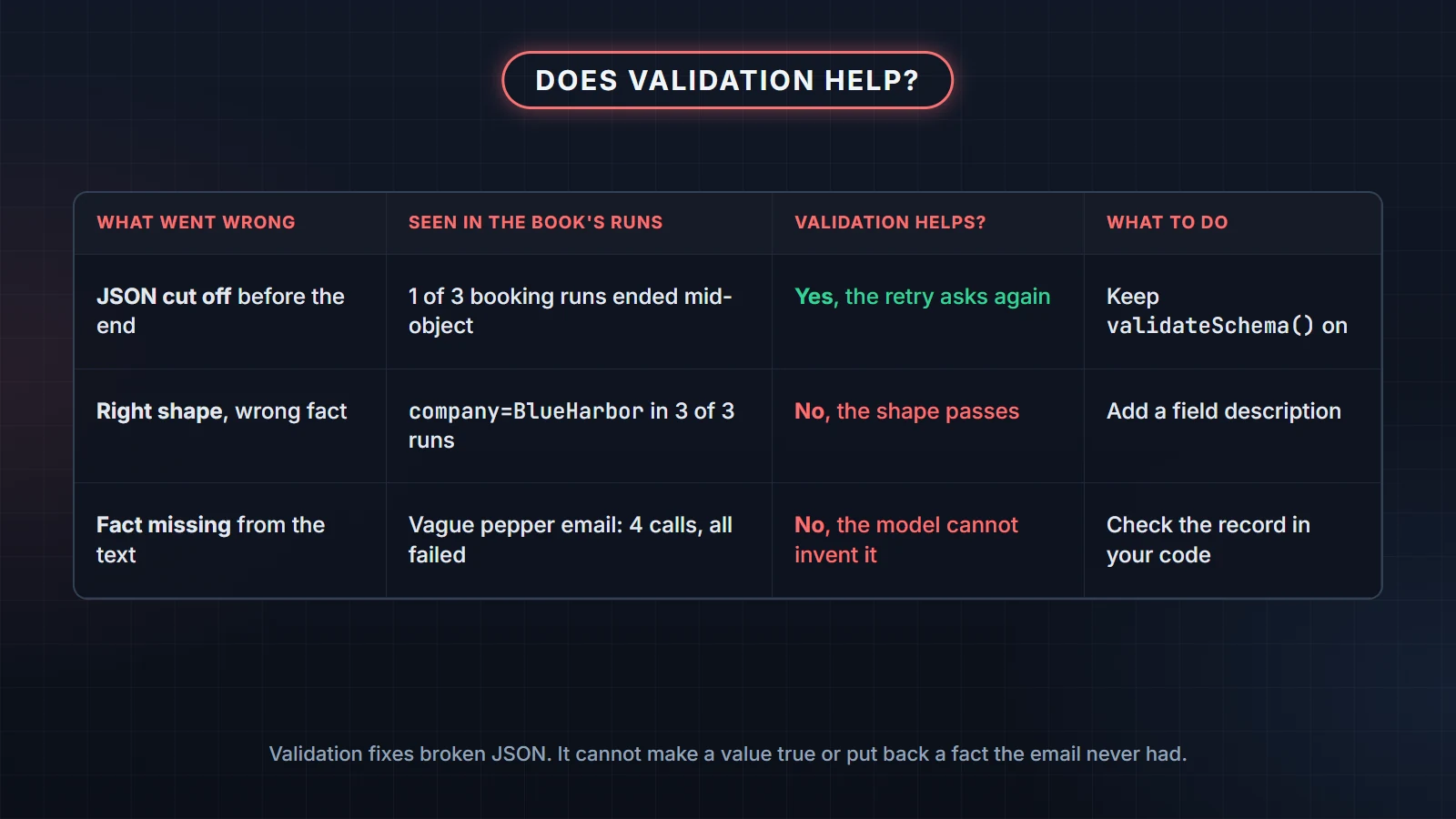
The book sums up its runs in three cases:
- JSON cut off before the end: validation helps, because the retry asks again. Keep
validateSchema()on. - Right shape, wrong fact (the
company=BlueHarborcase): validation does not help, because the shape passes. Add a field description. - Fact missing from the text (the vague email): validation does not help, because the model cannot invent what is not there. Check the record in your own code.
A practical pattern follows from this. Turn on validation so broken JSON gets a second chance, describe any field that keeps coming back wrong, and run your own completeness check on the record before it reaches the database. If a required field is null, ask the customer instead of guessing.
Go deeper
Chapter 4 of AI Engineering with Java, "Structured output into Java records", builds all of this step by step in a small Spring Boot app: the BookingRequest record from a free-text email, the list of container updates, the nested booking, and the validation and retry loop with its limits. Its practice tasks have you add a field and watch the schema follow, classify customer messages into a record of two enums and a summary, and write a Complete.require(record) helper that throws when any field at any depth is null.
You can find the book at AI Engineering with Java. The product page has a free 5-page sample you can read first.
Related reading
FAQ
How does Spring AI structured output work?
When you end a ChatClient call with .entity(SomeRecord.class), Spring AI's BeanOutputConverter generates a JSON Schema from the record and adds format instructions to your prompt. The model answers in JSON, and Spring AI reads that JSON into an instance of your record.
How do I get a List of records from ChatClient?
Pass a ParameterizedTypeReference instead of a class: .entity(new ParameterizedTypeReference<List<MyRecord>>() { }). The empty braces keep the full generic type so Spring AI can build the right schema.
Does Spring AI retry when the model returns invalid JSON?
Yes, if you turn on schema validation with spec -> spec.validateSchema() or register a StructuredOutputValidationAdvisor. On a failed check, the validation error is added to the prompt and the model is called again, with three repeat attempts by default. You can change the limit with maxRepeatAttempts(...).
Can schema validation catch a wrong value?
No. It checks shape and types only. A well-formed reply with the wrong company name passes. Use field descriptions to steer such fields and check important values in your own code.
What happens when all retry attempts fail?
In the book's runs, Spring AI passed the last reply to the converter rather than throwing a validation error. A null for a primitive field caused a MismatchedInputException, while object fields such as String quietly became null. Always check the record before you use it.