 Tech Tribers
Next.js 16 Caching Explained: use cache, cacheTag and updateTag
How Next.js 16 caching works with Cache Components: 'use cache', cacheLife profiles, cacheTag, updateTag vs revalidateTag, webhooks and the route table.
New12 min read
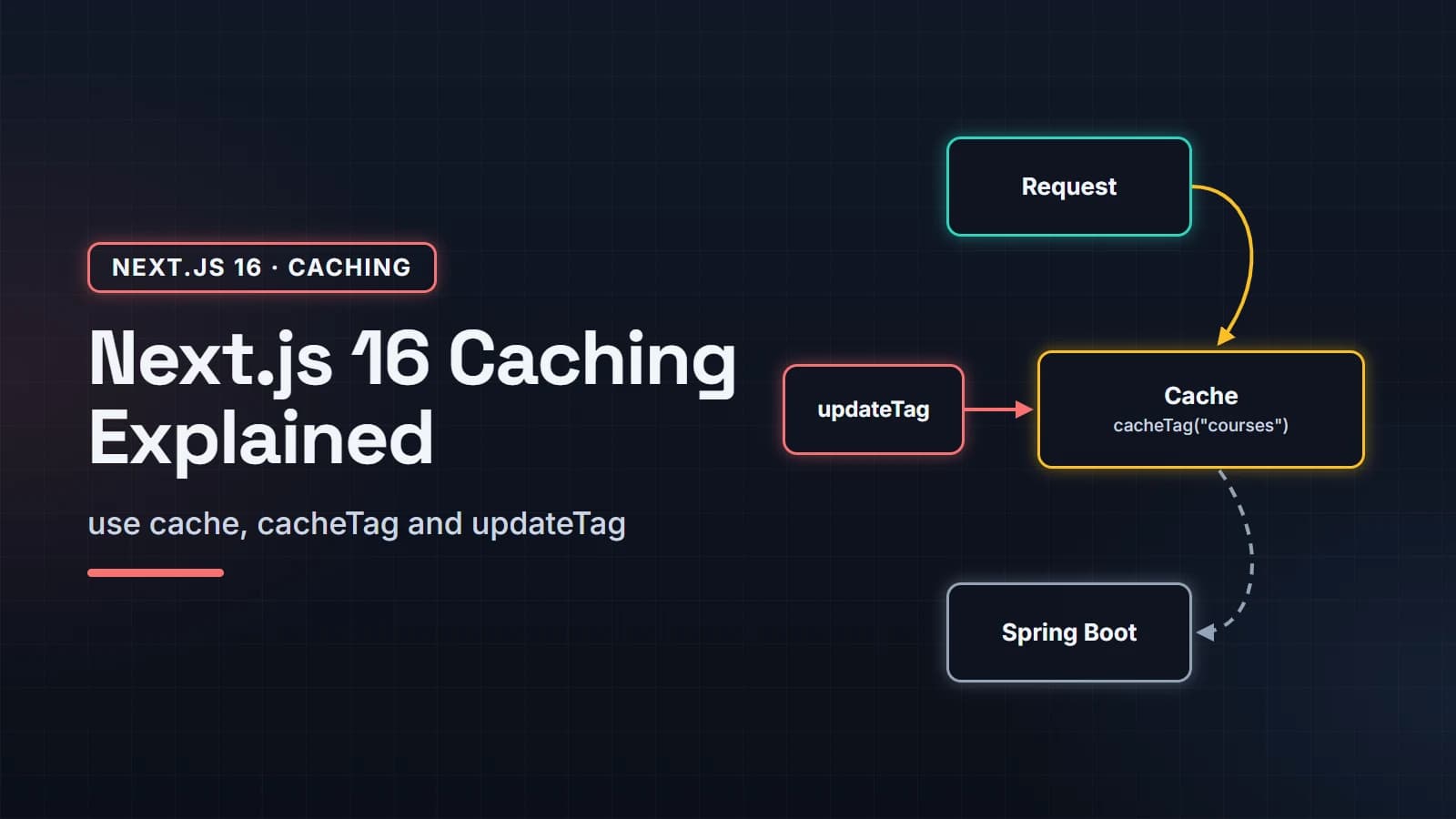
Next.js 16 caching is opt-in: with Cache Components switched on, the framework fetches data on every request unless you mark something as cached with 'use cache'. That is the opposite of what many older tutorials teach, and it is why cacheLife, cacheTag, updateTag and revalidateTag confuse so many developers.
This guide is for developers who already build with the App Router and want a clear mental model of the 2026 caching APIs. The examples come from a Next.js front end that reads a Spring Boot API, so Java developers will find familiar ideas.
You will learn how entries are keyed, how to pick a lifetime, how to expire data the moment an admin saves, how another system can trigger a refresh, and how to read the route table of next build.
In this guide
- What Cache Components and 'use cache' are
- cacheLife profiles: stale, revalidate, expire
- cacheTag: label entries so you can expire them together
- updateTag vs revalidateTag
- A revalidate webhook for other systems
- Reading the build's route table
- The Suspense and uncached data gotcha
- Caching per user, safely
- Instant navigations
From the book: this guide is based on Chapter 9 of React & Next.js 2026, where you build a full-stack React and Next.js app step by step, with the code for every chapter. Read the free 5-page sample on the book page.
What Cache Components and 'use cache' are
Cache Components is the caching and rendering model of Next.js 16, switched on in next.config.ts. New apps from create-next-app 16.4 already have it, together with Partial Prefetching, but the next package itself still defaults both to off. The docs say both will be on everywhere in the next major release.
// next.config.ts
import type { NextConfig } from "next";

const nextConfig: NextConfig = {
  cacheComponents: true,   // 'use cache', cacheLife, cacheTag, Partial Prerendering
  partialPrefetching: true, // prefetch one shell per route
};

export default nextConfig;
With the switch on, data is fetched on every request unless you put the 'use cache' directive at the top of an async function or component. Next.js then stores its return value. At the top of a file, the directive caches every exported function in it.
How the cache key works
A cache entry's key is built from the build ID, a hash of the function's location and signature (the function ID), and the serializable arguments. Values the function captures from an outer scope are bound as arguments too, so they join the key. That means getCourse("react-basics") and getCourse("next-routing") get separate entries. A read that finds an entry is a cache hit. A read that does not is a cache miss, and the function runs.
With the default handler, entries are kept in memory by the next start process. A new deploy starts empty, since the build ID is part of every key, and two servers do not share entries. If you need one shared store, 'use cache: remote' lets the hosting platform plug in a cache handler.
Three kinds of content on one page
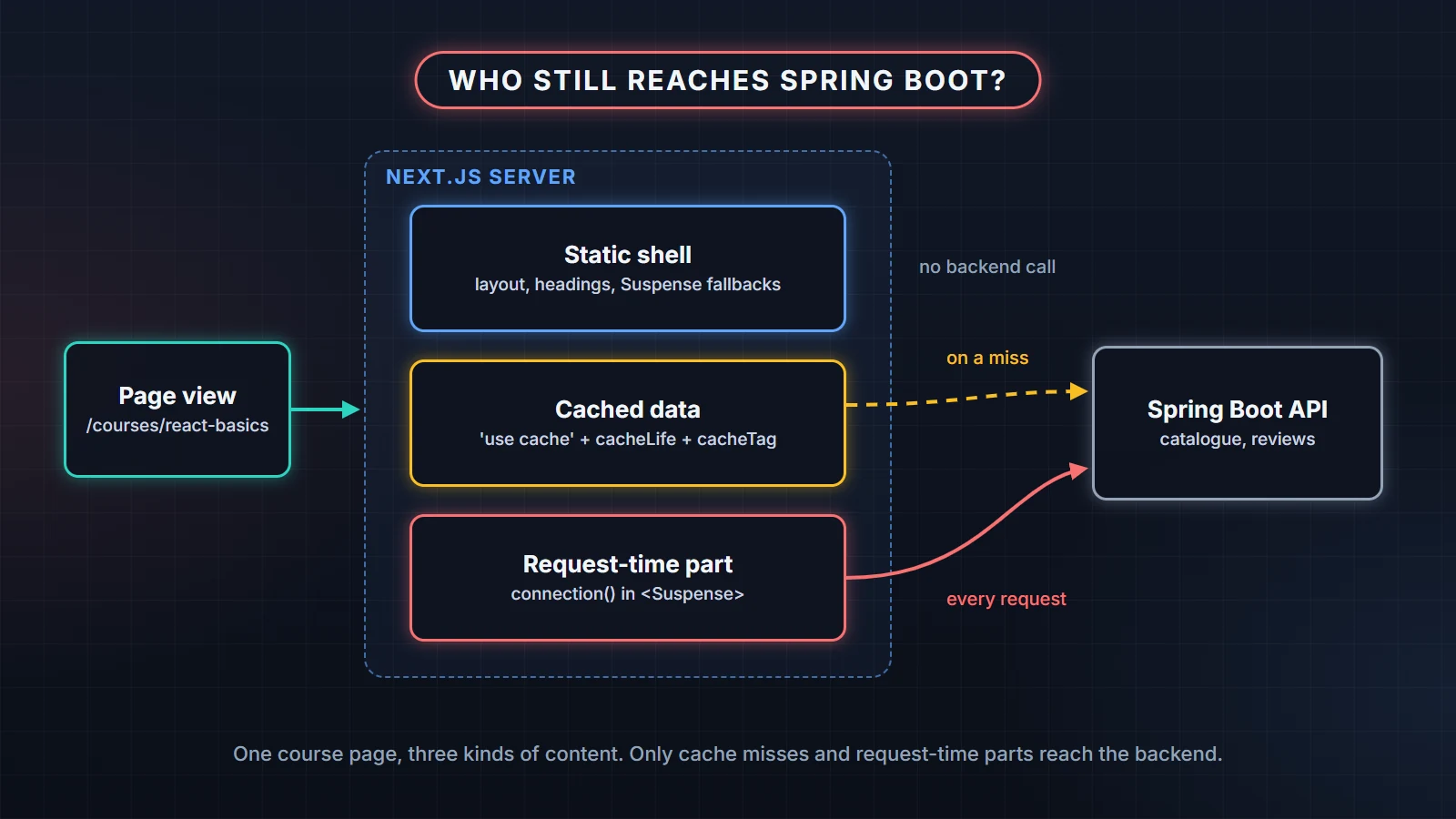
When you build, Next.js renders each page's static shell ahead of time. The shell holds layouts, headings, cached data and the fallback of every <Suspense> boundary. Anything that must be fresh per request streams in afterwards. This is Partial Prerendering. Only cache misses and request-time parts ever reach your backend.
For Java developers
Spring's cache abstraction maps closely:
@Cacheable("courses")becomes'use cache'pluscacheTag("courses"). Arguments form the key in both.@CacheEvict(value = "courses", allEntries = true)becomesupdateTag("courses")in a Server Action.- A Caffeine or Redis TTL becomes
cacheLife, which also refreshes in the background.
cacheLife profiles: stale, revalidate, expire
Here is a cached data function from the book's TribeAcademy course site. It wraps a typed client for the Spring Boot API:
import { cacheLife, cacheTag } from "next/cache";
import { api } from "./api";

export async function getCourse(slug: string) {
  "use cache"; // the argument is part of the cache key
  cacheLife("hours");
  cacheTag("courses", `course:${slug}`);
  return api.getCourse(slug);
}
cacheLife sets how long an entry lives. It must be called inside a cache scope, never at module level. The docs recommend one cacheLife call in every 'use cache' scope; without one, the implicit default profile applies. A profile has three times:
- stale: how long the browser's router reuses the data without asking the server.
- revalidate: after this, the next request gets the cached copy and triggers a background refresh on the server.
- expire: after this long with no traffic, the next request waits for fresh data.
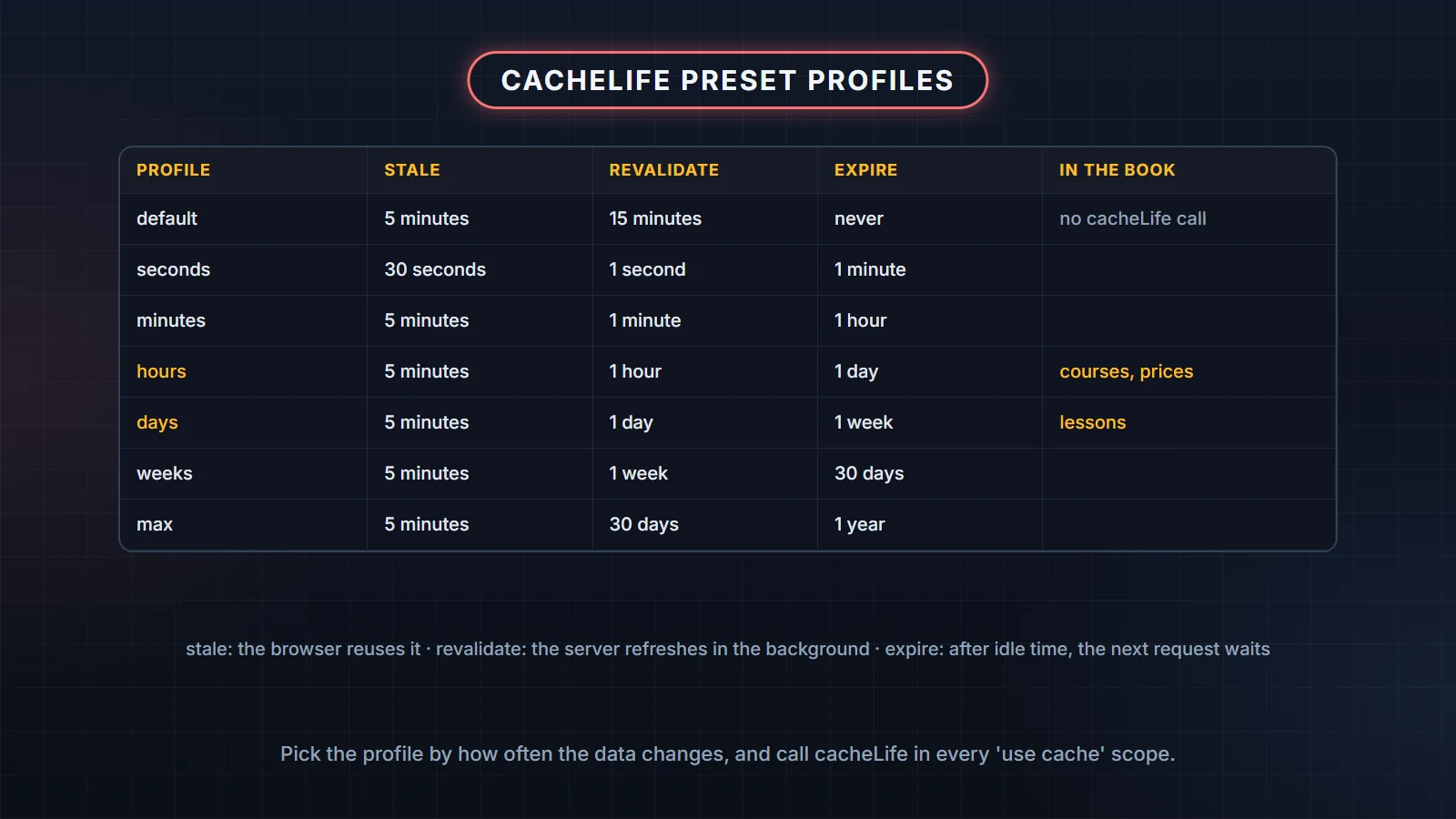
The key numbers from the docs' preset table, in text form:
minutes: stale 5 minutes, revalidate 1 minute, expire 1 hour.hours: stale 5 minutes, revalidate 1 hour, expire 1 day. The book uses it for courses and prices.days: stale 5 minutes, revalidate 1 day, expire 1 week. The book uses it for lessons.default: stale 5 minutes, revalidate 15 minutes, never expires.
You can also pass an object such as cacheLife({ revalidate: 900 }), or define named profiles in next.config.ts.
cacheTag: label entries so you can expire them together
To expire entries when data changes, you need a handle on them: a tag. cacheTag takes one or more strings and attaches them to the current entry. In the listing above every course entry gets two tags: courses for all catalogue data and course:react-basics (or whichever slug) for that one course. You can then expire the whole catalogue, or a single course.
updateTag vs revalidateTag
Both functions invalidate tagged entries. Which one you need depends on who made the change and who must see it.
updateTag: read your own writes
When an admin saves a new price, they must never see the old one again. The Server Action saves to Spring Boot first, because the API owns the price, then expires the tag:
"use server";
import { updateTag } from "next/cache";
// ... imports of api, PriceInput, PriceState and formatInr

export async function setPrice(slug: string, _prev: PriceState, form: FormData) {
  const parsed = PriceInput.safeParse(Object.fromEntries(form));
  if (!parsed.success) return { error: "Enter a whole number of rupees" };
  await api.setPrice(slug, parsed.data.priceInr);
  updateTag("courses"); // expire it now: the next read gets fresh data
  return { message: `Saved ${formatInr(parsed.data.priceInr)}` };
}
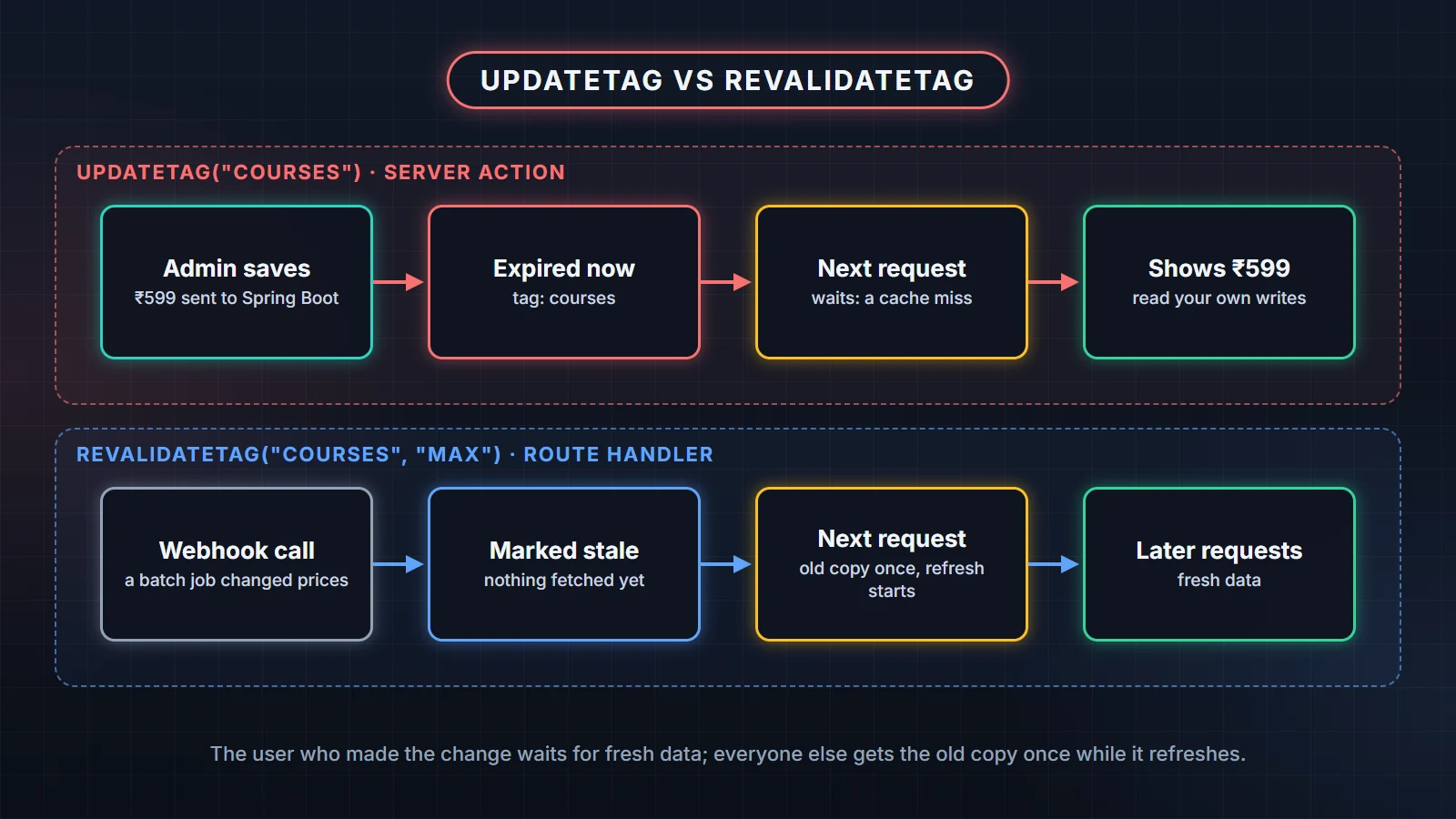
updateTag expires the entries immediately, so the next request waits for fresh data instead of getting a stale copy. It works only inside a Server Action. Calling it from a Route Handler throws.
revalidateTag: stale-while-revalidate
revalidateTag(tag, "max") only marks the tagged entries as stale. The next request for that data is served the old copy and starts a fresh fetch in the background. Nothing is fetched at the moment of the call, so pages refresh as people visit them rather than all at once.
In short:
- updateTag(tag): Server Actions only. The next request waits for fresh data. Use it for the user who made the change.
- revalidateTag(tag, "max"): Server Actions and Route Handlers. The next request gets the old copy once while a fresh one loads. Use it for changes made elsewhere.
- revalidateTag(tag, { expire: 0 }): never serves stale content. Use it from a Route Handler when the caller needs the data gone now and
updateTagis not available.
The one-argument form revalidateTag(tag) is deprecated. If you see it in older code, move to updateTag in Server Actions or pass a profile.
A revalidate webhook for other systems
Prices can also change outside your admin page, for example in a Spring Boot batch job. A webhook lets that system tell Next.js to refresh. Because a Route Handler cannot call updateTag, the webhook uses revalidateTag:
// app/api/revalidate/route.ts: POST with the shared secret
import { revalidateTag } from "next/cache";

export async function POST(request: Request) {
  const secret = request.headers.get("x-revalidate-secret");
  if (!secret || secret !== process.env.REVALIDATE_SECRET) {
    return Response.json({ error: "unauthorised" }, { status: 401 });
  }
  revalidateTag("courses", "max"); // serve stale once, refresh behind
  return Response.json({ revalidated: "courses" });
}
The secret comes from an environment variable and never reaches the browser. Without the right secret, nothing is revalidated. As a hardening step, compare the secret in constant time with Node's crypto.timingSafeEqual, which takes two Buffers of equal length, so check the lengths first.
The book measured this on a local production build on the author's machine. After warm-up, 50 page views across five pages sent 0 catalogue reads to Spring Boot. After a POST /api/revalidate, the next 10 views caused 3 reads as the tagged entries refreshed, and the 50 views after that were hits again, with 0 reads.
Reading the build's route table
A production build ends with a route table. Every route gets a symbol, and with Cache Components the symbols describe how much HTML the build produced:
- ○ Static: the whole route is prerendered as HTML. Cached routes also show their Revalidate and Expire times.
- ◐ Partial Prerender: a static HTML shell is prerendered, and the rest streams on request.
- ƒ Dynamic: rendered on request. Request-dependent Route Handlers, such as a webhook, use this symbol.
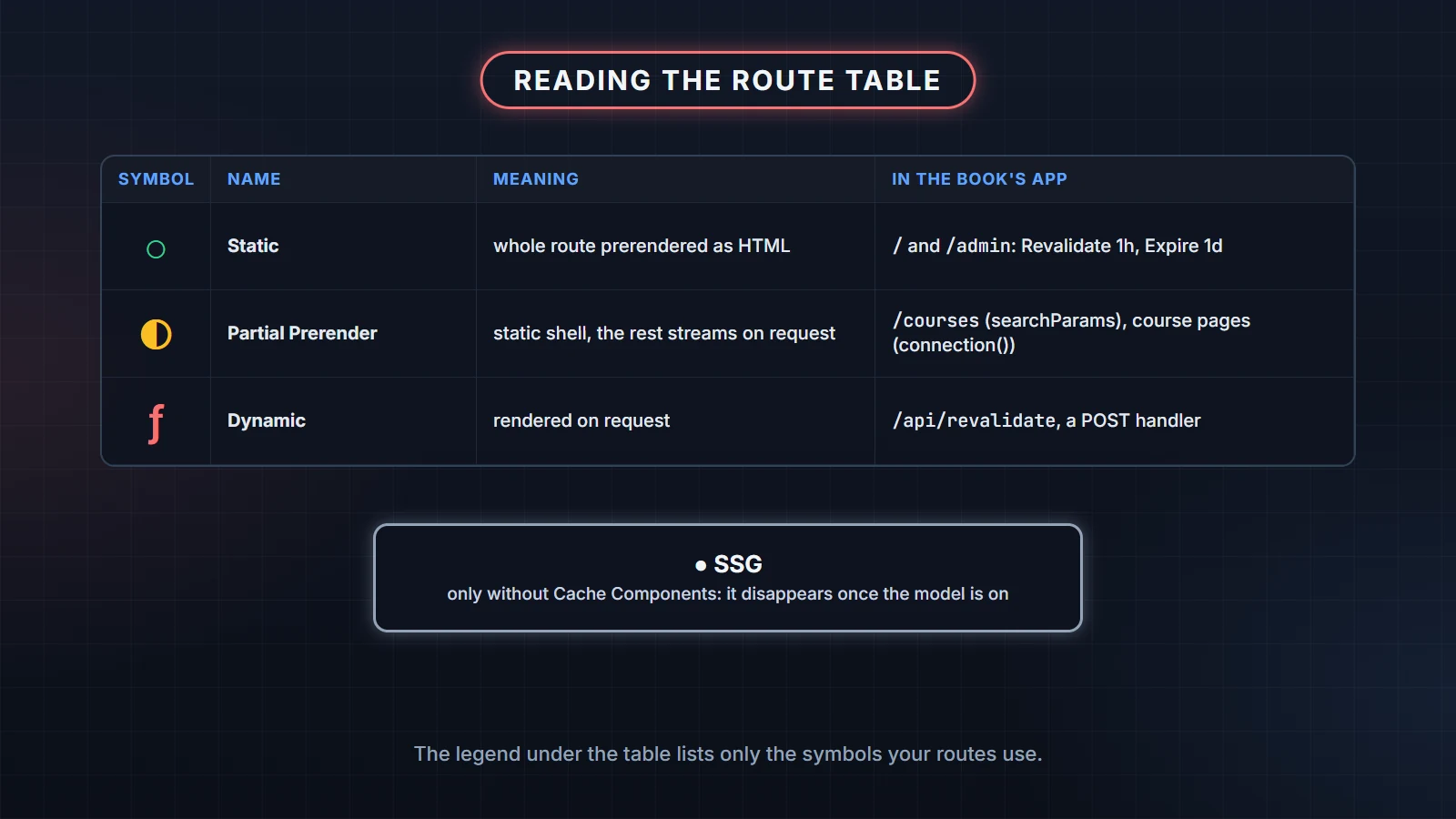
In the book's app, / and /admin are static with Revalidate 1h and Expire 1d, which is the hours profile. /courses is a partial prerender because its grid reads searchParams, and each course page is partial because its reviews call connection(). The webhook is dynamic. Without Cache Components you would also meet ● (SSG).
The Suspense and uncached data gotcha
With Cache Components, next build refuses uncached data outside a <Suspense> boundary. The book's Chapter 8 app built fine against an in-repo mock, then failed against the real Spring Boot API with "Next.js encountered uncached or runtime data during prerendering". The mock had hidden the problem.
You have two fixes, and the choice is about freshness:
- If the data is the same for every visitor, cache the read with
'use cache'and give it a lifetime and a tag. - If it must be fresh on every request, wrap the component in
<Suspense>with a fallback. Aloading.tsxfile does the same for a whole route segment. The fallback ships in the static shell and the data streams in.
The same rule applies to runtime APIs. Components that read cookies(), headers() or searchParams belong inside a <Suspense> boundary.
Caching per user, safely
Cache only what is the same for every visitor. In the book's app, courses, prices and lessons are cached. Reviews are the same for everyone but must be fresh, so they are not cached and stream in behind connection(). The signed-in user's data is never shared.
A cached function cannot read cookies(), headers() or searchParams, nor can any helper it calls: you get the next-request-in-use-cache error. On a dynamic route this can pass next build and only fail under next start, so test the production server. Read the value outside and pass it in as an argument. That puts it in the cache key, so each user or tenant gets its own entry.
This is a security rule. The book notes that the 3 November 2026 Next.js security release fixed seven issues, and the High one leaked cached data across tenants when unstable_cache and 'use cache' were combined. Run Next.js 16.4.5 or later, and do not mix the two APIs. For the rare case where you cannot pass runtime data as an argument, the docs describe a 'use cache: private' variant whose results live only in the browser.
Older APIs you may have seen
Old code uses unstable_cache(fn, keys, {tags}) and export const revalidate = 60. With Cache Components the revalidate, dynamic and fetchCache segment exports are errors. Use 'use cache', cacheLife and cacheTag instead.
Instant navigations
Partial Prefetching makes every <Link> prefetch its route's App Shell. That is the rendered output that does not depend on the URL, so all links to one route reuse a single prefetch. After a click, the page paints from static, cached and fallback content straight away, and the request-time parts stream in.
To have Next.js check that a route really navigates instantly, export one constant from its page or layout:
export const instant = true;
This works only with Cache Components. Validation runs in next dev and shows anything that would block the navigation in the dev overlay; the build is not affected. On the book's course page, title, price and lessons appear at once from cached data, and the reviews (slowed to 1.2 seconds on purpose) replace their skeletons a moment later. Next.js does not prefetch in development, so navigations feel faster under next start.
Go deeper
Chapter 9, "Caching, the 2026 way", of React & Next.js, 2026 Edition (TechTribers Guide Series, Book 3) builds all of this on the TribeAcademy course site, step by step: a cached catalogue with tags, an admin price form that updates the cache at once, the secret-protected webhook and instant course pages. The practice tasks have you revalidate a single course from the webhook body and compare the secret in constant time.
The product page has a free 5-page "Look inside" sample.
Related reading
- React Server Components vs Client Components
- Next.js Server Actions with useActionState and useOptimistic
- Next.js authentication with a Spring Boot BFF
Official references: the Next.js Caching guide, the use cache directive, cacheLife and updateTag.
FAQ
What does 'use cache' do in Next.js 16?
It marks an async function, component or file as cacheable. Next.js stores the return value, keyed by the build, the function and its arguments, until its lifetime runs out or a tag on it is expired. It needs cacheComponents: true.
What is the difference between revalidateTag and updateTag?
updateTag works only in Server Actions and expires the entries at once, so the next request waits for fresh data. revalidateTag(tag, "max") also works in Route Handlers and marks entries stale, so the next request gets the old copy once while a fresh one loads. Use updateTag for the user who made a change and revalidateTag for changes made elsewhere.
Is fetch cached by default in Next.js 16?
No. Since Next.js 15, fetch is not cached by default. With Cache Components on, data is fetched on every request unless you wrap the read in a 'use cache' function or component.
Why does next build fail with "uncached or runtime data during prerendering"?
With Cache Components, next build checks that every page can produce a static shell. An uncached fetch or a runtime API such as cookies() outside a <Suspense> boundary blocks that. Cache the read with 'use cache', or wrap the component in <Suspense> or add a loading.tsx.
Can I read cookies inside a 'use cache' function?
No. Reading cookies(), headers() or searchParams inside a cached scope, or in any helper it calls, throws the next-request-in-use-cache error. Read the value outside and pass it in as an argument, which also makes it part of the cache key.