 Tech Tribers
Next.js Authentication with Spring Boot: BFF and HttpOnly Cookie
Sign users in through your Next.js server, keep the Spring Boot token in an HttpOnly cookie, guard routes with proxy.ts and check roles where the data is.
New12 min read
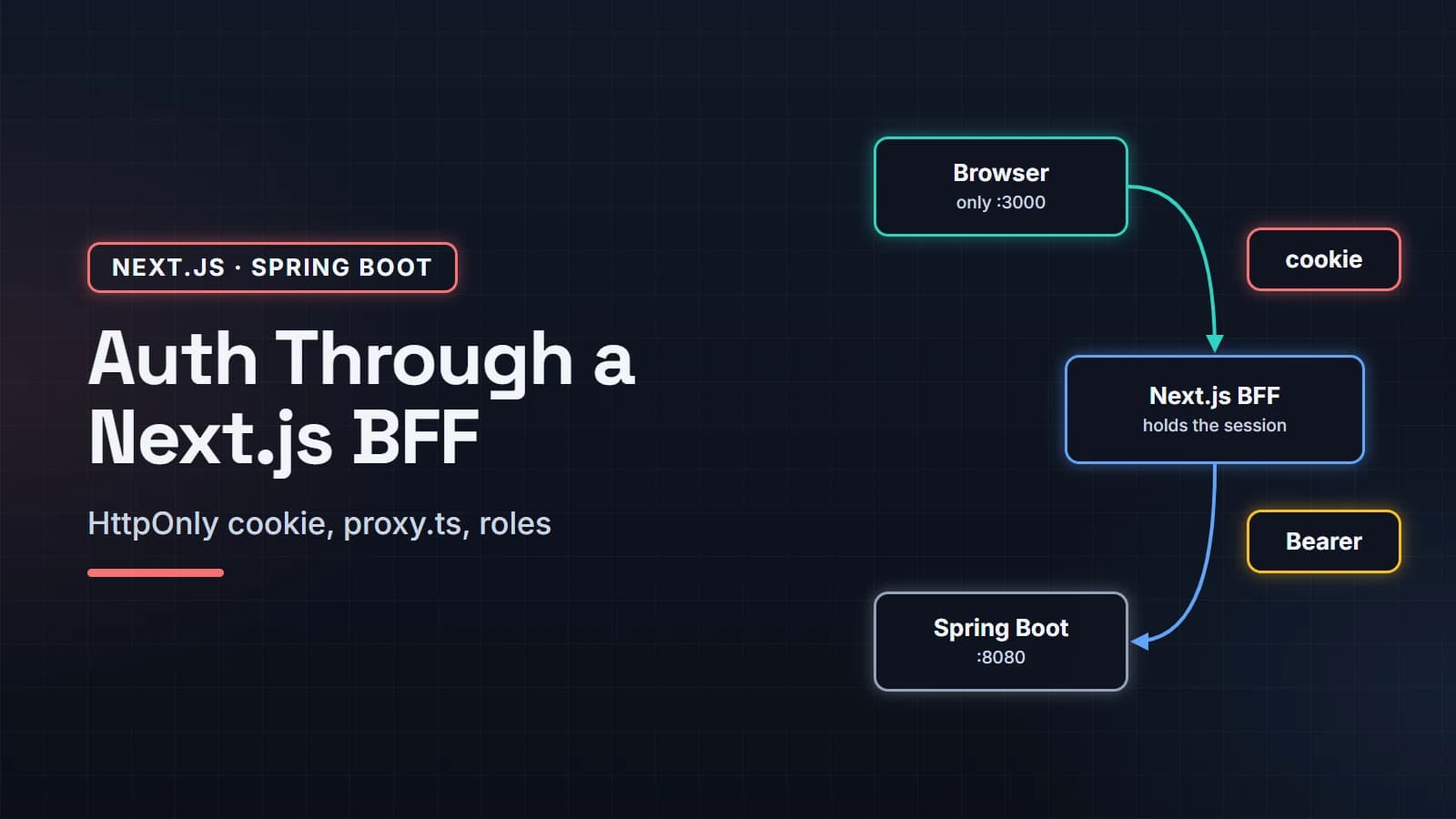
Next.js authentication with Spring Boot gets much simpler when the browser never talks to Spring Boot at all. Instead, your Next.js server signs the user in, keeps the API token in a cookie that page scripts cannot read, and calls Spring Boot on the user's behalf. This setup is called the backend-for-frontend (BFF) pattern.
This guide is for full-stack developers with a Spring Boot API and a Next.js 16 front end, especially if you have been storing a JWT in localStorage and calling the API from the browser. You will see why that is risky, how a Server Action signs the user in, which cookie flags matter, how proxy.ts (the renamed middleware) turns signed-out users away early, and why roles must be checked on the server, where the data is.
The code comes from the companion app of Chapter 10 (with one redirect check made stricter, explained below) in the TechTribers React and Next.js book: a course site with a Next.js front end on localhost:3000 and a Spring Boot API on localhost:8080.
In this guide
- Why not keep tokens in localStorage
- The BFF pattern in front of Spring Boot
- Sign in with a Server Action
- An HttpOnly, Secure, SameSite session cookie
- A session helper that asks who the user is
- Guard routes early with proxy.ts
- Check roles on the server, where the data is
- Why you do not need CORS
From the book: this guide is based on Chapter 10 of React & Next.js 2026, where you build a full-stack React and Next.js app step by step, with the code for every chapter. Read the free 5-page sample on the book page.
Why not keep tokens in localStorage
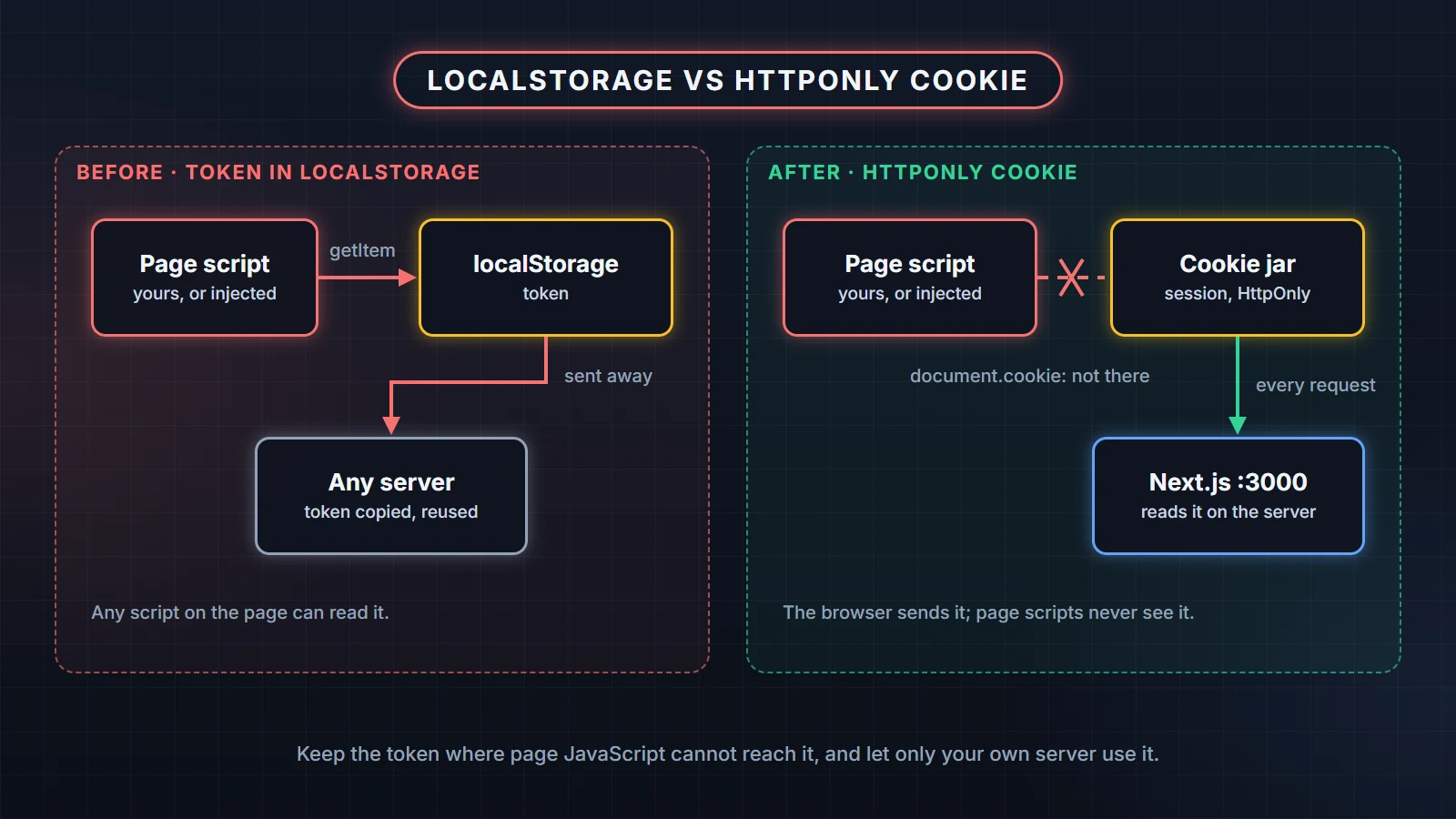
Many tutorials store the access token in localStorage and add it to every fetch. The problem is simple: any script that runs on the page can read localStorage and send the token anywhere. One injected script is enough for an attacker to walk away with a working token.
An HttpOnly cookie behaves differently. The browser stores it and sends it back to your server with every request, but document.cookie does not show it, so page JavaScript cannot read it. The companion app has a Playwright test that checks exactly this: after sign-in, the session cookie is HttpOnly and does not appear in document.cookie.
The BFF pattern in front of Spring Boot
A backend-for-frontend is a server that exists to serve one front end. Here, Next.js plays that role. The browser talks to one origin only, the Next.js server. Next.js alone calls Spring Boot. The Next.js docs describe this in their backend for frontend guide: an API layer of route handlers and proxy that is publicly reachable, not a full backend replacement.
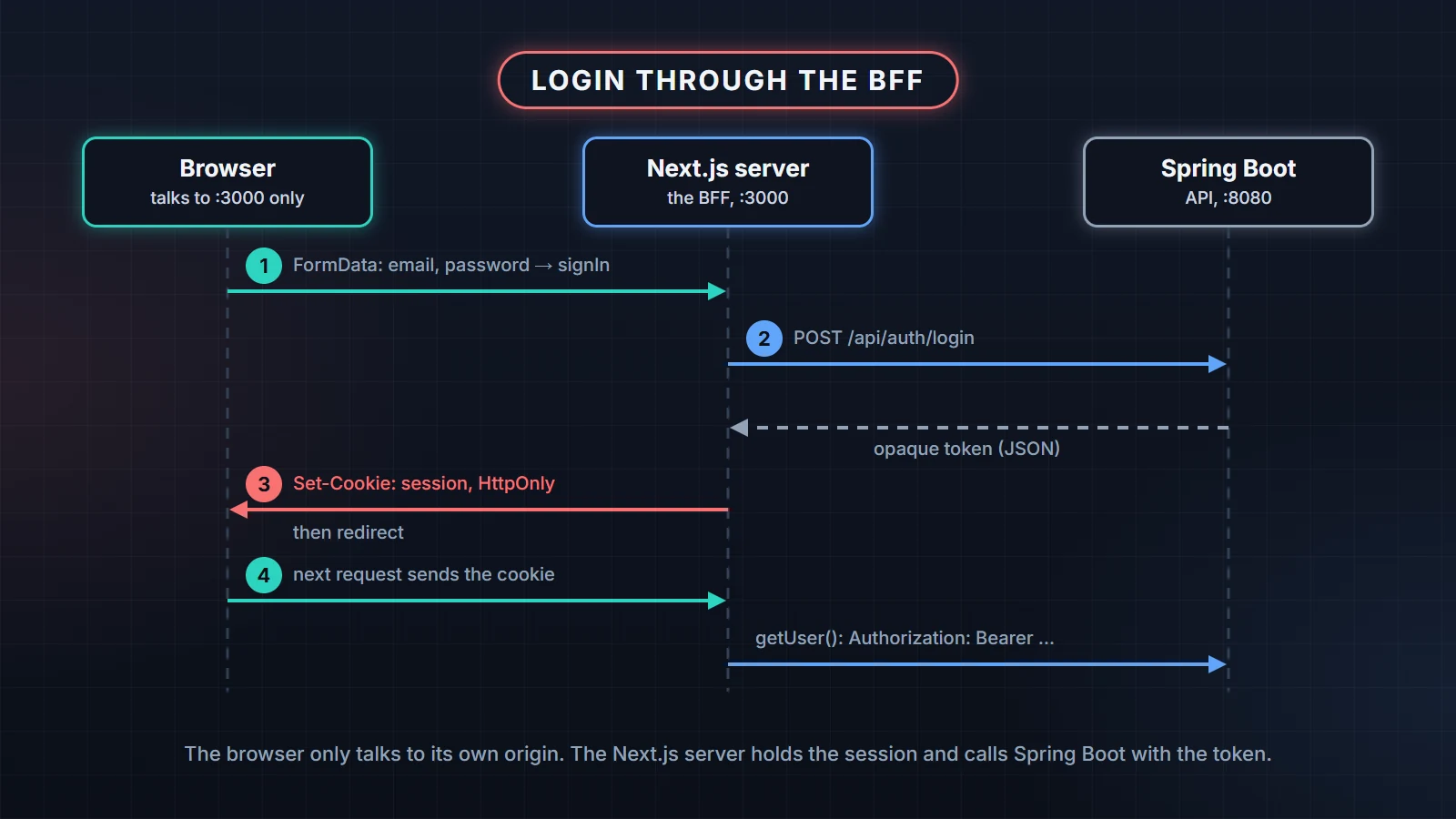
The sign-in flow has four steps:
- The user submits the login form. Email and password go as
FormDatato a Server Action onlocalhost:3000, the same origin as the page. - The action calls Spring Boot's
POST /api/auth/loginfrom the server. Spring Boot checks the password and answers with an opaque token: random bytes that mean nothing on their own, where only Spring Boot knows whose they are. - Next.js puts the token in an HttpOnly session cookie and redirects.
- Every later request carries the cookie. On the server, Next.js reads it and calls Spring Boot with an
Authorization: Bearerheader.
On the Spring Boot side, the API in the companion code is deliberately small. An AuthController exposes /api/auth/login, /api/auth/me and /api/auth/logout. The login request is a record validated with @Valid, @Email and @NotBlank, and a wrong password becomes a 401. Tokens are 24 bytes from SecureRandom, Base64 URL-encoded and kept in memory. The code comments say a real system would use Spring Security with an identity provider, and that the Next.js side works the same either way.
On the Next.js side, one file, lib/auth-api.ts, is the only code that knows where Spring Boot lives. Its login posts the credentials, returns null on a 401 (a wrong password is a normal answer, not an exception), and checks the response shape with Zod before trusting it.
Sign in with a Server Action
The login form does not call an API with fetch. It posts to signIn, a Server Action (an async function marked 'use server' that the form calls directly; see our Server Actions guide).
export async function signIn(
  _prev: SignInState,
  form: FormData,
): Promise<SignInState> {
  const email = String(form.get("email") ?? "");
  const parsed = LoginInput.safeParse(Object.fromEntries(form));
  if (!parsed.success)
    return { error: "Enter your email and password", email };
  const { password } = parsed.data;
  const result = await authApi.login(email, password); // → Spring Boot
  if (!result) return { error: "Wrong email or password", email };
  await setSession(result.token); // HttpOnly cookie; token stays here
  const next = String(form.get("next") ?? "/");
  const local =
    next.startsWith("/") && !next.startsWith("//") && !next.startsWith("/\\");
  redirect(local ? next : "/"); // fresh pages, signed in
}
What to notice:
- The form fields are untrusted input, so
LoginInput(a Zod schema withz.email()and a non-empty password) checks them first. - The password goes no further than this server-side call. The token's only home is the cookie.
- The
nextfield sends the user back where they came from, but only to a path inside this site; anything else would be an open redirect, where a crafted login link sends a freshly signed-in user to an attacker's page. A plainstartsWith("/")check is not enough: browsers read//evil.exampleas a protocol-relative URL pointing at another site, and treat/\evil.examplethe same way, so the check also rejects those two prefixes. - On failure the action returns an error and the typed email, so the form (built with
useActionState) can show the message and keep the field filled in.
Why a Server Action and not fetch? An early version of the companion app sent the login to a route handler with fetch, then navigated with router.replace("/admin"). The user ended up on /login again: the client router still held a redirect it had cached before sign-in. When a Server Action sets or deletes a cookie, Next.js throws that client cache away, so the redirect() that follows shows freshly rendered, signed-in pages.
The route handler still exists, for a different audience. app/api/session/route.ts answers POST /api/session for clients that are not React forms, such as a mobile app or a script. It uses the same schema and helpers and chooses its own status codes: 400 for bad input, 401 for wrong credentials. Its response body contains the user's name, never the token.
An HttpOnly, Secure, SameSite session cookie
One small helper writes the cookie. Its options carry most of the security of the whole setup:
export async function setSession(token: string) {
  (await cookies()).set(SESSION_COOKIE, token, {
    httpOnly: true, // JavaScript in the page cannot read it
    secure: process.env.NODE_ENV === "production",
    sameSite: "lax",
    path: "/",
    maxAge: 60 * 60 * 8,
  });
}- httpOnly: page JavaScript cannot read the cookie, so an injected script cannot steal the token.
- secure: the cookie only travels over HTTPS. It is off in development because
localhostuses plain HTTP. - sameSite: "lax": the cookie is sent when a user follows a link to your site, but not with a form post that another site starts.
- maxAge: eight hours, in seconds.
These match the options the Next.js authentication guide recommends for a session cookie: HttpOnly, Secure, SameSite, an expiry and a path. Note that cookies() is async in Next.js 16, and that the cookies API only lets you set or delete cookies in a Server Function or a route handler, not while a Server Component renders.
One more rule: no secrets in NEXT_PUBLIC_ variables. next build copies their values straight into the JavaScript it produces, and some of that JavaScript ships to every browser. Publishing the API's base URL that way is fine. API keys and passwords go in variables without the prefix, which only server code can read.
A session helper that asks who the user is
Pages and actions need to know who is signed in. They ask a helper in lib/session.ts:
// Per user, so never cached: it reads the cookie on every request.
export async function getUser() {
  const token = (await cookies()).get(SESSION_COOKIE)?.value;
  return token ? authApi.me(token) : null;
}

export async function requireUser(next: string) {
  const user = await getUser();
  if (!user) redirect(`/login?next=${encodeURIComponent(next)}`);
  return user;
}
The important design choice: Next.js does not decide whether the token is valid. authApi.me sends it to Spring Boot's /api/auth/me as a Bearer header, and Spring Boot answers with the user or a 401. A made-up or expired cookie therefore gives null. requireUser sends signed-out users to the login page and remembers the way back in next.
Because getUser reads a cookie, it is per request. In the companion app, the header's user menu calls it inside <Suspense>, so only that corner of the header renders per request.
Guard routes early with proxy.ts
Starting with Next.js 16, Middleware is called Proxy. The file is proxy.ts in the project root (next to app) and it exports a proxy function, where older code had middleware() in middleware.ts. A codemod renames both. Proxy runs before a matched route renders, so it can turn signed-out users away before any page work starts.
// proxy.ts (was middleware.ts): a fast first gate. It only checks
// that a session cookie exists; pages still check the user properly.
export function proxy(request: NextRequest) {
  if (request.cookies.has("session")) return NextResponse.next();
  const login = new URL("/login", request.url);
  login.searchParams.set("next", request.nextUrl.pathname);
  return NextResponse.redirect(login);
}

export const config = {
  matcher: ["/learn/:path*", "/admin/:path*"],
};
Four things to know about it:
- It only asks "is there a cookie?" There is no call to Spring Boot, so it stays fast. The docs call this an optimistic check and advise reading the session from the cookie only, with no database calls, because Proxy runs on every matched route, prefetches included.
- The matcher matters. Without one, Proxy runs for every request, CSS, images and static files included, and an auth redirect can block them.
- It runs on Node.js. Proxy defaults to the Node.js runtime, and setting the
runtimeoption in a proxy file throws an error. - It is not your security boundary. Anyone can send a cookie named
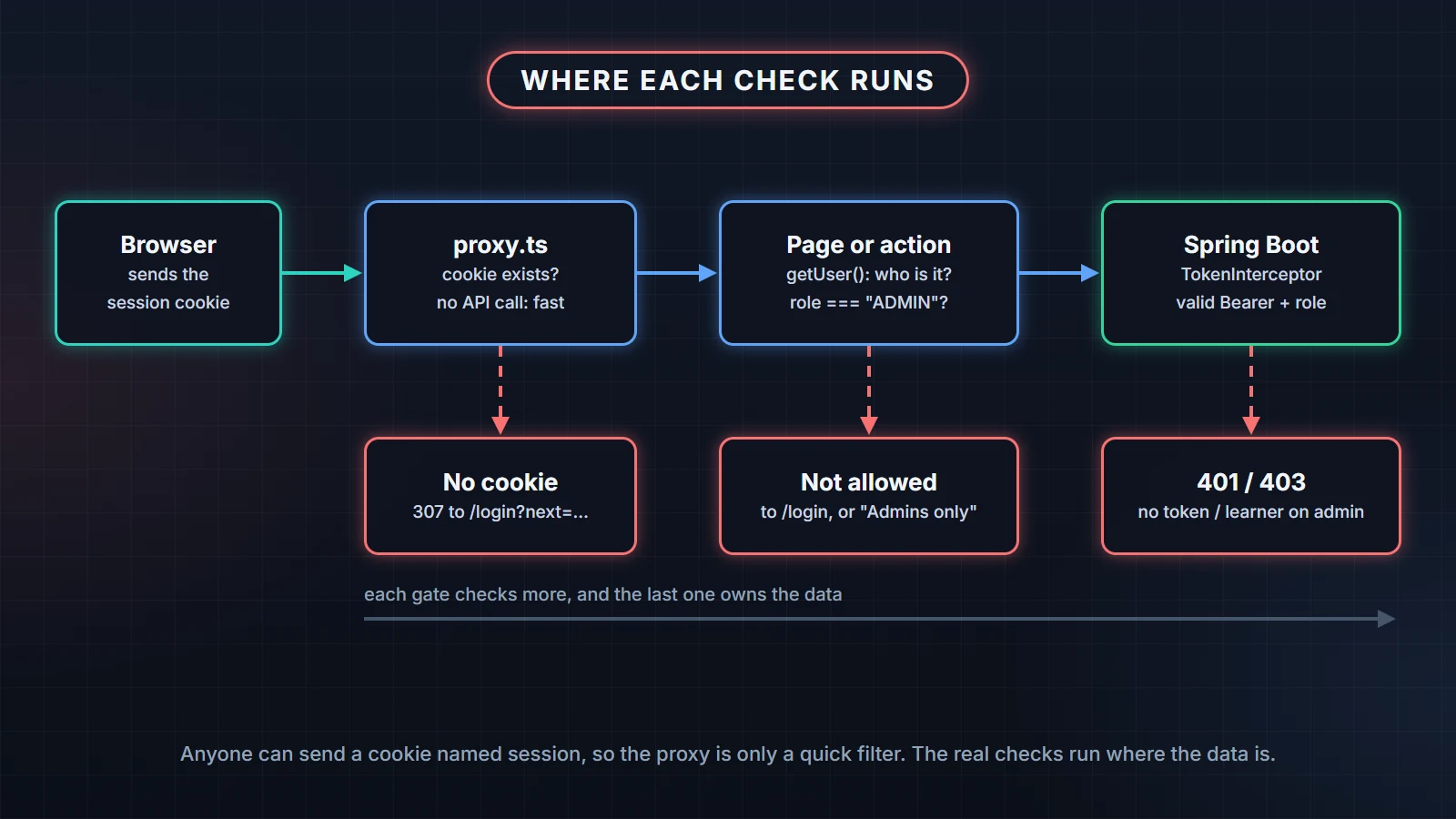
session. The proxy reference also warns that Server Functions are not separate routes: they are POST requests to the page that uses them, so a matcher change can silently remove Proxy coverage. Its advice: "Always verify authentication and authorization inside each Server Function rather than relying on Proxy alone."
Check roles on the server, where the data is
An admin page needs more than a cookie: it needs an admin. The companion app's admin page wraps its content in an AdminsOnly Server Component. It calls requireUser("/admin"), so Spring Boot has confirmed who this is, then checks user.role !== "ADMIN" and shows "Admins only" to everyone else. The role comes from Spring Boot, never from anything the browser sent.
A learner with a valid cookie passes the proxy but not AdminsOnly. And because a Server Action is a public endpoint, the setPrice action checks the role again before it calls the API.
The last gate belongs to the API that owns the data. In Spring Boot, a HandlerInterceptor called TokenInterceptor runs before the protected controllers. It answers 401 when there is no valid Bearer token and 403 when a learner calls anything under /api/admin/**. So even a bug in the Next.js checks cannot change a price with a learner's token.
If you know Spring Security, the mapping is close:
proxy.tssits where a filter chain sits: in front of every matched request, before any controller runs.AdminsOnlydoes the job of@PreAuthorize("hasRole('ADMIN')").TokenInterceptoris the API's own check, the one you can never skip.
Why you do not need CORS
CORS (cross-origin resource sharing) is a browser rule. Two URLs share an origin only when scheme, host and port all match, so localhost:3000 and localhost:8080 are different origins. A page may only read a response from a different origin if that server opts in with CORS headers. With a BFF the question never comes up: the page only talks to localhost:3000, and the call to localhost:8080 happens between two servers, where no browser is involved.
That is why the companion Spring Boot API deliberately has no CORS mapping. A Playwright test, run against the real API, confirms that a fetch from the page straight to port 8080 fails.
Finally, keep Next.js patched, because sign-in depends on its cookies, actions and proxy. For example, the November 2026 security release (3 November 2026) fixed seven issues in 16.4.5, so watch the Next.js blog and install each patch.
Go deeper
Chapter 10, "Route handlers, request interception, auth", of the TechTribers book React & Next.js (2026 Edition) builds this whole flow in seven steps against the companion Spring Boot API: the server-side API client, the HttpOnly cookie, the /api/session route handler, the sign-in action, the session helper, proxy.ts, and the admin role check. The practice tasks add an "Admin" label to the user menu, an /account page behind the proxy, and a GET /api/session endpoint that returns the current user or a 401.
You can find the book on the React and Next.js book page. The product page has a free 5-page sample you can read before you buy.
Related reading
- Spring Security with JWT in Spring Boot
- Next.js Server Actions: useActionState, useOptimistic, useFormStatus
- React Server Components vs Client Components
FAQ
Should I store a JWT in localStorage or a cookie in Next.js?
Prefer an HttpOnly cookie set by your Next.js server. Any script on the page can read localStorage and send the token away, while an HttpOnly cookie is sent with each request but hidden from document.cookie. With the BFF pattern, the token never needs to reach page JavaScript at all.
What is the BFF pattern in Next.js?
Backend-for-frontend means the browser talks only to your Next.js server, and Next.js calls your other APIs, such as Spring Boot, from the server. The Next.js server holds the session in a cookie, adds the Bearer token to API calls, and shapes the data for the UI.
Is middleware.ts deprecated in Next.js 16?
Yes. In Next.js 16 the middleware file convention is deprecated and renamed to proxy: the file becomes proxy.ts and the function proxy. The behaviour is the same, it defaults to the Node.js runtime, and a codemod (npx @next/codemod@canary middleware-to-proxy .) does the rename.
Is proxy.ts enough to protect pages in Next.js?
No. Use it as a fast first filter that checks a session cookie exists. Pages, Server Actions and route handlers must still check the user and role on the server, and the API that owns the data should check the token again.
Do I need CORS between Next.js and Spring Boot?
Not with the BFF pattern. The browser only calls the Next.js origin, and Next.js calls Spring Boot server to server, where CORS does not apply. You only need CORS if the browser calls the Spring Boot API directly.